Page 10 of 428
’07Camry_U (L/O 0608)
2
2007MY CAMRY from Oct. ’06 Prod. (OM33748U)
1. Side defroster outlets
2. Side vents
3. Instrument cluster
4. Center vents
5. Power door lock switches
6. Power window switches
7. Glove box
8. Cup holder
9. Rear console box
10. Parking brake lever
11. Manual transmission gear shift lever
12. Tilt and telescopic steering wheel lock
release lever
13. Hood lock release lever
14. Window lock switch
Instrument panel overview
�Manual transmission models
Page 11 of 428
’07Camry_U (L/O 0608)
3
2007MY CAMRY from Oct. ’06 Prod. (OM33748U)
1. Side defroster outlets
2. Side vents
3. Instrument cluster
4. Center vents
5. Power door lock switches
6. Power window switches
7. Glove box
8. Cup holder
9. Rear console box
10. Rear vents
11. Auxiliary box and/or power outlet
12. Automatic transmission selector lever
13. Seat heater switches
14. Tilt and telescopic steering wheel lock
release lever
15. Hood lock release lever
16. Parking brake pedal
17. Window lock switch �Automatic transmission models
Page 12 of 428
’07Camry_U (L/O 0608)
4
2007MY CAMRY from Oct. ’06 Prod. (OM33748U)
1. Headlight, turn signal and front fog
light switches
2. Wiper and washer switches
3. Theft deterrent system/engine
immobilizer system indicator light
4. Clock
5. “AIRBAG ON” and “AIRBAG OFF”
indicator lights and front passenger ’s
seat belt reminder light
6. Emergency flasher switch
7. Audio system or navigation system
including audio system (For the
navigation system, see the separate
“Navigation System Owner ’s Manual”.)
8. Rear window and outside rear view
mirror defogger switch
9. Air conditioning controls
10. Tire pressure warning system reset
switch
11. AUX adapter
12. Power outlet
13. Auxiliary boxes
14. Ignition switch
15. Power rear view mirror control switches �With manual air conditioning controls
Page 13 of 428
’07Camry_U (L/O 0608)
5
2007MY CAMRY from Oct. ’06 Prod. (OM33748U)
1. Headlight, turn signal and front fog
light switches
2. Wiper and washer switches
3. Theft deterrent system/engine
immobilizer system indicator light
4. Clock
5. “AIRBAG ON” and “AIRBAG OFF”
indicator lights and front passenger ’s
seat belt reminder light
6. Emergency flasher switch
7. Audio system or navigation system
including audio system (For the
navigation system, see the separate
“Navigation System Owner ’s Manual”.)
8. Air conditioning controls
9. Tire pressure warning system reset
switch
10. Rear window and outside rear view
mirror defogger switch
11. AUX adapter
12. Power outlet
13. Auxiliary boxes
14. Ignition switch (with smart key system)
15. Ignition switch
(with key cylinder type ignition switch)
16. Power rear view mirror control switches �With automatic air conditioning controls
Page 21 of 428

’07Camry_U (L/O 0608)
13
2007MY CAMRY from Oct. ’06 Prod. (OM33748U)
OPERATION OF INSTRUMENTS AND
CONTROLS
Keys and Doors
Keys14 . . . . . . . . . . . . . . . . . . . . . . . . . . . . . . . . . . . . . . . . . . . . . . . . . . . . . . .
Engine immobilizer system18 . . . . . . . . . . . . . . . . . . . . . . . . . . . . . . . . . . .
Wireless remote control20 . . . . . . . . . . . . . . . . . . . . . . . . . . . . . . . . . . . . . .
Smart key system30 . . . . . . . . . . . . . . . . . . . . . . . . . . . . . . . . . . . . . . . . . . . .
Side doors36 . . . . . . . . . . . . . . . . . . . . . . . . . . . . . . . . . . . . . . . . . . . . . . . . . .
Power windows43 . . . . . . . . . . . . . . . . . . . . . . . . . . . . . . . . . . . . . . . . . . . . . .
Trunk lid46 . . . . . . . . . . . . . . . . . . . . . . . . . . . . . . . . . . . . . . . . . . . . . . . . . . . .
Hood49 . . . . . . . . . . . . . . . . . . . . . . . . . . . . . . . . . . . . . . . . . . . . . . . . . . . . . . .
Theft deterrent system49 . . . . . . . . . . . . . . . . . . . . . . . . . . . . . . . . . . . . . . .
Fuel tank cap51 . . . . . . . . . . . . . . . . . . . . . . . . . . . . . . . . . . . . . . . . . . . . . . .
Electric moon roof53 . . . . . . . . . . . . . . . . . . . . . . . . . . . . . . . . . . . . . . . . . . .
SECTION 1 2
Page 32 of 428

’07Camry_U (L/O 0608)
24
2007MY CAMRY from Oct. ’06 Prod. (OM33748U)
To unlock: Push the unlock switch once to
unlock the driver ’s door alone. Pushing
the switch twice within 3 seconds unlocks
all the doors simultaneously. Each time
the unlock switch is pushed, two beeps
will sound and turn signal lights flash
twice.
This double switch operation to unlock all
doors can be changed to a single switch
operation. For details, contact your Toyota
dealer.
If the key is in the ignition (vehicles with
key cylinder−type ignition switch) or the
ignition switch is set to ACC or ON (ve-
hicles with smart key system), the vehicle
cannot be unlocked via the unlock switch.
You have 60 seconds to open a door after
using the wireless remote unlock feature.
If a door is not opened by then, all the
doors will be automatically locked again.
If the wireless remote control is used to
lock the doors near the window or door
handle, there is a possibility that the door
may not unlocked by entry function of
smart key system. Under these circum-
stances, use the wireless remote control
to unlock the doors.The automatic locking time can also be
set to 30 seconds. For details, contact
your Toyota dealer.
If the lock or unlock switch is kept
pressed in, the locking or unlocking opera-
tion is not repeated. Release the switch
and then push again.
When you unlock doors using the wireless
remote control, the illuminated entry func-
tion will be activated. (For further informa-
tion, see “Illuminated entry system” on
page 128 in Section 1−5.)
Vehicles with key cylindertype ignition
switch
Vehicles with smart key system
—Opening trunk lid
Page 40 of 428
’07Camry_U (L/O 0608)
32
2007MY CAMRY from Oct. ’06 Prod. (OM33748U)
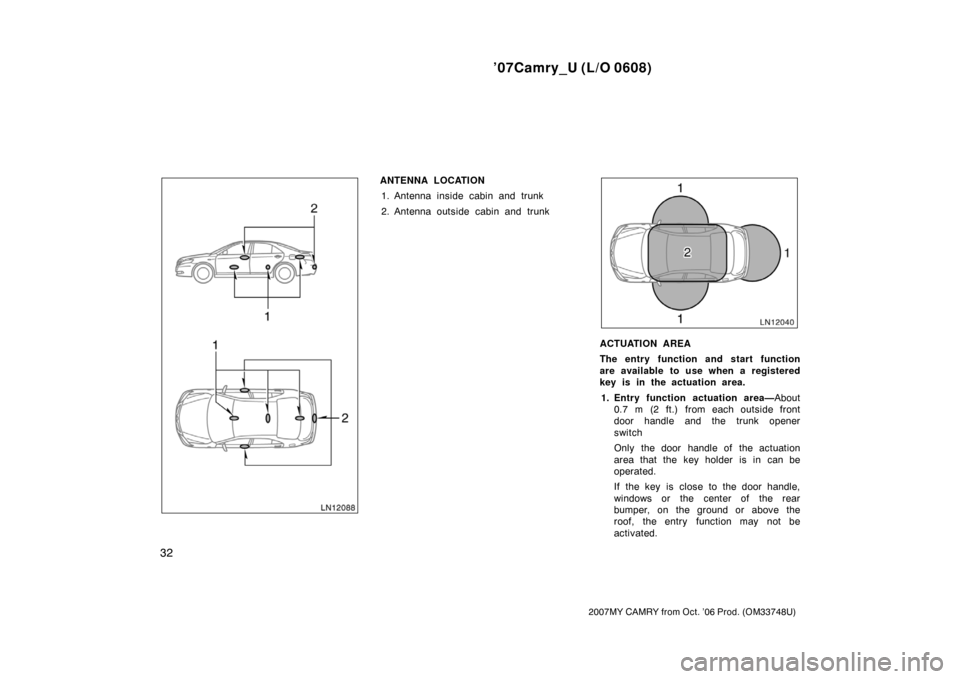
ANTENNA LOCATION
1. Antenna inside cabin and trunk
2. Antenna outside cabin and trunk
ACTUATION AREA
The entry function and start function
are available to use when a registered
key is in the actuation area.
1. Entry function actuation area—About
0.7 m (2 ft.) from each outside front
door handle and the trunk opener
switch
Only the door handle of the actuation
area that the key holder is in can be
operated.
If the key is close to the door handle,
windows or the center of the rear
bumper, on the ground or above the
roof, the entry function may not be
activated.
Page 46 of 428

’07Camry_U (L/O 0608)
38
2007MY CAMRY from Oct. ’06 Prod. (OM33748U)
�When the engine is not turned off. A
beep will sound continuously for 2 sec-
onds.
�When the key is left in the vehicle. A
beep will sound continuously for 2 sec-
onds.
�When attempting to lock the doors with
the key near a window or a door han-
dle. A beep will sound continuously for
2 seconds.
The beep may not sound if the key is on
the instrument panel, on the package tray,
in the glove box or on the floor, etc.
The answerback function (the turn signal
flash and the beep) can be disabled. For
details, contact your Toyota dealer.
Unlocking operation
Grasp the front outside door handle
(sensors are located on the underside
of the door handles). Only the driver’s
door unlocks when the driver ’s door
handle is grasped. All the doors unlock
when the front passenger ’s door handle
is grasped. At this time two beeps will
be heard and the turn signal lights
flash twice.
The doors may not unlock if the handle
is grasped too quickly. Be sure to confirm
that the doors are unlocked before pulling
the door handle. If the doors do not open
when the handle is pulled, return the han-
dle to its original position.Wearing gloves may slow response time.
For three seconds after the doors have
been locked, the doors cannot be re−un-
locked via the smart key system.
The answerback function (the turn signal
flash and the beep) can be disabled. For
details, contact your Toyota dealer.
When you enter the entry function actua-
tion area, the interior light comes on for
about 15 seconds. After the light comes
on, all the side doors can be unlocked by
grasping the outside door handle.
You have 60 seconds to open a door after
using the unlocking function. If a door is
not opened by then, all the doors will be
automatically locked again.
The automatic locking time can also be
set to 30 seconds. For details, contact
your Toyota dealer.
The doors may unlock if the key is within
the entry function actuation area and a
large amount of water splashes on the
door handle (for example, in the rain or
in a car wash).
When you unlock the doors, the illumi-
nated entry system will be activated. (For
further information, see “Illuminated entry
system” on page 128 in Section 1−5.)