Page 11 of 404
3
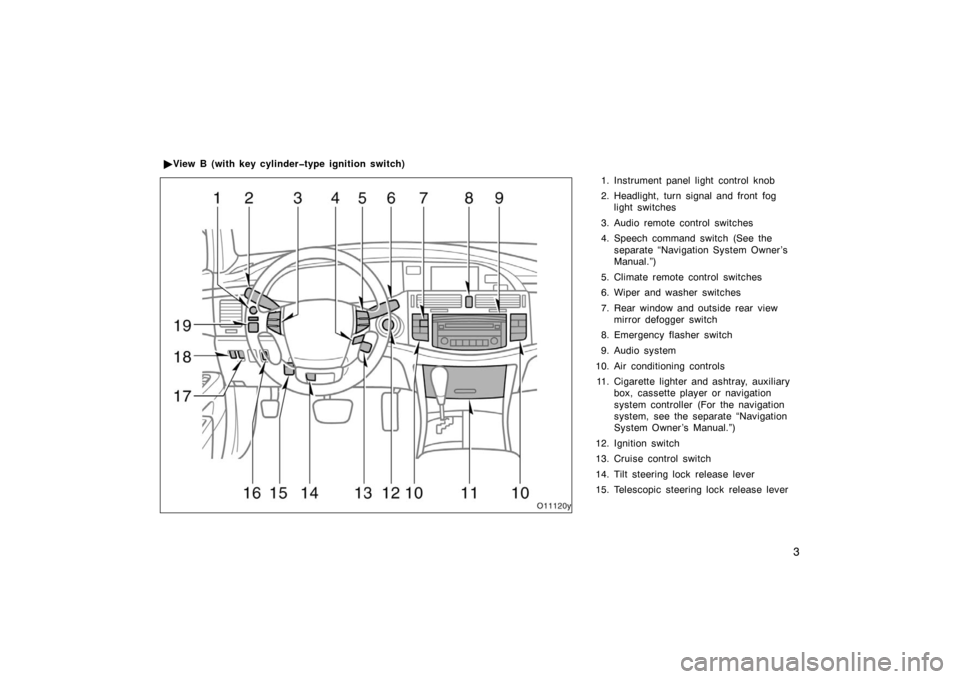
1. Instrument panel light control knob
2. Headlight, turn signal and front foglight switches
3. Audio remote control switches
4. Speech command switch (See the separate “Navigation System Owner ’s
Manual.”)
5. Climate remote control switches
6. Wiper and washer switches
7. Rear window and outside rear view mirror defogger switch
8. Emergency flasher switch
9. Audio system
10. Air conditioning controls 11. Cigarette lighter and ashtray, auxiliary box, cassette player or navigation
system controller (For the navigation
system, see the separate “Navigation
System Owner ’s Manual.”)
12. Ignition switch
13. Cruise control switch
14. Tilt steering lock release lever
15. Telescopic steering lock release lever
�
View B (with key cylindertype ignition switch)
Page 13 of 404
5
1. Instrument panel light control knob
2. Headlight, turn signal and front foglight switches
3. Audio remote control switches
4. Speech command switch (See the separate “Navigation System Owner ’s
Manual.”)
5. Climate remote control switches
6. Wiper and washer switches
7. Rear window and outside rear view mirror defogger switch
8. Emergency flasher switch
9. Audio system
10. Air conditioning controls 11. Cigarette lighter and ashtray, auxiliary box, cassette player or navigation
system controller (For the navigation
system, see the separate “Navigation
System Owner ’s Manual.”)
12. Ignition switch (engine switch)
13. Cruise control switch
14. Distance switch
15. Tilt steering lock release lever
�
View B (with smart key system)
Page 18 of 404
10
∗1: For details, see “Service reminder indicators and warning
buzzers” on page 145 in Section 1 −6.
∗
2: If this light flashes, see “Cruise control” on page 176 in
Section 1 −7.
∗
3: If this light flashes, see “Dynamic laser cruise control” on
page 179 in Section 1 −7.
Turn signal indicator lights
Slip indicator/traction control system off light
Cruise control indicator light∗
2 or dynamic laser
cruise control indicator light∗ 3
Automatic transmission indicator lights Headlight high beam indicator light
Tail light indicator light
Dynamic laser cruise control ready mode
indicator light
Conventional cruise control mode indicator light
Headlight indicator light
Page 29 of 404

21
Locking operation (vehicles with smart
key system)
Unlocking operation (vehicles with smart
key system)
To lock or unlock all the doors, push
the switches slowly and securely.
To lock: Push the lock switch. All the
doors are locked simultaneously. At this
time one beep will sound and turn signal
lights flash once.
Vehicles with smart key system—For 3
seconds after the doors have been locked,
the doors cannot be re−unlocked via the
smart key system.
Check to see that the doors are securely
locked.
If any of the doors is not securely closed,
or if the key is in the ignition switch (ve-
hicles with key cylinder −type ignition
switch) or key left in the vehicle (vehicles
with smart key system), locking cannot be
performed by the lock switch and a beep
will sound continuously for 10 seconds.
To stop the beep, take out the key from
the vehicle or push the unlock switch. To unlock: Push the unlock switch once to
unlock the driver ’s door alone. Pushing
the switch twice within 3 seconds unlocks
all the doors simultaneously. Each time
the unlock switch is pushed, two beeps
will sound and turn signal lights flash
twice.
This double switch operation to unlock all
doors can be changed to a single switch
operation. For details, contact your Toyota
dealer.
If the key is in the ignition (vehicles with
key cylinder
−type ignition switch) or the
ignition switch is set to ACC or ON (ve-
hicles with smart key system), the vehicle
cannot be unlocked via the unlock switch.
When all the doors are unlocked simulta-
neously with a key, wireless remote con-
trol or entry function of the smart key
system, the following lights come on for
about 15 seconds and then fade out, even
if the door is not opened.
Vehicles with key cylinder −type ignition
switch—Ignition switch light, interior light,
front personal lights and rear personal
lights
Vehicles with smart key system—Interior
light, front personal lights, rear personal
lights and exterior foot lights
Page 30 of 404

22
(For further information, see “Illuminated
entry system” on page 135 in Section
1−5.)
You have 30 seconds to open a door after
using the wireless remote unlock feature.
If a door is not opened by then, all the
doors will be automatically locked again.
If the wireless remote control is used to
lock the doors near the window or door
handle, there is a possib ility that the door
may not unlocked by entry function of
smart key system. Under these circum-
stances, use the wireless remote control
to unlock the doors.
The time before automatic door lock func-
tion can be changed. For details, contact
your Toyota dealer.
If the lock or unlock switch is kept
pressed in, the locking or unlocking opera-
tion is not repeated. Release the switch
and then push again. The following adjustments can be made in
this system. For details, contact your
Toyota dealer.
�Cancelling the wireless door locking or
unlocking function
�Cancelling the flash of the turn signal
lights
�Cancelling the beep sound
Vehicles with key cylindertype ignition
switch
Vehicles with smart key system
—Opening trunk lid
Page 31 of 404

23
To open the trunk lid, push the trunk
opener switch of the transmitter for 1
second. A long beep will sound.
If the key is in the ignition (vehicles with
key cylinder−type ignition switch) or the
ignition switch is set at ACC or ON (ve-
hicles with smart key system), the trunk
lid cannot be opened by the trunk opener
switch.
Opening of the trunk lid with the wireless
remote control can be changed as follows.
Contact your Toyota dealer for details.
�Trunk lid opens by pushing the trunk
opener switch twice in succession.
�Trunk lid opens by pushing the trunk
opener switch once regardless of how
long the switch is being pressed.
�Opening of the trunk lid is disabled
using the wireless remote control trans-
mitter.
Vehicles with key cylindertype ignition
switch
Vehicles with smart key system
Pushing the alarm switch for 1 second
blows the horn intermittently and
flashes the headlights, turn signal
lights, tail lights and interior light.
Vehicles with smart key system
only—When pushing the switch, the indi-
cator light flashes.
The alarm switch is used to deter vehicle
theft when you witness anyone attempting
to break into or damage your vehicle.
The alarm will last for one minute. To stop
the alarm midway, push the switch once
again, unlock a door with the transmitter,
or set the ignition switch to ON.
If the key is in the ignition (vehicles with
key cylinder −type ignition switch) or the
ignition switch is set at ACC or ON (ve-
hicles with smart key system), the alarm
does not work.
This alarm function can be disabled. For
details, contact your Toyota dealer.
—Activating alarm
Page 43 of 404

35
Locking operation
Push the lock button on the outside
door handle slowly and firmly. All the
doors lock simultaneously. At this time
one beep will be heard and turn signal
lights flash once.
In the following cases, you cannot be
locked by pushing the lock button and a
beep will sound as an indicator.
�When any of the doors is not securely
closed. A beep will sound continuously
for 10 seconds.
�When the lock switch is pressed while
opening or closing the door. A beep
will sound continuously for 10 seconds.
�When the engine is not turned off. A
beep will sound continuously for 2 sec-
onds.
�When the key is left in the vehicle. A
beep will sound continuously for 2 sec-
onds.
�When attempting to lock the doors with
the key near a window or a door han-
dle. A beep will sound continuously for
2 seconds.
The beep may not sound if the key is on
the instrument panel, on the package tray,
in the glove box or on the floor, etc.
Unlocking operation
Grasp the outside door handle (sensors
are located on the underside of the
door handles). Only the driver ’s door
unlocks when the driver ’s door handle
is grasped. All the doors unlock when
any door handle other than the driver’s
door handle is grasped. At this time
two beeps will be heard and the turn
signal lights flash twice.
The doors may not unlock if the handle
is grasped too quickly. Be sure to confirm
that the doors are unlocked before pulling
the door handle. If the doors do not open
when the handle is pulled, return the han-
dle to its original position.
Page 57 of 404
49
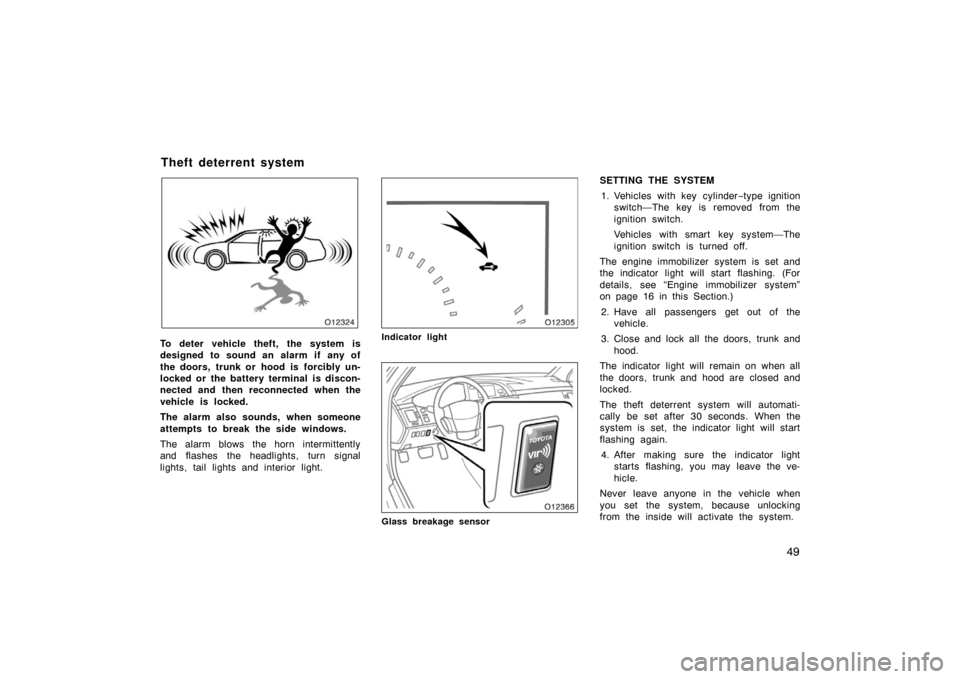
To deter vehicle theft, the system is
designed to sound an alarm if any of
the doors, trunk or hood is forcibly un-
locked or the battery terminal is discon-
nected and then reconnected when the
vehicle is locked.
The alarm also sounds, when someone
attempts to break the side windows.
The alarm blows the horn intermittently
and flashes the headlights, turn signal
lights, tail lights and interior light.Indicator light
Glass breakage sensor
SETTING THE SYSTEM1. Vehicles with key cylinder −type ignition
switch—The key is removed from the
ignition switch.
Vehicles with smart key system—The
ignition switch is turned off.
The engine immobilizer system is set and
the indicator light will start flashing. (For
details, see “Engine immobilizer system”
on page 16 in this Section.)
2. Have all passengers get out of the vehicle.
3. Close and lock all the doors, trunk and hood.
The indicator light will remain on when all
the doors, trunk and hood are closed and
locked.
The theft deterrent system will automati-
cally be set after 30 seconds. When the
system is set, the indicator light will start
flashing again. 4. After making sure the indicator light starts flashing, you may leave the ve-
hicle.
Never leave anyone in the vehicle when
you set the system, because unlocking
from the inside will activate the system.
Theft deterrent system