2007 SUZUKI XL7 door lock
[x] Cancel search: door lockPage 69 of 274

2-13 FEATURES AND CONTROLS
78J00-03E
tion and park your vehicle, a chime will
sound, when you open the driver’s door.
Always remember to remove your key from
the ignition and take it with you. This will
lock your ignition and transaxle. Also,
always remember to lock the doors.
The battery could be drained if you leave
the key in the ignition while your vehicle is
parked. You may not be able to start your
vehicle after it has been parked for an
extended period of time.Retained Accessory Power (RAP)The vehicle has Retained Accessory
Power (RAP), which will allow your vehi-
cle’s radio and windows to work when the
ignition key is in RUN or ACC. Once the
key is turned from RUN to LOCK the radio
will continue to work 10 minutes or until the
driver’s door is opened. Also, the power
windows will continue to work for up to 10
minutes or until any door is opened.
Starting the EnginePlace the transaxle in the proper gear.
Move your shift lever to PARK (P) or NEU-
TRAL (N). Your engine will not start in any
other position -- this is a safety feature. To
restart when you are already moving, use
NEUTRAL (N) only.
Starting Procedure
1) With your foot off the accelerator pedal,
turn the ignition key to START. When
the engine starts, let go of the key. The
idle speed will go down as your engine
gets warm. Do not race the engine
immediately after starting it. Operate
the engine and transaxle gently to allow
the oil to warm up and lubricate all mov-
ing parts.
Your vehicle has a Computer-Con-
trolled Cranking System. This feature
assists in starting the engine and pro-
tects components. If the ignition key is
turned to the START position, and then
released when the engine begins
cranking, the engine will continue
cranking for a few seconds or until the
vehicle starts. If the engine does not
start and the key is held in START for
many seconds, cranking will be stoppedafter 15 seconds to prevent cranking
motor damage. To prevent gear dam-
age, this system also prevents cranking
if the engine is already running. Engine
cranking can be stopped by turning the
ignition switch to the ACC or LOCK
position.
2) If the engine does not start after 5-10
seconds, especially in very cold
weather (below 0°F –18°C), it could be
flooded with too much gasoline. Try
pushing the accelerator pedal all the
way to the floor and holding it there as
you hold the key in START for up to a
maximum of 15 seconds. Wait at least
15 seconds between each try, to allow
the cranking motor to cool down. When
the engine starts, let go of the key and
accelerator. If the vehicle starts briefly
but then stops again, do the same
thing. This clears the extra gasoline
from the engine. Do not race the engine
immediately after starting it. Operate
the engine and transaxle gently until
CAUTION
Shifting into PARK (P) with the vehi-
cle moving could damage the tran-
saxle. Shift into PARK (P) only when
your vehicle is stopped.
CAUTION
Cranking the engine for long periods
of time, by returning the key to the
START position immediately after
cranking has ended, can overheat
and damage the cranking motor, and
drain the battery. Wait at least 15 sec-
onds between each try, to allow the
cranking motor to cool down.
Page 78 of 274
2-22 FEATURES AND CONTROLS
78J00-03E
Center Console Storage AreaYour vehicle has a center console armrest
with storage area. Use the top lever on the
front of the console to open it. There is an
additional storage area underneath the
center console. To access, use the bottom
lever and pull the console up.Assist HandlesThere are assist handles with garment
hooks located above the rear passenger
doors.
Luggage CarrierA luggage carrier allows you to load things
on top of your vehicle. The luggage carrier
has side rails attached to the roof, sliding
crossrails (if equipped) and places to use
for tying things down. These let you load
some things on top of your vehicle, as long
as they are not wider or longer than the
luggage carrier.
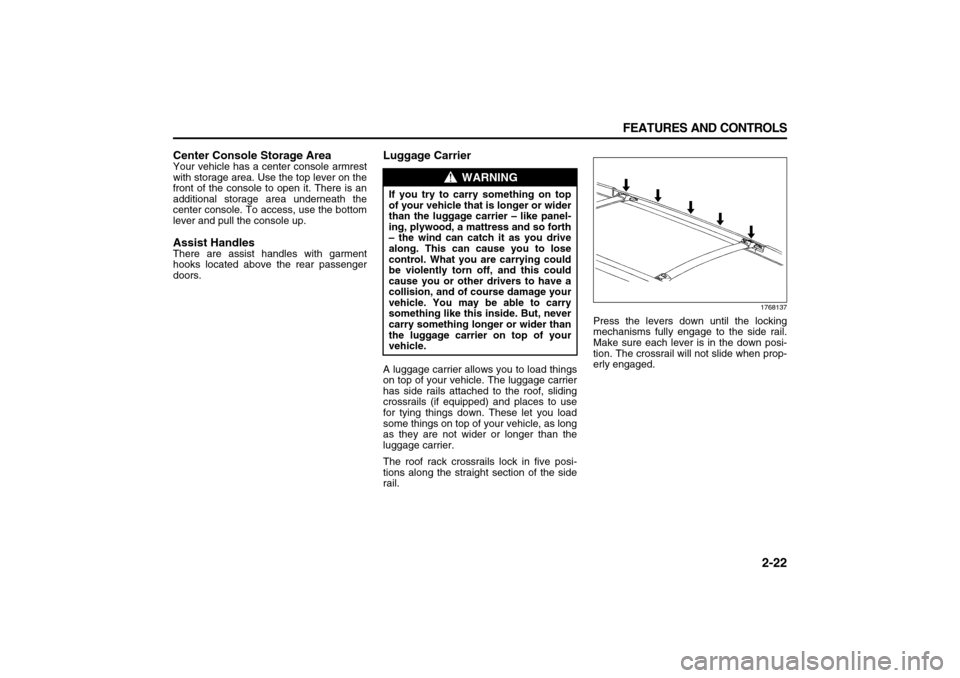
The roof rack crossrails lock in five posi-
tions along the straight section of the side
rail.
1768137
Press the levers down until the locking
mechanisms fully engage to the side rail.
Make sure each lever is in the down posi-
tion. The crossrail will not slide when prop-
erly engaged.
WARNING
If you try to carry something on top
of your vehicle that is longer or wider
than the luggage carrier – like panel-
ing, plywood, a mattress and so forth
– the wind can catch it as you drive
along. This can cause you to lose
control. What you are carrying could
be violently torn off, and this could
cause you or other drivers to have a
collision, and of course damage your
vehicle. You may be able to carry
something like this inside. But, never
carry something longer or wider than
the luggage carrier on top of your
vehicle.
Page 79 of 274

2-23 FEATURES AND CONTROLS
78J00-03E
1767348
To reposition the crossrail, pull up on the
end levers on each side of the crossrail to
the upright position. This will release the
locking mechanism from the siderail. Lift
and place the crossrail into the new posi-
tion. Press the levers down until the lock-
ing mechanisms fully engage to the side
rail. Make sure each lever is in the down
position. The crossrail will not slide when
properly engaged.Do not stand on the plastic lower body
panel when loading cargo on the luggage
carrier.
Loading cargo on the luggage carrier will
make the center of vehicle gravity higher.
Avoid high speeds, sudden starts, sharp
turns, sudden braking or abrupt maneu-
vers. This could result in loss of control of
the vehicle.
Do not exceed the maximum vehicle
capacity when loading your vehicle. For
more information on vehicle capacity and
loading, refer to “Loading Your Vehicle” in
“Your Driving, the Road, and Your Vehicle”
in the “Driving Your Vehicle” section.
To prevent damage or loss of cargo as you
are driving, check now and then to make
sure the luggage carrier crossrails are
locked and cargo is still securely fastened.
When the luggage carrier is not in use,
store the crossrails inside the vehicle. If
not possible, lock one crossrail at the rear
most position on the siderails and lock the
other crossrail above the opening of the
rear door to reduce wind noise.
Rear Seat ArmrestYour vehicle may have a rear seat armrest
that contains two cupholders. To access
the cupholders, pull the armrest down from
the rear seatback.
Convenience NetYour vehicle may have a rear compartment
net to prevent items from rolling under the
rear seat. There may also be four conve-
nience net tie-downs. Two tie-downs are
located on the side trim just behind the
rear seat and the other two are located on
the floor at the rear of the cargo area.
WARNING
Loading cargo on the luggage carrier
that weighs more than 220 lbs (100
kg) or hangs over the rear or sides of
the vehicle may damage your vehicle.
Load cargo so that it rests on the
slats as far forward as possible and
against the side rails, making sure to
fasten it securely.
Page 91 of 274

3-9 INSTRUMENT PANEL
78J00-03E
your vehicle will come on when any door is
opened. In addition, the light will come on
when the remote keyless entry unlock but-
ton is pressed. It will stay on for 20 sec-
onds or until a door is opened. After the
door is opened the light will remain on and
stay on for 20 seconds after the doors are
closed, or until you put the key in the igni-
tion and turn the key to RUN.Map Lamps
1788863
Your vehicle may have lamps located on
the headliner above the rearview mirror.
Push on the lens in the lamp to turn them
on and off.
Cargo LampThe cargo lamp is located over the rear
compartment, and is controlled by the
dome lamp. Refer to “Dome Lamp” in this
section.Electric Power ManagementThe vehicle has Electric Power Manage-
ment (EPM) that estimates the battery’s
temperature and state of charge. It then
adjusts the voltage for best performance
and extended life of the battery.
When the battery’s state of charge is low,
the voltage is raised slightly to quickly put
the charge back in. When the state of
charge is high, the voltage is lowered
slightly to prevent overcharging. If the vehi-
cle has a voltmeter gage or voltage display
on the Driver Information Center (DIC), you
may see the voltage move up or down.
This is normal. If there is a problem, an
alert will be displayed.
The battery can be discharged at idle if the
electrical loads are very high. This is true
for all vehicles. This is because the gener-
ator (alternator) may not be spinning fast
enough at idle to produce all the power
that is needed for very high electrical
loads.
A high electrical load occurs when several
of the following loads are on: headlamps,
high beams, fog lamps, rear window defog-
ger, climate control fan at high speed,
heated seats, engine cooling fans, trailerloads, and loads plugged into accessory
power outlets.
EPM works to prevent excessive discharge
of the battery. It does this by balancing the
generator’s output and the vehicle’s electri-
cal needs. It can increase engine idle
speed to generate more power, whenever
needed. It can temporarily reduce the
power demands of some accessories.
Normally, these actions occur in steps or
levels, without being noticeable. In rare
cases at the highest levels of corrective
action, this action may be noticeable to the
driver. If so, a Driver Information Center
(DIC) message might be displayed, such
as Battery Saver Active or Service Battery
Charging System. If this message is dis-
played, it is recommended that the driver
reduce the electrical loads as much as
possible. Refer to “DIC Warnings and Mes-
sages” in this section.
Battery Run-Down ProtectionYour vehicle has a battery saver feature
designed to protect the vehicle’s battery.
When any interior lamp is left on and the
ignition is turned off, the battery rundown
protection system will automatically turn
the lamp off after 20 minutes. This will
avoid draining the battery. This vehicle also
has a retained accessory power feature. If
the radio is on, it will turn off after 10 min-
utes or if any door on the vehicle is
opened. Refer to “Retained Accessory
Page 114 of 274

3-32 INSTRUMENT PANEL
78J00-03E
ENGINE OVERHEATD (Overheated)
STOP ENGINE
NOTE:
If you drive your vehicle while the engine is
overheating, severe engine damage may
occur. If an overheat warning appears on
the instrument panel cluster and/or DIC,
stop the vehicle as soon as possible. Refer
to “Engine Overheating” in “Checking
Things Under the Hood” in the “Service
and Appearance Care” section for more
information.
This message displays along with a contin-
uous chime when the engine has over-
heated. Stop and turn the engine off
immediately to avoid severe engine dam-
age. Refer to “Engine Overheating” in
“Checking Things Under the Hood” in the
“Service and Appearance Care” section.
ENGINE POWER IS REDUCED
This message displays when the vehicle’s
engine power is reduced. Reduced engine
power can affect the vehicle’s ability to
accelerate. If this message is on, but there
is no reduction in performance, proceed to
your destination. The performance may be
reduced the next time the vehicle is driven.
The vehicle may be driven at a reduced
speed while this message is on, but accel-
eration and speed may be reduced. Any-
time this message stays on, the vehicle
should be taken to your dealer for service
as soon as possible.FUEL LEVEL LOW
This message displays when your vehicle
is low on fuel. Refill the fuel tank as soon
as possible. Refer to “Fuel Gage” in this
section and “Filling the Tank” in “Fuel” in
the “Service and Appearance Care” sec-
tion for more information.
HOOD OPEN
This message displays on some vehicles
when the hood is not closed properly.
When this message appears, make sure
that the hood is closed completely. Refer to
“Hood Release” in “Checking Things
Under the Hood” in the “Service and
Appearance Care” section.
ICE POSSIBLE DRIVE WITH CARE
This message displays when the outside
air temperature is cold enough to create
icy road conditions. Adjust your driving
accordingly.
LIFTGATE OPEN
This message displays when the liftgate is
not closed completely. Make sure that the
liftgate is closed completely. Refer to “Lift-
gate” in “Doors and Locks” in the “Features
and Controls” section.OIL PRSSURE (Pressure) LOW STOP
ENGINE
This message displays when the vehicle’s
engine oil pressure is low. The oil pressure
light also appears on the instrument panel
cluster. Refer to “Oil Pressure Light” in this
section.
Stop the vehicle immediately, as engine
damage can result from driving a vehicle
with low oil pressure. Have the vehicle ser-
viced by your dealer as soon as possible
when this message is displayed.
PASSENGER DOOR FRONT/REAR
OPEN
This message displays when one or more
of the passenger’s doors are not closed
properly. When this message appears,
make sure that all passenger doors are
closed completely.
CAUTION
If you drive your vehicle while the
engine oil pressure is low, severe
engine damage may occur. If a low oil
pressure warning appears on the
Driver Information Center (DIC), stop
the vehicle as soon as possible. Do
not drive the vehicle until the cause
of the low oil pressure is corrected.
Refer to “Engine Oil” in “Checking
Things Under the Hood” in the “Ser-
vice and Appearance Care” section
for more information.
Page 118 of 274

3-36 INSTRUMENT PANEL
78J00-03E
NO CHANGE:
No change will be made to this feature.
The current setting will remain.
Choose one of the available settings and
press the set/reset button while it is dis-
played on the DIC to select it.
AUTO LOCK
This feature allows you to select when the
vehicle’s doors will automatically lock.
Refer to “Programmable Automatic Door
Locks” in “Doors and Locks” in the “Fea-
tures and Controls” section for more infor-
mation.
Press the vehicle information button until
AUTO LOCK appears on the DIC display.
Press the set/reset button to access the
settings for this feature. Then press the
vehicle information button to scroll through
the following settings:
SHIFT OUT OF PARK (default):
The vehicle’s doors automatically lock
when the doors are closed and the vehi-
cle is shifted out of PARK (P).
AT VEHICLE SPEED:
The vehicle’s doors automatically lock
when the vehicle speed is above 5 mph
(8 km/h) for three seconds.
NO CHANGE:
No change will be made to this feature.
The current setting will remain.
Choose one of the available settings and
press the set/reset button while it is dis-
played on the DIC to select it.AUTO UNLOCK
This feature allows you to select whether
or not to turn off the automatic door unlock-
ing feature. It also allows you to select
which doors and when the doors will auto-
matically unlock. Refer to “Programmable
Automatic Door Locks” in “Doors and
Locks” in the “Features and Controls” sec-
tion for more information.
Press the vehicle information button until
AUTO UNLOCK appears on the DIC dis-
play. Press the set/reset button to access
the settings for this feature. Then press the
vehicle information button to scroll through
the following settings:
OFF:
None of the doors will automatically
unlock.
DRIVER AT KEY OUT:
Only the driver’s door will unlock when
the key is taken out of the ignition.
DRIVER IN PARK:
Only the driver’s door will unlock when
the vehicle is shifted into PARK (P).
ALL AT KEY OUT:
All of the doors will unlock when the key
is taken out of the ignition.
ALL IN PARK (default):
All of the doors will unlock when the
vehicle is shifted into PARK (P).
NO CHANGE:
No change will be made to this feature.
The current setting will remain.Choose one of the available settings and
press the set/reset button while it is dis-
played on the DIC to select it.
REMOTE LOCK
This feature allows you to select the type of
feedback you will receive when locking the
vehicle with the Remote Keyless Entry
(RKE) transmitter. You will not receive
feedback when locking the vehicle with the
RKE transmitter if any of the doors are
open. Refer to “Remote Keyless Entry
(RKE) System Operation” in “Keys” in the
“Features and Controls” section for more
information.
Press the vehicle information button until
REMOTE LOCK appears on the DIC dis-
play. Press the set/reset button to access
the settings for this feature. Then press the
vehicle information button to scroll through
the following settings:
OFF:
There will be no feedback when you
press the lock button on the RKE trans-
mitter.
LIGHTS ONLY:
The exterior lamps will flash when you
press the lock button on the RKE trans-
mitter.
HORN ONLY:
The horn will sound on the second press
of the lock button on the RKE transmit-
ter.
HORN & LIGHTS (default):
The exterior lamps will flash when you
Page 119 of 274

3-37 INSTRUMENT PANEL
78J00-03E
press the lock button on the RKE trans-
mitter, and the horn will sound when the
lock button is pressed again within five
seconds of the previous command.
NO CHANGE:
No change will be made to this feature.
The current setting will remain.
Choose one of the available settings and
press the set/reset button while it is dis-
played on the DIC to select it.
REMOTE UNLOCK
This feature allows you to select the type of
feedback you will receive when unlocking
the vehicle with the RKE transmitter. You
will not receive feedback when unlocking
the vehicle with the RKE transmitter if the
doors are open. Refer to “Remote Keyless
Entry (RKE) System Operation” in “Keys”
in the “Features and Controls” section for
more information.
Press the vehicle information button until
REMOTE UNLOCK appears on the DIC
display. Press the set/reset button to
access the settings for this feature. Then
press the vehicle information button to
scroll through the following settings:
LIGHTS OFF:
The exterior lamps will not flash when
you press the unlock button on the RKE
transmitter.
LIGHTS ON (default):
The exterior lamps will flash when you
press the unlock button on the RKE
transmitter. NO CHANGE:
No change will be made to this feature.
The current setting will remain.
Choose one of the available settings and
press the set/reset button while it is dis-
played on the DIC to select it.
DELAY LOCK
This feature allows you to select whether
or not the locking of the vehicle’s doors will
be delayed. The locking of the vehicle’s
doors is delayed for up to 10 seconds after
a power door lock switch is pressed when
a door is open, or after the lock button on
the RKE transmitter is pressed while a
door is open. The key must be out of the
ignition for this feature to work. Refer to
“Delayed Locking” in “Doors and Locks” in
the “Features and Controls” section for
more information.
Press the vehicle information button until
DELAY LOCK appears on the DIC display.
Press the set/reset button to access the
settings for this feature. Then press the
vehicle information button to scroll through
the following settings:
OFF:
There will be no delayed locking of the
vehicle’s doors.
ON (default):
The locking of the vehicle’s doors will be
delayed by 10 seconds after a power
door lock switch is pressed when a door
is open, or the lock button on the RKEtransmitter is pressed while a door is
open.
NO CHANGE:
No change will be made to this feature.
The current setting will remain.
Choose one of the available settings and
press the set/reset button while it is dis-
played on the DIC to select it.
EXIT LIGHTING
If it is dark enough outside, this feature
allows you to select the amount of time you
want the exterior lamps to remain on. This
happens after the key is turned from RUN
to LOCK.
Press the vehicle information button until
EXIT LIGHTING appears on the DIC dis-
play. Press the set/reset button to access
the settings for this feature. Then press the
vehicle information button to scroll through
the following settings:
OFF:
The exterior lamps will not turn on.
30 SECONDS (default):
The exterior lamps will stay on for 30
seconds.
1 MINUTE:
The exterior lamps will stay on for one
minute.
2 MINUTES:
The exterior lamps will stay on for two
minutes.
NO CHANGE:
No change will be made to this feature.
The current setting will remain.
Page 175 of 274

4-17 DRIVING YOUR VEHICLE
78J00-03E
Tire and Loading Information Label
Label Example
1556694
A vehicle specific Tire and Loading Infor-
mation label is attached to the vehicle’s
center pillar (B-pillar). With the driver’s
door open, you will find the label attached
below the door lock post (striker). The tire
and loading information label lists the num-
ber of occupant seating positions (A), and
the maximum vehicle capacity weight (B)
in kilograms and pounds. The vehicle
capacity weight includes the weight of all
occupants, cargo, and all nonfactory-
installed options.
The Tire and Loading Information label
also lists the tire size of the original equip-
ment tires (C) and the recommended cold
tire inflation pressures (D). For more infor-
mation on tires and inflation, refer to “Tires”
in the “Service and Appearance Care” sec-tion and “Inflation - Tire Pressure” in “Tires”
in the “Service and Appearance Care” sec-
tion.
There is also important loading information
on the Certification/Tire label. It tells you
the Gross Vehicle Weight Rating (GVWR)
and the Gross Axle Weight Rating (GAWR)
for the front and rear axles. See “Certifica-
tion/Tire Label” later in this section.
Steps for Determining Correct Load
Limit
1) Locate the statement “The combined
weight of occupants and cargo should
never exceed XXX kg or XXX lbs” on
your vehicle’s placard.
2) Determine the combined weight of the
driver and passengers that will be riding
in your vehicle.
3) Subtract the combined weight of the
driver and passengers from XXX kg or
XXX lbs.
4) The resulting figure equals the available
amount of cargo and luggage load
capacity. For example, if the “XXX”
amount equals 1400 lbs and there will
be five 150 lb passengers in your vehi-
cle, the amount of available cargo and
luggage load capacity is 650 lbs (1400
– 750 (5 x 150) = 650 lbs).
5) Determine the combined weight of lug-
gage and cargo being loaded on the
vehicle. That weight may not safely
exceed the available cargo and luggage
load capacity calculated in Step 4.6) If your vehicle will be towing a trailer,
the load from your trailer will be trans-
ferred to your vehicle. Consult this man-
ual to determine how this reduces the
available cargo and luggage load
capacity for your vehicle.
If your vehicle can tow a trailer, refer to
“Towing a Trailer” in this section for impor-
tant information on towing a trailer, towing
safety rules, and trailering tips.