2007 SUZUKI FORENZA Eps
[x] Cancel search: EpsPage 107 of 225

3-31 INSTRUMENT PANEL
85Z03-03E
PLAYING THE RADIO
Power/Volume knob (1):
Press this knob to turn the system on and
off.
Turn the Power/Volume knob clockwise or
counterclockwise to increase or decrease
the volume.
Press this button for a short time to MUTE
the radio. Press the button again to cancel
MUTE.
Finding a Station
AM button (2):
Press this button to switch to an AM sta-
tion. The display will show the selection.
FM button (3):
Press this button to switch to an FM sta-
tion. The display will show the selection.
TUNE button (4):
Press this button to select radio stations.
(Manual tuning)
Press the up arrows to increase the fre-
quency.
Press the down arrows to decrease the fre-
quency.
The frequency of the AM band changes
10 kHz each time and the frequency of the
FM band changes 200 kHz each time.
SEEK button (5):
Press this button to search for and select
receivable radio stations. (Seek tuning)
To search for the next receivable higher
station, press the up arrows. To search for the previous receivable lower
station, press the down arrows.
SCAN/AST button (6):
Press this button to scan radio stations.
(Scan tuning)
Scan
The radio will go to a station, play for a few
seconds, and then go on to the next sta-
tion. Press this button again to stop scan-
ning.
The radio will only scan stations with a
strong signal that are in the selected band.
Automatic Store
Press and hold this button to use Auto
Store.
FM1’s 6 preset stations with the strongest
signal in the region can be automatically
stored. The display will show “AUTO
SCANNING”, and “SCANNING” will flash
on display.
Stored stations will flash for a short time on
display in sequence. Once the stations are
stored, the radio will switch to FM-A and
the first preset station will begin to play.
FM-A will appear on the display when lis-
tening to the automatically stored stations.
Press the AM or FM button to stop auto-
matic store.Preset station buttons (7):
Setting Preset Stations
Up to 36 stations (six FM1, six FM2, six
FM-A and six AM1, six AM2, six AM-A),
can be programmed on the six numbered
preset buttons, by performing the following
steps:
1) Turn the radio on.
2) Press the AM or FM button to select
FM1, FM2, FM-A, AM1, AM2 or AM-A.
3) Tune in the desired station.
4) Press and hold one of the six numbered
preset buttons.
The preset button number (Display:
CH#1 ~ CH#6) will flash on the display
when the station has been set. When-
ever that numbered preset button is
pressed, the memorized station will
return.
5) Repeat the previous four steps for each
preset button.
Page 114 of 225

3-38 INSTRUMENT PANEL
85Z03-03E
PLAYING THE RADIO
Power/Volume knob (1):
Press this knob to turn the system on and
off.
Turn the Power/Volume knob clockwise or
counterclockwise to increase or decrease
the volume.
Press this button for a short time to MUTE
the radio. Press the button again to cancel
MUTE.
Finding a Station
AM button (2):
Press this button to switch to an AM sta-
tion. The display will show the selection.
FM button (3):
Press this button to switch to an FM sta-
tion. The display will show the selection.
TUNE button (4):
Press this button to select radio stations.
(Manual tuning)
Press the up arrows to increase the fre-
quency.
Press the down arrows to decrease the fre-
quency.
The frequency of the AM band changes
10 kHz each time and the frequency of the
FM band changes 200 kHz each time.
SEEK button (5):
Press this button to search for and select
receivable radio stations. (Seek tuning)
To search for the next receivable higher
station, press the up arrows. To search for the previous receivable lower
station, press the down arrows.
SCAN/AST button (6):
Press this button to scan radio stations.
(Scan tuning)
Scan
The radio will go to a station, play for a few
seconds, and then go on to the next sta-
tion. Press this button again to stop scan-
ning.
The radio will only scan stations with a
strong signal that are in the selected band.
Automatic Store
Press and hold this button to use Auto
Store.
FM1’s 6 preset stations with the strongest
signal in the region can be automatically
stored. The display will show “AUTO
SCANNING”, and “SCANNING” will flash
on display.
Stored stations will flash for a short time on
display in sequence. Once the stations are
stored, the radio will switch to FM-A and
the first preset station will begin to play.
FM-A will appear on the display when lis-
tening to the automatically stored stations.
Press the AM or FM button to stop auto-
matic store.Preset station buttons (7):
Setting Preset Stations
Up to 36 stations (six FM1, six FM2, six
FM-A and six AM1, six AM2, six AM-A),
can be programmed on the six numbered
preset buttons, by performing the following
steps:
1) Turn the radio on.
2) Press the AM or FM button to select
FM1, FM2, FM-A, AM1, AM2 or AM-A.
3) Tune in the desired station.
4) Press and hold one of the six numbered
preset buttons.
The preset button number (Display:
CH#1 ~ CH#6) will flash on the display
when the station has been set. When-
ever that numbered preset button is
pressed, the memorized station will
return.
5) Repeat the previous four steps for each
preset button.
Page 128 of 225
4-4 DRIVING YOUR VEHICLE
85Z03-03E
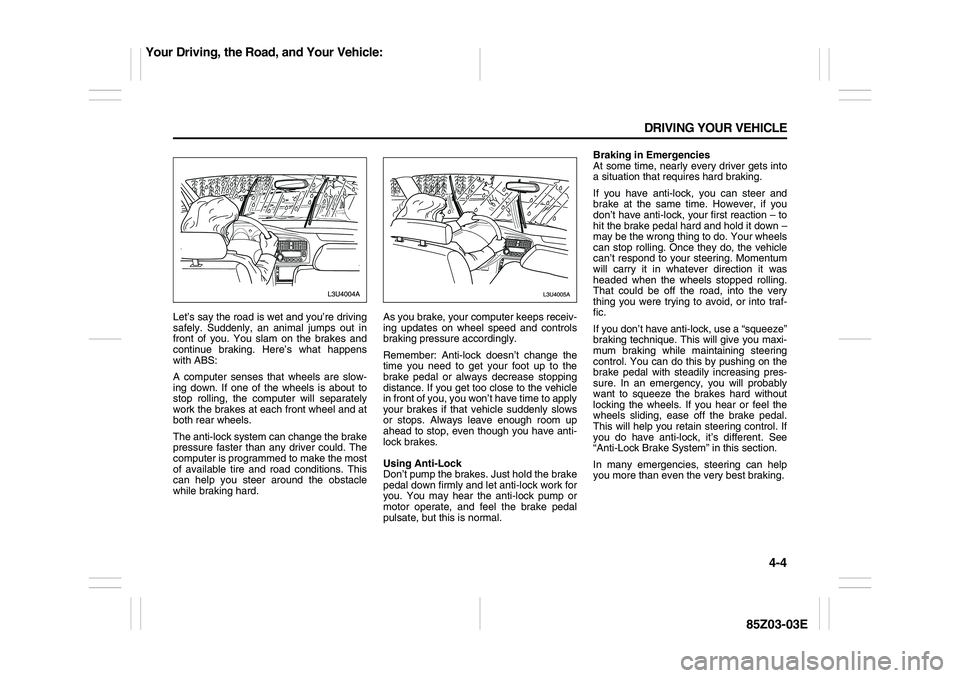
Let’s say the road is wet and you’re driving
safely. Suddenly, an animal jumps out in
front of you. You slam on the brakes and
continue braking. Here’s what happens
with ABS:
A computer senses that wheels are slow-
ing down. If one of the wheels is about to
stop rolling, the computer will separately
work the brakes at each front wheel and at
both rear wheels.
The anti-lock system can change the brake
pressure faster than any driver could. The
computer is programmed to make the most
of available tire and road conditions. This
can help you steer around the obstacle
while braking hard.As you brake, your computer keeps receiv-
ing updates on wheel speed and controls
braking pressure accordingly.
Remember: Anti-lock doesn’t change the
time you need to get your foot up to the
brake pedal or always decrease stopping
distance. If you get too close to the vehicle
in front of you, you won’t have time to apply
your brakes if that vehicle suddenly slows
or stops. Always leave enough room up
ahead to stop, even though you have anti-
lock brakes.
Using Anti-Lock
Don’t pump the brakes. Just hold the brake
pedal down firmly and let anti-lock work for
you. You may hear the anti-lock pump or
motor operate, and feel the brake pedal
pulsate, but this is normal.Braking in Emergencies
At some time, nearly every driver gets into
a situation that requires hard braking.
If you have anti-lock, you can steer and
brake at the same time. However, if you
don’t have anti-lock, your first reaction – to
hit the brake pedal hard and hold it down –
may be the wrong thing to do. Your wheels
can stop rolling. Once they do, the vehicle
can’t respond to your steering. Momentum
will carry it in whatever direction it was
headed when the wheels stopped rolling.
That could be off the road, into the very
thing you were trying to avoid, or into traf-
fic.
If you don’t have anti-lock, use a “squeeze”
braking technique. This will give you maxi-
mum braking while maintaining steering
control. You can do this by pushing on the
brake pedal with steadily increasing pres-
sure. In an emergency, you will probably
want to squeeze the brakes hard without
locking the wheels. If you hear or feel the
wheels sliding, ease off the brake pedal.
This will help you retain steering control. If
you do have anti-lock, it’s different. See
“Anti-Lock Brake System” in this section.
In many emergencies, steering can help
you more than even the very best braking.
Your Driving, the Road, and Your Vehicle:
Page 139 of 225

4-15 DRIVING YOUR VEHICLE
85Z03-03E
Run your engine only as long as you must.
This saves fuel. When you run the engine,
make it go a little faster than just idle. That
is, push the accelerator slightly. This uses
less fuel for the heat that you get and it
keeps the battery charged. You will need a
well-charged battery to restart the vehicle,
and possibly for signaling later on with your
headlamps. Let the heater run for a while.
Then, shut the engine off and close the
window almost all the way to preserve the
heat. Start the engine again and repeat
this only when you feel really uncomfort-
able from the cold. But do it as little as pos-
sible. Preserve the fuel as long as you can.
To help keep warm, you can get out of the
vehicle and do some fairly vigorous exer-
cises every half hour or so until help
comes.
If You Are Stuck: In Sand, Mud, Ice or
Snow
In order to free your vehicle when it is
stuck, you will need to spin the wheels, but
you don’t want to spin your wheels too fast.
The method known as “rocking” can help
you get out when you’re stuck, but you
must use caution.For information about using tire chains on
your vehicle, see “Tire Chains” in section 5.Rocking Your Vehicle To Get It Out
First, turn your steering wheel left and
right. That will clear the area around your
front wheels. Then shift back and forth
between REVERSE (R) and a forward
gear (or with a manual transmission,
between FIRST (1) or SECOND (2) and
REVERSE (R)), spinning the wheels as lit-
tle as possible. Release the accelerator
pedal while you shift, and press lightly on
the accelerator pedal when the transmis-
sion is in gear. By slowly spinning your
wheels in the forward and reverse direc-
tions, you will cause a rocking motion that
may free your vehicle. If that doesn’t get
you out after a few tries, you may need to
be towed out. If you do need to be towed
out, see “Towing Your Vehicle” in the fol-
lowing section.
WARNING
If you let your tires spin at high
speed, they can explode, and you or
others could be injured. And, the
transmission or other parts of the
vehicle can overheat. That could
cause an engine compartment fire or
other damage. When you’re stuck,
spin the wheels as little as possible.
Don’t spin the wheels above 35 mph
(55 km/h) as shown on the speedom-
eter.
CAUTION
Spinning your wheels can destroy
parts of your vehicle as well as the
tires. If you spin the wheels too fast
while shifting your transmission back
and forth, you can destroy your trans-
mission. See “Rocking Your Vehicle
To Get It Out.”
Your Driving, the Road, and Your Vehicle:
Page 140 of 225
4-16 DRIVING YOUR VEHICLE
85Z03-03E
TowingTowing Your VehicleConsult your SUZUKI dealer or a profes-
sional towing service if you need to have
your disabled vehicle towed.
If you want to tow your vehicle behind
another vehicle for recreational purposes
(such as behind a motorhome), see the fol-
lowing section, “Recreational Vehicle Tow-
ing”.Recreational Vehicle TowingRecreational vehicle towing means towing
your vehicle behind another vehicle – such
as behind a motorhome. The two most
common types of recreational vehicle tow-
ing are known as “dinghy towing” (towing
your vehicle with all four wheels on the
ground) and “dolly towing” (towing your
vehicle with two wheels on the ground and
two wheels up on a device known as a
“dolly”).
With the proper preparation and equip-
ment, many vehicles can be towed in these
ways. See the following sections, “Dinghy
Towing” and “Dolly Towing”.Here are some important things to con-
sider before you do recreational vehicle
towing:
What’s the towing capacity of the towing
vehicle? Be sure you read the tow vehi-
cle manufacturer’s recommendations.
How far will you tow? Some vehicles
have restrictions on how far and how
long they can tow.
Do you have the proper towing equip-
ment? See your SUZUKI dealer or traile-
ring professional for additional advice
and equipment recommendations.
Is your vehicle ready to be towed? Just
as you would prepare your vehicle for a
long trip, you’ll want to make sure your
vehicle is prepared to be towed. See
“Before Leaving on a Long Trip” in this
section.
Dinghy Towing
Your vehicle was not designed to be towed
with all four wheels on the ground. If your
vehicle must be towed, you should use a
dolly. See “Dolly Towing” that follows for
more information.Dolly Towing
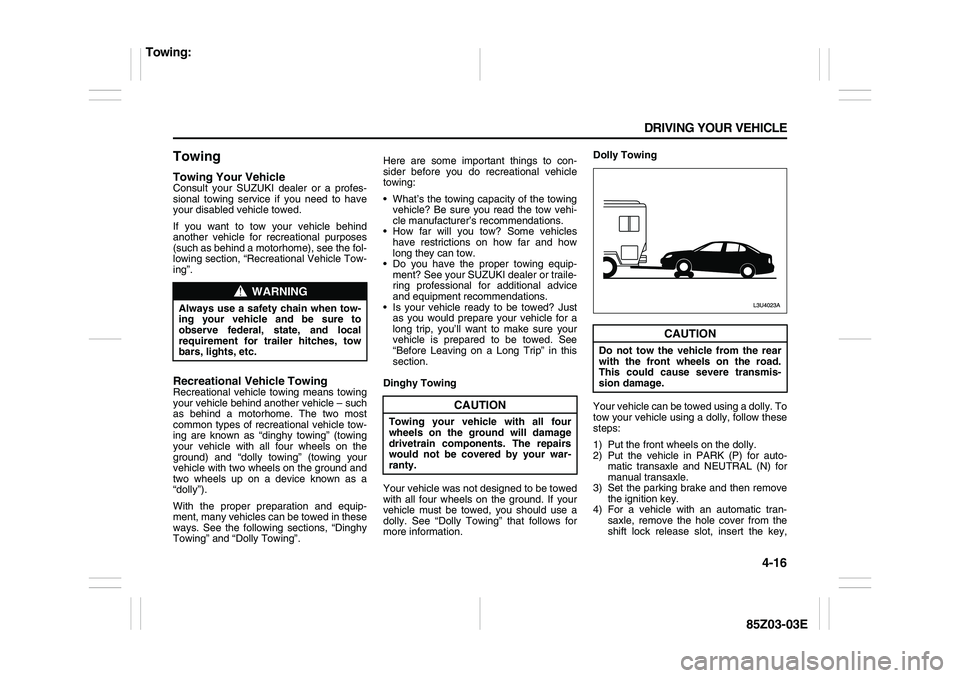
Your vehicle can be towed using a dolly. To
tow your vehicle using a dolly, follow these
steps:
1) Put the front wheels on the dolly.
2) Put the vehicle in PARK (P) for auto-
matic transaxle and NEUTRAL (N) for
manual transaxle.
3) Set the parking brake and then remove
the ignition key.
4) For a vehicle with an automatic tran-
saxle, remove the hole cover from the
shift lock release slot, insert the key,
WARNING
Always use a safety chain when tow-
ing your vehicle and be sure to
observe federal, state, and local
requirement for trailer hitches, tow
bars, lights, etc.
CAUTION
Towing your vehicle with all four
wheels on the ground will damage
drivetrain components. The repairs
would not be covered by your war-
ranty.
CAUTION
Do not tow the vehicle from the rear
with the front wheels on the road.
This could cause severe transmis-
sion damage.
Towing:
Page 141 of 225
4-17 DRIVING YOUR VEHICLE
85Z03-03E
and shift to NEUTRAL (N). See “Shift-
ing Out of Park (P)” in Section 2.
5) Clamp the steering wheel in a straight-
ahead position with a clamping device
designed for towing.
6) Release the parking brake.
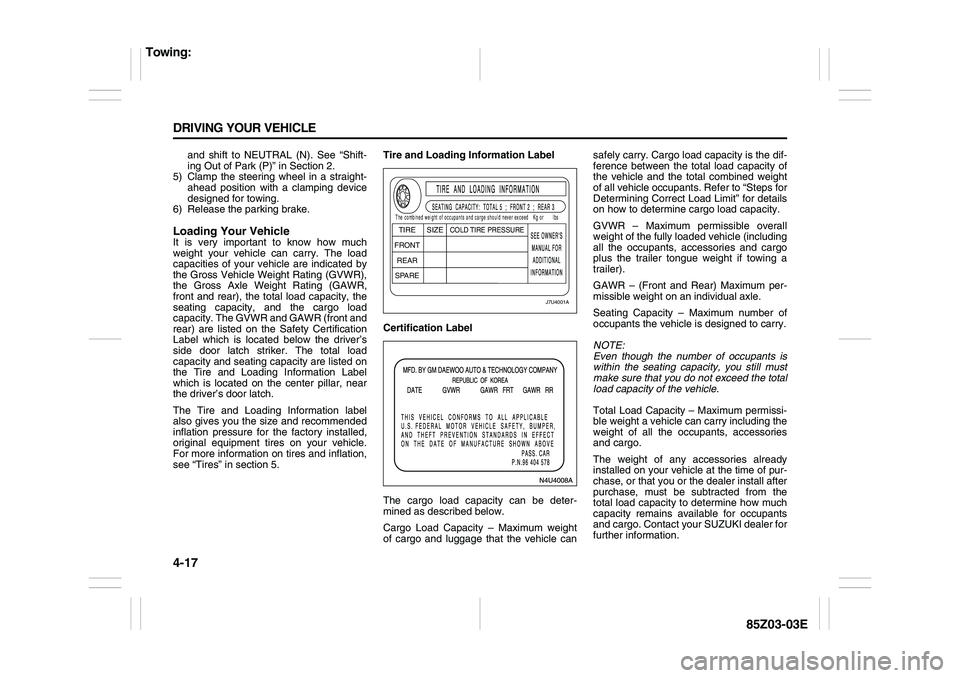
Loading Your VehicleIt is very important to know how much
weight your vehicle can carry. The load
capacities of your vehicle are indicated by
the Gross Vehicle Weight Rating (GVWR),
the Gross Axle Weight Rating (GAWR,
front and rear), the total load capacity, the
seating capacity, and the cargo load
capacity. The GVWR and GAWR (front and
rear) are listed on the Safety Certification
Label which is located below the driver’s
side door latch striker. The total load
capacity and seating capacity are listed on
the Tire and Loading Information Label
which is located on the center pillar, near
the driver’s door latch.
The Tire and Loading Information label
also gives you the size and recommended
inflation pressure for the factory installed,
original equipment tires on your vehicle.
For more information on tires and inflation,
see “Tires” in section 5.Tire and Loading Information Label
Certification Label
The cargo load capacity can be deter-
mined as described below.
Cargo Load Capacity – Maximum weight
of cargo and luggage that the vehicle cansafely carry. Cargo load capacity is the dif-
ference between the total load capacity of
the vehicle and the total combined weight
of all vehicle occupants. Refer to “Steps for
Determining Correct Load Limit” for details
on how to determine cargo load capacity.
GVWR – Maximum permissible overall
weight of the fully loaded vehicle (including
all the occupants, accessories and cargo
plus the trailer tongue weight if towing a
trailer).
GAWR – (Front and Rear) Maximum per-
missible weight on an individual axle.
Seating Capacity – Maximum number of
occupants the vehicle is designed to carry.
NOTE:
Even though the number of occupants is
within the seating capacity, you still must
make sure that you do not exceed the total
load capacity of the vehicle.
Total Load Capacity – Maximum permissi-
ble weight a vehicle can carry including the
weight of all the occupants, accessories
and cargo.
The weight of any accessories already
installed on your vehicle at the time of pur-
chase, or that you or the dealer install after
purchase, must be subtracted from the
total load capacity to determine how much
capacity remains available for occupants
and cargo. Contact your SUZUKI dealer for
further information.
J7U4001A
TIRE
SIZE
COLD TIRE PRESSURE
FRONT
REAR
SPAREThe combined weight of occupants and carge should never exceedKg or lbs
Towing:
Page 142 of 225
4-18 DRIVING YOUR VEHICLE
85Z03-03E
Actual weight of the loaded vehicle and
actual loads at the front and rear axles can
only be determined by weighing the vehicle
using a vehicle scale. To measure the
weight and load, try taking your vehicle to
a highway weighing station, shipping com-
pany or inspection station for trucks, etc.
Compare these weights to the GVWR and
GAWR (front and rear) listed on the Safety
Certification Label. If the gross vehicle
weight or the load on either axle exceeds
these ratings, you must remove enough
weight to bring the load down to the rated
capacity.
Steps for Determining Correct Load
Limit
1) Locate the statement “The combined
weight of occupants and cargo should
never exceed XXX pounds” on your
vehicle placard.
2) Determine the combined weight of the
driver and passengers that will be riding
in your vehicle.
3) Subtract the combined weight of the
driver and passengers from XXX kilo-
grams or XXX pounds.
4) The resulting figure equals the available
amount of cargo and luggage load
capacity. For example, if the “XXX”
amounts equals 1,400 lbs and there will
be five 150 lb passengers in your vehi-
cle, the amount of available cargo and
luggage load capacity is 650 lbs (1,400
– 750 (5 x 150) = 650 lbs).5) Determine the combined weight of lug-
gage and cargo being loaded on the
vehicle. That weight may not safely
exceed the available cargo and luggage
load capacity calculated in Step 4.
Vehicle Loading Example
As an example, suppose that the Tire and
Loading Information label on your vehicle
indicates that your vehicle’s total load
capacity is 950 lbs. If you were to drive
your vehicle with one passenger, and the
total combined weight of you and your pas-
senger was 350 lbs, then the cargo and
luggage capacity of your vehicle would be
600 lbs (950 – 350 = 600 lbs).
If you later added 2 more passengers, hav-
ing a combined weight of 325 lbs, the
cargo and luggage capacity of your vehicle
would be reduced from 600 lbs to 275 lbs
(600 – 325 = 275 lbs). As you can see, as
the number and combined weight of vehi-
cle occupants increase, the vehicle’s cargo
and luggage capacity decreases. Do not
carry more than 123 lbs (56 kg) in your
trunk.If you put things inside your vehicle – like
suitcases, tools, packages, or anything
else – they will go as fast as the vehicle
goes. If you have to stop or turn quickly, or
if there is a crash, they’ll keep going.
WARNING
Never overload your vehicle. Over-
loading your vehicle can cause dam-
age to your tires and lead to poor
steering and braking which can result
in an accident. The gross vehicle
weight (sum of the weights of the
loaded vehicle, driver and passen-
gers) must never exceed the Gross
Vehicle Weight Rating (GVWR) listed
on the Safety Certification Label. In
addition, never distribute a load so
that the weight on either the front or
rear axle exceeds the Gross Axle
Weight Rating (GAWR) listed on the
Safety Certification Label.
Towing:
Page 164 of 225

5-20 SERVICE AND APPEARANCE CARE
85Z03-03E
Brake Pedal Travel
See your SUZUKI dealer if the brake pedal
does not return to normal height, or if there
is a rapid increase in pedal travel. This
could be a sign of brake trouble.
Brake Adjustment
Every time you make a moderate brake
stop, your disc brakes adjust for wear. If
you rarely make a moderate or heavier
stop, then your brakes might not adjust
correctly. If you drive in that way, then –
very carefully – make a few moderate
brake stops about every 1,000 miles
(1,600 km), so your brakes will adjust prop-
erly.
Replacing Brake System Parts
The braking system on a vehicle is com-
plex. Its many parts have to be of top qual-
ity and work well together if the vehicle is
to have really good braking. When you
replace parts of your braking system – for
example, when your brake linings wear
down and you need new ones put in – be
sure you get new approved SUZUKI
replacement parts. If you don’t, your
brakes may no longer work properly. For
example, if someone puts in brake linings
that are wrong for your vehicle, the balance
between your front and rear brakes can
change – for the worse. The braking per-
formance you’ve come to expect can
change in many other ways if someone
puts in the wrong replacement brake parts.
BatteryYour new vehicle comes with a mainte-
nance free battery. When it’s time for a new
battery, get one that has the replacement
number shown on the original battery’s
label. See “Engine Compartment Over-
view” in this section for battery location.
Vehicle Storage
If you’re not going to drive your vehicle for
25 days or more, remove the black, nega-
tive (–) cable from the battery. This will
help keep your battery from running down.
Contact your SUZUKI dealer to learn how
to prepare your vehicle for longer storage
periods.
Jump StartingIf your battery has run down, you may want
to use another vehicle and some jumper
cables to start your vehicle. Be sure to fol-
low the steps below to do it safely.
1) Check the other vehicle. It must have a
12-volt battery with a negative ground
system.
WARNING
Battery posts, terminals and related
accessories contain lead and lead
compounds, chemicals known to the
State of California to cause cancer
and reproductive harm. Wash hands
after handling.
WARNING
Batteries have acid that can burn you
and gas that can explode. You can be
badly hurt if you aren’t careful. See
the next section, “Jump Starting”, for
tips on working around a battery
without getting hurt.
WARNING
Batteries can hurt you. They can be
dangerous because:
They contain acid that can burn
you.
They contain gas that can explode
or ignite.
They contain enough electricity to
burn you.
If you don’t follow these steps
exactly, some or all of these things
can hurt you.
CAUTION
Ignoring the following steps could
result in costly damage to your vehi-
cle that wouldn’t be covered by your
warranty.
Trying to start your vehicle by push-
ing or pulling it won’t work, and it
could damage your vehicle.
Checking Things Under the Hood: