2007 SUBARU TRIBECA brake
[x] Cancel search: brakePage 237 of 377
7-22 Starting and operating
ing that the Traction Control system is not
operating. It comes on in the event of a
malfunction in the system and is illuminat-
ed whenever the system is not operating. VVehicle Dynamics Control warning
The warning light comes on when the igni-
tion switch is turned to the “ON” position
and goes off several seconds after engine
startup. This lighting pattern indicates that
the Vehicle Dynamics Control system is
operating normally.
The following situations could indicate a
malfunction of the Vehicle Dynamics Con-
trol system; if any should occur, we rec-
ommend that you have an authorized
SUBARU dealer carry out an inspection of
the system at the first available opportuni-ty. y The warning light does not turn on when
the ignition key is turned to the ON posi- tion. y The warning light turns on while the ve-
hicle is being driven. y When a malfunction has occurred in the
Vehicle Dynamics Control electrical sys-
tem, only the warning light will turn on. In
such an event, the ABS will still be operat-
ing normally. y The warning light will also turn on when
a problem occurs with the ABS or Vehicle
Dynamics Control electronic control sys- tems.
Because the Vehicle Dynamics Control
system controls each brake through the
ABS, whenever the ABS stops operating
due to a malfunction in that electrical sys-
tem, the Vehicle Dynamics Control will
also become unable to control all four
brakes. Thus Vehicle Dynamics Control
system operation halts and the warning
light turns on. Although both the Vehicle
Dynamics Control system and the ABS
will be inoperable in this situation, it will
still be possible to stop the vehicle using
normal braking. The Vehicle Dynamics
Control system and the ABS do not ad-
versely affect operation of the vehicle in
any way when they are inoperable; how-
ever should such a situation occur, drive
with care and have an authorized
SUBARU dealer carry out an inspection of
those systems at the first available oppor-
tunity.
NOTE
When the warning light turns on and
off in the following way, it indicates
that the Vehicle Dynamics Control sys-
tem is operating normally. y
Although turning on after the engine
has been started, the warning light
quickly turns off and stays off. y The warning light turns on when the vehicle is being driven; it then turns off
and stays off. V
Traction Control system OFF indica- tor light
This light comes on to indicate that the
Traction Control system is in non-opera-
tion mode. This does not constitute failure
of the Vehicle Dynamics Control system.
NOTE y The indicator light may stay on for a
while after the engine has been started,
especially in cold weather. This occurs
because the engine has not yet
warmed up and is completely normal.
The light will turn off when the engine
has reached a suitable operating tem-
perature. y When an engine problem occurs and
the malfunction indicator lamp turns
on, the indicator light will also come
on.
The following two situations could indicate
malfunction of the Vehicle Dynamics Con-
trol system; if either should occur, have an
authorized SUBARU dealer carry out an
inspection of that system at the first avail-
able opportunity. y The indicator light does not turn on
when the ignition key is turned to the ON
position.
Page 239 of 377
7-24 Starting and operating
Tire pressure monitoring
system (TPMS)
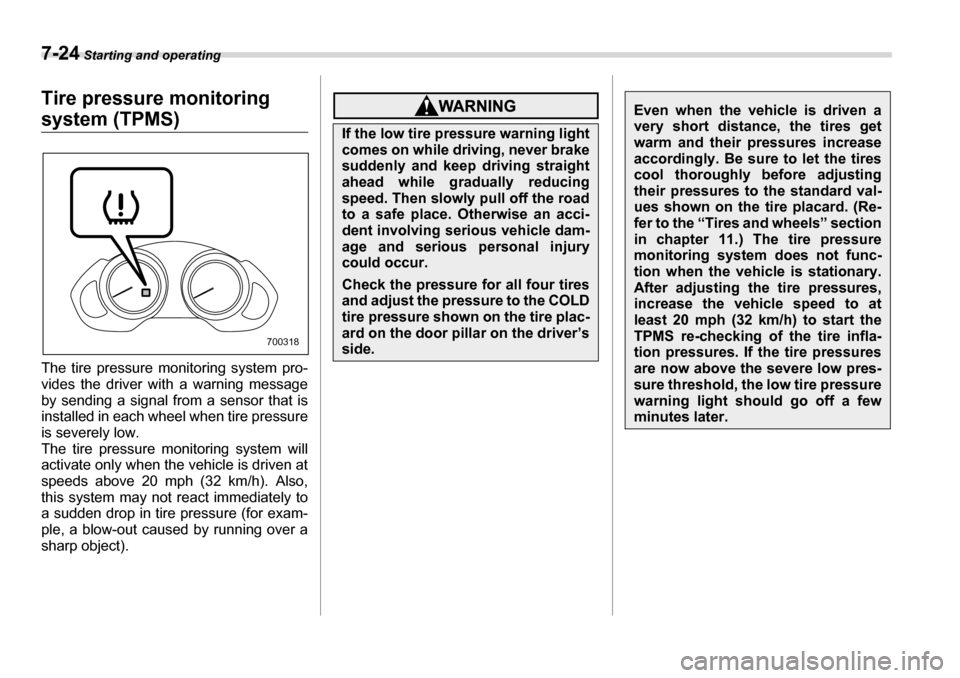
The tire pressure monitoring system pro-
vides the driver with a warning message
by sending a signal from a sensor that is
installed in each wheel when tire pressure
is severely low.
The tire pressure monitoring system will
activate only when the vehicle is driven at
speeds above 20 mph (32 km/h). Also,
this system may not react immediately to
a sudden drop in tire pressure (for exam-
ple, a blow-out caused by running over a
sharp object).
700318
If the low tire pressure warning light
comes on while driving, never brake
suddenly and keep driving straight
ahead while gradually reducing
speed. Then slowly pull off the road
to a safe place. Otherwise an acci-
dent involving serious vehicle dam-
age and serious personal injury
could occur.
Check the pressure for all four tires
and adjust the pressure to the COLD
tire pressure shown on the tire plac-
ard on the door pillar on the driver’s
side.
Even when the vehicle is driven a
very short distance, the tires get
warm and their pressures increase
accordingly. Be sure to let the tires
cool thoroughly before adjusting
their pressures to the standard val-
ues shown on the tire placard. (Re-
fer to the “Tires and wheels” section
in chapter 11.) The tire pressure
monitoring system does not func-
tion when the vehicle is stationary.
After adjusting the tire pressures,
increase the vehicle speed to at
least 20 mph (32 km/h) to start the
TPMS re-checking of the tire infla-
tion pressures. If the tire pressures
are now above the severe low pres-
sure threshold, the low tire pressure
warning light should go off a few minutes later.
Page 241 of 377
7-26 Starting and operating
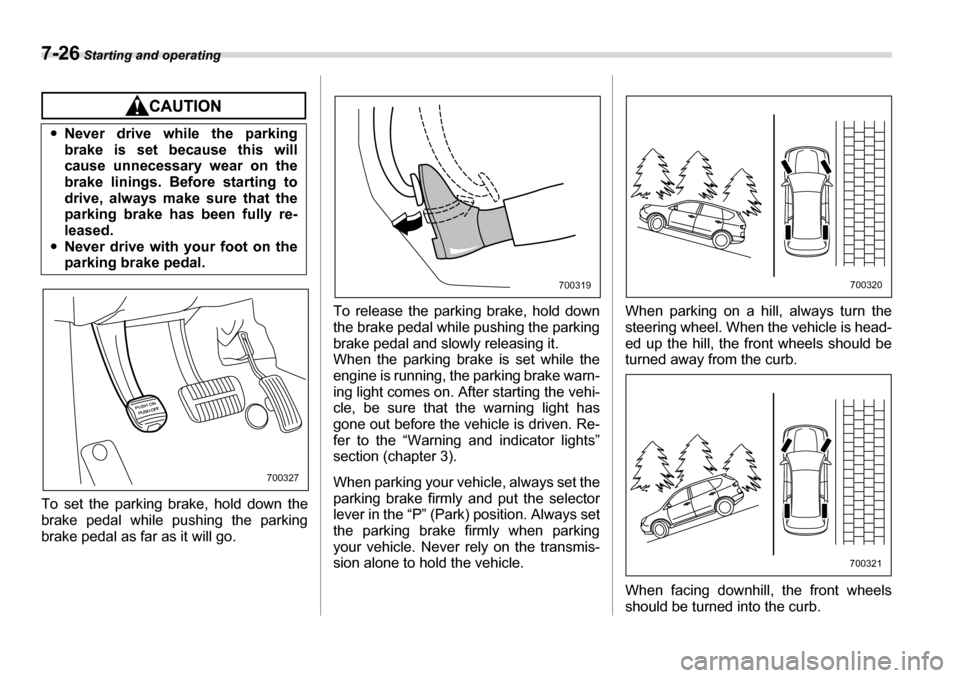
To set the parking brake, hold down the
brake pedal while pushing the parking
brake pedal as far as it will go. To release the parking brake, hold down
the brake pedal while pushing the parking
brake pedal and slowly releasing it.
When the parking brake is set while the
engine is running, the parking brake warn-
ing light comes on. After starting the vehi-
cle, be sure that the warning light has
gone out before the vehicle is driven. Re-
fer to the “Warning and indicator lights”
section (chapter 3).
When parking your vehicle, always set the
parking brake firmly and put the selector
lever in the “P” (Park) position. Always set
the parking brake firmly when parking
your vehicle. Never rely on the transmis-
sion alone to hold the vehicle. When parking on a hill, always turn the
steering wheel. When the vehicle is head-
ed up the hill, the front wheels should be
turned away from the curb.
When facing downhill, the front wheels
should be turned into the curb.
y
Never drive while the parking
brake is set because this will
cause unnecessary wear on the
brake linings. Before starting to
drive, always make sure that the
parking brake has been fully re-
leased.
y Never drive with your foot on the
parking brake pedal.
700327
700319700320
700321
Page 243 of 377
7-28 Starting and operating
The vehicle will maintain the desired
speed.
Vehicle speed can be temporarily in-
creased while driving with the cruise con-
trol activated. Simply depress the acceler-
ator pedal to accelerate the vehicle. When
the accelerator pedal is released, the ve-
hicle will return to and maintain the previ-
ous cruising speed. „To temporarily cancel the
cruise control
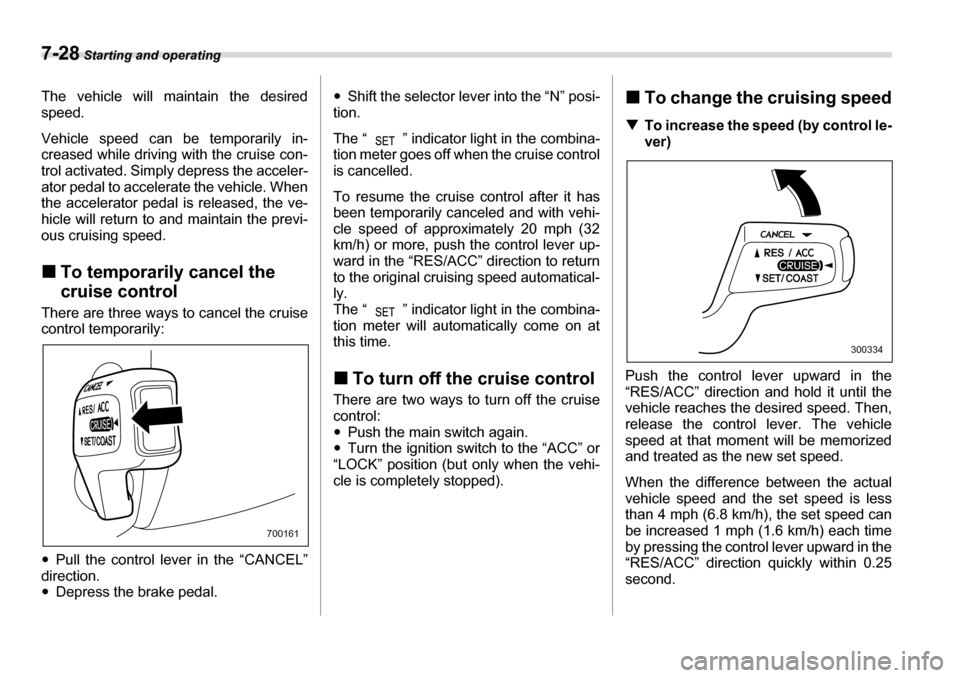
There are three ways to cancel the cruise
control temporarily: y Pull the control lever in the “CANCEL”
direction. y Depress the brake pedal. y
Shift the selector lever into the “N” posi-
tion.
The “ ” indicator light in the combina-
tion meter goes off when the cruise control
is cancelled.
To resume the cruise control after it has
been temporarily canceled and with vehi-
cle speed of approximately 20 mph (32
km/h) or more, push the control lever up-
ward in the “RES/ACC” direction to return
to the original cruising speed automatical- ly.
The “ ” indicator light in the combina-
tion meter will automatically come on at
this time. „ To turn off the cruise control
There are two ways to turn off the cruise control:y Push the main switch again.
y Turn the ignition switch to the “ACC” or
“LOCK” position (but only when the vehi-
cle is completely stopped). „
To change the cruising speed
T To increase the speed (by control le-
ver)
Push the control lever upward in the
“RES/ACC” direction and hold it until the
vehicle reaches the desired speed. Then,
release the control lever. The vehicle
speed at that moment will be memorized
and treated as the new set speed.
When the difference between the actual
vehicle speed and the set speed is less
than 4 mph (6.8 km/h), the set speed can
be increased 1 mph (1.6 km/h) each time
by pressing the control lever upward in the
“RES/ACC” direction quickly within 0.25 second.
700161
300334
Page 244 of 377
Starting and operating 7-29
– CONTINUED –
T
To increase the speed (by accelera-
tor pedal)
1. Depress the accelerator pedal to accel-
erate the vehicle to the desired speed.
2. Push the control lever downward in the
“SET/COAST” direction once. Now the
desired speed is set and the vehicle will
keep running at that speed without de-
pressing the accelerator pedal.
NOTE
If the difference between the actual ve-
hicle speed when the control lever is
pushed downward and the speed last
time you set is less than 4 mph (6.8 km/
h), the vehicle speed will be lowered by
1 mph (1.6 km/h). This occurs because
the cruise control system unit regards
this lever operation as that intended to
decrease the vehicle speed. T
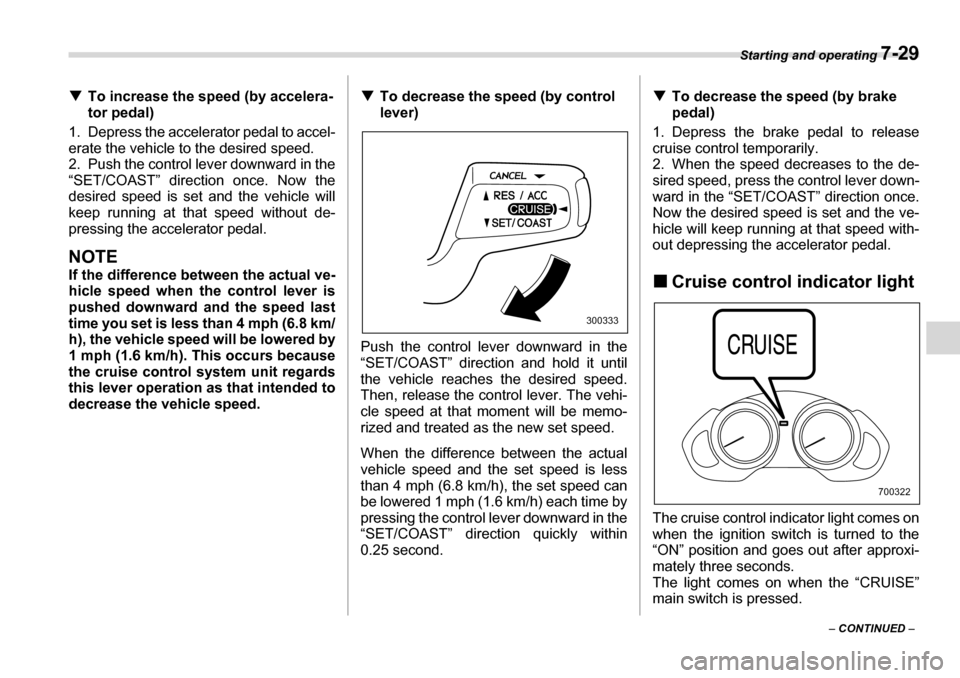
To decrease the speed (by control lever)
Push the control lever downward in the
“SET/COAST” direction and hold it until
the vehicle reaches the desired speed.
Then, release the control lever. The vehi-
cle speed at that moment will be memo-
rized and treated as the new set speed.
When the difference between the actual
vehicle speed and the set speed is less
than 4 mph (6.8 km/h), the set speed can
be lowered 1 mph (1.6 km/h) each time by
pressing the control lever downward in the
“SET/COAST” direction quickly within
0.25 second. T
To decrease the speed (by brake
pedal)
1. Depress the brake pedal to release
cruise control temporarily.
2. When the speed decreases to the de-
sired speed, press the control lever down-
ward in the “SET/COAST” direction once.
Now the desired speed is set and the ve-
hicle will keep running at that speed with-
out depressing the accelerator pedal.
„ Cruise control indicator light
The cruise control indicator light comes on
when the ignition switch is turned to the
“ON” position and goes out after approxi- mately three seconds.
The light comes on when the “CRUISE”
main switch is pressed.
300333
700322
Page 247 of 377
8-2 Driving tips
Driving tipsNew vehicle break-in driving – the first 1,000 miles (1,600
km)
The performance and long life of your ve-
hicle are dependent on how you handle
and care for your vehicle while it is new.
Follow these instructions during the first
1,000 miles (1,600 km):yDo not race the engine. And do not al-
low engine speed to exceed 4,000 rpm ex-
cept in an emergency.y Do not drive at one constant engine or
vehicle speed for a long time, either fast orslow.y Avoid starting suddenly and rapid accel-
eration, except in an emergency.y Avoid hard braking, except in an emer-
gency.
The same break-in procedures should be
applied to a newly installed or overhauled
engine or when brake pads or brake lin-
ings are replaced with new ones.
Fuel economy hints
The following suggestions will help to save your fuel. y Select the proper gear position for the
speed and road conditions. y Avoid sudden acceleration or decelera-
tion. Always accelerate gently until you
reach the desired speed. Then try to main-
tain that speed for as long as possible. y Do not pump the accelerator and avoid
racing the engine. y Avoid unnecessary engine idling.
y Keep the engine properly tuned.
y Keep the tires inflated to the correct
pressure shown on the tire placard, which
is located under the door latch on the driv-
er’s side. Low pressure will increase tire
wear and fuel consumption. y Use the air conditioner only when nec-
essary. y Keep the front and rear wheels in prop-
er alignment.y Avoid carrying unnecessary luggage or
cargo. Engine exhaust gas (Carbon
monoxide)
y
Never inhale engine exhaust gas.
Engine exhaust gas contains car-
bon monoxide, a colorless and
odorless gas which is dangerous,
or even lethal, if inhaled.
yAlways properly maintain the en-
gine exhaust system to prevent
engine exhaust gas from entering
the vehicle.
yNever run the engine in a closed
space, such as a garage, except
for the brief time needed to drive
the vehicle in or out of it.
yAvoid remaining in a parked vehi-
cle for a lengthy time while the en-
gine is running. If that is unavoid-able, then use the ventilation fan
to force fresh air into the vehicle.
yAlways keep the front ventilator
inlet grille free from snow, leaves
or other obstructions to ensure
that the ventilation system always
works properly.
Page 251 of 377
8-6 Driving tips
Your B9 TRIBECA is classified as a utility
vehicle. Utility vehicles feature a higher
ground clearance which enables them to
be used for wide applications including
off-road driving, but a higher center of
gravity in relation to the tread width as
compared with ordinary passenger cars
makes vehicles of this type more likely to
roll over. In reality, utility vehicles have a
significantly higher rollover rate than other
types of vehicles. The high ground clear-
ance of this vehicle is a real advantage,
giving you a better view of the road and al-
lowing you to anticipate problems earlier.
However, remember that your utility vehi-
cle is not designed for high-speed corner-
ing comparable to ordinary passenger
cars and that your vehicle could roll over if you make a sharp turn at high speed. If
you do take your SUBARU off-road, cer-
tain common sense precautions such as
the following should be taken: y
Make certain that you and all of your
passengers are wearing seatbelts. y Carry some emergency equipment,
such as a towing rope or chain, a shovel,
wheel blocks, first aid kit and cell phone or
citizens band radio. y Drive carefully. Do not take unneces-
sary risks by driving in dangerous areas or
over rough terrain. y Slow down and employ extra caution at
all times. When driving off-road, you will
not have the benefit of marked traffic
lanes, banked curves, traffic signs and the
like. y Do not drive across steep slopes. In-
stead, drive either straight up or straight
down the slopes. A vehicle can much
more easily tip over sideways than it can
end over end. Avoid driving straight up or
down slopes that are too steep. y Avoid sharp turning maneuvers, espe-
cially at higher speeds. y Do not grip the inside or spokes of the
steering wheel. A bad bump could jerk the
wheel and injure your hands. Instead drive
with your fingers and thumbs on the out-
side of the rim.y If driving through water, such as when crossing shallow streams, first check the
depth of the water and the bottom of the
stream bed for firmness and ensure that
the bed of the stream is flat. Drive slowly
and completely through the stream. The
water should be shallow enough that it
does not reach the vehicle’s undercar-
riage. Water entering the engine air intake
or the exhaust pipe or water splashing
onto electrical parts may damage your ve-
hicle and may cause it to stall. Never at-
tempt to drive through rushing water; re-
gardless of its depth, it can wash away the
ground from under your tires, resulting in
possible loss of traction and even vehiclerollover. y
Always check your brakes for effective-
ness immediately after driving in sand,
mud or water. Do this by driving slowly
and stepping on the brake pedal. Repeat
that process several times to dry out the
brake discs and brake pads.y Do not drive or park over or near flam-
mable materials such as dry grass or fall-
en leaves, as they may burn easily. Theexhaust system is very hot while the en-
gine is running and right after engine
stops. This could create a fire hazard.y After driving through tall grass, mud,
rocks, sand, rivers, etc., check that there
is no grass, bush, paper, rags, stones,
sand, etc. adhering to or trapped on the
y Whenever strong crosswinds are
present, slow down sufficiently to
maintain control of your vehicle.
Remember that your vehicle, with
its higher profile and center of
gravity, is more likely to be affect-
ed by crosswinds than ordinary
passenger cars.
yAlways use the utmost care in
driving – overconfidence because
you are driving an All-Wheel Drive
vehicle could easily lead to a seri-
ous accident.
Page 252 of 377
Driving tips 8-7
– CONTINUED –
underbody. Clear off any such matter from
the underbody. If the vehicle is used with
these materials trapped or adhering to the
underbody, a mechanical breakdown or
fire could occur. y
Secure all cargo carried inside the vehi-
cle and make certain that it is not piled
higher than the seatbacks. During sudden
stops or jolts, unsecured cargo could be
thrown around in the vehicle and cause in-
jury. Do not pile heavy loads on the roof.
Those loads raise the vehicle’s center of
gravity and make it more prone to tip over. y If you must rock the vehicle to free it
from sand or mud, depress the accelera-
tor pedal slightly and move the selector le-
ver back and forth between “D” and “R” re-
peatedly. Do not race the engine. For the
best possible traction, avoid spinning the
wheels when trying to free the vehicle. y When the road surface is extremely
slippery, you can obtain better traction by
starting the vehicle with the transmission
in 2nd than 1st. y Never equip your vehicle with tires larg-
er than those specified in this manual. y Wash the vehicle’s underbody after off-
road driving. Suspension components are
particularly prone to dirt buildup, so they
need to be washed thoroughly. y Frequent driving of an AWD vehicle un-
der hard-driving conditions such as rough roads or off roads will necessitate more
frequent replacement of engine oil, brake
fluid and transmission oil than that speci-
fied in the maintenance schedule de-
scribed in the “Warranty and Maintenance Booklet”.
Remember that damage done to your
SUBARU while operating it off-road and
not using common sense precautions
such as those listed above is not eligible for warranty coverage.
Winter driving „
Operation during cold weath- er
Carry some emergency equipment, such
as tire chains, a window scraper, a bag of
sand, flares, a small shovel, and jumper cables.
Check the battery and cables. Cold tem-
peratures reduce battery capacity. The
battery must be in good condition to pro-
vide enough power for cold winter starts.
Use an engine oil of proper grade and vis-
cosity for cold weather. Heavy summer oil
will cause harder starting.
Keep the door locks from freezing by
800201