2007 SUBARU LEGACY light
[x] Cancel search: lightPage 160 of 442

Black plate (161,1)
北米Model "A2420BE-B" EDITED: 2006/ 7/ 26
Light control switch
WARNING
To prevent battery discharge result-
ing from accidentally leaving your
lights on when your vehicle is
parked, the light switch operates
only when the ignition switch is in
the “ON ”position. In any other
position, the vehicle ’s lights will be
out.
If you park your vehicle on a road-
side at night, use the hazard warn-
ing flasher to alert the other drivers.
The light switch operates only when the
ignition switch is in the “ON”position.
& HeadlightsTo turn on the headlights, turn the knob on
the end of the turn signal lever.
first position
Parking lights, instrument panel illumina-
tion, tail lights and license plate light are
on.second position
Headlights, parking lights, instrument pa-
nel illumination, tail lights, and license
plate light are on.
& High/low beam change (dim-
mer)To change from low beam to high beam,
push the turn signal lever forward. When
the headlights are on high beam, the high
beam indicator light “
”on the instru-
ment panel is also on.
To switch back to low beam, pull the lever
back to the detent position.
Instruments and controls
3-39
– CONTINUED –
3
ProCarManuals.com
Page 161 of 442

Black plate (162,1)
北米Model "A2420BE-B" EDITED: 2006/ 7/ 26
3-40
Instruments and controls
& Headlight flasher
CAUTION
Do not hold the lever in the flashing
position for more than just a few
seconds.
To flash the headlights, pull the lever
toward you and then release it. The high
beam will stay on for as long as you hold
the lever. The headlight flasher works
even though the lighting switch is in the
“OFF ”position.
When the headlights are on high beam,
the high beam indicator light “
”on the
instrument panel also comes on.
& Daytime running light system
WARNING
The brightness of the illumination of
the low beam headlights is reduced
by the daytime running light system.
The light switch must always be
turned to the “
”position when it
is dark outside.
The front side marker lights, parking lights,
tail lights and license plate lights will
automatically come on and the low beam
headlights will automatically come on at
reduced brightness when the engine has
started, under the following conditions:
. The parking brake is fully released.
. The light switch is in the “OFF”or “
”
position.
The indicator light located on the combi-
nation meter will illuminate when the
daytime running light system is on.
Turbo modelsNon-turbo models
ProCarManuals.com
Page 162 of 442

Black plate (163,1)
北米Model "A2420BE-B" EDITED: 2006/ 7/ 26
Turn signal leverTo activate the right turn signal, push the
turn signal lever up. To activate the left
turn signal, push the turn signal lever
down. When the turn is finished, the lever
will return automatically. If the lever does
not return after cornering, return the lever
to the neutral position by hand.
To signal a lane change, push the turn
signal lever up or down slightly and hold it
during the lane change. The turn signal
indicator lights will flash in the direction of
the turn or lane change. The lever will
return automatically to the neutral position
when you release it.
Illumination brightness con-
trolThe brightness of clock display, audio, air
conditioner, information display and instru-
ment panel illumination dims when the
light switch is in the “
”or “
”
positions. You can adjust brightness of
the instrument panel illumination for better
visibility.
In turbo models, you can also adjust the
brightness of the instrument panel illumi-
nation when the lighting switch is in the
OFF position.
To brighten, turn the control dial upward.
To darken, turn the control dial downward.
NOTEWhen the control dial is turned fully
upward, the illumination brightness
becomes the maximum and the auto-
matic dimming function does not work
at all.
Instruments and controls
3-41
3
ProCarManuals.com
Page 163 of 442

Black plate (164,1)
北米Model "A2420BE-B" EDITED: 2006/ 7/ 26
3-42
Instruments and controls
Parking light switchThe parking light switch operates regard-
less of the ignition switch position.
By pushing the front end of this switch,
following lights will come on.
– Parking lights
– Front and rear side marker lights
– Tail lights
– License plate lights
To turn off, push the rear end of the
parking light switch.
Avoid leaving these lights on for a long
time because that will run down the
battery.
Front fog light switch (if
equipped)The front fog lights operate only when the
light switch is in the “
”position.
However, the front fog lights turn off when
the headlights are switched to high beam.
To turn on the front fog lights, turn the front
fog light switch on the turn signal lever
upward to the “
”position. To turn off the
front fog lights, turn the switch back down
to the “OFF”position.
Turbo modelsNon-turbo modelsThe indicator light located on the combi-
nation meter will illuminate when the front
fog lights are on.
ProCarManuals.com
Page 167 of 442

Black plate (168,1)
北米Model "A2420BE-B" EDITED: 2006/ 7/ 26
3-46
Instruments and controls
vehicle speed (longer when the vehicle
speed is low; shorter when the vehicle
speed is high).
When you subsequently move the selec-
tor lever of the automatic transmission to
the “R ”position, the rear wiper will switch
to continuous operation. When you move
the selector lever from the “R”position to
some other position, the rear wiper will
return to intermittent operation.
! Washer
To wash the rear window while the rear
wiper is operating, turn the knob on the
end of the wiper control lever upward to
the “
”position. The washer fluid sprays
until you release the knob.
To wash the rear window when the rear
wiper is not in use, turn the knob on the
end of the wiper control lever downward to
the “”position. The washer fluid sprays
and the wiper operates until you release
the knob.
Windshield wiper deicer (if
equipped)The windshield wiper deicer operates only
when the ignition switch is in the “ON”
position.
Before turning on the windshield wiper
deicer, remove any snow from the wind-
shield. To turn on the windshield wiper
deicer, push the button. The indicator light
located on the button lights up while the
windshield wiper deicer is operating.
The windshield wiper deicer will automa-
tically shut off after approximately 15
minutes. If the windshield wiper blades
have been deiced completely before that
time, push the button to turn it off. It also
turns off when the ignition switch is turned to the
“ACC”or “LOCK” position. If deicing
is not complete, you have to push the
button to turn the deicer on again.
Your SUBARU dealer can set your wind-
shield wiper deicer for continuous opera-
tion. Contact your SUBARU dealer for
details.
Once the windshield wiper deicer has
been set for continuous operation, press-
ing the button results in continuous opera-
tion. The windshield wiper deicer
automatically stops operating if any one
of the following conditions occurs during
continuous operation.
. The outside temperature becomes
41 8F(5 8C) or higher.
. The vehicle speed remains at 9 mph
(15 km/h) or lower for 15 minutes.
. The battery voltage decreases below
the permissible level.
ProCarManuals.com
Page 168 of 442

Black plate (169,1)
北米Model "A2420BE-B" EDITED: 2006/ 7/ 26
Rear window defogger but-
tonVehicle with manual climate control sys-
tem
Vehicle with automatic climate control
systemThe rear window defogger operates only
when the ignition switch is in the “ON”
position.
The rear window defogger button is
located on the climate control panel.
To turn on the defogger, push the button.
To turn it off, push the button again.
The indicator light located on the button
lights up while the rear window defogger is
operating.
The defogger will automatically shut off
after approximately 15 minutes. If the
window clears before that time, push the
button to turn it off. It also turns off when
the ignition switch is turned to the “ACC ”
or “LOCK” position. If defrosting or defog- ging is desired when you restart your
vehicle, you have to push the button to
turn it on again.
Your SUBARU dealer can set your rear
window defogger for continuous opera-
tion. Contact your SUBARU dealer for
details.
Once the rear window defogger has been
set for continuous operation, the rear
window defogger repeatedly operates for
15 minutes, stops for two minutes, and
again operates for 15 minutes. If the
battery voltage drops below the permis-
sible level, continuous operation is can-
celed and operation stops as described in
the following.
.
If the battery voltage drops below the
permissible level within 15 minutes of
depression of the button, continuous
operation is canceled and the rear window
defogger stops operating 15 minutes later.
. If the battery voltage drops below the
permissible level after the rear window
defogger has, following depression of the
button, operated for 15 minutes, stopped
operating for two minutes, and started
operating again, the rear window defogger
immediately stops operating.
Instruments and controls
3-47
– CONTINUED –
3
ProCarManuals.com
Page 169 of 442
Black plate (170,1)
北米Model "A2420BE-B" EDITED: 2006/ 7/ 26
3-48
Instruments and controls
CAUTION
. Do not use sharp instruments or
window cleaner containing abra-
sives to clean the inner surface
of the rear window. They may
damage the conductors printed
on the window.
. To prevent the battery from being
discharged, do not operate the
defogger continuously for any
longer than necessary.NOTEIf your vehicle is equipped with the
outside mirror defogger, the outside
mirror defogger operates while the rear
window defogger is operating.
MirrorsAlways check that the inside and outside
mirrors are properly adjusted before you
start driving.& Inside mirrorThe inside mirror has a day and night
position. Pull the tab at the bottom of the
mirror toward you for the night position.
Push it away for the day position. The
night position reduces glare from head-
lights.
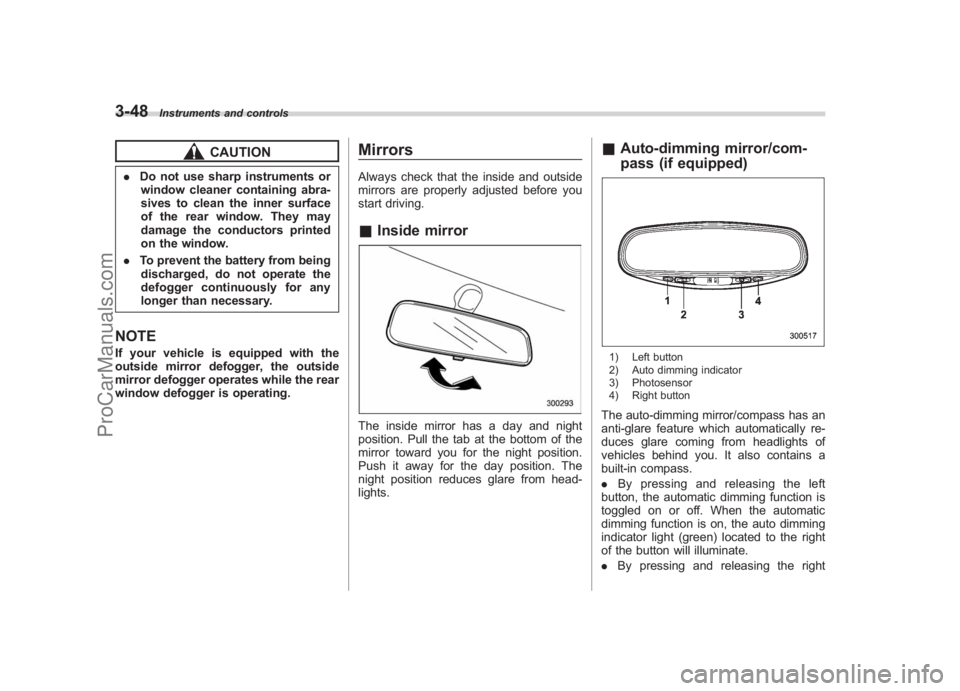
&Auto-dimming mirror/com-
pass (if equipped)1) Left button
2) Auto dimming indicator
3) Photosensor
4) Right buttonThe auto-dimming mirror/compass has an
anti-glare feature which automatically re-
duces glare coming from headlights of
vehicles behind you. It also contains a
built-in compass.
. By pressing and releasing the left
button, the automatic dimming function is
toggled on or off. When the automatic
dimming function is on, the auto dimming
indicator light (green) located to the right
of the button will illuminate.
. By pressing and releasing the right
ProCarManuals.com
Page 170 of 442

Black plate (171,1)
北米Model "A2420BE-B" EDITED: 2006/ 7/ 26
button, the compass display is toggled on
or off. When the compass is on, an
illuminated compass reading will appear
in the lower part of the mirror.
Even with the mirror in anti-glare mode,
the mirror surface turns bright if the
transmission is shifted into reverse. This
is to ensure good rearward visibility during
reversing.
! PhotosensorsThe mirror has a photosensor attached on
both the front and back sides. If the glare
from the headlights of vehicles behind you
strikes the mirror, these sensors detect it
and make the reflection surface of the
mirror dimmer to help prevent you from
being blinded. For this reason, use care
not to cover the sensors with stickers, or other similar items. Periodically wipe the
sensors clean using a piece of dry soft
cotton cloth or an applicator.
!
Compass calibration
1. For optimum calibration, switch off all
nonessential electrical accessories (rear
window defogger, heater/air conditioning
system, spotlight, etc.) and ensure all
doors are shut.
2. Drive to an open, level area away from
large metallic objects or structures and
make certain the ignition switch is in the
“ON ”position.
3. Press and hold the left button for 3
seconds then release, and the compass
will enter the calibration mode. “CAL”and
direction will be displayed.
4. Drive slowly in a circle until “CAL”
disappears from the display (approxi-
mately two or three circles). The compass
is now calibrated.
5. Further calibration may be necessary
should outside influences cause the mirror
to read inaccurately. You will know that
this has occurred if your compass begins
to read in only limited directions. Should
you encounter this situation, return to step
one of the above procedure and recali-
brate the mirror. !
Compass zone adjustment
1. The zone setting is factory preset to
Zone 8. Refer to the “Compass calibration
zone” map attached to the end of this
manual to verify that the compass zone
setting is correct for your geographical
location.
2. Press and hold the right button for 3
seconds then release, and the word
“ZONE ”will briefly appear and then the
zone number will be displayed.
3. Press the right-hand button repeatedly
to cycle the display through all possible
zone settings. Stop cycling when the
correct zone setting for your location is
displayed.
4. Releasing the button for 3 seconds will
exit the zone setting mode.
Instruments and controls
3-49
– CONTINUED –
3
ProCarManuals.com