2007 SUBARU FORESTER ECU
[x] Cancel search: ECUPage 91 of 356
Keys and doors 2-3
– CONTINUED –
Immobilizer (if equipped)
The immobilizer system is designed to
prevent an unauthorized persons from
starting the engine. Only keys registered
with your vehicle’s immobilizer system
can be used to operate your vehicle. Even
if an unregistered key fits into the ignition
switch and can be turned to the “START”
position, the engine will automatically stop
after several seconds.
Each immobilizer key contains a tran-
sponder in which the key’s ID code is
stored. When a key is inserted into the ig-
nition switch and turned to the “ON” posi-
tion, the transponder transmits the key’s
ID code to the immobilizer system’s re-
ceiver. If the transmitted ID code matches
the ID code registered in the immobilizer
system, the system allows the engine to
be started. Since the ID code is transmit-
ted and acted upon almost instantly, the
immobilizer system does not impede nor-
mal starting of the engine.
If the engine fails to start, pull out the key
once before trying again. (Refer to the “Ig-
nition switch” section [chapter 3].)
This device complies with Part 15 of
the FCC Rules and with RSS-210 of In-
dustry Canada. Operation is subject to
the following two conditions: (1) Thisdevice may not cause harmful interfer-
ence, and (2) this device must accept
any interference received, including in-
terference that may cause undesired
operation.
Changes or modifications not express-
ly approved by the party responsible
for compliance could void the user’s
authority to operate the equipment.
NOTE
To protect your vehicle from theft,
please pay close attention to the fol-
lowing security precautions: y Never leave your vehicle unattended
with its keys inside. y Before leaving your vehicle, close all
windows and lock the doors and rear
gate. y Do not leave spare keys or any
record of your key number in the vehi-
cle.
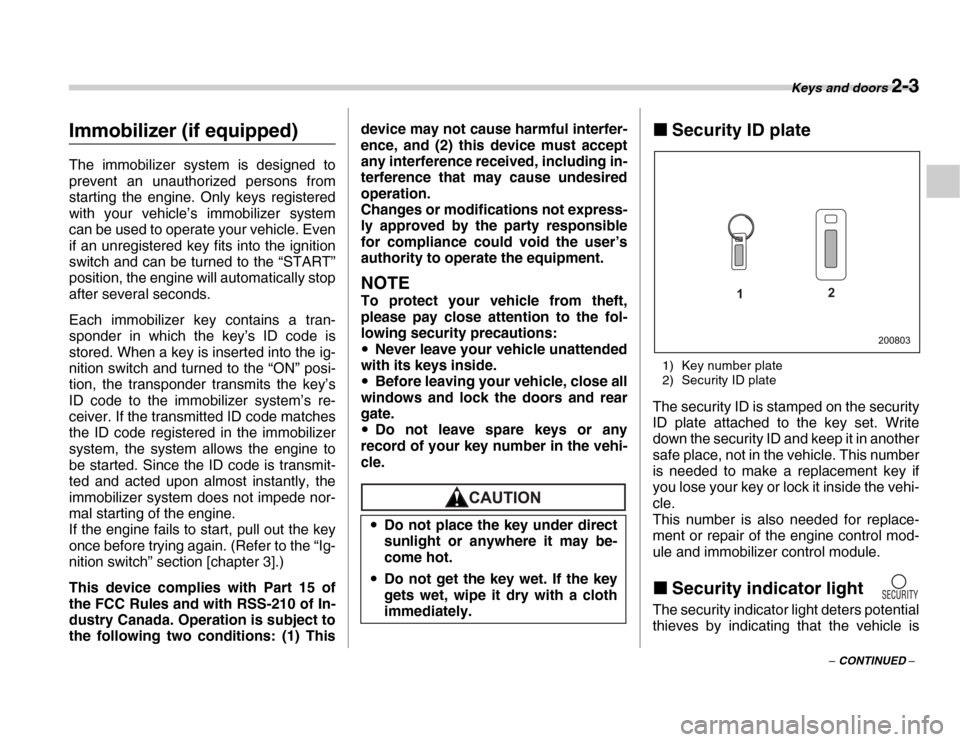
„ Security ID plate
1) Key number plate
2) Security ID plate
The security ID is stamped on the security
ID plate attached to the key set. Write
down the security ID and keep it in another
safe place, not in the vehicle. This number
is needed to make a replacement key if
you lose your key or lock it inside the vehi-
cle.
This number is also needed for replace-
ment or repair of the engine control mod-
ule and immobilizer control module. „ Security indicator light
The security indicator light deters potential
thieves by indicating that the vehicle is
y
Do not place the key under direct
sunlight or anywhere it may be-
come hot.
y Do not get the key wet. If the key
gets wet, wipe it dry with a cloth
immediately.
1 2
200803
Page 92 of 356

2-4 Keys and doors
equipped with an immobilizer system. It
begins flashing approximately 60 seconds
after the ignition switch is turned from the
“ON” position to the “ACC” or “LOCK” po-
sition or immediately after the key is pulled
out.
If the security indicator light does not
flash, the immobilizer system may be
faulty. If this occurs, contact your SUBA-
RU dealer as soon as possible.
In case an unauthorized key is used (e.g.
an imitation key), the security indicator
light comes on.
NOTE
Even if the security indicator light
flashes irregularly or its fuse blows
(the light does not flash if its fuse is
blown), the immobilizer system will
function normally. „ Key replacement
Your key number plate and security ID
plate will be required if you ever need a re-
placement key made. Any new key must
be registered for use with your vehicle’s
immobilizer system before it can be used.
Up to four keys can be registered for use
with one vehicle.
For security, all the keys registered with
your vehicle’s immobilizer system will have their ID codes erased and re-regis-
tered when a new key is made. Therefore,
all of your vehicle’s keys must be present-
ed when a new key is registered. Any key
that is not re-registered when a new key is
made cannot be used after the other keys
are re-registered. For information on re-
placement keys and on the registration of
keys with your immobilizer system, con-
tact your SUBARU dealer.
Door locks „
Locking and unlocking from
the outside
1) Lock
2) Unlock
To lock the driver’s door from the outside
with the key, turn the key toward the rear.
To unlock the door, turn the key toward
the front (Driver’s side only).
Pull the outside door handle to open the
unlocked door.
2 1
200804
Page 97 of 356
Keys and doors 2-9
– CONTINUED –
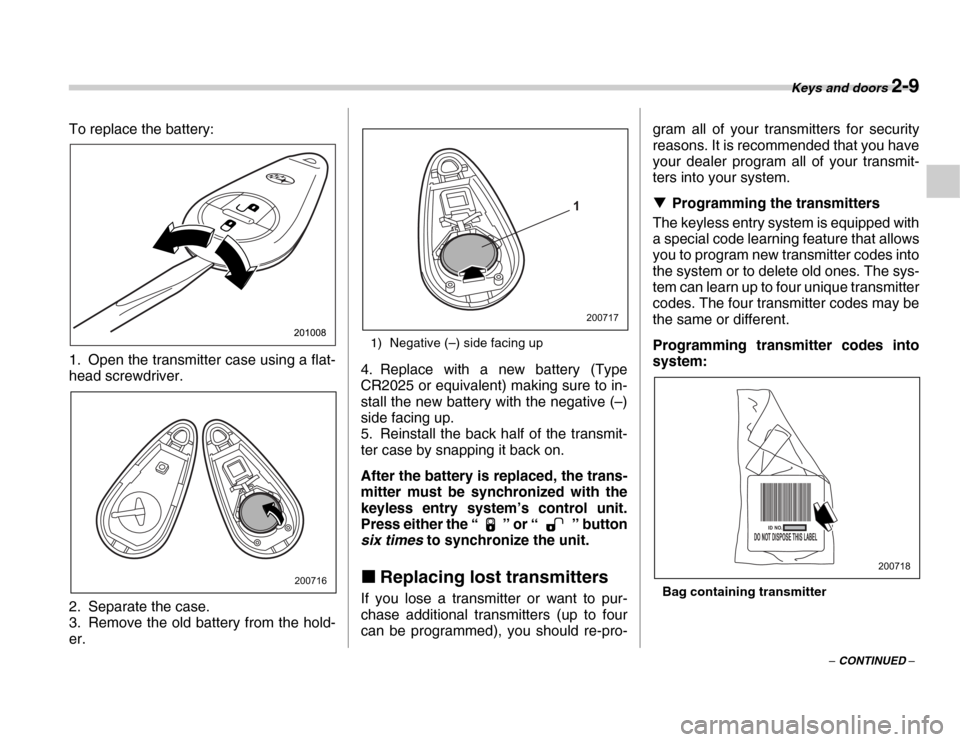
To replace the battery:
0
1. Open the transmitter case using a flat-
head screwdriver.
2. Separate the case.
3. Remove the old battery from the hold- er.
1) Negative (–) side facing up
4. Replace with a new battery (Type
CR2025 or equivalent) making sure to in-
stall the new battery with the negative (–)
side facing up.
5. Reinstall the back half of the transmit-
ter case by snapping it back on.
After the battery is replaced, the trans-
mitter must be synchronized with the
keyless entry system’s control unit.
Press either the “ ” or “ ” button
six times to synchronize the unit.
„ Replacing lost transmitters
If you lose a transmitter or want to pur-
chase additional transmitters (up to four
can be programmed), you should re-pro- gram all of your transmitters for security
reasons. It is recommended that you have
your dealer program all of your transmit-
ters into your system. T
Programming the transmitters
The keyless entry system is equipped with
a special code learning feature that allows
you to program new transmitter codes into
the system or to delete old ones. The sys-
tem can learn up to four unique transmitter
codes. The four transmitter codes may be
the same or different.
Programming transmitter codes into
system:
Bag containing transmitter
200716
1
200717
200718
Page 101 of 356
Keys and doors 2-13
– CONTINUED –
The alarm is triggered by: y
Opening a door or the rear gate.
y Physical impact to the vehicle, such as
forced entry (only vehicles with shock sen-
sors (dealer option)) „ Activating and deactivating
the alarm system
To change the setting of your vehicle’s
alarm system for activation or deactiva-
tion, do the following.
1. Disarm the alarm system (see “Disarm-
ing the system” in this section).
2. Sit in the driver’s seat and shut all
doors and the rear gate.
3. Turn the ignition switch to the “ON” po-
sition.
4. Hold down the UNLOCK side of the
driver’s power door locking switch, open
the driver’s door within the following 1 sec-
ond, and wait 10 seconds without releas-
ing the switch. The setting will then be
changed as follows:
If the system was previously activated:
The horn sounds twice, indicating that the
system is now deactivated.
If the system was previously deactivated:
The horn sounds once, indicating that the
system is now activated.
NOTE
You may have the above setting
change done by your SUBARU dealer. „ If you have accidentally trig-
gered the alarm system
T To stop the alarm
Do any of the following operations: y Press any button on the remote trans-
mitter.y Cycle the ignition switch from the
“LOCK” to “ON” position three times within
5 seconds. „ Arming the system
T To arm the system using remote
transmitter
1. Close all windows and the moonroof (if
so equipped).
2. Remove the key from the ignition
switch.
3. Open the doors and get out of the vehi-
cle.
4. Make sure that the engine hood is
locked.
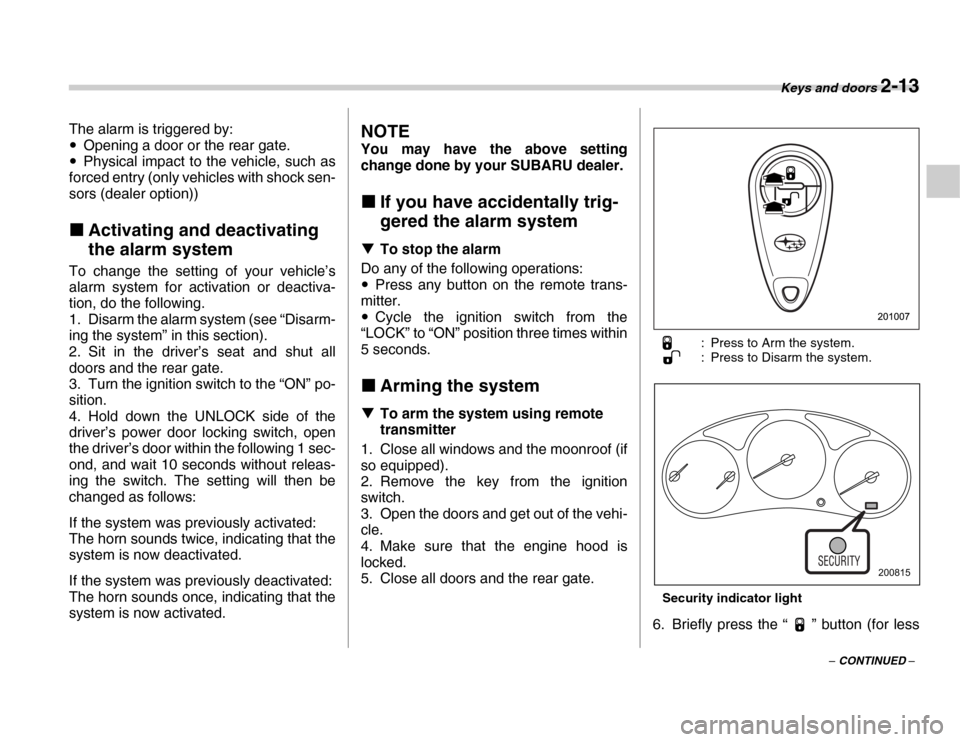
5. Close all doors and the rear gate. : Press to Arm the system.
: Press to Disarm the system.
Security indicator light
6. Briefly press the “ ” button (for less
200815
Page 102 of 356

2-14 Keys and doors
than two seconds). All doors and the rear
gate will lock, an electric chirp will sound
once, the turn signal lights will flash once,
and the indicator lights will start flashing
rapidly. After rapid flashing for 30 seconds
(standby time), the indicator lights will
then flash slowly (twice approximately ev-
ery two seconds), indicating that the sys-
tem has been armed for surveillance.
If any of the doors or the rear gate is not
fully closed, an electronic chirp sounds
five times, the turn signal lights flash five
times to alert you that the doors or the rear
gate are not properly closed. When you
close the door, the system will automati-
cally arm and doors will automatically
lock. TTo arm the system using power
door locking switches
1. Close all windows.
2. Remove the key from the ignition
switch.
3. Open the doors and get out of the vehi-
cle.
4. Make sure that the engine hood is
locked.
5. Close the doors and the rear gate but
leave only the driver’s door or the front
passenger’s door open. 6. Push the front side (“LOCK” side) of
the power door locking switch to set the
door locks.
7. Close the door. An electronic chirp will
sound once, the turn signal lights will flash
once, and the indicator lights will start
flashing rapidly. After rapid flashing for 30
seconds (standby time), the indicator
lights will then flash slowly (twice approxi-
mately every two seconds), indicating that
the system has been armed for surveil-
lance.
NOTE
y The system can be armed even if the
engine hood, the windows and/or
moonroofs are opened. Always make
sure that they are fully closed before
arming the system. y
The 30-second standby time can be
eliminated if you prefer. Have it per-
formed by your SUBARU dealer. y The system is in the standby mode
for a 30-second period after locking the
doors with the remote transmitter. The
security indicator light will flash at
short intervals during this period. y If any of the following actions is done
during the standby period, the system
will not switch to the surveillance state. yDoors are unlocked using the re-
mote transmitter.y Any door or the rear gate is
opened. y Ignition switch is turned to the
“ON” position.
y The engine does not start even when
the ignition switch is turned to the
“START” position once the alarm sys-
tem has been triggered.
„ Disarming the system
Briefly press the “ ” button (for less
than two seconds) on the remote transmit-
ter. The driver’s door will unlock, an elec-
tronic chirp will sound twice, the turn sig-
nal lights will flash twice and the indicator
light will go off.
200883
Page 103 of 356

Keys and doors 2-15
– CONTINUED –
NOTE (Models with immobiliz-
er)
If your vehicle is equipped with an im-
mobilizer, the immobilizer’s function
will cause the security indicator light to
flash (approximately once every three
seconds) even after the system is dis-
armed.
NOTE
The system can be disarmed by the fol-
lowing method, too. y Cycle the ignition switch from the
“LOCK” to the “ON” position three
times within 5 seconds. T Emergency disarming
If you cannot disarm the system using the
transmitter (i.e. the transmitter is lost, bro-
ken or the transmitter battery is too weak),
you can disarm the system without using
the transmitter.
1. Unlock the door with the key and then
open the door.
2. Insert the key into the ignition switch
and cycle it from the “LOCK” to the “ON”
position three times within 5 seconds.
„ Valet mode
When you choose the valet mode, the se-
curity system does not operate. In valet
mode, the remote transmitter is used only for locking and unlocking the doors and
rear gate and panic activation.
To enter the valet mode, change the set-
ting of your vehicle’s alarm system for de-
activation mode. (Refer to “Activating and
deactivating the alarm system” in this sec-
tion.) The security indicator light will con-
tinue to flash once every three seconds in-
dicating that the system is in the valet
mode (only vehicle with an immobilizer).
To exit valet mode, change the setting of
your vehicle’s alarm system for activation
mode. (Refer to “Activating and deactivat-
ing the alarm system” in this section.)
NOTE
If your vehicle is not equipped with an
immobilizer, the security indicator light
does not flash during the valet mode. „
Passive arming
When passive arming mode has been
programmed by the dealer, arming of the
system is automatically accomplished
without using the remote transmitter. Note
that in this mode, DOORS MUST BE
MANUALLY LOCKED. T To enter the passive mode
If you wish to program the passive arming
mode, have it done by your SUBARU dealer. T
Arming the system1. Turn the ignition switch to the “ON” po-
sition.
1) ON
2) LOCK
In passive mode, the system will au-
tomatically activate the alarm but
WILL NOT automatically lock the
doors. In order to lock the doors you
must either lock them as indicated
in the following step 4 or with the
key once they have been closed.
Failure to lock the doors manually
will result in a higher security risk.
1
2
200816
Page 104 of 356

2-16 Keys and doors
2. Turn the ignition switch from “ON” to
“LOCK” position and remove the key from
the ignition switch.
3. Open the doors and get out of the vehi-
cle.
4. Before closing the doors, lock all doors
with the inside door lock levers.
5. Close the doors. The system will auto-
matically arm after one minute.
In the passive mode, the system can also
be armed with the remote transmitter or
with the power door locking switches. If
the remote transmitter or power door lock-
ing switch is used to lock the vehicle, arm-
ing will take place immediately regardless
of whether or not the passive mode has
been selected.T
Disarming the system
To disarm the system, briefly press the
“ ” button on the transmitter.
„ Tripped sensor identification
The security indicator light flashes when
the alarm system has been triggered. Al-
so, the number of flashes indicates the lo-
cation of unauthorized intrusion or the se-
verity of impact on the vehicle.y When the ignition switch is turned to the
“ON” position, the indicator light will light
for 1 second and then flash as follows: When a door or rear gate was opened:
5 times
When the ignition switch was turned to
the “ON” position: 3 times
When a strong impact or multiple im-
pacts were sensed: twice (only vehicles
with shock sensors (dealer option))
When a light impact was sensed: once
(only vehicles with shock sensors (deal-
er option))
NOTE
Any of the above indicator light flash-
ings will recur each time the ignition
switch is turned to the “ON” position.
Rearming the alarm system cancels
the flashing. „
Shock sensors (dealer op-
tion)
The shock sensors trigger the alarm sys-
tem when they sense impacts applied to
the vehicle and when any of their electric
wires is cut. The alarm system causes the
horn to sound and the turn signal lights to
flash for a short time when the sensed im-
pact is weak, but it warns of a strong im-
pact or multiple impacts by sounding the
horn and flashing the turn signal lights,
both lasting approximately 30 seconds.
If you desire, your SUBARU dealer can
connect them and set them for activation
or deactivation.
NOTE
y The shock sensors are not always
able to sense impacts caused by
breaking in, and cannot sense an im-
pact that does not cause vibration
(such as breaking the glass using a
rescue hammer). y The shock sensors may sense vibra-
tion like those shown below and trigger
the alarm system. Select the settings of
the alarm system and shock sensors
appropriately depending on where you
usually park your vehicle.
Example:
Vibration from a construction site
Vibration in a multistory parking ga-
200817
Page 114 of 356

3-4 Instruments and controls
The key can be turned from “ACC” to
“LOCK” only when the selector lever is in
the “P” position. TManual transmission vehicles
The key can be turned from “ACC” to “LOCK” only when the key is pushed in
while turning it.
„ ACC
In this position the electrical accessories
(radio, accessory power outlet, etc.) can
be used. „ ON
This is the normal operating position after
the engine is started. „ START
The engine is started in this position. The
starter cranks the engine to start it. When
the key is released (after the engine has
started), the key automatically returns to
the “ON” position. TFor models with immobilizer
If you fail to start your engine with your
registered key, once pull out the key (at
this time, the security indicator light
blinks), and then insert the key in the igni- tion switch and turn it to the “START” po-
sition and again try to start your engine.
NOTE
The engine may not start in the follow-
ing cases: y
The key grip is touching another key
or a metallic key holder.
300566
300115
Do not turn the ignition switch to the
“START” position while the engine
is running.300567