2007 SUBARU FORESTER hold
[x] Cancel search: holdPage 113 of 356
Instruments and controls 3-3
– CONTINUED –
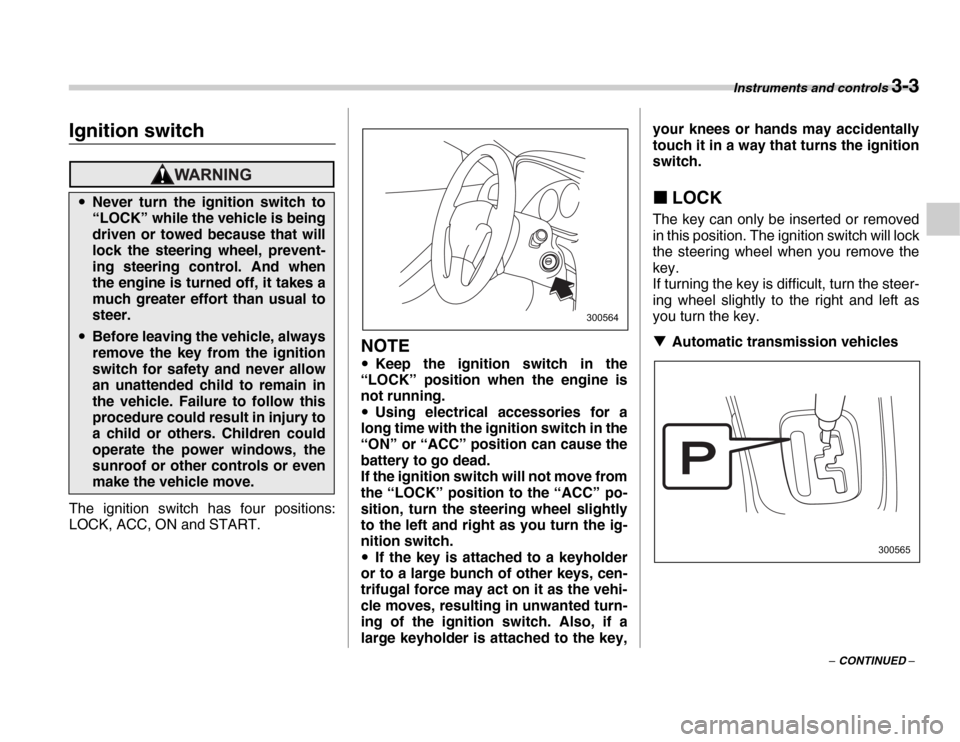
Instrume nts an d c ontrolsIgnition switch
The ignition switch has four positions:
LOCK, ACC, ON and START.
NOTE
y Keep the ignition switch in the
“LOCK” position when the engine is
not running. y Using electrical accessories for a
long time with the ignition switch in the
“ON” or “ACC” position can cause the
battery to go dead.
If the ignition switch will not move from
the “LOCK” position to the “ACC” po-
sition, turn the steering wheel slightly
to the left and right as you turn the ig-
nition switch. y If the key is attached to a keyholder
or to a large bunch of other keys, cen-
trifugal force may act on it as the vehi-
cle moves, resulting in unwanted turn-
ing of the ignition switch. Also, if a
large keyholder is attached to the key, your knees or hands may accidentally
touch it in a way that turns the ignition
switch. „
LOCK
The key can only be inserted or removed
in this position. The ignition switch will lock
the steering wheel when you remove the
key.
If turning the key is difficult, turn the steer-
ing wheel slightly to the right and left as
you turn the key. T Automatic transmission vehicles
yNever turn the ignition switch to
“LOCK” while the vehicle is being
driven or towed because that will
lock the steering wheel, prevent-
ing steering control. And when
the engine is turned off, it takes a
much greater effort than usual to
steer.
yBefore leaving the vehicle, always
remove the key from the ignition
switch for safety and never allow
an unattended child to remain in
the vehicle. Failure to follow this
procedure could result in injury to
a child or others. Children could
operate the power windows, the
sunroof or other controls or even
make the vehicle move.
300564
300565
Page 114 of 356

3-4 Instruments and controls
The key can be turned from “ACC” to
“LOCK” only when the selector lever is in
the “P” position. TManual transmission vehicles
The key can be turned from “ACC” to “LOCK” only when the key is pushed in
while turning it.
„ ACC
In this position the electrical accessories
(radio, accessory power outlet, etc.) can
be used. „ ON
This is the normal operating position after
the engine is started. „ START
The engine is started in this position. The
starter cranks the engine to start it. When
the key is released (after the engine has
started), the key automatically returns to
the “ON” position. TFor models with immobilizer
If you fail to start your engine with your
registered key, once pull out the key (at
this time, the security indicator light
blinks), and then insert the key in the igni- tion switch and turn it to the “START” po-
sition and again try to start your engine.
NOTE
The engine may not start in the follow-
ing cases: y
The key grip is touching another key
or a metallic key holder.
300566
300115
Do not turn the ignition switch to the
“START” position while the engine
is running.300567
Page 128 of 356
3-18 Instruments and controls
„Headlight flasher
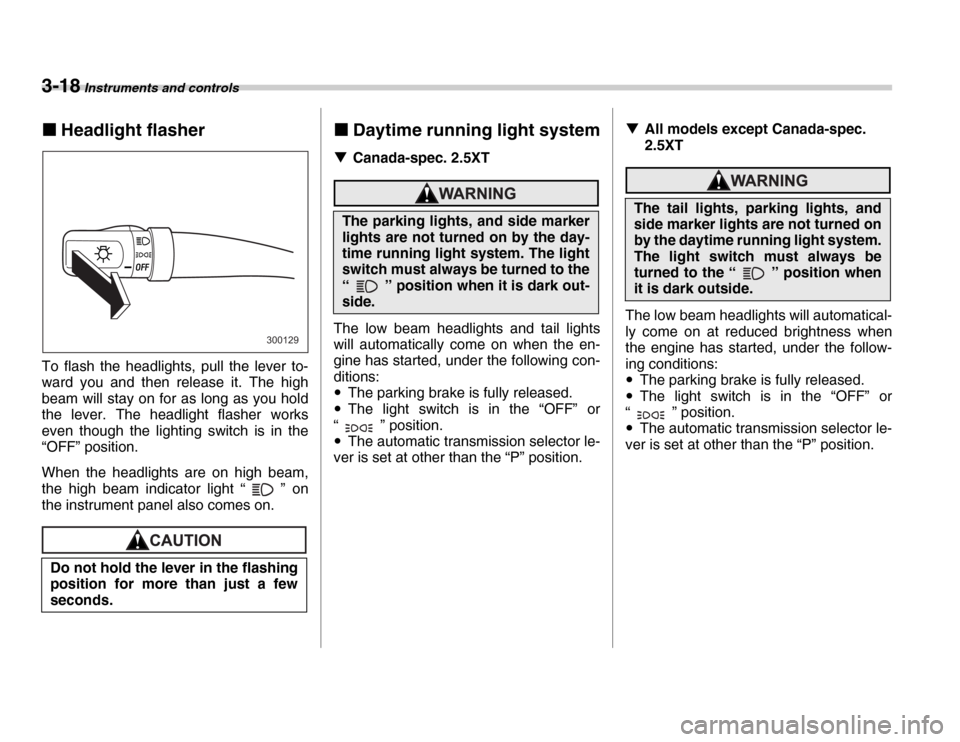
To flash the headlights, pull the lever to-
ward you and then release it. The high
beam will stay on for as long as you hold
the lever. The headlight flasher works
even though the lighting switch is in the
“OFF” position.
When the headlights are on high beam,
the high beam indicator light “ ” on
the instrument panel also comes on.„ Daytime running light system
T Canada-spec. 2.5XT
The low beam headlights and tail lights
will automatically come on when the en-
gine has started, under the following con-
ditions: yThe parking brake is fully released.
y The light switch is in the “OFF” or
“ ” position.y The automatic transmission selector le-
ver is set at other than the “P” position. T
All models except Canada-spec.
2.5XT
The low beam headlights will automatical-
ly come on at reduced brightness when
the engine has started, under the follow-
ing conditions: yThe parking brake is fully released.
y The light switch is in the “OFF” or
“ ” position.y The automatic transmission selector le-
ver is set at other than the “P” position.
Do not hold the lever in the flashing
position for more than just a few
seconds.
300129
The parking lights, and side marker
lights are not turned on by the day-
time running light system. The light
switch must always be turned to the
“ ” position when it is dark out-
side.
The tail lights, parking lights, and
side marker lights are not turned on
by the daytime running light system.
The light switch must always be
turned to the “ ” position when
it is dark outside.
Page 129 of 356

Instruments and controls 3-19
Turn signal lever1) Right turn
2) Left turn
3) Lane change for right
4) Lane change for left
To activate the right turn signal, push the
turn signal lever up. To activate the left
turn signal, push the turn signal lever
down. When the turn is finished, the lever
will return automatically. If the lever does
not return after cornering, return the lever
to the neutral position by hand.
To signal a lane change, push the turn sig-
nal lever up or down slightly and hold it
during the lane change. The turn signal in-
dicator lights will flash in the direction of
the turn or lane change. The lever will re- turn automatically to the neutral position
when you release it.
Illumination brightness con-
trol
When the headlight switch is in the
“ ” or “ ” position, you can ad-
just brightness of the instrument panel illu-
mination for better visibility.
To brighten, turn the control dial upward.
To darken, turn the control dial downward.
1
2 3
4
300601
300131
Page 136 of 356
3-26 Instruments and controls
TAuto-dimming mirror/compass (if
equipped)
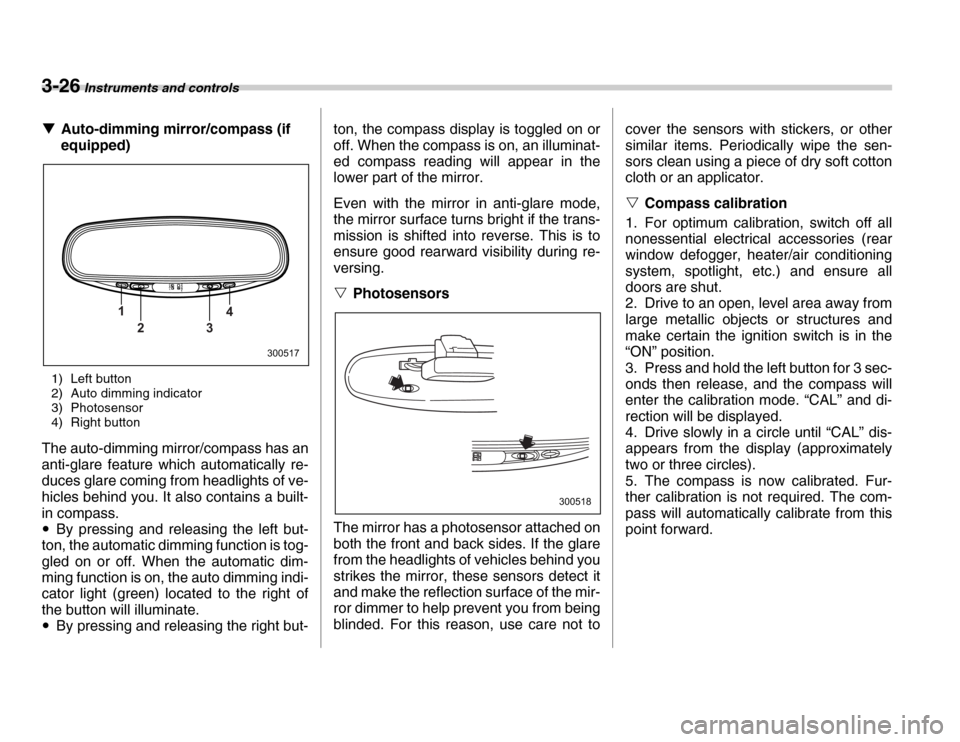
1) Left button
2) Auto dimming indicator
3) Photosensor
4) Right button
The auto-dimming mirror/compass has an
anti-glare feature which automatically re-
duces glare coming from headlights of ve-
hicles behind you. It also contains a built-
in compass. y By pressing and releasing the left but-
ton, the automatic dimming function is tog-
gled on or off. When the automatic dim-
ming function is on, the auto dimming indi-
cator light (green) located to the right of
the button will illuminate. y By pressing and releasing the right but- ton, the compass display is toggled on or
off. When the compass is on, an illuminat-
ed compass reading will appear in the
lower part of the mirror.
Even with the mirror in anti-glare mode,
the mirror surface turns bright if the trans-
mission is shifted into reverse. This is to
ensure good rearward visibility during re-
versing. V
Photosensors
The mirror has a photosensor attached on
both the front and back sides. If the glare
from the headlights of vehicles behind you
strikes the mirror, these sensors detect it
and make the reflection surface of the mir-
ror dimmer to help prevent you from being
blinded. For this reason, use care not to cover the sensors with stickers, or other
similar items. Periodically wipe the sen-
sors clean using a piece of dry soft cotton
cloth or an applicator. V
Compass calibration
1. For optimum calibration, switch off all
nonessential electrical accessories (rear
window defogger, heater/air conditioning
system, spotlight, etc.) and ensure all
doors are shut.
2. Drive to an open, level area away from
large metallic objects or structures and
make certain the ignition switch is in the
“ON” position.
3. Press and hold the left button for 3 sec-
onds then release, and the compass will
enter the calibration mode. “CAL” and di-
rection will be displayed.
4. Drive slowly in a circle until “CAL” dis-
appears from the display (approximately
two or three circles).
5. The compass is now calibrated. Fur-
ther calibration is not required. The com-
pass will automatically calibrate from this
point forward.
1 23 4
300517
300518
Page 137 of 356
Instruments and controls 3-27
– CONTINUED –
V
Compass zone adjustment
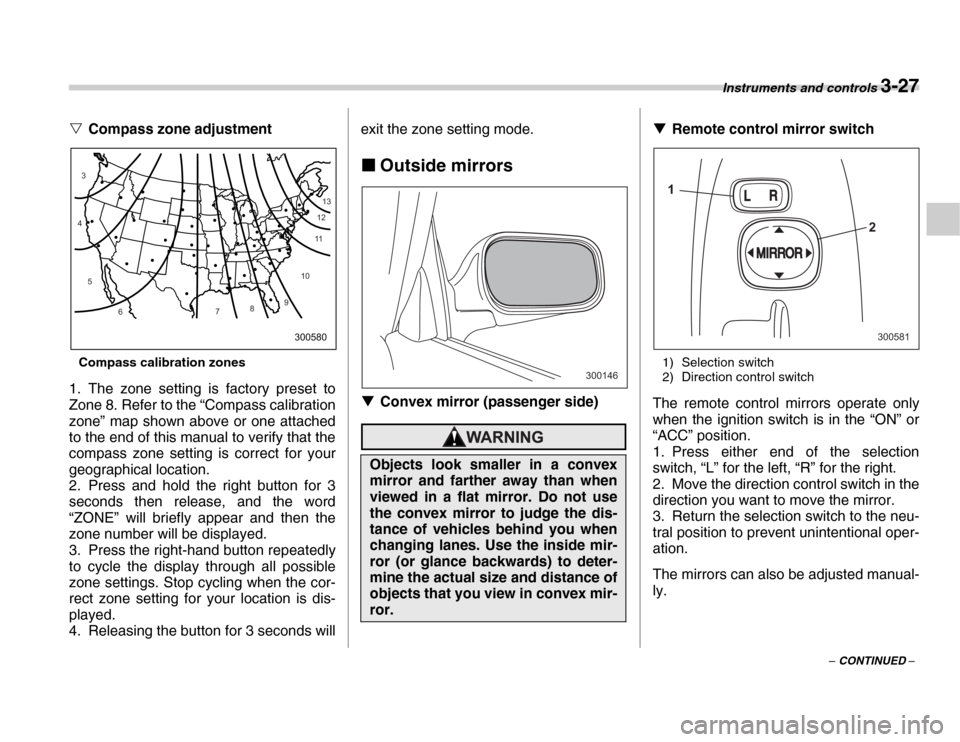
Compass calibration zones
1. The zone setting is factory preset to
Zone 8. Refer to the “Compass calibration
zone” map shown above or one attached
to the end of this manual to verify that the
compass zone setting is correct for your
geographical location.
2. Press and hold the right button for 3
seconds then release, and the word
“ZONE” will briefly appear and then the
zone number will be displayed.
3. Press the right-hand button repeatedly
to cycle the display through all possible
zone settings. Stop cycling when the cor-
rect zone setting for your location is dis-
played.
4. Releasing the button for 3 seconds will exit the zone setting mode.
„ Outside mirrors
T Convex mirror (passenger side)
T Remote control mirror switch
1) Selection switch
2) Direction control switch
The remote control mirrors operate only
when the ignition switch is in the “ON” or
“ACC” position.
1. Press either end of the selection
switch, “L” for the left, “R” for the right.
2. Move the direction control switch in the
direction you want to move the mirror.
3. Return the selection switch to the neu-
tral position to prevent unintentional oper-
ation.
The mirrors can also be adjusted manual-
ly.
10
9
8
7
6
5
4
3
1112
13
300580
Objects look smaller in a convex
mirror and farther away than when
viewed in a flat mirror. Do not use
the convex mirror to judge the dis-
tance of vehicles behind you when
changing lanes. Use the inside mir-
ror (or glance backwards) to deter-
mine the actual size and distance of
objects that you view in convex mir- ror.
300146
1
2
300581
Page 161 of 356
Audio 5-7
– CONTINUED –
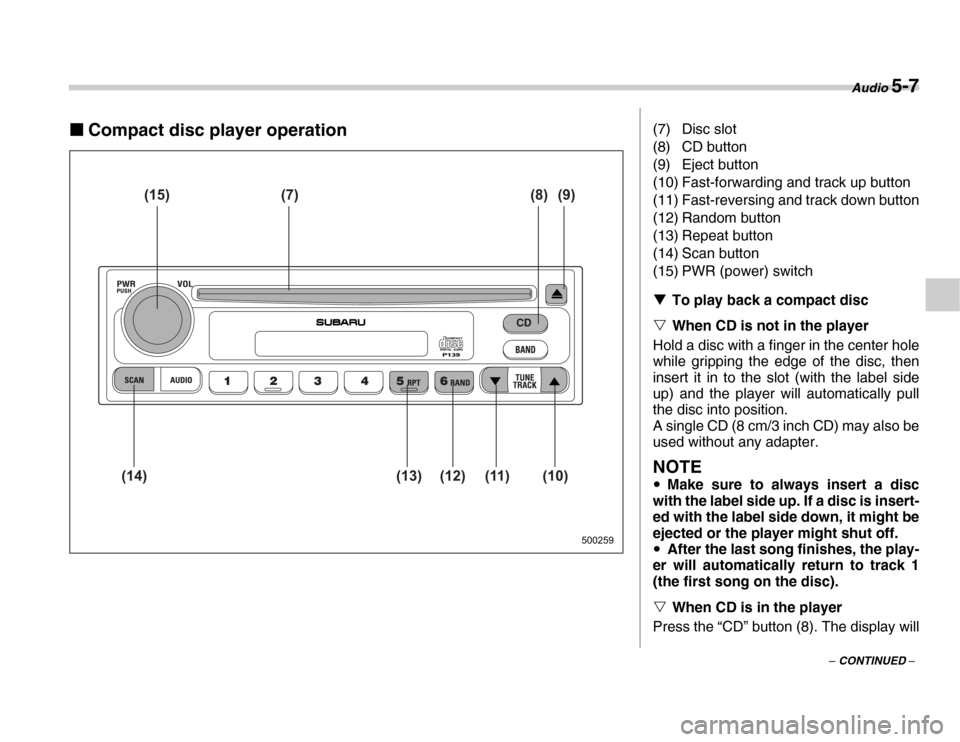
„Compact disc player operation
500259
(15) (7) (8) (9)
(10)
(11)
(12)
(13)
(14)
(7) Disc slot
(8) CD button
(9) Eject button
(10) Fast-forwarding and track up button
(11) Fast-reversing and track down button
(12) Random button
(13) Repeat button
(14) Scan button
(15) PWR (power) switch T To play back a compact disc
V When CD is not in the player
Hold a disc with a finger in the center hole
while gripping the edge of the disc, then
insert it in to the slot (with the label side
up) and the player will automatically pull
the disc into position.
A single CD (8 cm/3 inch CD) may also be
used without any adapter.
NOTE
y Make sure to always insert a disc
with the label side up. If a disc is insert-
ed with the label side down, it might be
ejected or the player might shut off. y After the last song finishes, the play-
er will automatically return to track 1
(the first song on the disc). V When CD is in the player
Press the “CD” button (8). The display will
Page 178 of 356
5-24 Audio
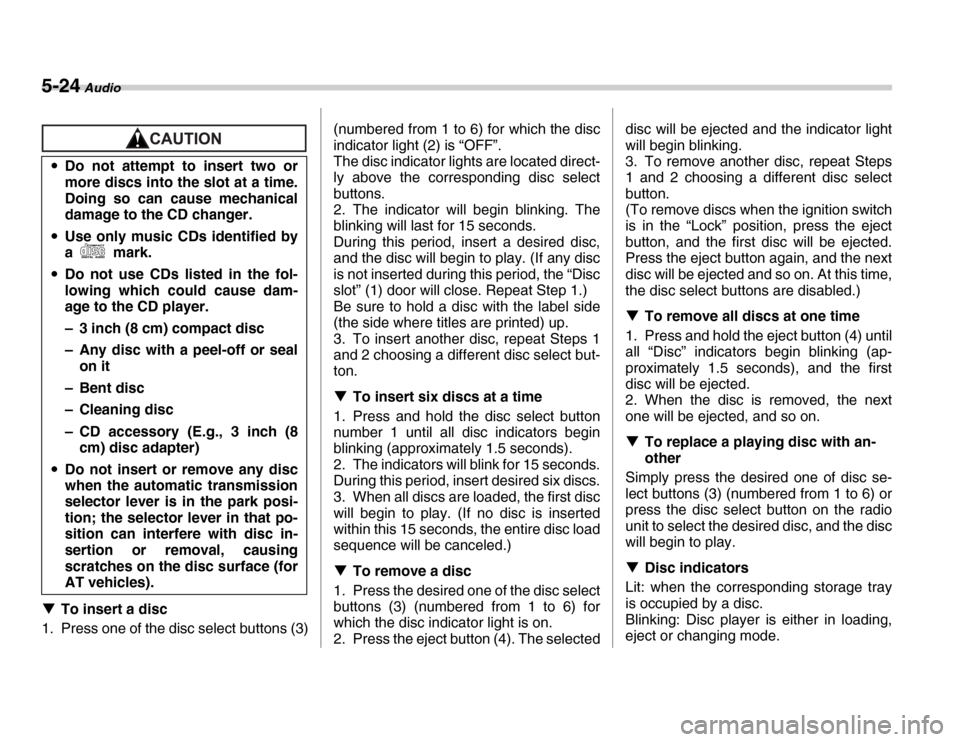
TTo insert a disc
1. Press one of the disc select buttons (3) (numbered from 1 to 6) for which the disc
indicator light (2) is “OFF”.
The disc indicator lights are located direct-
ly above the corresponding disc select
buttons.
2. The indicator will begin blinking. The
blinking will last for 15 seconds.
During this period, insert a desired disc,
and the disc will begin to play. (If any disc
is not inserted during this period, the “Disc
slot” (1) door will close. Repeat Step 1.)
Be sure to hold a disc with the label side
(the side where titles are printed) up.
3. To insert another disc, repeat Steps 1
and 2 choosing a different disc select but-
ton. T
To insert six discs at a time
1. Press and hold the disc select button
number 1 until all disc indicators begin
blinking (approximately 1.5 seconds).
2. The indicators will blink for 15 seconds.
During this period, insert desired six discs.
3. When all discs are loaded, the first disc
will begin to play. (If no disc is inserted
within this 15 seconds, the entire disc load
sequence will be canceled.) T To remove a disc
1. Press the desired one of the disc select
buttons (3) (numbered from 1 to 6) for
which the disc indicator light is on.
2. Press the eject button (4). The selected disc will be ejected and the indicator light
will begin blinking.
3. To remove another disc, repeat Steps
1 and 2 choosing a different disc select
button.
(To remove discs when the ignition switch
is in the “Lock” position, press the eject
button, and the first disc will be ejected.
Press the eject button again, and the next
disc will be ejected and so on. At this time,
the disc select buttons are disabled.) T
To remove all discs at one time
1. Press and hold the eject button (4) until
all “Disc” indicators begin blinking (ap-
proximately 1.5 seconds), and the first
disc will be ejected.
2. When the disc is removed, the next
one will be ejected, and so on. T To replace a playing disc with an-
other
Simply press the desired one of disc se-
lect buttons (3) (numbered from 1 to 6) or
press the disc select button on the radio
unit to select the desired disc, and the disc
will begin to play. T Disc indicators
Lit: when the corresponding storage tray
is occupied by a disc.
Blinking: Disc player is either in loading,
eject or changing mode.
y
Do not attempt to insert two or
more discs into the slot at a time.
Doing so can cause mechanical
damage to the CD changer.
y Use only music CDs identified by
a mark.
y Do not use CDs listed in the fol-
lowing which could cause dam-
age to the CD player.
– 3 inch (8 cm) compact disc
– Any disc with a peel-off or seal
on it
–Bent disc
– Cleaning disc
– CD accessory (E.g., 3 inch (8 cm) disc adapter)
y Do not insert or remove any disc
when the automatic transmission
selector lever is in the park posi-
tion; the selector lever in that po-
sition can interfere with disc in-
sertion or removal, causing
scratches on the disc surface (for
AT vehicles).