2007 SUBARU FORESTER child lock
[x] Cancel search: child lockPage 56 of 356
1-28 Seat, seatbelt and SRS airbags
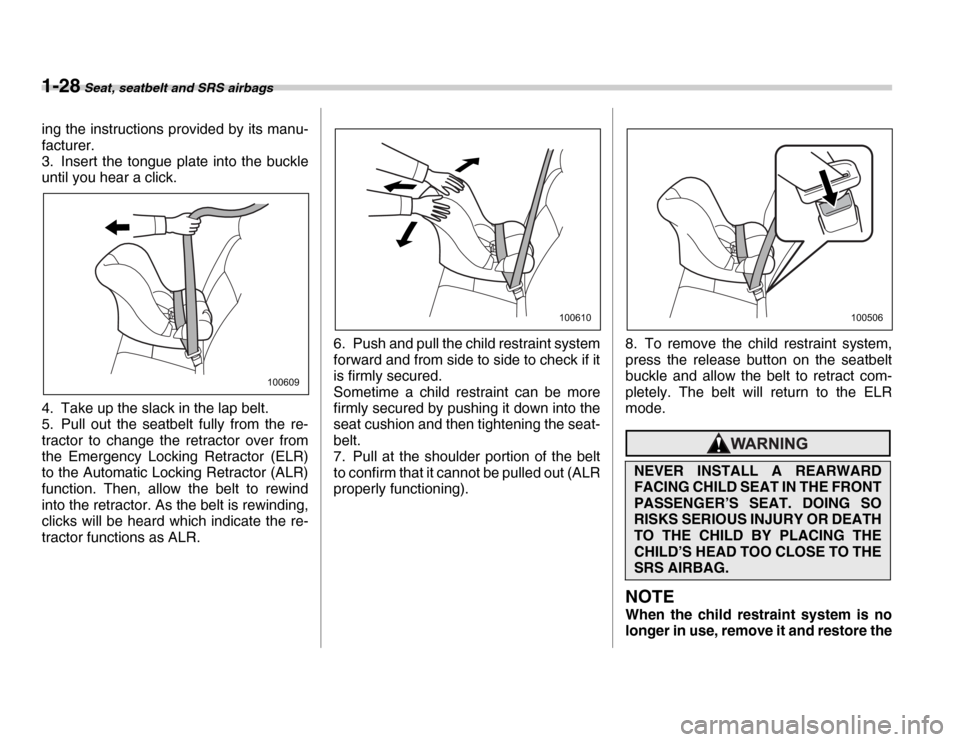
ing the instructions provided by its manu-
facturer.
3. Insert the tongue plate into the buckle
until you hear a click.
4. Take up the slack in the lap belt.
5. Pull out the seatbelt fully from the re-
tractor to change the retractor over from
the Emergency Locking Retractor (ELR)
to the Automatic Locking Retractor (ALR)
function. Then, allow the belt to rewind
into the retractor. As the belt is rewinding,
clicks will be heard which indicate the re-
tractor functions as ALR.6. Push and pull the child restraint system
forward and from side to side to check if it
is firmly secured.
Sometime a child restraint can be more
firmly secured by pushing it down into the
seat cushion and then tightening the seat-
belt.
7. Pull at the shoulder portion of the belt
to confirm that it cannot be pulled out (ALR
properly functioning).
8. To remove the child restraint system,
press the release button on the seatbelt
buckle and allow the belt to retract com-
pletely. The belt will return to the ELR
mode.
NOTE
When the child restraint system is no
longer in use, remove it and restore the
100609
100610
NEVER INSTALL A REARWARD
FACING CHILD SEAT IN THE FRONT
PASSENGER’S SEAT. DOING SO
RISKS SERIOUS INJURY OR DEATH
TO THE CHILD BY PLACING THE
CHILD’S HEAD TOO CLOSE TO THE
SRS AIRBAG.
100506
Page 57 of 356
Seat, seatbelt and SRS airbags 1-29
– CONTINUED –
ELR function of the retractor. That
function is restored by allowing the
seatbelt to retract fully. T
Installing forward facing child re-
straint
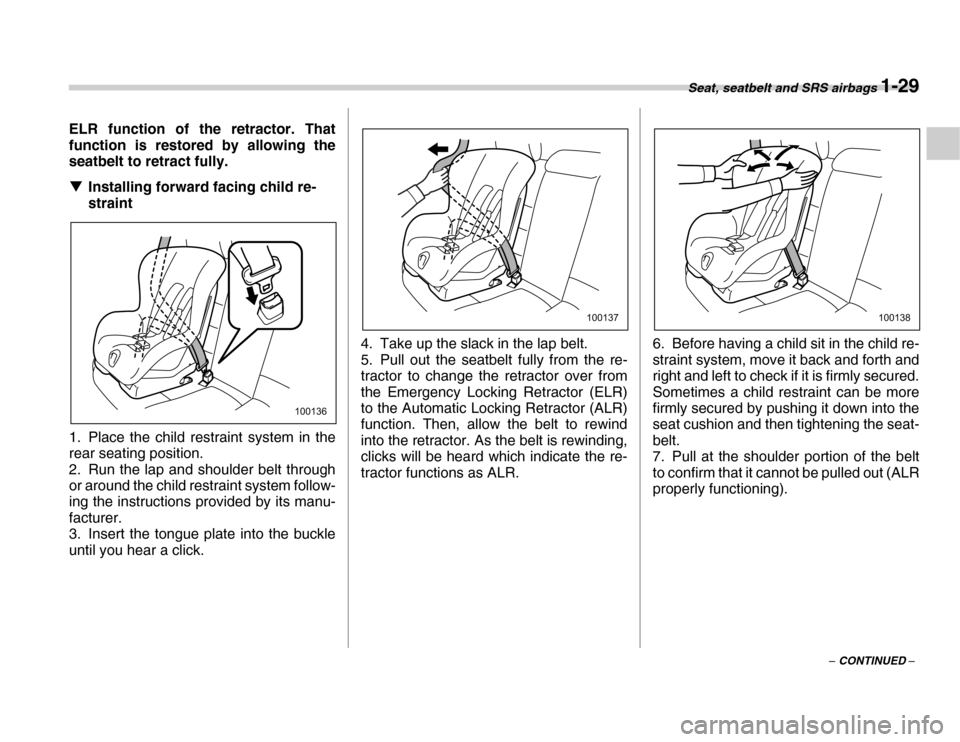
1. Place the child restraint system in the
rear seating position.
2. Run the lap and shoulder belt through
or around the child restraint system follow-
ing the instructions provided by its manu-
facturer.
3. Insert the tongue plate into the buckle
until you hear a click. 4. Take up the slack in the lap belt.
5. Pull out the seatbelt fully from the re-
tractor to change the retractor over from
the Emergency Locking Retractor (ELR)
to the Automatic Locking Retractor (ALR)
function. Then, allow the belt to rewind
into the retractor. As the belt is rewinding,
clicks will be heard which indicate the re-
tractor functions as ALR.
6. Before having a child sit in the child re-
straint system, move it back and forth and
right and left to check if it is firmly secured.
Sometimes a child restraint can be more
firmly secured by pushing it down into the
seat cushion and then tightening the seat-
belt.
7. Pull at the shoulder portion of the belt
to confirm that it cannot be pulled out (ALR
properly functioning).
100136
100137100138
Page 71 of 356

Seat, seatbelt and SRS airbags 1-43
– CONTINUED –
y
Do not apply any strong impact to the
front passenger’s seat such as by kicking. y Do not spill liquid on the front passen-
ger’s seat. If liquid is spilled, wipe it off im-
mediately. y Do not remove or disassemble the front
passenger’s seat. y Do not install any accessory (such as
an audio amplifier) other than a genuine
SUBARU accessory under the front pas-
senger’s seat. y Do not place anything (shoes, umbrella,
etc.) under the front passenger’s seat. y The front passenger’s seat must not be
used with the head restraint removed. y Do not leave any article including a child
restraint system on the front passenger’s
seat or the seatbelt tongue and buckle en-
gaged when you leave your vehicle. y Do not place a magnet near the seatbelt
buckle and the seatbelt retractor. y Do not use front seats with their back-
ward-forward position and seatback not
being locked into place securely. If any of
them are not locked securely, adjust them
again. For adjusting procedure, refer to
the “Manual seat” in the front seats sec-
tion in Chapter 1 in this Owner’s Manual.
(Models equipped with manual seats only) y If you use an optional seatbelt extender,
remove it after each use. (Refer to the
“Seatbelt extender” section in this chap- ter.)
If the seatbelt buckle switch and/or front
passenger’s occupant detection system
have failed, the SRS airbag system warn-
ing light will illuminate. Have the system
inspected by your SUBARU dealer imme-
diately if the SRS airbag system warning
light comes on.
If your vehicle has sustained impact, this
may affect the proper function of the Sub-
aru advanced frontal airbag system. Have
your vehicle inspected at your SUBARU
dealer.
NOTE
The front passenger’s SRS side airbag
and seatbelt pretensioner are not con-
trolled by the Subaru advanced frontal
airbag system. T
Passenger’s frontal airbag ON and
OFF indicators
1) U.S.-spec. models
2) Canada-spec. models or :Front passenger’s frontal airbag ON indicator
or :Front passenger’s frontal airbag OFF indicator
The front passenger’s frontal airbag ON
and OFF indicators show you the status of
the front passenger’s SRS frontal airbag.
The indicators are located next to the
clock in the central portion of the instru-
ment panel.
When the ignition switch is turned to the
“ON” position, both the ON and OFF indi-
cators illuminate for 6 seconds during
which time the system is checked. Follow-
ing the system check, both indicators ex-
12
12
100547
Page 73 of 356

Seat, seatbelt and SRS airbags 1-45
– CONTINUED –
y
Do not place more than one child on the
seat. y Do not install any accessory such as a
table or TV onto the seatback. y Do not store a heavy load in the seat-
back pocket. y Do not allow the rear seat occupant to
place his/her hands or legs on the front
passenger’s seatback, or allow him/her to
pull the seatback. V If the front passenger’s frontal air-
bag ON indicator illuminates and the
OFF indicator extinguishes even
when an infant or a small child is in
a child restraint system (including
booster seat)
Turn the ignition switch to the “OFF” posi-
tion if the front passenger’s frontal airbag
ON indicator illuminates and the OFF indi-
cator extinguishes even when an infant or
a small child is in a child restraint system
(including booster seat). Remove the child
restraint system from the seat. By refer-
ring to the child restraint manufacturer’s
recommendations as well as the child re-
straint system installation procedures in
the “Child restraint systems” section in this
chapter, correctly install the child restraint
system. Turn the ignition switch to the
“ON” position and make sure that the front
passenger’s frontal airbag ON indicator goes out and the OFF indicator comes on.
If the ON indicator remains illuminated
while the OFF indicator extinguishes, take
the following actions. y
Ensure that no article is placed on the
seat other than the child restraint system
and the child occupant. y Ensure that there is no article left in the
seatback pocket. y Ensure that the backward-forward posi-
tion and seatback of front passenger’s
seat are locked into place securely by
moving the seat back and forth. (Models
equipped with manual seats only)
If the ON indicator still illuminates while
the OFF indicator extinguishes after tak-
ing relevant corrective actions described
above, relocate the child restraint system
to the rear seat and immediately contact
your SUBARU dealer for an inspection.
NOTE
When a child who has outgrown a child
restraint system or a small adult is
seated in the front passenger’s seat,
the Subaru advanced frontal airbag
system may or may not activate the
front passenger’s SRS frontal airbag
depending on the occupant’s seating
posture. If the front passenger’s SRS
frontal airbag is activated (the ON indi- cator illuminates while the OFF indica-
tor extinguishes), take the following
actions.y
Ensure that no article is placed on
the seat other than the occupant.y Ensure that there is no article left in
the seatback pocket.
If the ON indicator still illuminates
while the OFF indicator extinguishes
despite the fact that the actions noted
above have been taken, seat the child/
small adult in the rear seat and immedi-
ately contact your SUBARU dealer for
an inspection. Even if the system has
passed the dealer inspection, it is rec-
ommended that on subsequent trips
the child/small adult always take the
rear seat.
Children who have outgrown a child re-
straint system should always wear the
seatbelt irrespective of whether the airbag
is deactivated or activated. T Conditions in which front passen-
ger’s SRS frontal airbag is activated
The front passenger’s SRS frontal airbag
will be activated for deployment upon im-
pact when any of the following conditions
is met regarding the front passenger’s
seat. y When the seat is occupied by an adult.
Page 89 of 356

2
Keys and doors
Keys ..................................................................... 2-2Key number ............................................................. 2-2
Immobilizer (if equipped) ................................... 2-3 Security ID plate ..................................................... 2-3
Security indicator light ....................................... 2-3
Key replacement ..................................................... 2-4
Door locks ........................................................... 2-4 Locking and unlocking from the outside ............. 2-4
Locking and unlocking from the inside ................ 2-5
Power door locking switches ............................ 2-6 Key lock-in prevention function ............................ 2-6
Remote keyless entry system ........................... 2-6 Locking the doors .................................................. 2-7
Unlocking the doors ............................................... 2-7
Illuminated entry ..................................................... 2-8
Vehicle finder function ........................................... 2-8
Sounding a panic alarm ......................................... 2-8
Selecting audible signal operation ....................... 2-8
Replacing the battery ............................................. 2-8
Replacing lost transmitters ................................... 2-9
Alarm system ...................................................... 2-12 System operation ................................................... 2-12
Activating and deactivating the alarm system ..... 2-13
If you have accidentally triggered the alarm system ................................................................... 2-13
Arming the system ................................................. 2-13
Disarming the system ............................................ 2-14
Valet mode .............................................................. 2-15
Passive arming ....................................................... 2-15 Tripped sensor identification ................................ 2-16
Shock sensors (dealer option) .............................. 2-16
Child safety locks ............................................... 2-17
Windows .............................................................. 2-18 Power windows ....................................................... 2-18
Rear gate ............................................................. 2-20
Moonroof (if equipped) ...................................... 2-21 To open the moonroof ............................................ 2-21
To close the moonroof ........................................... 2-21
Anti-entrapment function ....................................... 2-21
Page 93 of 356
Keys and doors 2-5
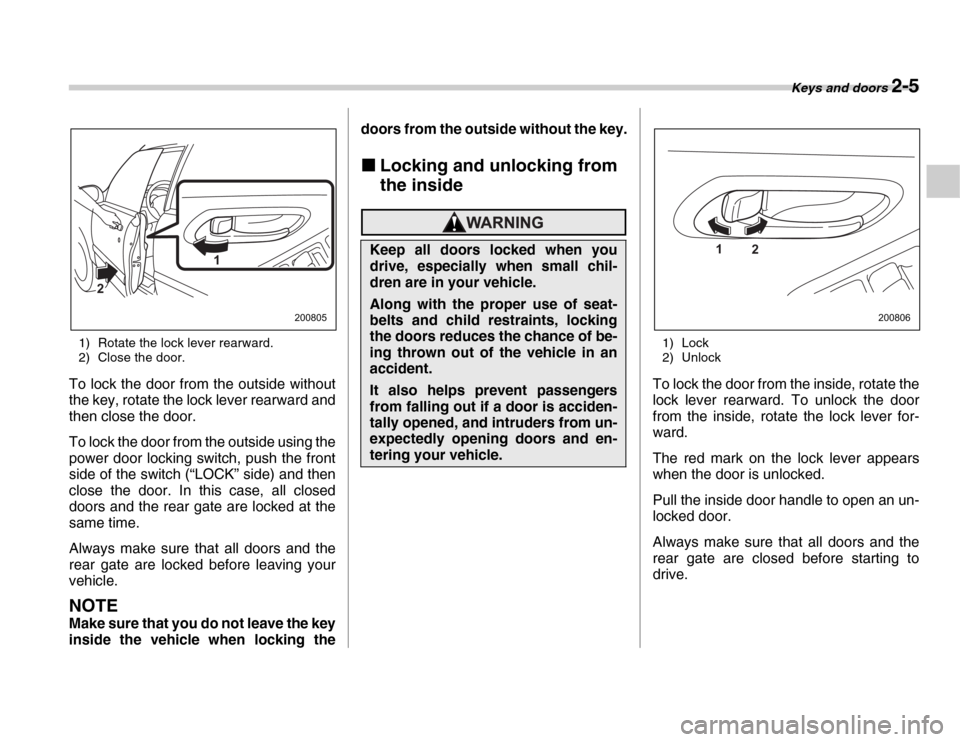
1) Rotate the lock lever rearward.
2) Close the door.
To lock the door from the outside without
the key, rotate the lock lever rearward and
then close the door.
To lock the door from the outside using the
power door locking switch, push the front
side of the switch (“LOCK” side) and then
close the door. In this case, all closed
doors and the rear gate are locked at the
same time.
Always make sure that all doors and the
rear gate are locked before leaving your
vehicle.
NOTE
Make sure that you do not leave the key
inside the vehicle when locking the doors from the outside without the key.
„ Locking and unlocking from
the inside
1) Lock
2) Unlock
To lock the door from the inside, rotate the
lock lever rearward. To unlock the door
from the inside, rotate the lock lever for-
ward.
The red mark on the lock lever appears
when the door is unlocked.
Pull the inside door handle to open an un-
locked door.
Always make sure that all doors and the
rear gate are closed before starting to
drive.
1
2
200805
Keep all doors locked when you
drive, especially when small chil-
dren are in your vehicle.
Along with the proper use of seat-
belts and child restraints, locking
the doors reduces the chance of be-
ing thrown out of the vehicle in an
accident.
It also helps prevent passengers
from falling out if a door is acciden-
tally opened, and intruders from un-
expectedly opening doors and en-
tering your vehicle.
1 2
200806
Page 105 of 356
Keys and doors 2-17
rage
Vibration from trains
y You can have the sensitivity of the
shock sensors adjusted to your prefer-
ence by your SUBARU dealer.Child safety locks
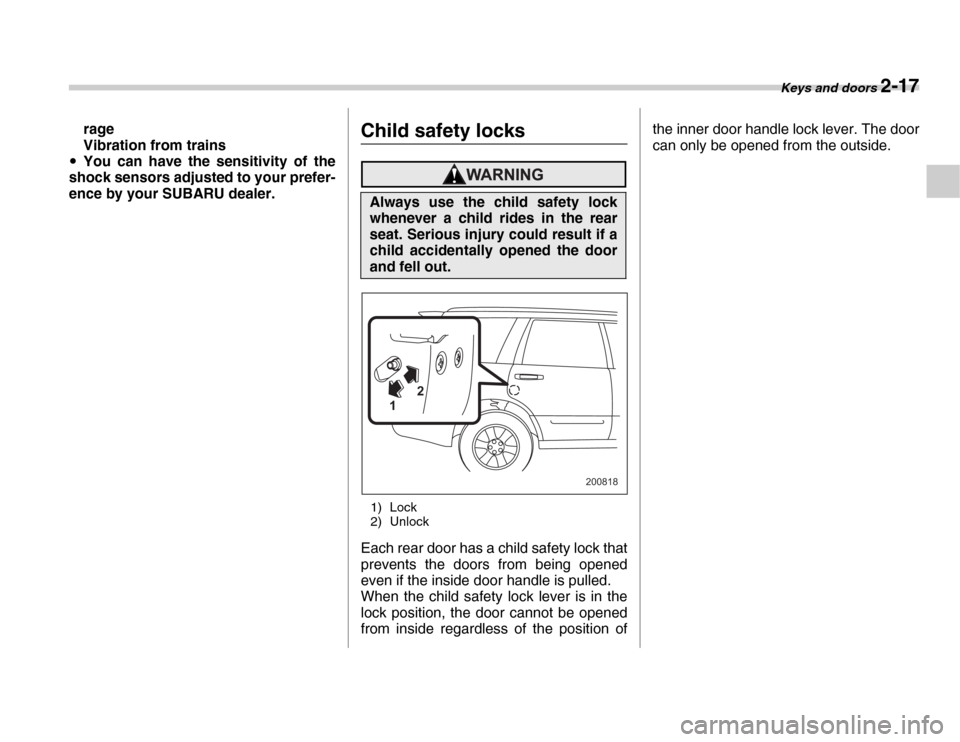
1) Lock
2) Unlock
Each rear door has a child safety lock that
prevents the doors from being opened
even if the inside door handle is pulled.
When the child safety lock lever is in the
lock position, the door cannot be opened
from inside regardless of the position of the inner door handle lock lever. The door
can only be opened from the outside.
Always use the child safety lock
whenever a child rides in the rear
seat. Serious injury could result if a
child accidentally opened the door
and fell out.
2
1
200818
Page 106 of 356
2-18 Keys and doors
Windows „Power windows
The power windows operate only when
the ignition switch is in the “ON” position. T
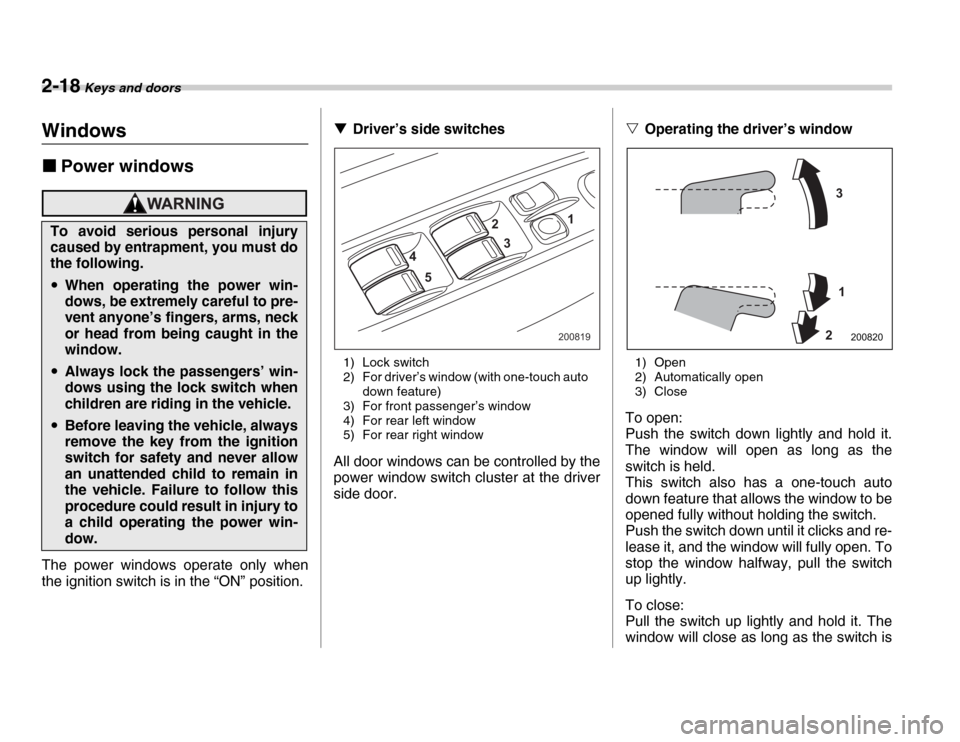
Driver’s side switches
1) Lock switch
2) For driver’s window (with one-touch auto down feature)
3) For front passenger’s window
4) For rear left window
5) For rear right window
All door windows can be controlled by the
power window switch cluster at the driver
side door. V
Operating the driver’s window
1) Open
2) Automatically open
3) Close
To open:
Push the switch down lightly and hold it.
The window will open as long as the
switch is held.
This switch also has a one-touch auto
down feature that allows the window to be
opened fully without holding the switch.
Push the switch down until it clicks and re-
lease it, and the window will fully open. To
stop the window halfway, pull the switch
up lightly.
To close:
Pull the switch up lightly and hold it. The
window will close as long as the switch is
To avoid serious personal injury
caused by entrapment, you must do
the following.
y When operating the power win-
dows, be extremely careful to pre-
vent anyone’s fingers, arms, neck
or head from being caught in the
window.
yAlways lock the passengers’ win-
dows using the lock switch when
children are riding in the vehicle.
yBefore leaving the vehicle, always
remove the key from the ignition
switch for safety and never allow
an unattended child to remain in
the vehicle. Failure to follow this
procedure could result in injury to
a child operating the power win-
dow.
1
2
4 5 3
200819
3
1
2
200820