2007 SKODA SUPERB instrument cluster
[x] Cancel search: instrument clusterPage 21 of 259

Instruments and Indicator/Warning Lights
20
As an additional warning signal, a 3 time peep sounds if the car is driven at a speed
of more than 6km/hour an d if the door is open.
Radio display
These displays appear in addition to the normal information in the radio display.
Auto Check Control
Car state
The Auto Check Control carries out a check of certain functions and vehicle compo-
nents. The check is performed constantly wh en the ignition is switched on, both
when the vehicle is stationary, as well as when driving.
Operational faults, urgent repairs, service work or other information appear in the
display of the instrument cluster. The displays are shown with a red or yellow light
symbol depending on the priority of the message.
The red symbols indicate danger (priority 1) while the yellow symbols indicate a
warning (priortity 2). Information for the driver may also appear in addition to the
symbols ⇒page 22. Investigate the displayed faults as soon as possible. If several operational faults exist
at the same time, the symbols will appear
one after the other and are each visible
for about 2 seconds.
The error messages are faded out after 10 seconds or by actuating the rocker switch
⇒ page 19, fig. 11 and are stored under the information CAR STATUS.
There is at least one error message to be read when the term CAR STATUS is
flashing in the main menu. The display will show STATUS 1/2 (for example) if a
number of error messages are present. This display indicates that the first of a total
of two error messages should be displayed.
Actuate the rocker switch , to call up the individual error messages.
If a fault occurs, a warning signal will also sound in addition to the symbol and text
in the display:
•Priority 1 - three warning signals
•Priority 2 - one warning signal
Operational check of the automatic gearbox
When the ignition is switched on, the Auto Check Control automatically carries out
an operational check. The following text will appear first if the selector lever is the
position P or N:
"APPLY FOOT BRAKE WHEN SELECTING GEAR WITH VEHICLE
STATIONARY." (Apply foot brake when selecting a gear while the vehicle is
stationary).
You must depress the brake pedal first and press the Shiftlock button at the same
time in order to move the selector lever out of these positions.
The text will disappear once you select a drive position ( R, D etc.), and the Auto
Check Control function is displayed.
If the Auto Check Control detects faults, these will be displayed about 15 seconds
after starting the engine in place of the text shown above. A warning signal sounds
at the same time.
Fig. 13 Information
display: Radio display
AA
AA
NKO B5 20.book Page 20 Friday, March 2, 2007 1:46 PM
Page 23 of 259
Instruments and Indicator/Warning Lights
22
If several operational faults of priority 2 exist, the symbols appear one after the
other and are each illuminated for about 2 seconds.
Check the relevant function as soon as possible.Navigation system*
The controls for the navigation system, radi o, CD player are located in the centre
console on both sides of the monitor screen. Navigation data is also shown in the
information display of the instrument cluster.
Information and warning texts are displayed preferentially when the navigation
system is switched on.
Operation of the navigation system is described in separate operating instructions
to be found in the on-board literature.
Warning lights
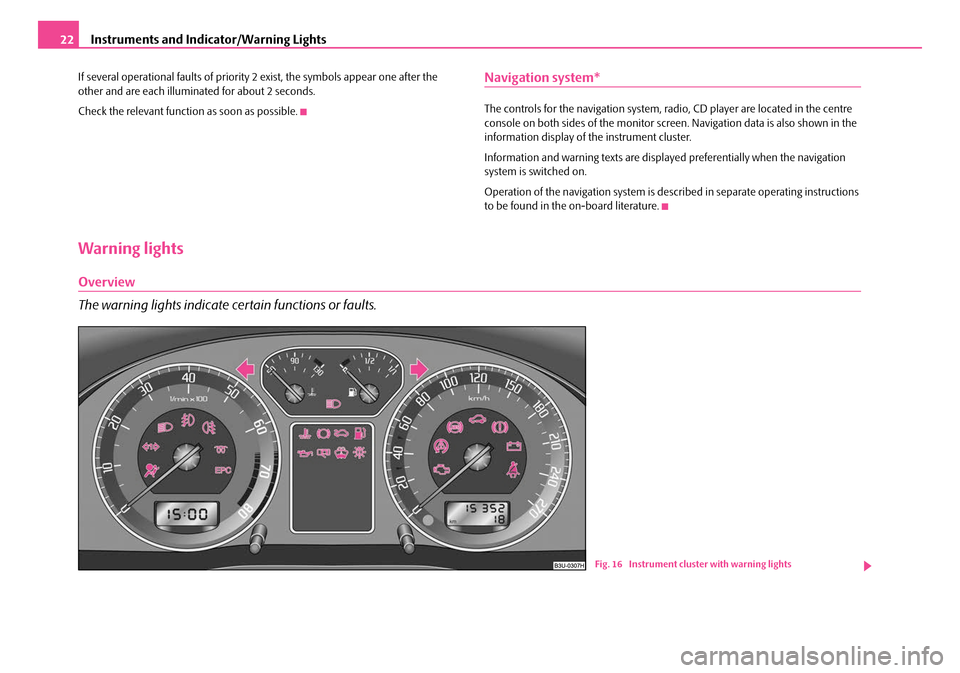
Overview
The warning lights indicate certain functions or faults.
Fig. 16 Instrument cluster with warning lights
NKO B5 20.book Page 22 Friday, March 2, 2007 1:46 PM
Page 25 of 259

Instruments and Indicator/Warning Lights
24
Note
•Arrangement of the indicator lights de pends on the model and model version.
The symbols shown in the following functional description are to be found as indi-
cator lights in the instrument cluster.
•Operational faults are shown in the disp lay of the instrument cluster as red
symbols (priority 1 - danger) or yell ow symbols (priority 2 - warning).
Turn signal system
Either the left or right indicator light flashes depending on the position of the
turn signal lever.
The indicator light flashes at twice its normal rate if a turn signal light fails. This does
not apply when towing a trailer.
Switching off the hazard warning light system is switched on will cause all of the
turn signal lights as well as both indicator lights to flash.
Further information about the turn signal system ⇒page 49.
Main beam
The indicator light comes on when the main beam is selected or also when the
headlight flasher is operated.
Further information about the main beam ⇒page 49.
Airbag system
Monitoring the airbag system
The warning light
comes on for a few seconds when the ignition is switched on.
There is a fault in the system if the warn ing light does not go out or comes on or
flashes while driving ⇒. This also applies if the warning light does not come on
when the ignition is switched on. The following text will be displayed in the information display*:
AIRBAG FAULT
The functionality of the airbag system is also monitored electronically, when one
airbag has been switched off
Front, side or head front passenger airbags which have been switched off
using the vehicle system tester:
•The warning light lights up for 3 seconds after switching on the ignition and
then flashes for 12 seconds afterwards in 2 second intervals.
Front, side or head passenger airbags which have been switched off using the
switch (for switching off airbags)* in the storage compartment on the front
passenger side:
•The warning light comes on for 3 seconds after the ignition has been
switched on.
•Switching off airbags is indicated in the middle of the dash panel by the lighting
up of the indicator light (airbag switched off) ⇒ page 144.
WARNING
Have the airbag system ch ecked immediately by a specialist garage if a fault
exists. Otherwise, there is a risk of th e airbag not being activated in the event
of an accident!
Note
Further information about switching off airbags ⇒page 144, “Deactivating an
airbag”.
Turn signal system for vehicles towing a trailer
The indicator light on vehicles towing a trailer flashes together with the respec-
tive indicator light for the turn signal system.
The indicator light
does not flash if a turn signal light on the trailer or on the
vehicle is not operating.
NKO B5 20.book Page 24 Friday, March 2, 2007 1:46 PM
Page 30 of 259

Instruments and Indicator/Warning Lights29
Using the systemSafetyDriving TipsGeneral MaintenanceBreakdown assistanceTechnical Data
The fact that the TCS system operates together with the ABS means that the TCS
warning light will also come on if the
ABS system is not operating properly.
Further information about the TCS ⇒page 156, “Traction control system (TCS)*”.
Antilock brake system (ABS)
The warning light shows the functionality of the ABS and the Electronic Differ-
ential Lock (EDL).
The warning light comes on for a few seconds after the ignition has been switched
on or when starting the engine. The warning light goes out after an automatic check
sequence has been completed.
A fault in the ABS
The system is not functioning properly if the warning light
does not go out within
a few seconds after switching on the ignition , does not light up at all or lights up
while driving. The vehicle will only be br aked by the normal brake system. Visit a
specialist garage as quickly as possible and adjust your style of driving in the mean-
time since you will not know how great the damage is.
Three additional warning tones will sound if there is a major fault in the ABS.
Further information about ABS ⇒page 159, “Antilock brake system (ABS)”.
A fault in the entire brake system
If the ABS warning light
comes on together with the brake system warning light (handbrake must be released), there is a fault not only in the ABS but also in
another part of the brake system ⇒.
The following text will be displayed in the information display*: STOP BRAKE FAULT SERVICE MANUAL (STOP! BRAKE FAULT OWNER'S
MANUAL)
Electronic Differential Lock (EDL)
The EDL is a part of the ABS. A fault in the EDL is indicated by the ABS warning light
in the instrument cluster. Have the ve hicle inspected without delay by a Škoda
Service Partner. Further information on the EDL ⇒page 157, “Electronic Differen-
tial Lock (EDL)”.
WARNING
•If the brake system warning light comes on together with the ABS
warning light stop the vehicle immediately and check the brake fluid
level in the reservoir ⇒page 191, “Brake fluid”. If the brake fluid level has
dropped below the MIN marking, do not drive any further - risk of accident!
Contact a Škoda dealer to obta in professional assistance.
•Pay attention to the following instructions ⇒ page 185, “Working in the
engine compartment” before checking the brake fluid level and opening the
bonnet.
•If the brake fluid is at the correct level, the ABS control function has
failed. The rear wheels may then block very rapidly when braking. In certain
circumstances, this can result in the rear end of the car breaking away - risk
of skidding! Drive carefully to the nearest specialist garage and have the
fault rectified.
Electronic immobiliser
Data is compared between the ignition ke y and the control unit when switching on
the ignition. The indicator light will light up for a few seconds when ignition key
authorisation is confirmed.
The warning light will start flashing conti nuously if a non-authorised ignition key
(for example the wrong ignition key) has been used. The engine cannot be started
⇒ page 32.
It is only possible to start the engine of your car with a Genuine Škoda key with the
matching code.
Brake system
The warning light flashes or comes on if the brake fluid level is too low, if there
is a fault in the ABS or if the handbrake is applied.
If the warning light
flashes (handbrake is not applied), stop and check the brake
fluid level ⇒ .
NKO B5 20.book Page 29 Friday, March 2, 2007 1:46 PM
Page 48 of 259

Lights and Visibility47
Using the systemSafetyDriving TipsGeneral MaintenanceBreakdown assistanceTechnical Data
−
This mist has no influence on th e life of the lighting system.
Fog lights
Switching on the fog lights
– First of all turn the light switch into position
or ⇒ fig. 35 .
– Pull the light switch into position .
The rear fog light warning light ⇒ page 25 lights up in the instrument cluster
when the fog light is switched off.
Rear fog light
Switching on the rear fog light
– First of all turn the light switch into position
or ⇒ fig. 35 .
– Pull the light switch into position .
The rear fog light warning light ⇒ page 25 lights up in the instrument cluster
when the fog light is switched off.
Only the rear fog light of the trailer lights up automatically when you are towing a
trailer using a factory-fitted towing device which is fitted with the rear fog light .
Caution
The rear fog light should only be switched on if visibility is particularly poor
(conform with any varying legal provisions) to avoid dazzling vehicles behind your
vehicle.
Instrument lighting
You can adjust the brightness of the instrument lighting.
– Switch on the light.
– Turn the control dial ⇒fig. 36 to the desired intensity of the instru-
ment lighting.
Fig. 35 Dash panel: Light
switch
A1
A2
Fig. 36 Dash panel:
Instrument lighting
NKO B5 20.book Page 47 Friday, March 2, 2007 1:46 PM
Page 50 of 259

Lights and Visibility49
Using the systemSafetyDriving TipsGeneral MaintenanceBreakdown assistanceTechnical Data
The turn signal and main beam lever
The parking lights and headlight flas her are also switched on and off
using the turn signal and main beam lever.
The turn signal and main beam lever perform the following functions:
Right
and left turn signal light
– Push the lever upwards or downwards ⇒fig. 39 .
– Turn signal for changing lanes - in or der to only flash briefly, move the
lever up or down to the pressure po int and hold it in this position.
Main beam
– Switch on the low beam.
– Push the lever forwards.
– Pull the lever back into the initial position in order to switch the main beam off again.
Headlight flasher
– Pull on the lever of the steering wheel (sprung position) - the main beam and warning light in the instrument cluster come on. Parking light
– Switch off the ignition.
– Push the lever up or down - the right-hand or left-hand parking light
is switched on.
Notes on light and indicator functions
•The turn signal system only operates when the ignition is switched on. The
corresponding indicator light or in the instrument cluster also flashes.
•The turn signal is automatically cancelled after negotiating a curve.
•The side light and rear light on the appropriate side of the vehicle are switched
on when the parking light is selected. The parking light function only operates if
the ignition is switched off.
•An acoustic warning signal will sound when the driver's door is opened if the
lever is not in the middle position after removing the ignition key. The acoustic
warning signal will stop just as soon as the driver's door is closed.
Caution
Use main beam or the headlight flasher only if this does not risk dazzling other road
users.
Note
Use only in accordance with the legal requirements the described lighting and
signal systems.
Coming Home Function
This function makes it possible to switch on low or main beam for a short
time after leaving the car, e.g. to illuminate the path to your front door,
etc.
Selecting function
– Switch off the light.
Fig. 39 Turn signal and
main beam lever
NKO B5 20.book Page 49 Friday, March 2, 2007 1:46 PM
Page 111 of 259

Automatic gearbox*
110
Selector lever positions
The selector lever position you have engaged is shown in the information display
of the instrument cluster with the co rresponding gear symbol highlighted
⇒ fig. 123 .
P - Parklock
The driven wheels are locked mechanically in this position.
The Parklock must only be engaged when the vehicle is stationary ⇒.
If you wish to move the select or lever into or out of this position, you must press the
Shiftlock button in the handle of the select or lever and at the same time depress the
brake pedal. R - Reverse
Reverse gear must only be engaged when
the vehicle is stationary and the engine
idling ⇒ .
The brake pedal must be depressed and at the same time the Shiftlock must be
pressed, if you wish to obtain the selector lever positions R, P or N.
The reversing lights come on when the selector lever is moved into position R when
the ignition is also on.
N - Neutral
The transmission is in Neutral in this position.
The brake pedal must be depressed (if the lever is in its position for longer than 2
seconds) in order to move the selector lever out of the position N into another posi-
tion, with the ignition switched on, on a vehicle travelling at less than 5 km/h or on
a stationary vehicle.
D - Drive, position for driving forward
When the selector lever is in this position, the forward gears are shifted up and
down automatically in line with engine load, vehicle speed and the dynamic shift
programme (DSP).
You must depress the brake pedal ⇒ if you wish to move the selector lever into
position D from N when the vehicle is travelling at less than 5 km/h or is stationary.
In certain circumstances (e.g. when driving in mountainous regions or when towing
a trailer) it may be beneficial to select the manual shift programme ⇒page 113 for
a short time in order to adapt the gearbox ratios manually to the driving situations.
4 - Position when driving in hilly areas
We recommend this position if driving with the selector lever in position D would,
in certain circumstances, result in the gearbox frequently shifting between fourth
and fifth gears.
The gearbox then shifts up and down automa tically into the first, second, third and
fourth gears in line with engine load and vehicle speed. Fifth gear is not engaged in
this case. This makes it possible to expl oit greater engine braking power when the
accelerator is released ⇒.
Fig. 122 Selector lever
Fig. 123 Information
display: Selector lever
positions
NKO B5 20.book Page 110 Friday, March 2, 2007 1:46 PM
Page 137 of 259

Airbag system
136
Airbag system
Description of the airbag system
General information on the airbag system
The front airbag system is complementary to the three-point seat belts and offers
additional protection for the head and ches t area of the driver and passenger in the
event of a frontal collision.
In the case of a violent side crash, the side and head airbags* reduce the risk of inju-
ries to the occupants on the part of th e body facing the side of the accident ⇒.
The airbag system is only functional after the ignition has been switched on.
The operational readiness of the airbag system is monitored electronically. The
airbag warning light comes on for a few seconds each time the ignition is switched
on.
The airbag system (according to vehicl e equipment) essentially consists of:
•an electronic control unit,
•the two front airbags,
•the side airbags,
•Head airbags*
•an airbag warning light in the instrument cluster,
•a front passenger airbag switch* ⇒page 144,
•an indicator light for a switched off fron t seat passenger airbag* in the middle
of the dash panel ⇒page 144.
A fault in the airbag system exists if:
•the airbag indicator light does not light up when the ignition is switched on,
•the warning light does not go out after about 3 seconds after the ignition is
switched on,
•the airbag indicator light goes out and comes on again after the ignition is
switched on,
•the airbag indicator light comes on or flickers when driving,
•an airbag indicator light showing a swit ched-off front passenger airbag* in the
middle of the dash panel flashes.
WARNING
•To enable the occupants of a car to be protected with the greatest
possible effect when the airbag is deployed, the front seats must be
⇒ page 127, “Correct seated position” co rrectly adjusted to match the body
size of the occupant.
•If you do not fasten the seat belts when driving, lean too far forward or
adopt an incorrect seated position, you are exposing yourself to increased
risk of injury in the event of an accident.
•Have the airbag system checked imme diately by a specialist garage if a
fault exists. Otherwise, there is a risk of the airbag not being activated in the
event of an accident.
•No modifications of any kind may be made to parts of the airbag system.
•It is prohibited to manipulate individual parts of the airbag system as this
might result in the airbag being deployed.
•The protective function of the airbag system is sufficient for only one
accident. The airbag system must then be replaced if the airbag has been
deployed.
•The airbag system needs no maintenance during its working life.
•If you sell your car, please hand over the complete vehicle documenta-
tion to the new owener. Please note that the documents relating to the
possibility of deactivating the front passenger airbag are also part of the
vehicle documents!
•If the vehicle or individual parts of the airbag system are scrapped, it is
essential to observe the relevant safety precautions. Škoda Service Partners
are familiar with these regulations.
•When disposing of vehicle or parts of the airbag system, it is important
to comply with the national legal requirements.
NKO B5 20.book Page 136 Friday, March 2, 2007 1:46 PM