2007 SKODA OCTAVIA lights
[x] Cancel search: lightsPage 121 of 288

Starting-off and Driving
120
The reversing lights will come on once reverse gear is engaged, provided the igni-
tion is on.
WARNING
Never engage the reverse gear when driving - risk of accident!
Note
•One should not lay the hand on the shift lever while driving the vehicle. The
pressure of the hand will be transferred to the gearshift forks in the gearbox. This
can, over a period of time, lead to early wear of the gearshift forks.
•Depress the clutch pedal fully when chan ging gears, in order to avoid unneces-
sary wear and damage.
Handbrake
Applying the handbrake
– Pull the handbrake lever up fully. Releasing the handbrake
– Pull the handbrake lever up slightly
and at the same time press in the
locking button ⇒fig. 134 .
– Hold the button pressed and push the handbrake lever down fully ⇒ .
The handbrake warning light lights up when the handbrake is applied, provided
the ignition is on.
A warning signal sounds and the following text appears in the display* if you have
inadvertently driven off with the handbrake applied:
Handbrake on
The handbrake warning is activated if you drive at a speed of more than 6 km/h for
more than 3 seconds.
WARNING
•Please note that the handbrake must be fully released. A handbrake
which is only partially released can re sult in the rear brakes overheating
which will have a negative effect on the operation of the brake system - risk
of accident! In addition this can result in premature wear of the rear brake
pads.
•Never leave children unattended in the vehicle. The children might, for
example, release the handbrake or take the vehicle out of gear. The vehicle
might then move off - risk of accident!
Caution
After the car has come to a stop, always firs t of all apply the handbrake firmly before
then additionally engaging a gear (manual gearbox) or moving the selector lever
into position P (automatic gearbox).
Fig. 134 Centre console:
Handbrake
NKO A5 20 MR08.book Page 120 Wednesday, April 11, 2007 2:54 PM
Page 123 of 288

Starting-off and Driving
122
Front and rear parking aid*
The parking aid provides a warning of obstacles in front and behind
the vehicle.
The audible parking aid determines the distance between the front or rear bumper
and an obstacle with the aid of ultrasound sensors. The sensors are integrated in the
front and rear bumper. The signal tones for the front parking aid sound higher than
for the rear parking aid.
Range of sensors
The distance warning begins at a distance of about 120 cm from the obstacle in
front of the vehicle (area ⇒fig. 137 ) and about 160 cm from the obstacle behind the vehicle (area
⇒page 121, fig. 135). The interval between the
warning signals becomes shorter as the clearance is reduced.
A continuous tone sounds from a clearanc e of just 30 cm (area ) - danger area.
You should not reverse any further after this signal sounds!
Your vehicle can be equipped with a radio which shows on its display the distance
of the vehicle to the obstacle. You can also switch off this function - see operating
instructions for radio
Activating
The parking aid is activated when the reverse gear is engaged and the ignition is
turned on or by pressing the button ⇒fig. 136 - the symbol
lights up in the
button. The activation is confirmed by a brief acknowledgement signal.
Deactivating
The parking aid is deactivated after pressing the button
⇒ fig. 136 or at a speed
of more than 15 km/h - the symbol in the button is no longer illuminated.
WARNING
•The parking aid is not a substitute fo r the driver paying proper attention
and it is always the driver's responsibility to take care when reversing the
vehicle or carrying out similar manoeuvres.
•You should therefore satisfy yourself, before reversing, that there is no
small obstacle, such as a rock, thin po st, trailer drawbar etc., in front or
behind your vehicle. Such an obstacle might not be within the range
detected by the sensors.
Caution
In order to ensure the correct functioning of the parking aid, only a licence plate
frame approved by the manufacturer Škod a for your vehicle type should be
installed at the front bumper. Non-proved licence plate frames can project into the
detection range ⇒fig. 137 . A non-proved licence plate frame could be recog-
nized as an obstacle by the system and this would lead to an incorrect warning. If
you have any questions, please contact a specialist garage.
Fig. 136 Activating the
parking aid
Fig. 137 Parking aid:
Detection range of the
front sensors
AA
AA
AB
AB
NKO A5 20 MR08.book Page 122 Wednesday, April 11, 2007 2:54 PM
Page 128 of 288

Automatic gearbox127
Using the systemSafetyDriving TipsGeneral MaintenanceBreakdown assistanceTechnical Data
•When the engine is running and the vehicle is stationary, it is necessary
to hold the car with the brake pedal in all the positions of the selector lever
(except P and N) since the power transmission is never completely inter-
rupted, also not when the engine is idling - the vehicle "creeps".
Selector lever positions
The selector lever position you have engaged is shown in the information display
of the instrument cluster with the co rresponding gear symbol highlighted ⇒
fig. 140 . In the positions D and S the gear you have already engaged will be addi-
tionally displayed on the display.
P - Parklock
The driven wheels are locked me chanically in this position.
The Parklock must only be engage d when the vehicle is stationary ⇒.
If you wish to move the select or lever into or out of this position, you must press the
Shiftlock button in the handle of the select or lever and at the same time depress the
brake pedal.
If the battery is used, the selector le ver cannot be moved out of the position P
⇒ page 130.
R - Reverse
Reverse gear must only be engaged when the vehicle is stationary and the engine
idling ⇒ .
The brake pedal must be depressed and at the same time the Shiftlock must be
pressed, if you wish to obtain the selector lever positions R, P or N.
When the ignition is switched on and the selector lever is in position R, the reverse
lights will come on.
N - Neutral
The transmission is in Neutral in this position.
The brake pedal must be depressed (if the le ver is in its position for longer than 2
seconds) in order to move the selector lever out of the position N into the position
D , with the ignition switched on, on a vehicle travelling at less than 5 km/hour or on
a stationary vehicle.
The brake pedal must be depressed (if the le ver is in its position for longer than 2
seconds) in order to move the selector lever out of the position N into the position
R , with the ignition switched on, on a vehicl e travelling at less than 5 km/hour or on
a stationary vehicle.
D - Drive, position for driving forward
When the selector lever is in this position, the forward gears are shifted up and
down automatically in line with engine load, vehicle speed and the dynamic shift
programme.
WARNING (continued)
Fig. 139 Selector lever
Fig. 140 Information
display: Selector lever
positions
NKO A5 20 MR08.book Page 127 Wednesday, April 11, 2007 2:54 PM
Page 129 of 288

Automatic gearbox
128
You must depress the brake pedal ⇒ if you wish to move the selector lever into
position D from N when the vehicle is travelling at less than 5 km/hour or is
stationary.
In certain circumstances (e.g. when driving in mountainous regions or when towing
a trailer) it may be beneficial to select the manual shift programme ⇒page 129 for
a short time in order to adapt the gearbox ratios manually to the driving situations.
S - Position for sporty style of driving
Shifting up later into a higher gear ma kes it possible to fully exploit the power
potential of the engine. The gearbox also th en shifts down at higher engine speeds
as in the position D.
The gearbox does not shift into the 6th gear in the position S, because the
maximum speed is achieved with the 5th gear.
The Shiftlock on the selector lever grip must be pressed when moving the selector
lever out of the position D into the position S.
WARNING
•Never move the selector lever into position R or P when driving - risk of
an accident!
•When the engine is running and the ve hicle is stationary, it is necessary
to hold the car with the brake pedal in all the positions of the selector lever
(except P and N) since the power transmission is never completely inter-
rupted, also not when the engine is idling - the vehicle "creeps".
•You must on no account unintentionally operate the throttle (e.g. by
hand from the engine compartment) if a drive position is engaged when the
car is stationary. The vehicle would ot herwise immediately start off - also
when the handbrake is firmly a pplied - risk of an accident!
•You must move the selector lever into position P and firmly apply the
handbrake first before you or any other person opens the bonnet and starts
working on the engine when it is running - risk of accident! It is also essential
to observe all warnings ⇒page 210, “Working in the engine
compartment”.
Selector lever lock
Automatic selector lever lock
With the ignition on, the selector lever is locked when it is in the positions P and N .
You must first of all depress the brake pedal in order to move the selector lever out
of this position. The warning light
⇒ page 31 lights up in the instrument cluster
as a reminder for the driver when the selector lever is in position P and N:
In addition, the symbol
for the automatic selector lever lock in the shift gate
lights up.
A time delay element ensures that the selector lever is not blocked when rapidly
switching over the position N (e.g. from R to D). This does, for example, allow one
to seesaw out a stuck vehicle. The selector lever lock will click into place if the lever
is in the N position for more than 2 seconds without the brake pedal being pressed.
The selector lever lock is only active if th e vehicle is stationary or moving at speed
of less than 5 km/hour. The lock is switched off automatically into position N when
the car is travelling at a higher speed.
Shiftlock button
The Shiftlock button in the handle of sele ctor lever prevents certain selector lever
positions being engaged inadvertently. The selector lever lock is cancelled when
you press the Shiftlock button.
Keylock - Ignition key withdrawal lock
You can only withdraw the ignition key after switching off the ignition if the selector
lever is in position P. If the ignition key is withdrawn, the selector lever is blocked in
position P .
Kickdown function
The kickdown function provides you with maximum acceleration
power.
Depressing the accelerator pedal allows th e kickdown function to be activated in
the desired driving program. This function has precedence over the driving
programme and serves for maximum accelera tion of the vehicle when exploiting
the maximum power potential of the engi ne without taking into account the
NKO A5 20 MR08.book Page 128 Wednesday, April 11, 2007 2:54 PM
Page 134 of 288

Automatic gearbox DSG133
Using the systemSafetyDriving TipsGeneral MaintenanceBreakdown assistanceTechnical Data
•If you are stopping at a hill (downhill section), never try to hold the car
stationary with the gear engaged by me ans of the “accelerator”, this means
by letting the clutch slip. This can lead to overheating of the clutch. If there is
a risk of overheating of the clutch due to overload, the clutch is opened auto-
matically and the vehicle rolls backward - risk of accident!
•If you must stop at a slope, depress and hold the brake pedal, so that you
can prevent the vehicle from rolling back.
Caution
•The double clutch on the automatic gear box DSG is equipped with an overload
protection. If you make use of the uphill f unction on a vehicle which is stationary or
driving slowly uphill, it will result in an increase of thermal stress of the clutches.
•An overheating of the clutches can be detected by the flashing of the selector
level indicator and the “jerk” of the clut ches, finally the clutches are opened. The
power transmission from the engine to the front wheels is interrupted and as a
result of this the vehicle ca n no longer be driven. If the clutch opens automatically,
depress the brake pedal, wait a few seconds and only then continue driving.
Selector lever positions
The selector lever position you have engaged is shown in the information display
of the instrument cluster with the co rresponding gear symbol highlighted
⇒ fig. 145 . In the positions D and S the gear you have already engaged will be addi-
tionally displayed on the display.
P - Parklock
The driven wheels are locked me chanically in this position.
The Parklock must only be engage d when the vehicle is stationary ⇒.
If you wish to move the select or lever into or out of this position, you must press the
Shiftlock button in the handle of the select or lever and at the same time depress the
brake pedal.
If the battery is used, the selector le ver cannot be moved out of the position P
⇒ page 137.
R - Reverse
Reverse gear must only be engaged when the vehicle is stationary and the engine
idling ⇒ .
The brake pedal must be depressed and at the same time the Shiftlock must be
pressed, if you wish to obtain the selector lever positions R, P or N.
When the ignition is switched on and the selector lever is in position R, the reverse
lights will come on.
WARNING (continued)
Fig. 144 Selector lever
Fig. 145 Information
display: Selector lever
positions
NKO A5 20 MR08.book Page 133 Wednesday, April 11, 2007 2:54 PM
Page 135 of 288

Automatic gearbox DSG
134
N - Neutral
The transmission is in Neutral in this position.
The brake pedal must be depressed (if the le ver is in its position for longer than 2
seconds) in order to move the selector lever out of the position N into the position
D , with the ignition switched on, on a vehicle travelling at less than 5 km/hour or on
a stationary vehicle.
The brake pedal must be depressed (if the le ver is in its position for longer than 2
seconds) in order to move the selector lever out of the position N into the position
R , with the ignition switched on, on a vehicle travelling at less than 5 km/hour or on
a stationary vehicle.
D - Drive, position for driving forward
When the selector lever is in this position, the forward gears are shifted up and
down automatically in line with engine load, vehicle speed and the dynamic shift
programme.
You must depress the brake pedal ⇒ if you wish to move the selector lever into
position D from N when the vehicle is travelling at less than 5 km/hour or is
stationary.
In certain circumstances (e.g. when driving in mountainous regions or when towing
a trailer) it may be beneficial to select the manual shift programme ⇒page 136 for
a short time in order to adapt the gearbox ratios manually to the driving situations.
S - Position for sporty style of driving
Shifting up later into a higher gear ma kes it possible to fully exploit the power
potential of the engine. The gearbox also th en shifts down at higher engine speeds
as in the position D.
The Shiftlock on the selector lever grip must be pressed when moving the selector
lever out of the position D into the position S.
WARNING
•Never move the selector lever into position R or P when driving - risk of
an accident!
•When the engine is running and the ve hicle is stationary, it is necessary
to hold the car with the brake pedal in all the positions of the selector lever (except P and N) since the power transmission is never completely inter-
rupted, also not when the engine
is idling - the vehicle "creeps".
•You must on no account unintentionally operate the throttle (e.g. by
hand from the engine compartment) if a drive position is engaged when the
car is stationary. The vehicle would otherwise immediately start off - also
when the handbrake is firmly a pplied - risk of an accident!
•You must move the selector lever into position P and firmly apply the
handbrake first before you or any other person opens the bonnet and starts
working on the engine when it is running - risk of accident! It is also essential
to observe all warnings ⇒page 210, “Working in the engine
compartment”.
Selector lever lock
Automatic selector lever lock
With the ignition on, the selector lever is locked when it is in the positions P and N .
You must first of all depress the brake pedal in order to move the selector lever out
of this position. The warning light
⇒ page 31 lights up in the instrument cluster
as a reminder for the driver when the selector lever is in position P and N:
In addition, the symbol
for the automatic selector lever lock in the shift gate
lights up.
A time delay element ensures that the selector lever is not blocked when rapidly
switching over the position N (e.g. from R to D). This does, for example, allow one
to seesaw out a stuck vehicle. The selector lever lock will click into place if the lever
is in the N position for more than 2 seconds without the brake pedal being pressed.
The selector lever lock is only active if th e vehicle is stationary or moving at speed
of less than 5 km/hour. The lock is switched off automatically into position N when
the car is travelling at a higher speed.
Shiftlock button
The Shiftlock button in the handle of sele ctor lever prevents certain selector lever
positions being engaged inadvertently. The selector lever lock is cancelled when
you press the Shiftlock button.
WARNING (continued)
NKO A5 20 MR08.book Page 134 Wednesday, April 11, 2007 2:54 PM
Page 139 of 288

Communication
138
Communication
Multifunction steering wheel*
Operating the radio system
The driver can set the basic functions of the radio system by simply operating the
buttons on the steering wheel so that he can concentrate on the traffic situation
without being distracted as little as possible by operating the radio system
⇒ fig. 149 .
This applies only if your radio equipment has been installed at the factory. You can
of course operate the radio system at the appliance. You will find a description in
the operating instructions of your radio system.
If the headlights are switched on, the bu ttons on the steering wheel come on when
pressing the button
.
By pressing the buttons, you can carry out the following functions: The buttons apply for the respective operating mode of the current radio system.
Note
The loudspeakers in the vehicle are
matched to a power output of 30 W.
Fig. 149 Multifunction
steering wheel: Buttons
for the operation of the
radio
ButtonRadioCassetteCD
Button for stored
transmitter
forward
without functionTitle search forward
Increase volume
Decrease volume
Button for stored
transmitter back
without functionTitle search back
Lighting of buttons
Frequency search back
Fa s t re w i n d Reading the
previous CD
Frequency search for- ward
Fa s t fo r w a rd Reading the
following CD
Mute switch
A1
A2
A3
A4
A5
A6
A7
A8
NKO A5 20 MR08.book Page 138 Wednesday, April 11, 2007 2:54 PM
Page 140 of 288
Communication139
Using the systemSafetyDriving TipsGeneral MaintenanceBreakdown assistanceTechnical Data
Radio and mobile phone operation
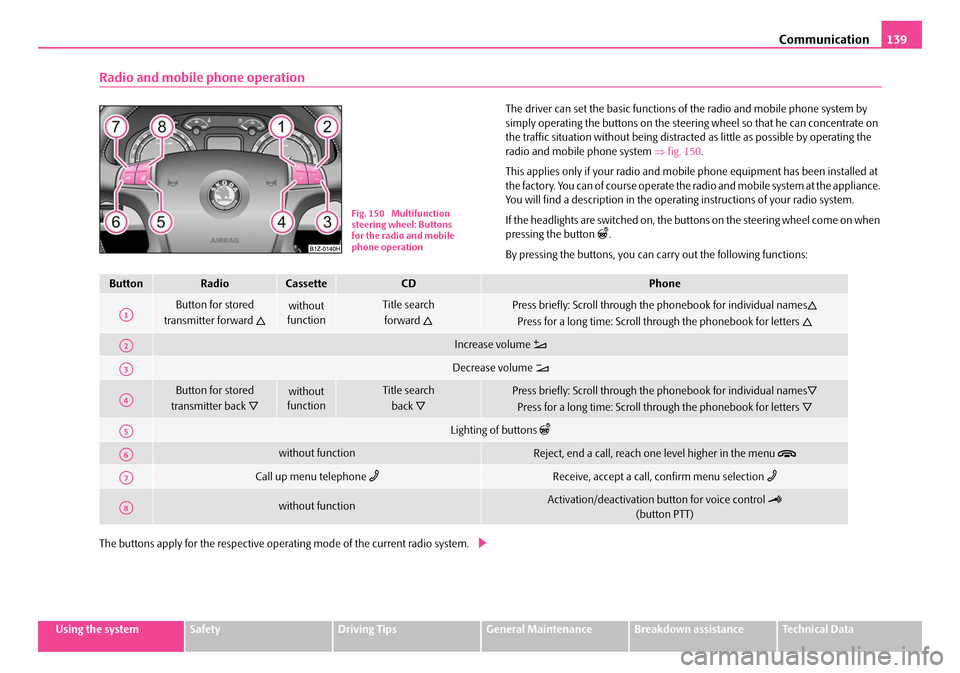
The driver can set the basic functions of the radio and mobile phone system by
simply operating the buttons on the steering wheel so that he can concentrate on
the traffic situation without being distracted as little as possible by operating the
radio and mobile phone system ⇒fig. 150 .
This applies only if your radio and mobi le phone equipment has been installed at
the factory. You can of course operate the radio and mobile system at the appliance.
You will find a description in the operating instructions of your radio system.
If the headlights are switched on, the buttons on the steering wheel come on when
pressing the button
.
By pressing the buttons, you can carry out the following functions:
The buttons apply for the respective operating mode of the current radio system.
Fig. 150 Multifunction
steering wheel: Buttons
for the radio and mobile
phone operation
ButtonRadioCassetteCDPhone
Button for stored
transmitter forward
without
functionTitle search
forward
Press briefly: Scroll through the phonebook for individual names
Press for a long time: Scroll through the phonebook for letters
Increase volume
Decrease volume
Button for stored
transmitter back
without
functionTitle search
back
Press briefly: Scroll through the phonebook for individual names
Press for a long time: Scroll through the phonebook for letters
Lighting of buttons
without functionReject, end a call, reach one level higher in the menu
Call up menu telephone Receive, accept a call, confirm menu selection
without functionActivation/deactivation button for voice control
(button PTT)
A1
A2
A3
A4
A5
A6
A7
A8
NKO A5 20 MR08.book Page 139 Wednesday, April 11, 2007 2:54 PM