2007 SKODA OCTAVIA aux
[x] Cancel search: auxPage 115 of 288

Heating and air conditioning system
114
– In the menu Aux. Heating select the menu Mode .
– In the menu Mode select the desired mode Heating or Ventilation .
Programming
For the programming of the auxiliary heatin g (auxiliary heating and ventilation) in
the menu Aux. Heating there are three pre-set times:
•Pre-set time 1
•Pre-set time 2
•Pre-set time 3
In each pre-set time, the day (if necessary each day = daily) and the time (hour and
minute) can be set for the operating period of the auxiliary heating and/or ventila-
tion.
If you leave the pre-se t menu by selecting menu Back or do not operate the display
for longer than 10 seconds, the set values are stored, but the pre-set time is not
active.
Both other pre-set times can be prog rammed and stored in the same way.
If you select the menu Activate after setting the desired values, Pre-set time
(weekday, hours, minute) activated! is displayed in the display and the set pre-
set time is active.
Only one programmed pre-set time can be active.
The last programmed pre-set time remains active.
The active pre-set time can be changed in the menu Aux. Heating in the menu
Activation by selecting a pre-set time.
The prerequisite for the correct switching on of the auxiliary heating (auxiliary
heating and ventilation) according to the programmed pre-set time is the correct
setting of the current time ⇒page 14 and weekday ⇒page 113.
If the system is running, a warning light in the button for direct switching on/off of
the auxiliary heating lights up. The running system deactivates after expiration of the operating period or is deac-
tivated earlier by pressing the button for
direct switching on/off of the auxiliary
heating ⇒page 114.
The deactivation of a desired pre-set time can be performed by selecting the menu
Deactive in the menu Active .
It is possible to re-establish the factory setting using the menu Fa ct or y se t tin g in
the menu Aux. Heating .
Direct switching on/off
Fig. 129 Button for direct switching on/off of the auxiliary heating (auxiliary heating and
ventilation) on the operating part of the Climatic
The auxiliary heating (auxiliary heating and ve ntilation) can be switched on or off at
any time directly using the button on the operating part of the Climatic
⇒ fig. 129 , if necessary the operating part of the heating ⇒page 100, fig. 119 or the
operating part of the Climatronic ⇒page 109, fig. 125 .
The auxiliary heating system (auxiliary heating and ventilation) switches off auto-
matically after expiration of the set operating period in the menu Running time, if
it is not switched off beforehand by you.
NKO A5 20 MR08.book Page 114 Wednesday, April 11, 2007 2:54 PM
Page 116 of 288

Heating and air conditioning system115
Using the systemSafetyDriving TipsGeneral MaintenanceBreakdown assistanceTechnical Data
WARNING
•The auxiliary heating must never be operated in closed rooms - risk of
poisoning!
•The auxiliary heating must not be running during refueling - risk of fire.
•The exhaust pipe of the auxiliary heating is located on the underside of
the vehicle. Therefore do not place the vehicle, if you wish to operate the
auxiliary heating, in such a way that the exhaust gases of the auxiliary
heating can come easily into contact with inflammable materials (e.g. dry
grass) or easily inflammable su bstances (e.g. fuel run out).
Note
•If the auxiliary heating runs, the fuel consumption comes from the vehicle tank.
Therefore the auxiliary heating should not be operated, if there is very little fuel in
the tank.
•The exhaust pipe of the auxiliary heating, which is located on the underside of
the vehicle, must not be clogged and the exhaust flow must not be blocked.
•If the auxiliary heat ing and ventilation is running, the vehicle battery discharges.
If the auxiliary heating and ventilation has been operated several times over a
longer period, the vehicle must be driven a few kilometers in order to recharge the
vehicle battery.
•The auxiliary heating only sw itches the blower on, if it has achieved a coolant
temperature of approx. 50 °C.
•At low outside temperatures, this can resu lt in a formation of water vapour in
the area of the engine compartment. This is quite normal and is not an operating
problem.
•After switching off the auxiliary heating, the coolant pump runs for a short
period.
•The auxiliary heating and ventilation does not switch on or comes on, if the
vehicle battery indicate s a low loading state.
•The auxiliary heating (auxiliary heating) switches on, if in the information
display: Please refuel! is indicated or was indicated before switching off the igni-
tion.
•When driving, the auxiliary heating can only be switched on, if the exterior
temperature is lower than 5 °C.
•The air inlet in front of the windscreen mu st be free of ice, snow or leaves in
order to ensure that the auxiliary heating operates properly.
•So that the warm air can flow into the vehicle interior after switching on the
auxiliary heating (auxiliary heating), the control dial ⇒page 100, fig. 119 must
be turned up to the stop to the right when heating. With Climatic and Climatronic,
you can maintain the temperature norma lly selected by you (we recommend 22
°C). It is recommended to put the air flow in the position
. For heating and
climatic put the blower switch ⇒page 100, fig. 119 if necessary ⇒page 104,
fig. 122 in the position 2.
•On vehicles with DPF (die sel particle filter) the warm coolant heats up the
engine.
AA
AB
NKO A5 20 MR08.book Page 115 Wednesday, April 11, 2007 2:54 PM
Page 151 of 288
Communication
150
Input AUX-IN*
The input for external audio sources AUX-IN is located below the armrest of the
front seat and is marked with This input serves for connecting external audio
sources (e.g. portable mp3 player) to th e your radio system. The equipment AUX-
IN* can only be used in combination with a radio or navigation system installed in
the factory. The description on how to operate AUX-IN* can be found in the rele-
vant operating instructions of the radio or the navigation system Nexus.
Note
If an external audio source is connected via AUX-IN, which has a separate power
supply, this can lead to an interference of the audio signals. It depends on the prop-
erties of the adapter.
CD changer*
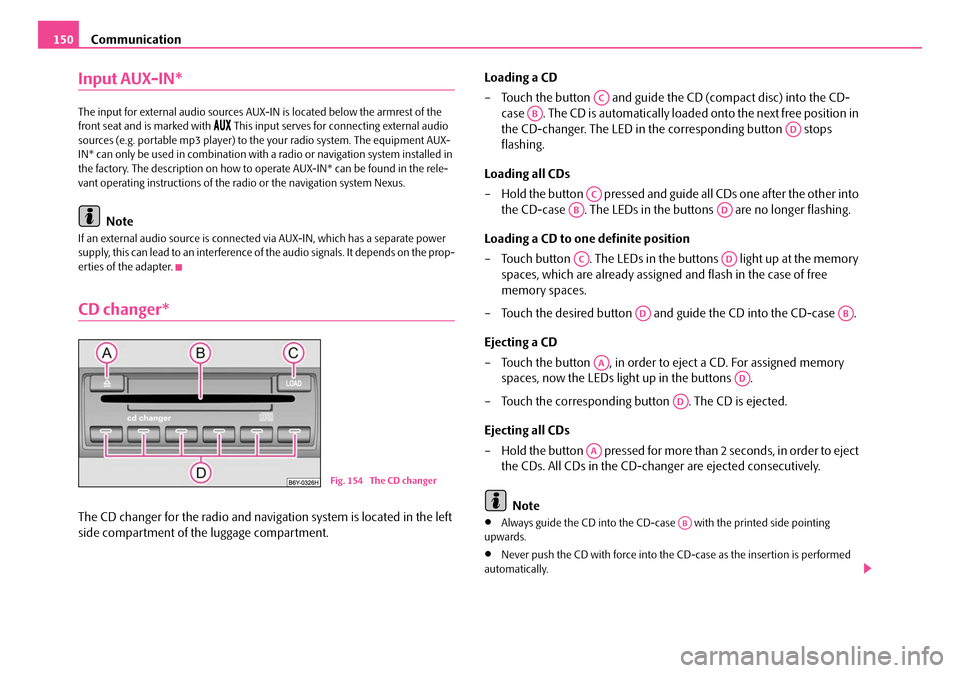
The CD changer for the radio and navigation system is located in the left
side compartment of the luggage compartment. Loading a CD
– Touch the button and guide the
CD (compact disc) into the CD-
case . The CD is automatically loaded onto the next free position in
the CD-changer. The LED in the corresponding button stops
flashing.
Loading all CDs
– Hold the button pressed and guide all CDs one after the other into the CD-case . The LEDs in the buttons are no longer flashing.
Loading a CD to one definite position
– Touch button . The LEDs in the buttons light up at the memory spaces, which are already assigned and flash in the case of free
memory spaces.
– Touch the desired button and guide the CD into the CD-case .
Ejecting a CD
– Touch the button , in order to eject a CD. For assigned memory spaces, now the LEDs light up in the buttons .
– Touch the corresponding button . The CD is ejected.
Ejecting all CDs
– Hold the button pressed for more th an 2 seconds, in order to eject
the CDs. All CDs in the CD-changer are ejected consecutively.
Note•Always guide the CD into the CD-cas e with the printed side pointing
upwards.
•Never push the CD with force into the CD-case as the insertion is performed
automatically.
Fig. 154 The CD changer
AC
AB
AD
AC
ABAD
ACAD
ADAB
AA
AD
AD
AA
AB
NKO A5 20 MR08.book Page 150 Wednesday, April 11, 2007 2:54 PM
Page 209 of 288
Fuel
208
– Unscrew the fuel filler cap anti-clo ckwise and place the fuel filler cap
from above on the fuel filler flap ⇒page 207, fig. 193 .
Closing fuel filler cap
– Screw on the cap by turning it to the right until it is heard to lock.
– The fuel filler cap on the fuel filler tube must be locked to the right using the vehicle key (only valid for vehicles which do not have auto-
matic locking of the fuel filler flap).
– Press the fuel tank flap closed.
The correct grade of fuel for your vehicle as well as the tyre size and inflation pres-
sures are stated on a sticker affixed to the inside of the fuel filler flap. Further infor-
mation on fuel ⇒page 206, “Fuel”.
The fuel tank has a capacity of about 55 litres.
WARNING
Pay attention to any legal requirements if you do carry a spare canister in the
vehicle. We do not recommend carrying any fuel canisters in your vehicle for
safety reasons. The canister can be da maged in the event of an accident and
fuel may leak out.
Caution
•Before refuelling it is necessary to switch off the auxiliary heating system (auxil-
iary heating and ventilation) *.
•Remove any fuel which has spilled onto the paintwork of your vehicle immedi-
ately - risk of paint damage!
•Vehicles fitted with catalytic converter should neve r be allowed to let the fuel
tank to run completely empty. An irregular supply of fuel to the engine can result in
misfiring and unburnt fuel may get into the exhaust system, which may result in
overheating and damage to the catalytic converter.
•Make sure that the valve is not pressed into the filler tube when inserting the
pump nozzle into the filler tube. Otherwis e you are unintentionally filling up the volume, which in case of heat can cause an
expansion of the fuel. This can lead to
an overflow of fuel or damage to parts of the fuel reservoir.
•T h e f u e l t a n k i s f u l l j u s t a s s o o n a s t h e pump nozzle switches off for the first time,
provided the nozzle has been operated pr operly. Do not continue refuelling -
otherwise the expansion volume is filled up.
NKO A5 20 MR08.book Page 208 Wednesday, April 11, 2007 2:54 PM
Page 246 of 288

Fuses and light bulbs245
Using the systemSafetyDriving TipsGeneral MaintenanceBreakdown assistanceTechnical Data
F11Lambda probe upstream of catalytic converter,
engine control unit10
F12Lambda probe downstream of catalytic converter10
F13Control unit for automatic gearbox15
F14Not assigned
F15Coolant pump10
F16Windshield wiper lever and turn signal light lever5
F17Instrument cluster5
F18Audio amplifier (sound system)30
F19Radio15
F20Phone5
F21Not assigned
F22Not assigned
F23Engine control unit10
F24Control unit for CAN databus5
F25Not assigned
F26Not assigned
F27Not assigned
F28Engine control unit25
F29Actuation for coolant pump after-running5
F30Control unit for auxiliary heating20
F31Front window wiper30
F32Not assigned
F33Not assigned
F34Not assigned
No.Power consumerAmperes
F35Not assigned
F36Not assigned
F37Not assigned
F38Radiator fan, valves10
F39Clutch pedal switch, brake pedal switch5
F40Ignition coils20
F41Not assigned
F42Actuation of fuel pump5
F43Not assigned
F44Not assigned
F45Not assigned
F46Not assigned
F47Central control unit, Left main headlights30
F48Central control unit, Right main headlights30
F49Power supply for terminal 15 (ignition on)40
F50Not assigned
F51Not assigned
F52Power supply relay - terminal X a)40
F53Accessory equipment50
F54Not assigned
a)In order not to drain the battery unnecessarily when starting the engine, the electrical
components of this terminal are automatically switched off.
No.Power consumerAmperes
NKO A5 20 MR08.book Page 245 Wednesday, April 11, 2007 2:54 PM
Page 247 of 288

Fuses and light bulbs
246
Fuse assignment in engine compartment - version 2
Certain electrical components are only st andard on certain vehicle model versions
or only suppliable as optional equipment for certain models.
No.Power consumerAmperes
F1Not assigned
F2Windshield wiper lever and turn signal light lever5
F3Measuring circuit5
F4Valves for ABS30
F5Control unit for automatic gearbox15
F6Instrument cluster5
F7Not assigned
F8Radio15
F9Phone5
F10Engine control unit, Main relay5
F11Control unit for auxiliary heating20
Fig. 225 Schematic
representation of fuse
box in engine compart-
ment - version 2
F12Control unit for CAN databus5
F13Engine control unit15
F14Ignition20
F15Lambda probe, NOx-sensor, Fuel pump relay
Glow plug system relay15 5
F16Pump for ABS30
F17Horn15
F18Amplifier for digital sound processor30
F19Front window wiper30
F20Not assigned5
F21Lambda probe15
F22Clutch pedal switch, brake pedal switch5
F23Secondary air pump
Air mass meter
Fuel high pressure pump5
10
15
F24Activated charcoal filter, exhaust gas recirculation
valve10
F25Right lighting system30
F26Left lighting system30
F27Secondary air pump
Preglowing40
50
F28Power suppy terminal 15, Starter40
F29Power supply terminal 3050
F30Te r m i n a l Xa)40
a)In order not to drain the battery unnecessarily when starting the engine, the electrical
components of this terminal are automatically switched off.
No.Power consumerAmperes
NKO A5 20 MR08.book Page 246 Wednesday, April 11, 2007 2:54 PM
Page 248 of 288

Fuses and light bulbs247
Using the systemSafetyDriving TipsGeneral MaintenanceBreakdown assistanceTechnical Data
Fuse assignment in the dash panel
Certain electrical components are only standard on certain vehicle model versions
or only suppliable as optional equipment for certain models.
No.Power consumerAmperes
1Diagnostic socket, Engine co ntrol unit, Electrical fuel
pump10
2Control unit for ABS, ESP5
3Airbag5
4Heating, Air conditioning system, Reversing lights5
5Control unit for headla mp beam adjustment5
6Instrument cluster, Contro l unit for automatic gear-
box, Control unit for elec tromechanical power steer-
ing, Parking aid; Haldex clutch5
7Not assigned
8Not assigned
9Not assigned
Fig. 226 Schematic
representation of the
fuse carrier in the dash
panel
10Not assigned
11Not assigned
12Central locking control unit10
13Diagnostic socket, Light switch, Brake light10
14Control unit for automatic gearbox, Selector lever
lock5
15Central control unit - interior lights7,5
16Climatronic10
17Not assigned
18Parking aid5
19Control unit for trailer detection5
20Uphill-Start off-Assist5
21Not assigned
22Air blower for Climatronic40
23Front power window30
24Cigarette lighter25
25Rear window heater
Rear window heater, Auxiliar y heating (auxiliary heat-
ing and ventilation)25
30
26Power socket in the luggage compartment20
27Fuel pump relay, Injection valves (diesel engine)15
28Not assigned
29Engine control unit, Crankcase ventilation heater10
30Control unit for automatic gearbox20
31Vacuum pump20
32Rear power window30
No.Power consumerAmperes
NKO A5 20 MR08.book Page 247 Wednesday, April 11, 2007 2:54 PM
Page 249 of 288

Fuses and light bulbs
248
Electrically adjustable seats are protected by automatic circuit breakers, which
switch on again automatically after a few seconds after the overload has been
eliminated.
Bulbs
Changing bulbs
The relevant lamp must always be switch ed off before a light bulb is replaced. Defect light bulbs should only be replaced
with light bulbs of the same type. The
designation is located on the li ght socket or the glass bulb.
Changing certain bulbs is not something wh ich you can do yourself, but requires to
be done by a specialist. Other parts of the vehicle must be removed in order to
change the light bulbs. This applies, in particular, to bulbs which can only be
reached from the engine compartment.
We therefore recommend that you have any bulbs changed by a Škoda Service
Partner or, in exceptional cases, by ca lling on other professional assistance.
Please note that the engine compartment is a hazardous area ⇒page 210.
We recommend that you carry the set of light bulbs with you which was delivered
in your vehicle. Replacement light bulbs
13) are available at specialist garages.
The set of light bulbs can be stowed in the locable box in the spare wheel.
Fitted with a xenon headlight
Change of light bulbs on Xenon lights (low beam lights, parking lights and main
beam lights) should be undertaken by a specialist garage.
Overview of bulbs
33Electric sliding/tilting roof25
34Control unit for convenience functions20
35Anti-theft alarm system5
36Headlight cleaning system20
37Front seat heating30
38Heated rear seats30
39Not assigned
40Air blower for heating and air conditioning40
41Rear window wiper15
42Wipe wash pump for windscreen15
43Towing device15
44Towing device20
45Towing device15
46Heated windscreen washer nozzles5
47Relay for auxiliary heating5
48Not assigned
49Light switch5
No.Power consumerAmperes
13)Replacement light bulbs are, on the other hand, part of the basic equipping of the vehicle in
some countries.
Front headlightHalogen headlightXenon headlight
Low beamH7D1S
Main beamH1
Parking lightsW5W
Tu r n s i g n a l sPY21W
Fog lightsH8/H1a)
a)Octavia RS
NKO A5 20 MR08.book Page 248 Wednesday, April 11, 2007 2:54 PM