2007 SKODA FABIA ECU
[x] Cancel search: ECUPage 59 of 242

Seats and Stowage58
– Move the head restraint downwards if required by pressing the locking
button ⇒fig. 50 and by pressing with the other hand the head
restraint downwards.
Removing and installing a head restraint
– Pull the head restraint out of the backrest of the seat as far as the stop.
– Press the locking button in the direction of arrow ⇒fig. 50 and pull
the head restraint out.
– To re-insert the head restraint, push it down into the backrest of the
seat far enough until you hear the locking button engage.
The position of the front, rear outer head restraints and the rear middle head restraint* is adjustable for height.
The head restraints must be adjusted to match the size of the seat occupant. Correctly adjusted head restraints togeth er with the seat belts offer effective protection for the occupants ⇒page 115.
WARNING
•The head restraints must be correctly adjusted in order to offer effective protection for the occupants in the event of an accident.
•Do not drive under any circumstance with removed head restraints - risk of injury!
Heating the front seats*
The seating and leaning surfaces of the driver and front passenger seat
can be heated when the ignition is switched on.
Front seats
– By pressing the rocker switch in the position or switch on the
front seat heating to 25 % or 100 % of its power output ⇒fig. 51.
– To switch off the heating shift the rocker switch into the horizontal
position.
WARNING
If you have a subdued pain and/or temperature sensitivity, e.g. through medication, paralysis or because of ch ronic illness (e.g. diabetes), we recommend not to use the seat heating of the driver or front passenger seat. This can lead to burns on the back, th e posterior and the legs which are diffi- cult to heal. If the seat heating is used, we recommend to make regular breaks in your journey when driving long distances, so that the body can recuperate from the stress of the journey. Please consult your doctor, who can evaluate your specific condition.
Fig. 51 Rocker switch: Front seat heating
A1A2
NKO A05F 20 MR08.book Page 58 Thursday, April 19, 2007 11:34 AM
Page 60 of 242
Seats and Stowage59
Using the systemSafetyDriving TipsGeneral MaintenanceBreakdown assistanceTechnical Data
Caution
•You should not kneel on the seats or otherwise apply pressure at specific points in order to avoid damaging the heating elements of the seat heaters.
•Do not clean the seats moist ⇒page 166.
Note
The seat heating should only be switched on when the engine is running. This has a significant effect of saving on the battery capacity.
Rear seats
Folding the rear seats forwards
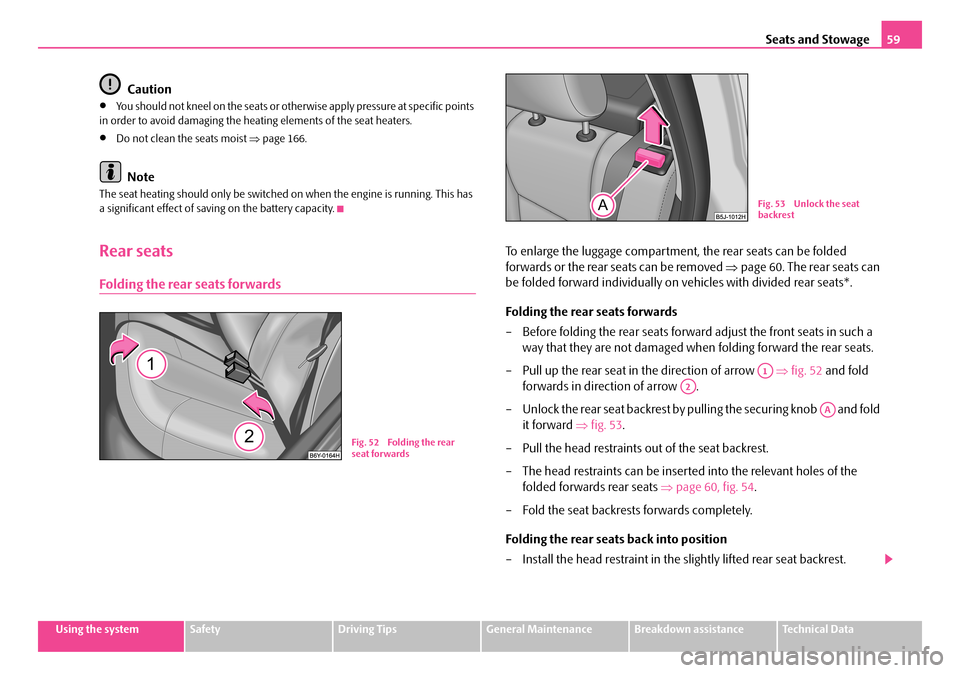
To enlarge the luggage compartment, the rear seats can be folded
forwards or the rear seats can be removed ⇒page 60. The rear seats can
be folded forward individually on vehicles with divided rear seats*.
Folding the rear seats forwards
– Before folding the rear seats forward adjust the front seats in such a
way that they are not damaged when folding forward the rear seats.
– Pull up the rear seat in the direction of arrow ⇒fig. 52 and fold
forwards in direction of arrow .
– Unlock the rear seat backrest by pulling the securing knob and fold
it forward ⇒fig. 53.
– Pull the head restraints out of the seat backrest.
– The head restraints can be inserted into the relevant holes of the
folded forwards rear seats ⇒page 60, fig. 54.
– Fold the seat backrests forwards completely.
Folding the rear seats back into position
– Install the head restraint in the slightly lifted rear seat backrest.
Fig. 52 Folding the rear seat forwards
Fig. 53 Unlock the seat backrest
A1
A2
AA
NKO A05F 20 MR08.book Page 59 Thursday, April 19, 2007 11:34 AM
Page 61 of 242

Seats and Stowage60
– Then push the seat backrest back into the upright position until the
securing knob clicks into place - check by pulling on the rear seat
backrest.
– Make sure that the red surface of the securing knob is not visible
⇒ fig. 53.
– Fold the rear seat back into its original position.
WARNING
•Ensure that the seat belts are not damaged when operating the rear seat backrests. Under no circumstances must the rear seat belts be jammed by the folded back rear seat backrest.
•The belts and the belt locks must be in their original position after folding back the rear seats and seat backre sts - they must be ready to use.
•Pay attention that the rear seat backrest is correctly interlocked. It is only then that the three-point seat belt can reliably fulfil its function.
•The seat backrests must be securely interlocked in position so that no objects in the luggage compartment ca n slide into the passenger compart- ment if there is sudden braking - risk of injury!
Inserting head restraints in the rear seats
– The rear head restraints can be inserted into the relevant holes of the
folded forwards rear seats.
Remove the rear seat
The luggage compartment can be increased in size by removing the rear
seat.
Removing
– Fold the rear seat forwards.
– Press the wire clamps in the direction of the arrow ⇒fig. 55 and
remove the rear seat from its holder.
Installing
– Press the wire clamp in the direct ion of the arrow and place the seat
upholstery in its holder.
– Fold the rear seat back into its original position.
AA
Fig. 54 Rear seats: Head restraints in rear seats
Fig. 55 Remove the rear seats
NKO A05F 20 MR08.book Page 60 Thursday, April 19, 2007 11:34 AM
Page 62 of 242

Seats and Stowage61
Using the systemSafetyDriving TipsGeneral MaintenanceBreakdown assistanceTechnical Data
Pedals
You should use only footmats which do not obstruct the movement of the pedals and have an anti-slip protection.
We recommend only to use footmats from Škoda genuine accessories offered by your Škoda dealer.
Operation of the pedals must not be hindered!
WARNING
•Greater pedal distances may be needed when there is a fault in the brake system.
•Do not place any footmats or other additional floor coverings in the area of the pedals in order to ensure that all the pedals can be fully depressed and are able to return unobstructed to their initial position - risk of accident!
•There must be no objects on the floor which could roll under the pedals. You would then no longer be able to apply the brakes, operate the clutch or accelerator - risk of accident!
luggage compartment
Loading the luggage compartment
Please observe the following in the inte rest of having good handling char-
acteristics of your vehicle:
– Distribute the items of luggage as evenly as possible.
– Place heavy objects as far forward as possible.
– Attach the items of luggage to the lashing eyes or the safety net*
⇒ page 62.
In the event of an accident, there is such a high kinetic energy which is produced by small and light objects that they can caus e severe injuries. The magnitude of the
kinetic energy depends on the speed at wh ich the vehicle is travelling and on the weight of the object. The speed at which the vehicle is travelling is in this case the more significant factor.
Example: In the event of a frontal collision at a speed of 50 km/h, an unsecured object with a weight of 4.5 kg produces an energy, which corresponds to 20 times its own weight. This means that it results in a weight of approx. 90 kg. You can imagine the injuries that can occur, if this “bullet” is flying through the interior compartment and hits an occupant.
WARNING
•Store the objects in the luggage compartment and attach them to the lashing eyes.
•Loose objects in the passenger co mpartment can be thrown forward during a sudden manoeuvre or in case of an accident and can injure the occupants or other oncoming traffic. This risk is still increased, if the objects which are flying around are hit by a deployed airbag. In this case, the objects which are thrown back can injure the occupants - hazard.
•Please note that the handling properties of your vehicle may be affected when transporting heavy objects as a result of the displacement of the centre of gravity. The speed and style of driving must be adjusted accord- ingly.
•The items carried in the luggage compartment should be stored in such a way that no objects are able to slip forward if there are any sudden driving or braking manoeuvres under taken - risk of injury!
•When transporting fastened objects which are sharp and dangerous in the luggage compartment enlarged by folding the rear seats forward or removing the rear seats, ensure the safety of the passengers transported on the other rear seats ⇒page 116, “Correct seated position for the occupants on the rear seats”.
•If the rear seats next to the folded forward seat are occupied, ensure maximum safety, e.g. by placing the goods to be transported in such a way that a folding back of the seat is prevented in case of a rear collision.
•Never drive with the boot lid fully opened or slightly ajar otherwise exhaust gases may get into the interior of the vehicle - risk of poisoning!
NKO A05F 20 MR08.book Page 61 Thursday, April 19, 2007 11:34 AM
Page 63 of 242

Seats and Stowage62
•On no account exceed the permissible axle loads and the permissible gross weight of the vehicle - risk of accident!
•Never transport occupants in the luggage compartment.
Caution
Please ensure that the heating elements of the rear window heater are not damaged as a result of objects sliding in this area.
Note
•Tyre pressure must be adjusted to the load ⇒page 186, fig. 154.
Fastening elements
Eyes are located on the sides of the loading area for lashing the goods to be loaded ⇒ fig. 56.
You can also attach securing nets* to these eyes for lashing small objects.
WARNING
•The load to be transported must be fixed in place in such a way that it cannot move during the journey and when braking.
•If the items of luggage or objects are attached to the lashing eyes with unsuitable or damaged lashing straps, injuries can occur in the event of braking manoeuvres or accidents. In order to prevent the items of luggage being thrown forward, always use suit able lashing straps which are firmly attached to the lashing eyes.
•The whole strength of the net makes it possible to load the pocket with objects of up to 1.5 kg in weight. Heavy objects are not secured sufficiently - risk of injury and net damage!
•The load to be transported must be fixed in place in such a way that it cannot move during the journey and when braking.
Folding hooks*
A folding hook* for attaching small items of luggage, such as bags etc., is provided on both sides of the luggage compartment ⇒fig. 57.
An item of luggage weighing up to 10 kg can be attached to the hook.
WARNING (continued)
Fig. 56 Luggage compartment: Lashing eyes and lashing hooksFig. 57 Luggage compartment: folding hooks
NKO A05F 20 MR08.book Page 62 Thursday, April 19, 2007 11:34 AM
Page 103 of 242

Communication102
Caution
Taking the mobile phone out of the adapter during the call can lead to interruption of the connection. When taking out th e mobile phone, the connection to the factory-fitted antenna is interrupted, this reduces the quality of the transmitting and receiving signal. This might result additionally in harmful radiation from the mobile phone in the interior of the ve hicle and the charging of the telephone battery is interrupted.
Note
•Please also refer to the additional instructions ⇒page 109, “Mobile phones and two-way radio systems”.
•Please contact your Škoda Service Partner if there are any points which are not clear.
•The voice control of the telephone is only possible for adapters with PTT button. Suitable adapters are available at a Škoda Service Partner.
Inserting the mobile phone and adapter
Only one telephone mount is factory-fitted. An adapter for the mobile
phone can be purchased from Škoda original accessories.
Inserting the mobile phone and adapter
– First of all push the adapter in the direction of arrow ⇒fig. 102 up to
the stop into the mount. Press the adapter slightly downwards, until it
locks securely into position.
– Insert the mobile phone into the adapter (as specified in manufac-
turer's instructions).
Removing the mobile phone and adapter
– Press simultaneouly the side locks of the mount and remove the
mobile phone and adapter ⇒fig. 102.
This enables you to make full use of the advantages of a normal carphone (“hands- free system” using a microphone integrated in the vehicle, optimal transmission of signals using an external aerial etc.). The battery of the mobile phone is also constantly charged.
Mobile phone operation
If you select the menu PHONE in the information display and the phone is not in the adapter, INSERT PHONE is shown on the display.
After inserting the phone in the adapter, th e system begins to load the phone book from the phone and the SIM card into the information display.
Fig. 102 Universal prep- aration for the mobile phone
Fig. 103 Multi-func-tional module: control buttons
NKO A05F 20 MR08.book Page 102 Thursday, April 19, 2007 11:34 AM
Page 106 of 242

Communication105
Using the systemSafetyDriving TipsGeneral MaintenanceBreakdown assistanceTechnical Data
•When entering an incorrect PIN code, the system indicates “The PIN is incor- rect ”.
•If the incorrect PIN code has been entered three times consecutively, the card is blocked. With the aid of the person al unblocking code PUK (Personal Unblock Key), the SIM card can be unblocked. The unblocking code can only be entered via the phone keypad and not through the voice control.
Example for entering the PIN code
You can interrupt the dialogue at any time by pressing the PTT button or with the voice command CANCEL.
Select number
– Press the PTT button.
– Give the command DIAL NUMBER after the signal tone.
After giving this command, the system requests the entry of a telephone number. The telephone number can be entered as an interconnected spoken row of digits (complete number), in the form of order of digits (separation through a brief voice pause) or through individually spoken digi ts. After each order of digits (separation through brief voice pause) the detected digits are repeated.
The digits zero to nine are permitted. The system detects no continuous digit combinations such as twenty-three, but only individually spoken digits (two, three).
When entering more than 20 digits, th e system answers with voice response “The number is too long ”.
Additionally for international calls a Plus (+) has to be entered in front of the 20 digits.
Example when entering a telephone number
You can interrupt the dialogue at any time by pressing the PTT button or with the voice command CANCEL.
Repeat last call
– Press the PTT button.
– Give the command REDIAL after the signal tone.
After giving this command, the last number selected via voice input is selected again.
Voice commandAnnouncement
ENTER PIN/PIN CODE“ The PIN please”
e.g. ZERO ONE TWO THREE“Zero One Two Three”
If no entry is put in, the following announcement is made after about 5 sec- onds.
“ Possible commands are: store, repeat, back, delete or more digits ”
STORE“The PIN is saved” (end of dialogue)
Voice commandAnnouncement
DIAL NUMBER“ The number please”
e.g. ZERO SIX ZERO THREE“Zero Six Zero Three”
If no entry is put in, the following announcement is made after about 5 sec- onds.
“ Possible commands are: dial, repeat, back, delete or more digits ”
FIVE SEVEN TWO“Five Seven Two”
DIAL“The number is being dialed”
NKO A05F 20 MR08.book Page 105 Thursday, April 19, 2007 11:34 AM
Page 112 of 242

Communication111
Using the systemSafetyDriving TipsGeneral MaintenanceBreakdown assistanceTechnical Data
Loading a CD
– Touch the button and guide the CD (compact disc) into the CD-
case . The CD is automatically loaded onto the next free position in
the CD-changer. The LED in the corresponding button stops
flashing.
Loading all CDs
– Hold the button pressed and guide all CDs one after the other into
the CD-case . The LEDs in the bu ttons are no longer flashing.
Loading a CD to one definite position
– Touch button . The LEDs in the buttons light up at the memory
spaces, which are already assigned and flash in the case of free
memory spaces.
– Touch the desired button and guide the CD into the CD-case .
Ejecting a CD
– Touch the button , in order to eject a CD. For assigned memory
spaces, now the LEDs light up in the buttons .
– Touch the corresponding button . The CD is ejected.
Ejecting all CDs
– Hold the button pressed for more than 2 seconds, in order to eject
the CDs. All CDs in the CD-cha nger are ejected consecutively.
Note
•Always guide the CD into the CD-cas e with the printed side pointing upwards.
•Never push the CD with force into the CD-case as the insertion is performed automatically.
•After loading a CD into the CD-changer, you must wait until the LED of the corresponding button lights up. Then th e CD-case is free to load the next CD.
•If you have selected a position, on which a CD is already located, this CD will be ejected. Take out the ejected CD and load the desired CD.
•The magazine can take up to six standard CDs (diameter 12 cm). Please do not use 8 cm “single CDs”!
•In order to avoid malfunctions of the chan ger, please never use a CD protective foil or stabilizer (obtainable on the market as CD-accessory).
•Described in this Owner's Manual are only the steps required for the operation of the CD-changer.
•You will find further information for th is setting menu in the Radio Owner's Manual.
Tips for operating the CD-changer
Please pay attention to the following notes for operating the CD-changer.
•Only clean CDs without scratches and damages should be used, in order to guarantee a proper, high-quality CD-playback.
•Affix no labels to the CDs.
•Always store non-used CDs in the original folding box.
•Never expose CDs to direct sun rays.
•Use a soft, non-fluffy cloth to clean the CDs. Wipe the CD straight-lined from the middle to the outside. Strong dirt mu st be eliminated with usual CD-cleaner.
•Please never use liquids such as gasoline, paint thinner or disk cleaner, other- wise the surface of the CD could get damaged.
Precaution measures for laser equipment
Laser equipment is classified according to DIN IEC 76 (CO) 6/VDE 0837 in the safety categories 1 - 4.
The Škoda CD-changer correspond s to the safety category 1.
AC
AB
AD
AC
ABAD
ACAD
ADAB
AA
AD
AD
AA
AB
ADAB
NKO A05F 20 MR08.book Page 111 Thursday, April 19, 2007 11:34 AM