2007 Seat Altea lock
[x] Cancel search: lockPage 119 of 302

Lights and visibility117
Safety First
Operating instructions
Tips and Maintenance
Te c h n i c a l D a t a
Interior lightsInterior front light, type 1 The switch ⇒fig. 78 is used to select the following positions:
Courtesy light position
Rocker switch in flat position (not ac tivated). The interior lights are automat-
ically switched on when the vehicle is unlocked or the key removed from the
ignition lock and turn off about 20 secon ds after the closure of the doors. The
interior lights are switched off when the vehicle is locked or when the ignition
is switched on.
Interior light switched on
Push the switch to the position
.
Interior light switched off O
Push the switch to the position O ⇒fig. 78 .
Note
If not all the vehicle doors are closed, th e interior lights will be switched off
after approx. 10 minutes, providing the key has been removed and the cour-
tesy light position selected. This prevents the battery discharging.Interior front light, type 2 The switch ⇒fig. 79 is used to select the following positions:
Courtesy light position
Rocker switch in flat position (not ac tivated). The interior lights are automat-
ically switched on when the vehicle is unlocked or the key removed from the
ignition lock and turn off about 20 seconds after the closure of the doors. The
interior lights are switched off when th e vehicle is locked or when the ignition
is switched on.
Fig. 78 Detail of the roof:
Front reading light
AA
Fig. 79 Detail of the roof:
Front reading light
AA
altea_ingles_0706.book Seite 117 Mittwoch, 30. August 2006 3:48 15
Page 121 of 302

Lights and visibility119
Safety First
Operating instructions
Tips and Maintenance
Te c h n i c a l D a t a
Rear interior and reading lights* The switch ⇒fig. 82 is used to select the following positions:
Interior light switched off 0
In switch position ⇒fig. 82 , the interior and reading lights are switched
off.
Switching on the reading light
Turn the switch to position (left reading light) or to position (right
reading light).
Courtesy light position
Turn the control to position . The interior lights are automatically switched
on when the vehicle is unlocked or the key removed from the ignition lock The
light turns off about 20 seconds after the closure of the doors. The interior
lights are switched off when the vehicle is locked or when the ignition is
switched on. Interior lights or both reading lights switched on
Turn the control to position .
Note
If not all the vehicle doors are closed, th
e interior lights will be switched off
after approx. 10 minutes, providing the key has been removed and the cour-
tesy light position selected. This prevents the battery discharging.VisibilitySun visorsThe sun visors for the driver and the front passenger can be pulled out of their
mountings in the centre of the vehicle and turned towards the doors ⇒fig. 83
.
Fig. 82 Detail of the roof:
Rear interior light and
reading lights
AC
A1A2
A4
A3
A5
Fig. 83 Sun visor on the
driver side
A1
altea_ingles_0706.book Seite 119 Mittwoch, 30. August 2006 3:48 15
Page 123 of 302

Lights and visibility121
Safety First
Operating instructions
Tips and Maintenance
Te c h n i c a l D a t a
Optional heated windscreen in the wiper blade* area (page
In some countries and with some versions, there is the possibility of heating
the windscreen in the area of the windscreen wiper blades in order to aid de-
icing in the zone.
This function is activated by turning the exterior heated rearview mirror*
control forwards
⇒page 125.
WARNING
•
Worn and dirty wiper blades obstruct visibility and reduce safety levels.
•
In cold conditions, you should not use the wash / wipe system unless
you have warmed the windscreen with the heating and ventilation system.
The washer fluid could otherwise freeze on the windscreen and obscure
your view of the road.
•
Always note the corresponding warnings on ⇒page 219.Caution
In icy conditions, always check that th e wiper blades are not frozen to the
glass before using the wipers for the fi rst time. If you switch on the wipers
when the wiper blades are frozen to the windscreen, you could damage both
the wiper blades and the wiper motor.
Note
•
The windscreen wipers will only work when the ignition is switched on.
•
In vehicles fitted with alarms and in certain versions, the windscreen
wipers only operate when the igniti on is on and the bonnet closed.
•
When in use, the wipers do not go as far as the rest position. When the
lever is moved to position 0, they are totally hidden.
•
The next speed down will automatically be selected if wiper speed
⇒ page 120, fig. 84 or is selected when the vehicle stops. The set speed
will be resumed when the vehicle starts again.
•
The windscreen will be wiped again after approximately five seconds once
the “automatic wipe/wash system” has been operated while the vehicle is in
transit (automatic function). If the wi ndscreen wiper function is activated
within three seconds of the automatic function, a new cleaning cycle begins
without performing the final wipe. To reactivate the “automatic” function the
ignition must be turned off and on again.
•
When the “intermittent wi pe function” is on, the intervals are directly
proportional to the speed. This way, the higher the vehicle speed the shorter
the intervals.
•
The wiper will try to wipe away any obstacles that are on the windscreen.
The wiper will stop moving if the obstacle blocks its path. Remove the
obstacle and switch the wiper back on again.
•
Before removing any objects that may be trapped in the side areas of the
windscreen, always move the wiper arms to the service position
(horizontal).
A2
A3
altea_ingles_0706.book Seite 121 Mittwoch, 30. August 2006 3:48 15
Page 133 of 302
Seats and stowage131
Safety First
Operating instructions
Tips and Maintenance
Te c h n i c a l D a t a
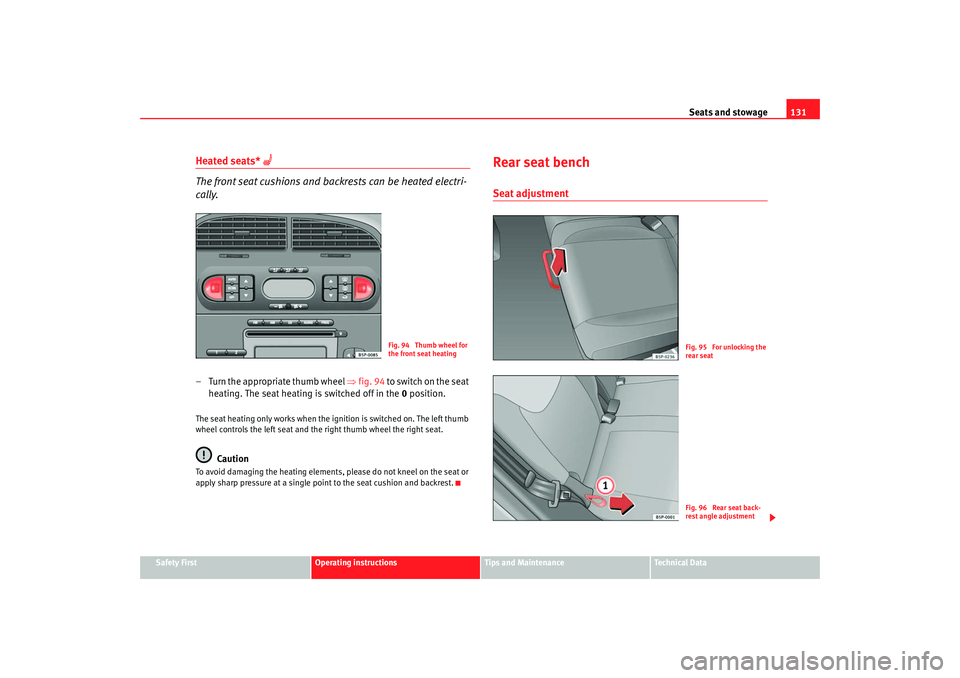
Heated seats*
The front seat cushions and backrests can be heated electri-
cally.
– Turn the appropriate thumb wheel ⇒fig. 94 to switch on the seat
heating. The seat heating is switched off in the 0 position.The seat heating only works when the ignition is switched on. The left thumb
wheel controls the left seat and the right thumb wheel the right seat.
Caution
To avoid damaging the heating elements, please do not kneel on the seat or
apply sharp pressure at a single poin t to the seat cushion and backrest.
Rear seat benchSeat adjustment
Fig. 94 Thumb wheel for
the front seat heating
Fig. 95 For unlocking the
rear seatFig. 96 Rear seat back-
rest angle adjustment
altea_ingles_0706.book Seite 131 Mittwoch, 30. August 2006 3:48 15
Page 134 of 302

Seats and stowage
132
The seats may be moved forwards and backwards independently.
The movement can be 1/3 or 2/3 of the seat. There are various
possible positions.
Adjusting reach
– In the seated position, unlock the lever in the direction of the arrow ⇒page 131, fig. 95 .
– Push the seat backwards or forwards to the desired position.
Backrest angle adjustment
– Hold the backrest at the top. Pull the loop on the side of the seat
⇒ page 131, fig. 96 in the direction of the arrow and hold the
loop in this position. Push the backrest to the required position
and release the loop.
WARNING
•
Adjust the seat only when the vehicle is stationary. Otherwise your seat
could move unexpectedly while the vehicle is moving. This could increase
the risk of an accident and therefore injury.
•
Do not push the seatbacks down until the seat is moved, this is to avoid
damage to the centre console.
•
Ensure that the seat, once mo ved, is fixed in position.Note
•
In order to maintain the maximum luggage compartment space, put the
seatbacks in normal position, without moving.
•
In order to maintain the maximum space without putting the seatbacks
down, move the seats forward to the desired position.
Folding the seat backrests down – Pull the loop on the side of the seat ⇒ fig. 97 .In this position the back rest is locked. This is the reason why the loop located
on the side of the seat must be pulled in the direction of the arrow to open the
backrest.
WARNING
•
You should check that the backrest has engaged properly in position
after the loop is released.
•
The locking system loops on the seat s may not, for safety reasons, be
used to secure any items.
A1
Fig. 97 Folding or
opening the rear seat
backrestsA1
altea_ingles_0706.book Seite 132 Mittwoch, 30. August 2006 3:48 15
Page 135 of 302

Seats and stowage133
Safety First
Operating instructions
Tips and Maintenance
Te c h n i c a l D a t a
Folding the rear seat backrests down– Pull the loop on the side of the seat ⇒fig. 98 in the direction
of the arrow and lift the seat backrest into position.
WARNING
•
You should check that the backrest has engaged properly in position
after the loop is released.
•
The locking system loops on the seats may not, for safety reasons, be
used to secure any items.
•
After locking the seat backrest into position ensure that the seat belts
protrude from the seat.
Stowage compartmentsStowage compartment on the front passenger sideThe compartment can be opened by pulling the lever ⇒fig. 99 .
WARNING
Always keep the stowage compartment cover closed while the vehicle is in
motion to reduce the risk of injury during a sudden braking manoeuvre or
in the event of an accident.
Fig. 98 Folding or
opening the front seat
backrestsA1
Fig. 99 Passenger side:
Stowage compartment
altea_ingles_0706.book Seite 133 Mittwoch, 30. August 2006 3:48 15
Page 136 of 302
Seats and stowage
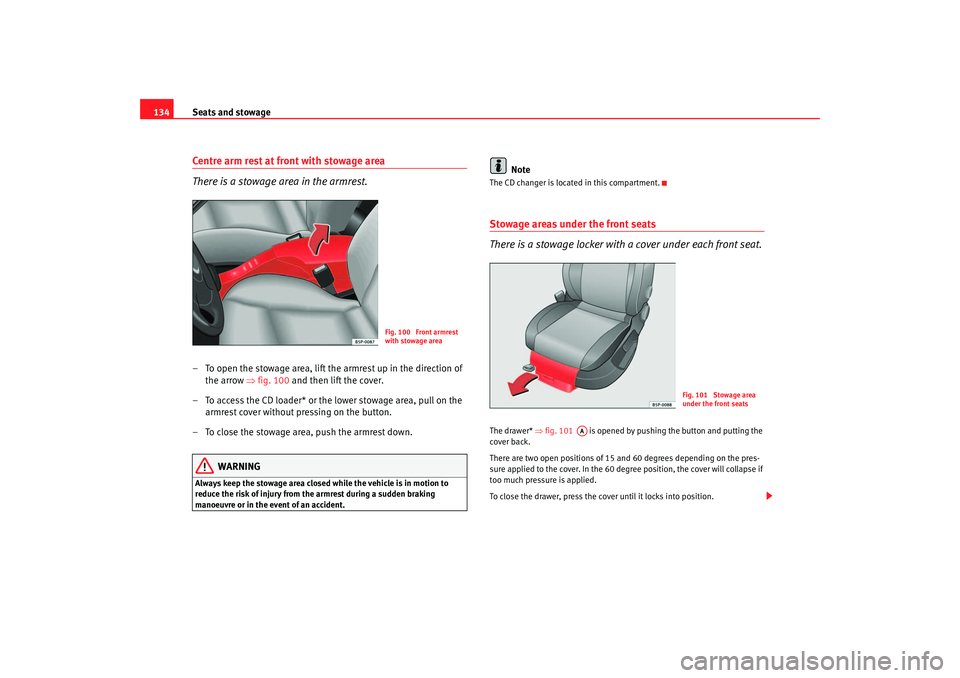
134Centre arm rest at front with stowage area
There is a stowage area in the armrest.– To open the stowage area, lift the armrest up in the direction of
the arrow ⇒fig. 100 and then lift the cover.
– To access the CD loader* or the lower stowage area, pull on the armrest cover without pressing on the button.
– To close the stowage area, push the armrest down.
WARNING
Always keep the stowage area closed while the vehicle is in motion to
reduce the risk of injury from the armrest during a sudden braking
manoeuvre or in the event of an accident.
Note
The CD changer is located in this compartment.Stowage areas under the front seats
There is a stowage locker with a cover under each front seat.The drawer* ⇒fig. 101 is opened by pushing the button and putting the
cover back.
There are two open positions of 15 and 60 degrees depending on the pres-
sure applied to the cover. In the 60 degree position, the cover will collapse if
too much pressure is applied.
To close the drawer, press the cover until it locks into position.
Fig. 100 Front armrest
with stowage area
Fig. 101 Stowage area
under the front seats
AA
altea_ingles_0706.book Seite 134 Mittwoch, 30. August 2006 3:48 15
Page 154 of 302

Heating, Ventilation and Air conditioning
152
NotePlease observe the general notes ⇒page 158.Heating and cooling the interiorHeating of the vehicle interior
– Turn the temperature selector ⇒fig. 125 clockwise to select
the required temperature.
– Turn the blower switch to one of the settings 1-4.
– Use the air distribution control to guide the flow of air in the required direction: (to the windscreen), (to the upper
body), (to the foot well) and (to the windscreen and to the
foot well). Cooling the passenger compartment
– Switch on the air conditioner using the button
⇒page 151,
fig. 124 .
– Turn the temperature selector anti-clockwise until the desired cooling output is reached.
– Turn the blower switch to one of the settings 1-4.
Fig. 125 On the dash panel: Climatic controls
A1
AC
altea_ingles_0706.book Seite 152 Mittwoch, 30. August 2006 3:48 15