2007 SATURN AURA lock
[x] Cancel search: lockPage 194 of 406

Setting the Time
Your vehicle has a radio with aH(clock) button
for setting the time and date.
To set the time and date, follow these instructions:
1. Turn the radio on.
2. Press the
Hbutton and the HR, MIN, MM,
DD, YYYY (hour, minute, month, day, and
year) displays.
3. Press the pushbutton located under any one
of the labels to be changed. Every time the
pushbutton is pressed again, the time or
the date if selected, increases by one.
Another way to increase the time or date, is
to press the right
¨SEEK arrow or\
FWD (forward) button.
To decrease the time or date, press the left
©SEEK arrow orsREV (reverse)
button, or turn the
fknob, located on the
upper right side of the radio.The date does not automatically display. To see
the date press the
H(clock) button while the radio
is on. The date with display times out after a
few seconds and goes back to the normal radio
and time display.
To change the time default setting from 12 hour to
24 hour or to change the date default setting
from month/day/year to day/month/year, follow
these instructions:
1. Press the
Hbutton and then the pushbutton
located under the forward arrow label. Once
the time 12H and 24H, and the date
MM/DD/YYYY (month, day, and year) and
DD/MM/YYYY (day, month, and year)
displays.
2. Press the pushbutton located under the
desired option.
3. Press the
Hbutton again to apply the
selected default, or let the screen time out.
194
ProCarManuals.com
Page 195 of 406

Radio with CD (MP3)
Radio Data System (RDS)
The audio system has a Radio Data System
(RDS). The RDS feature is available for use only
on FM stations that broadcast RDS information.
This system relies upon receiving specic
information from these stations and only workswhen the information is available. While the radio
is tuned to an FM-RDS station, the station
name or call letters display. In rare cases, a radio
station can broadcast incorrect information that
causes the radio features to work improperly. If this
happens, contact the radio station.
Playing the Radio
O
(Power/Volume):Press theO(power) knob
to turn the system on and off.
Turn the
O(volume) knob clockwise or
counterclockwise to increase or decrease the
volume.
195
ProCarManuals.com
Page 198 of 406

Setting the Tone
(Bass/Midrange/Treble)
BASS/MID/TREB (Bass, Midrange, or Treble):
To adjust bass, midrange, or treble, press the
fknob until the tone control labels display.
Continue pressing to highlight the desired label, or
press the pushbutton positioned under the
desired label. Turn the
fknob clockwise or
counterclockwise to adjust the highlighted setting.
The highlighted setting can also be adjusted by
pressing either SEEK arrow,
\FWD (forward) or
sREV (reverse) button until the desired
levels are obtained. If a station’s frequency is
weak, or has static, decrease the treble.
To quickly adjust bass, midrange, or treble to the
middle position, press the pushbutton positioned
under the BASS, MID, or TREB label for more than
two seconds. A beep sounds and the level
adjusts to the middle position.
To quickly adjust all tone and speaker controls to
the middle position, press the
fknob for more
than two seconds until a beep sounds.EQ (Equalization):Press this button to select
preset equalization settings.
To return to the manual mode, press the EQ button
until Manual displays or start to manually adjust the
bass, midrange, or treble by pressing the
fknob.
Adjusting the Speakers (Balance/Fade)
BAL/FADE (Balance/Fade):To adjust balance
or fade, press the
fknob until the speaker control
labels display. Continue pressing to highlight the
desired label, or press the pushbutton positioned
under the desired label. Turn the
fknob
clockwise or counterclockwise to adjust the
highlighted setting. The highlighted setting can
also be adjusted by pressing either SEEK arrow,
\FWD orsREV button until the desired
levels are obtained.
To quickly adjust balance or fade to the middle
position, press the pushbutton positioned under the
BAL or FADE label for more than two seconds.
A beep sounds and the level adjusts to the middle
position.
To quickly adjust all speaker and tone controls to
the middle position, press the
fknob for more
than two seconds until a beep sounds.
198
ProCarManuals.com
Page 199 of 406

Category (CAT) Button Option
CAT (Category):The CAT button does not
function in this Hybrid vehicle.
Radio Messages
Calibration Error:The audio system has been
calibrated for your vehicle from the factory. If
Calibration Error displays, it means that the radio
has not been congured properly for your
vehicle and it must be returned to your
dealer/retailer for service.
Locked:This message is displayed when the
THEFTLOCK
®system has locked up the
radio. Take the vehicle to your dealer/retailer for
service.
If any error occurs repeatedly or if an error cannot
be corrected, contact your dealer/retailer.
Playing an MP3 CD-R or CD-RW Disc
If your radio system has a single CD (MP3) player,
it is capable of playing an MP3 CD-R or CD-RW
disc. For more information on how to play an MP3
CD-R or CD-RW disc, seeUsing an MP3 on
page 200later in this section.
CD Messages
CHECK DISC:If this message displays and/or
the CD ejects, it could be for one of the following
reasons:
It is very hot. When the temperature returns to
normal, the CD should play.
You are driving on a very rough road. When the
road becomes smoother, the CD should play.
The CD is dirty, scratched, wet, or
upside down.
The air is very humid. If so, wait about an hour
and try again.
There could have been a problem while burning
the CD.
The label could be caught in the CD player.
If the CD is not playing correctly, for any other
reason, try a known good CD.
If any error occurs repeatedly or if an error cannot
be corrected, contact your dealer/retailer. If the
radio displays an error message, write it down and
provide it to your dealer/retailer while reporting
the problem.
199
ProCarManuals.com
Page 200 of 406

Using the Auxiliary Input Jack
Your radio system has an auxiliary input jack
located on the lower right side of the faceplate.
This is not an audio output; do not plug the
headphone set into the front auxiliary input jack.
You can however, connect an external audio
device such as an iPod, laptop computer, MP3
player, CD changer, or cassette tape player, etc. to
the auxiliary input jack for use as another source
for audio listening.
Drivers are encouraged to set up any auxiliary
device while the vehicle is in PARK (P). See
Defensive Driving on page 210for more
information on driver distraction.
To use a portable audio player, connect a 3.5 mm
(1/8 inch) cable to the radio’s front auxiliary
input jack. When a device is connected, press the
radio CD/AUX button to begin playing audio
from the device over the vehicle speakers.
O(Power/Volume):Turn this knob clockwise or
counterclockwise to increase or decrease the
volume of the portable player. You might need to
do additional volume adjustments from the
portable device if the volume is not loud or soft
enough.BAND:Press this button to listen to the radio
while a portable audio device is playing. The
portable audio device continues playing, so you
might want to stop it or turn it off.
CD/AUX (CD/Auxiliary):Press this button to play
a CD while a portable audio device is playing.
Press this button again and the system begins
playing audio from the connected portable audio
player. If a portable audio player is not
connected, No Input Device Found displays.
Using an MP3
MP3 CD-R or CD-RW Disc
The radio plays MP3 les that were recorded on a
CD-R or CD-RW disc. The les can be recorded
with the following xed bit rates: 32 kbps, 40 kbps,
56 kbps, 64 kbps, 80 kbps, 96 kbps, 112 kbps,
128 kbps, 160 kbps, 192 kbps, 224 kbps,
256 kbps, and 320 kbps or a variable bit rate.
Song title, artist name, and album are available for
display by the radio when recorded using ID3
tags version 1 and 2.
200
ProCarManuals.com
Page 206 of 406
Theft-Deterrent Feature
THEFTLOCK®is designed to discourage theft of
your vehicle’s radio. The feature works
automatically by learning a portion of the Vehicle
Identication Number (VIN). If the radio is
moved to a different vehicle, it does not operate
and LOCKED displays.
With THEFTLOCK
®activated, the radio cannot
operate if stolen.
Audio Steering Wheel Controls
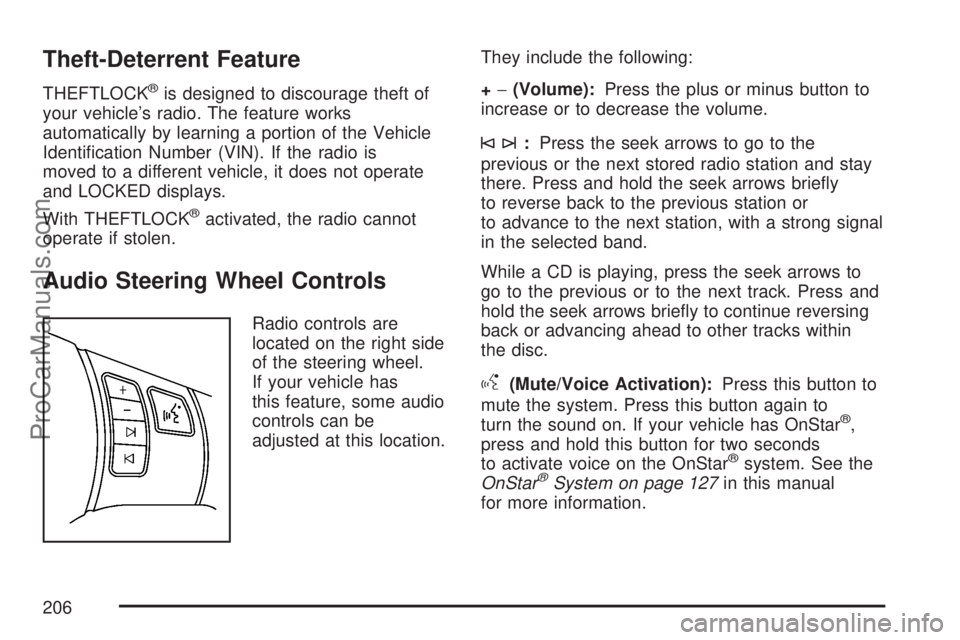
Radio controls are
located on the right side
of the steering wheel.
If your vehicle has
this feature, some audio
controls can be
adjusted at this location.They include the following:
+−(Volume):Press the plus or minus button to
increase or to decrease the volume.
©¨:Press the seek arrows to go to the
previous or the next stored radio station and stay
there. Press and hold the seek arrows briey
to reverse back to the previous station or
to advance to the next station, with a strong signal
in the selected band.
While a CD is playing, press the seek arrows to
go to the previous or to the next track. Press and
hold the seek arrows briey to continue reversing
back or advancing ahead to other tracks within
the disc.
g(Mute/Voice Activation):Press this button to
mute the system. Press this button again to
turn the sound on. If your vehicle has OnStar
®,
press and hold this button for two seconds
to activate voice on the OnStar
®system. See the
OnStar®System on page 127in this manual
for more information.
206
ProCarManuals.com
Page 209 of 406

Your Driving, the Road, and
Your Vehicle............................................ 210
Defensive Driving...................................... 210
Drunken Driving........................................ 211
Control of a Vehicle.................................. 214
Braking...................................................... 214
Antilock Brake System (ABS).................... 215
Braking in Emergencies............................. 217
Traction Control System (TCS).................. 217
Electronic Stability Control......................... 219
Steering.................................................... 221
Off-Road Recovery.................................... 224
Passing..................................................... 224
Loss of Control.......................................... 226
Driving at Night......................................... 227Driving in Rain and on Wet Roads............ 228
City Driving............................................... 231
Freeway Driving........................................ 232
Before Leaving on a Long Trip.................. 233
Highway Hypnosis..................................... 234
Hill and Mountain Roads........................... 235
Winter Driving........................................... 237
If Your Vehicle is Stuck in Sand, Mud,
Ice, or Snow.......................................... 241
Rocking Your Vehicle to Get It Out........... 242
Loading Your Vehicle................................ 242
Towing........................................................ 247
Towing Your Vehicle................................. 247
Recreational Vehicle Towing...................... 247
Towing a Trailer........................................ 250
Section 4 Driving Your Vehicle
209
ProCarManuals.com
Page 215 of 406

Avoid needless heavy braking. Some people drive
in spurts — heavy acceleration followed by
heavy braking — rather than keeping pace with
traffic. This is a mistake. The brakes may not have
time to cool between hard stops. The brakes
will wear out much faster if you do a lot of heavy
braking. If you keep pace with the traffic and
allow realistic following distances, you will
eliminate a lot of unnecessary braking. That means
better braking and longer brake life.
If your vehicle’s engine ever stops while you are
driving, brake normally but do not pump the
brakes. If you do, the pedal may get harder to
push down. If the engine stops, you will still have
some power brake assist. But you will use it
when you brake. Once the power assist is used
up, it may take longer to stop and the brake pedal
will be harder to push.
Adding non-Saturn accessories can affect your
vehicle’s performance. SeeAccessories and
Modications on page 253.Antilock Brake System (ABS)
Your vehicle has the Antilock Brake System (ABS),
an advanced electronic braking system that will
help prevent a braking skid.
When you start the engine and begin to drive
away, ABS will check itself. You might hear
a momentary motor or clicking noise while this test
is going on, and you might even notice that the
brake pedal moves a little. This is normal.
If there is a problem
with ABS, this warning
light will stay on.
SeeAntilock Brake
System Warning Light
on page 169.
215
ProCarManuals.com