2007 SATURN AURA steering wheel
[x] Cancel search: steering wheelPage 185 of 406

HOOD AJAR
This message displays if the hood is not fully
closed. Make sure that the hood is closed
completely. The vehicle will not auto stop when
the hood is ajar.
ICE POSSIBLE
This message displays when the outside air
temperature is cold enough to create icy road
conditions. Adjust your driving accordingly.
KEY FOB BATT (Battery) LOW
This message displays if the Remote Keyless
Entry (RKE) transmitter battery is low. Replace the
battery in the transmitter. See “Battery
Replacement” underRemote Keyless Entry (RKE)
System Operation on page 90.
LOW FUEL
This message displays when your vehicle is low
on fuel. Rell the fuel tank as soon as possible.
SeeFuel Gage on page 177,Fuel on page 255,
andFilling the Tank on page 258for more
information.
LOW TRACTION
If your vehicle has the Traction Control System
(TCS), this message displays when the system is
actively limiting wheel spin. Slippery road
conditions may exist if this message is displayed,
so adjust your driving accordingly. This message
stays on for a few seconds after the system stops
limiting wheel spin. SeeTraction Control System
(TCS) on page 217for more information.
LOW WASHER FLUID
This message displays when the vehicle’s
windshield washer uid is low. Fill the windshield
washer uid reservoir to the proper level as
soon as possible. SeeWindshield Washer Fluid
on page 282.
POWER STEERING
This message displays if a problem has been
detected with the electric power steering. Have
your vehicle serviced by your retailer immediately.
PUSH PARK PEDAL
This message displays if the parking brake is left
engaged. SeeParking Brake on page 119for
more information.
185
ProCarManuals.com
Page 193 of 406

Keeping your mind on the drive is important for
safe driving. SeeDefensive Driving on page 210.
Here are some ways in which you can help
avoid distraction while driving.
While your vehicle is parked:
Familiarize yourself with all of its controls.
Familiarize yourself with its operation.
Set up your audio system by presetting your
favorite radio stations, setting the tone, and
adjusting the speakers. Then, when driving
conditions permit, you can tune to your favorite
radio stations using the presets and steering
wheel controls if the vehicle has them.Notice:Before adding any sound equipment
to your vehicle, such as an audio system,
CD player, CB radio, mobile telephone,
or two-way radio, make sure that it can be
added by checking with your dealer/retailer.
Also, check federal rules covering mobile radio
and telephone units. If sound equipment can
be added, it is very important to do it properly.
Added sound equipment may interfere with
the operation of your vehicle’s engine, radio, or
other systems, and even damage them. Your
vehicle’s systems may interfere with the
operation of sound equipment that has been
added.
Your vehicle has a feature called Retained
Accessory Power (RAP). With RAP, the audio
system can be played even after the ignition
is turned off. SeeRetained Accessory Power
(RAP) on page 109for more information.
193
ProCarManuals.com
Page 197 of 406

Storing a Radio Station as a Favorite
Drivers are encouraged to set up their radio station
favorites while the vehicle is parked. Tune to
your favorite stations using the presets, favorites
button, and steering wheel controls if the
vehicle has this feature. SeeDefensive Driving on
page 210.
FAV (Favorites):A maximum of 36 stations can
be programmed as favorites using the
six pushbuttons positioned below the radio station
frequency labels and by using the radio favorites
page button (FAV button). Press the FAV button to
go through up to six pages of favorites, each
having six favorite stations available per page.
Each page of favorites can contain any
combination of AM or FM stations. To store a
station as a favorite, perform the following steps:
1. Tune to the desired radio station.
2. Press the FAV button to display the page
where you want the station stored.3. Press and hold one of the six pushbuttons
until a beep sounds. When that pushbutton
is pressed and released again, the station that
was set, returns.
4. Repeat the steps for each radio station you
want stored as a favorite.
The number of favorites pages can be setup using
the MENU button. To setup the number of
favorites pages, perform the following steps:
1. Press the MENU button to display the radio
setup menu.
2. Press the pushbutton located below the
FAV 1-6 label.
3. Select the desired number of favorites pages
by pressing the pushbutton located below the
displayed page numbers.
4. Press the FAV button, or let the menu time
out, to return to the original main radio
screen showing the radio station frequency
labels and to begin the process of
programming your favorites for the chosen
amount of numbered pages.
197
ProCarManuals.com
Page 206 of 406
Theft-Deterrent Feature
THEFTLOCK®is designed to discourage theft of
your vehicle’s radio. The feature works
automatically by learning a portion of the Vehicle
Identication Number (VIN). If the radio is
moved to a different vehicle, it does not operate
and LOCKED displays.
With THEFTLOCK
®activated, the radio cannot
operate if stolen.
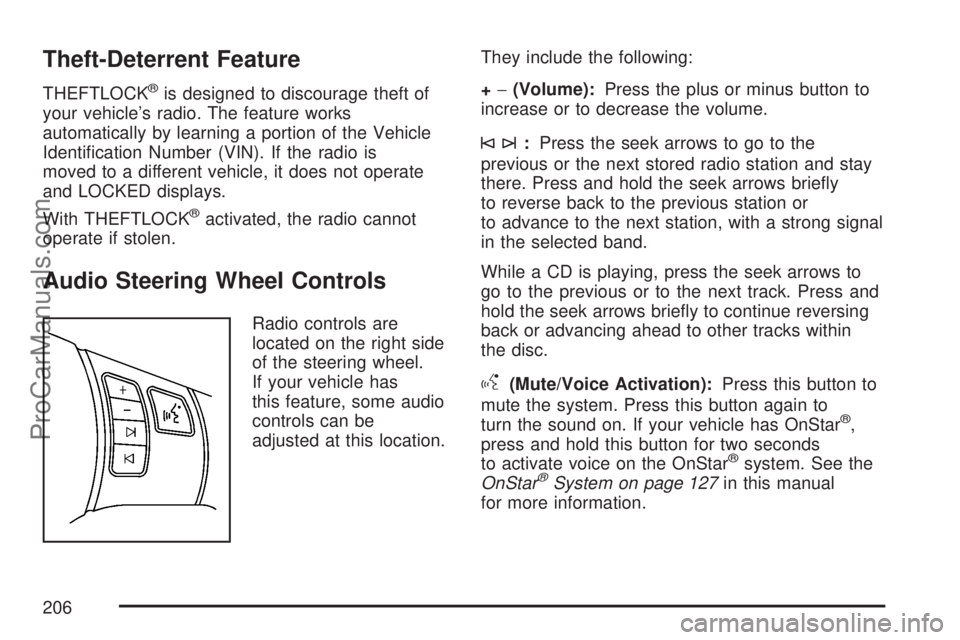
Audio Steering Wheel Controls
Radio controls are
located on the right side
of the steering wheel.
If your vehicle has
this feature, some audio
controls can be
adjusted at this location.They include the following:
+−(Volume):Press the plus or minus button to
increase or to decrease the volume.
©¨:Press the seek arrows to go to the
previous or the next stored radio station and stay
there. Press and hold the seek arrows briey
to reverse back to the previous station or
to advance to the next station, with a strong signal
in the selected band.
While a CD is playing, press the seek arrows to
go to the previous or to the next track. Press and
hold the seek arrows briey to continue reversing
back or advancing ahead to other tracks within
the disc.
g(Mute/Voice Activation):Press this button to
mute the system. Press this button again to
turn the sound on. If your vehicle has OnStar
®,
press and hold this button for two seconds
to activate voice on the OnStar
®system. See the
OnStar®System on page 127in this manual
for more information.
206
ProCarManuals.com
Page 217 of 406

Remember: ABS does not change the time you
need to get your foot up to the brake pedal
or always decrease stopping distance. If you get
too close to the vehicle in front of you, you will not
have time to apply the brakes if that vehicle
suddenly slows or stops. Always leave enough
room up ahead to stop, even though you
have ABS.
Using ABS
Do not pump the brakes. Just hold the brake
pedal down rmly and let antilock work for you.
You might hear the antilock pump or motor
operate, and feel the brake pedal pulsate, but this
is normal.
Braking in Emergencies
With ABS, you can steer and brake at the same
time. In many emergencies, steering can help you
more than even the very best braking.
Traction Control System (TCS)
Your vehicle may have a Traction Control
System (TCS) that limits wheel spin. This is
especially useful in slippery road conditions. The
system operates only if it senses that one or
both of the front wheels are spinning or beginning
to lose traction. When this happens, the system
reduces engine power and may also upshift
the transmission to limit wheel spin. You may feel
or hear the system working, but this is normal.
Also, the traction control system activates
the appropriate corner brakes to gain even quicker
control to limit wheel spin. The LOW TRACTION
message will appear on the Driver Information
Center (DIC) when the traction control system is
limiting wheel spin.
If your vehicle is in cruise control when the
traction control system begins to limit wheel spin,
the cruise control will automatically disengage.
When road conditions allow you to safely
use it again, you may re-engage the cruise control.
SeeCruise Control on page 145.
217
ProCarManuals.com
Page 221 of 406

Notice:If you allow the wheel(s) of one axle to
spin excessively while the ESC, ABS and brake
warning lights and the SERVICE ESC message
are displayed, you could damage the transfer
case. The repairs would not be covered by your
warranty. Reduce engine power and do not spin
the wheel(s) excessively while these lights and
this message are displayed.
The traction control system may activate on dry or
rough roads or under conditions such as heavy
acceleration while turning or abrupt
upshifts/downshifts of the transmission. When this
happens, you may notice a reduction in
acceleration, or may hear a noise or vibration.
This is normal.
If your vehicle is in cruise control when the system
activates, the ESC ACTIVE message will appear
and the cruise control will automatically disengage.
When road conditions allow you to use cruise
again, you may re-engage the cruise control. See
Cruise Control on page 145.
ESC may also turn off automatically if it determines
that a problem exists with the system. If the
problem does not clear itself after restarting the
vehicle, you should see your retailer for service.Adding non-dealer/non-retailer accessories can
affect your vehicle’s performance. SeeAccessories
and Modications on page 253for more
information.
Steering
If the engine stalls while you are driving, the
power steering assist system will continue
to operate until you are able to stop your vehicle.
If you lose power steering assist because the
electric power steering system is not functioning,
you can steer, but it will take more effort.
If you turn the steering wheel in either direction
several times until it stops, or hold the steering
wheel in the stopped position for an extended
amount of time, you may notice a reduced amount
of power steering assist. The normal amount of
power steering assist should return shortly after a
few normal steering movements.
The electric power steering system does not
require regular maintenance. If you suspect
steering system problems, contact your
dealer/retailer for service repairs. SeeDIC
Warnings and Messages on page 182.
221
ProCarManuals.com
Page 222 of 406

Steering Tips
It is important to take curves at a reasonable
speed.
A lot of the “driver lost control” accidents
mentioned on the news happen on curves.
Here is why:
Experienced driver or beginner, each of us is
subject to the same laws of physics when driving on
curves. The traction of the tires against the road
surface makes it possible for the vehicle to change
its path when you turn the front wheels. If there is
no traction, inertia will keep the vehicle going in the
same direction. If you have ever tried to steer a
vehicle on wet ice, you will understand this.
The traction you can get in a curve depends on
the condition of the tires and the road surface, the
angle at which the curve is banked, and your
speed. While you are in a curve, speed is the one
factor you can control.
Suppose you are steering through a sharp curve.
Then you suddenly accelerate. Both control
systems — steering and acceleration — have to
do their work where the tires meet the road.
Adding the sudden acceleration can demand toomuch of those places. You can lose control. See
Traction Control System (TCS) on page 217
andElectronic Stability Control on page 219.
What should you do if this ever happens? Ease up
on the brake or accelerator pedal, steer the
vehicle the way you want it to go, and slow down.
Speed limit signs near curves warn that you
should adjust your speed. Of course, the posted
speeds are based on good weather and road
conditions. Under less favorable conditions you will
want to go slower.
If you need to reduce your speed as you approach
a curve, do it before you enter the curve, while
the front wheels are straight ahead.
Try to adjust your speed so you can “drive”
through the curve. Maintain a reasonable, steady
speed. Wait to accelerate until you are out of
the curve, and then accelerate gently into
the straightaway.
Adding non-dealer/non-retailer accessories can
affect your vehicle’s performance. SeeAccessories
and Modications on page 253.
222
ProCarManuals.com
Page 223 of 406

Steering in Emergencies
There are times when steering can be more
effective than braking. For example, you come
over a hill and nd a truck stopped in your lane, or
a car suddenly pulls out from nowhere, or a
child darts out from between parked cars and
stops right in front of you. You can avoid these
problems by braking — if you can stop in time. But
sometimes you cannot; there is not room. That
is the time for evasive action — steering around
the problem.
Your vehicle can perform very well in emergencies
like these. First apply the brakes. SeeBraking
on page 214. It is better to remove as much speed
as you can from a possible collision. Then steer
around the problem, to the left or right depending
on the space available.An emergency like this requires close attention
and a quick decision. If you are holding the
steering wheel at the recommended 9 and
3 o’clock positions, you can turn it a full
180 degrees very quickly without removing either
hand. But you have to act fast, steer quickly,
and just as quickly straighten the wheel once you
have avoided the object.
The fact that such emergency situations are
always possible is a good reason to practice
defensive driving at all times and wear safety belts
properly.
223
ProCarManuals.com