2007 PONTIAC TORRENT remote start
[x] Cancel search: remote startPage 252 of 490

Z(Eject):Press this button to eject a CD or
DVD. If a CD or DVD is ejected, but not removed,
the player automatically pulls it back in after
15 seconds.
If loading and reading of a CD cannot be
completed, such as unknown format, etc., and the
disc fails to eject, press and hold the CD eject
button for more than ve seconds to force the disc
to eject.
DVD-V (Video) Display Buttons
Once a DVD-V is inserted, the radio display menu
shows several tag options for DVD playing.
Press the pushbuttons located under any desired
tag option during DVD playback. See the tag
options listed below for more information.
The rear seat passenger navigates the DVD-V
menus and controls through the remote control.
See “Remote Control”, underRear Seat
Entertainment System on page 274for more
information. The Video Screen automatically turns
on when the DVD-V is inserted into the DVD slot.
r/j(Play/Pause):Press either the play or
pause icon displayed on the radio system,
to toggle between pausing or restarting playback
of a DVD. If the forward arrow is showing on
display, the system is in pause mode. If the pause
icon is showing on display, the system is in
playback mode. If the DVD screen is off, press the
play button to turn the screen on.
Some DVDs begin playing after the previews have
nished, although there may be a delay of up to
30 seconds. If the DVD does not begin playing the
movie automatically, press the pushbutton
located under the play/pause symbol tag displayed
on the radio. If the DVD still does not play, refer
to the on-screen instructions, if available.
c(Stop):Press this button to stop playing,
rewinding, or fast forwarding a DVD.
r(Enter):Press this button to select the
choices that are highlighted in any menu.
252
Page 254 of 490

r/j(Play/Pause):Press either the play or
pause icon displayed on the radio system,
to toggle between pausing or restarting playback
of a DVD. If the forward arrow is showing on
display, the system is in pause mode. If the pause
icon is showing on display, the system is in
playback mode.
qGroupr:Press this button to cycle through
musical groupings on the DVD-A disc.
Nav (Navigate):Press this button to display
directional arrows for navigating through the
menus.
e(Audio Stream):Press this button to cycle
through audio steam formats located on DVD-A
disc. There is not any type of notication for
the customer to see through the radio display, but
VSM has a text eld that shows audio stream
changing.
Inserting a Disc
To play a disc, gently insert the disc, with the label
side up, into the loading slot. The DVD player
may not accept some paper labeled media. The
player starts loading the disc into the system
and display “Loading Disc” on the radio display.
At the same time, the radio displays a softkey
menu of option(s). Some discs automatically play
the movie while others default to the softkey
menu display which requires the Play, Enter, or
Navigation softkeys to be pressed (either by
softkey or by the rear seat passenger using the
remote control).
Loading a disc into the system, depending on
media type and format, ranges from
5 to 20 seconds for a CD, and up to 30 seconds
for a DVD.
254
Page 279 of 490
Video Screen
The video screen is located in the RSE overhead
console.
To use the video screen, do the following:
1. Push the release button located on the RSE
overhead console.
2. Turn the screen to the desired position.
When the video screen is not in use, push it up
into its locked position.
If a DVD is playing and the screen is raised to its
locked position, the screen will remain on, this
is normal, and the DVD will continue to play
through the previous audio source. Use the remote
control power button or eject the disc to turn off
the screen.
The RSE overhead console contains the IR
transmitters for the wireless headphones and the
IR receivers for the remote control. They are
located at the rear of the console.
Notice:Avoid directly touching the video
screen, as damage may occur. See “Cleaning
the Video Screen” later in this section for
more information.
Remote Control
To use the remote control, aim it at the transmitter
window at the rear of the RSE overhead console
and press the desired button. Direct sunlight
or very bright light may affect the ability of the RSE
transmitter to receive signals from the remote
control. If the remote control does not seem to be
working, the batteries may need to be replaced.
See “Battery Replacement” later in this section.
Objects blocking the line of sight may also affect
the function of the remote control.
If a CD or DVD is in the Radio DVD slot, the
remote control power button can be used to turn
on the video screen display and start the disc. The
radio can also turn on the video screen display.
SeeRadio with CD and DVD on page 239
for more information.
Notice:Storing the remote control in a hot
area or in direct sunlight may damage it,
and the repairs will not be covered by your
warranty. Keep the remote control stored in a
cool, dry place.
279
Page 283 of 490
Problem Recommended Action
No power. The ignition might not be
turned on or in accessory.
The picture does not ll the
screen. There are black
borders on the top and
bottom or on both sides or
it looks stretched out.Check the display mode
settings in the setup menu
by pressing the display
menu button on the remote
control.
In auxiliary mode, the
picture moves or scrolls.Check the auxiliary input
connections at both
devices.
The remote control does
not work.Check to make sure there
is no obstruction between
the remote control and the
transmitter window.
Check the batteries to
make sure they are not
dead or installed
incorrectly.
After stopping the player, I
push Play but sometimes
the DVD starts where I left
off and sometimes at the
beginning.If the stop button was
pressed one time, the DVD
player will resume playing
where the DVD was
stopped. If the stop button
was pressed two times the
DVD player will begin to
play from the beginning of
the DVD.Problem Recommended Action
The auxiliary source is
running but there is no
picture or sound.Check that the RSE video
screen is in the auxiliary
source mode.
Check the auxiliary input
connections at both
devices.
Sometimes the wireless
headphone audio cuts out
or buzzes.Check for obstructions,
low batteries, reception
range, and interference
from cellular telephone
towers or by using your
cellular telephone in the
vehicle.
Check that the
headphones are on
correctly using the L (left)
and R (right) on the
headphones.
I lost the remote and/or
the headphones.See your dealer for
assistance.
The DVD is playing, but
there is no picture or
sound.Check that the RSE video
screen is sourced to the
DVD player.
283
Page 349 of 490

A. Engine Air Cleaner/Filter. SeeEngine Air
Cleaner/Filter on page 354.
B. Engine Oil Fill Cap. See “When to Add Engine
Oil” underEngine Oil on page 349.
C. Engine Oil Dipstick. See “Checking Engine Oil”
underEngine Oil on page 349.
D. Brake Fluid Reservoir. SeeBrakes on
page 369.
E. Engine Compartment Fuse Block. SeeFuses
and Circuit Breakers on page 431.
F. Remote Positive (+) Terminal. SeeJump
Starting on page 373.
G. Engine Coolant Surge Tank. SeeEngine
Coolant on page 357.
H. Windshield Washer Fluid Reservoir. See
Windshield Washer Fluid on page 368.Engine Oil
Checking Engine Oil
It is a good idea to check the engine oil every time
you get fuel. In order to get an accurate reading,
the oil must be warm and the vehicle must be
on level ground.
The engine oil dipstick handle is a yellow loop.
SeeEngine Compartment Overview on page 348
for the location of the engine oil dipstick.
1. Turn off the engine and give the oil
several minutes to drain back into the oil pan.
If you do not do this, the oil dipstick might
not show the actual level.
2. Pull out the dipstick and clean it with a paper
towel or cloth, then push it back in all the
way. Remove it again, keeping the tip down,
and check the level.
349
Page 372 of 490

Battery
Your vehicle has a maintenance free battery.
When it is time for a new battery, get one that has
the replacement number shown on the original
battery’s label. We recommend an ACDelco
®
replacement battery.
For battery replacement, see your dealer or the
service manual. To purchase a service manual,
seeService and Owner PublicationsinService
Publications Ordering Information on page 474.
Warning:Battery posts, terminals, and related
accessories contain lead and lead compounds,
chemicals known to the State of California
to cause cancer and reproductive harm. Wash
hands after handling.
Vehicle Storage
If you are not going to drive your vehicle for
25 days or more, remove the black, negative (-)
cable from the battery. This will help keep
your battery from running down.
{CAUTION:
Batteries have acid that can burn you and
gas that can explode. You can be badly
hurt if you are not careful. SeeJump
Starting on page 373for tips on working
around a battery without getting hurt.
You must close all doors and the liftgate before
reconnecting the battery. After reconnecting
the battery, you must press the unlock button on
the remote keyless entry transmitter. Failure
to follow this procedure may result in a sounding
alarm. Pressing unlock on the remote keyless
entry transmitter would stop the sounding alarm.
372
Page 374 of 490
Notice:If you leave your radio or other
accessories on during the jump starting
procedure, they could be damaged. The repairs
would not be covered by your warranty.
Always turn off your radio and other
accessories when jump starting your vehicle.
3. Turn off the ignition on both vehicles. Unplug
unnecessary accessories plugged into the
cigarette lighter or the accessory power outlet.
Turn off the radio and all lamps that are not
needed. This will avoid sparks and help save
both batteries. And it could save your radio!
4. Open the hoods and locate the positive (+)
and negative (−) terminal locations on each
vehicle.
You will not need to access your battery for
jump starting. Your vehicle has a remote
positive (+) and a remote negative (−) jump
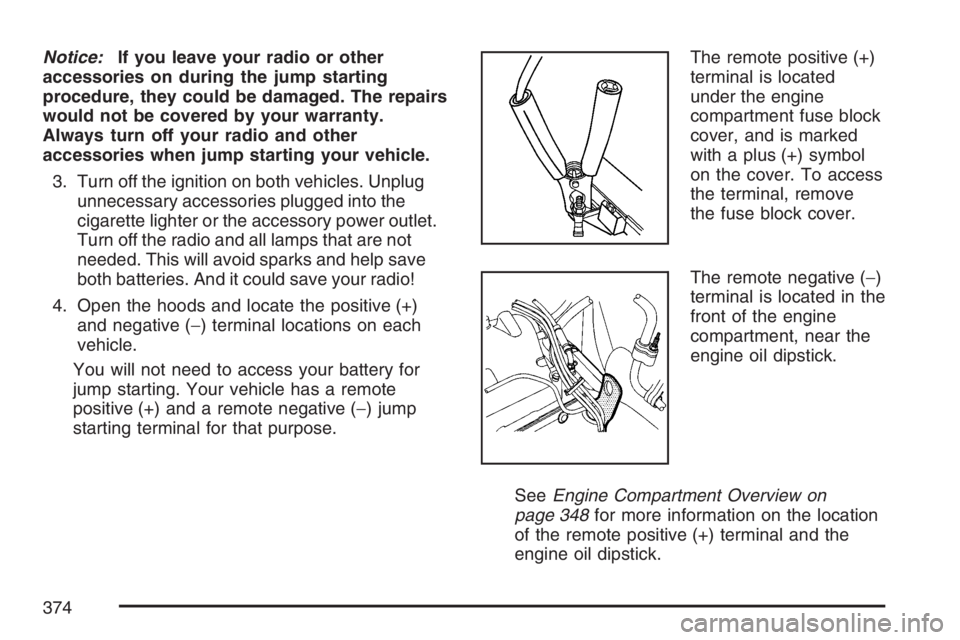
starting terminal for that purpose.The remote positive (+)
terminal is located
under the engine
compartment fuse block
cover, and is marked
with a plus (+) symbol
on the cover. To access
the terminal, remove
the fuse block cover.
The remote negative (−)
terminal is located in the
front of the engine
compartment, near the
engine oil dipstick.
SeeEngine Compartment Overview on
page 348for more information on the location
of the remote positive (+) terminal and the
engine oil dipstick.
374
Page 377 of 490
9. Connect the other end of the negative (−) cable
at least 18 inches (45 cm) away from the dead
battery, but not near engine parts that move.
The electrical connection is just as good there,
and the chance of sparks getting back to the
battery is much less.
Your vehicle has a remote negative (−)
terminal for this purpose.
10. Now start the vehicle with the good battery
and run the engine for a while.
11. Press the unlock button on the remote
keyless entry transmitter to disarm your
content theft-deterrent system.
12. Try to start the vehicle that had the dead
battery. If it will not start after a few tries, it
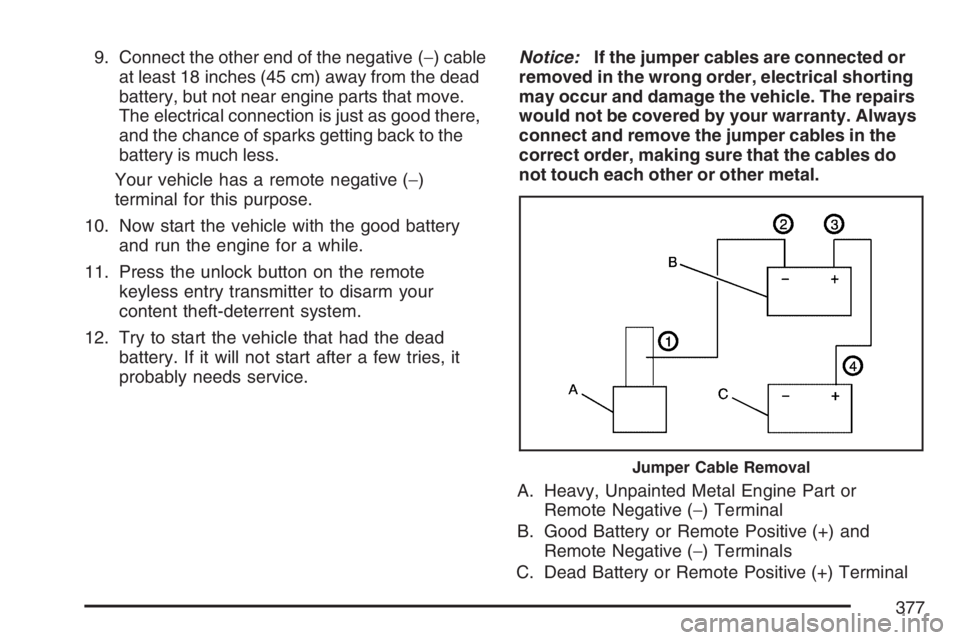
probably needs service.Notice:If the jumper cables are connected or
removed in the wrong order, electrical shorting
may occur and damage the vehicle. The repairs
would not be covered by your warranty. Always
connect and remove the jumper cables in the
correct order, making sure that the cables do
not touch each other or other metal.
A. Heavy, Unpainted Metal Engine Part or
Remote Negative (−) Terminal
B. Good Battery or Remote Positive (+) and
Remote Negative (−) Terminals
C. Dead Battery or Remote Positive (+) Terminal
Jumper Cable Removal
377