2007 PONTIAC TORRENT climate control
[x] Cancel search: climate controlPage 166 of 490

Climate Controls
Climate Control System
With this system you can control the heating,
cooling, and ventilation for the vehicle.
Operation
Temperature Control:Turn the center knob
clockwise or counterclockwise to increase
or decrease the temperature inside the vehicle.
9(Fan):Turn the left knob clockwise or
counterclockwise to increase or decrease the fan
speed. In any setting other than off, the fan
will run continuously with the ignition on. To turn
off the air completely, turn the fan to 0 and
select the recirculation button.
Use the right knob to select from the following
modes:
There is one position between each mode to nely
adjust airow position.
166
Page 168 of 490

For quick cool down on hot days, do the following:
1. Select the vent mode.
2. Select the outside air.
3. Select air conditioning.
4. Select the coolest temperature.
5. Select the highest fan speed.
6. Once the vehicle’s interior temperature is
below the outside temperature, select
recirculation mode for enhanced cooling.
Using these settings together for long periods of
time may cause the air inside of the vehicle
to become too dry. To prevent this from
happening, after the air inside of the vehicle has
cooled, turn the recirculation mode off.
The air conditioning system removes moisture
from the air, so you may sometimes notice a small
amount of water dripping underneath the vehicle
while idling or after turning off the engine. This
is normal.
((Heated Seats):If your vehicle has heated
seats, seeHeated Seats on page 11.
Defogging and Defrosting
Fog or frost on the inside of windows is a result of
high humidity (moisture) condensing on the cool
window glass. This can be minimized if the climate
control system is used properly. To avoid fogging
windows on rainy and humid days at temperatures
above freezing, turn on the air conditioning
system. Also, it is best to avoid the use of the
recirculation mode, except when maximum
A/C performance is needed or for short times to
avoid exterior odors.
Use the defog mode to clear the windows of fog
or moisture and warm the passengers. Use
the defrost mode to remove fog or frost from the
windshield more quickly. When you select either of
these modes, or the oor mode which also
helps defog the windows slightly, the system runs
the air conditioning compressor and cancels
recirculation mode to dry the air; however, the
recirculation light will stay on. For best results,
clear all snow and ice from the windshield before
defrosting.
Turn the right knob to select the defog or
defrost mode.
168
Page 179 of 490

If the word OFF or the off symbol is lit on the
airbag status indicator, it means that the
passenger sensing system has turned off the right
front passenger’s frontal airbag. SeePassenger
Sensing System on page 82for more on this,
including important safety information.
If, after several seconds, all status indicator lights
remain on, or if there are no lights at all, there
may be a problem with the lights or the passenger
sensing system. See your dealer for service.
{CAUTION:
If the off indicator and the airbag
readiness light ever come on together, it
means that something may be wrong with
the airbag system. If this ever happens,
have the vehicle serviced promptly,
because an adult-size person sitting in the
right front passenger seat may not have
the protection of the frontal airbag. See
Airbag Readiness Light on page 176.
Battery Warning Light
The battery warning light
will come on briey as a
check, when you turn on
the ignition. Then it
should go out when the
engine is started.
If the light does not come on when you start your
vehicle, have your vehicle serviced right away.
This condition may indicate your battery warning
light is not functioning properly. If this light
comes on while you are driving, be sure to turn off
accessories such as the radio and climate
control system. Have your vehicle serviced right
away. The SERVICE BATTERY CHARGING
SYSTEM message may also appear in the Driver
Information Center. SeeDIC Warnings and
Messages on page 200for more information.
179
Page 332 of 490
Because your vehicle may have anti-lock brakes,
do not try to tap into your vehicle’s brake system.
If you do, both brake systems will not work well,
or at all.
Driving with a Trailer
{CAUTION:
If you have the liftgate open and you pull
a trailer with your vehicle, carbon
monoxide (CO) could come into your
vehicle. You cannot see or smell CO. It
can cause unconsciousness or death. See
Engine Exhaust on page 127. To maximize
your safety when towing a trailer:
Have your exhaust system inspected
for leaks, and make necessary repairs
before starting on your trip.
Keep the liftgate closed.
CAUTION: (Continued)
CAUTION: (Continued)
If exhaust does come into your vehicle
through a window in the rear or
another opening, drive with your front,
main heating or cooling system on
and with the fan on any speed. This
will bring fresh, outside air into your
vehicle. Do not use the climate control
setting for maximum air because it
only recirculates the air inside your
vehicle. SeeClimate Control System
on page 166.
Towing a trailer requires a certain amount of
experience. Before setting out for the open road,
you will want to get to know your rig. Acquaint
yourself with the feel of handling and braking with
the added weight of the trailer. And always
keep in mind that the vehicle you are driving is
now a good deal longer and not nearly as
responsive as your vehicle is by itself.
332
Page 404 of 490
While the tires available on General Motors
passenger cars and light trucks may vary with
respect to these grades, they must also conform
to federal safety requirements and additional
General Motors Tire Performance Criteria (TPC)
standards.
Treadwear
The treadwear grade is a comparative rating based
on the wear rate of the tire when tested under
controlled conditions on a specied government
test course. For example, a tire graded 150 would
wear one and a half (1.5) times as well on the
government course as a tire graded 100. The
relative performance of tires depends upon the
actual conditions of their use, however, and may
depart signicantly from the norm due to variations
in driving habits, service practices, and differences
in road characteristics and climate.
Traction – AA, A, B, C
The traction grades, from highest to lowest, are AA,
A, B, and C. Those grades represent the tire’s
ability to stop on wet pavement as measured under
controlled conditions on specied government test
surfaces of asphalt and concrete. A tire marked C
may have poor traction performance.Warning:The traction grade assigned to this tire
is based on straight-ahead braking traction
tests, and does not include acceleration, cornering,
hydroplaning, or peak traction characteristics.
Temperature – A, B, C
The temperature grades are A (the highest),
B, and C, representing the tire’s resistance to the
generation of heat and its ability to dissipate
heat when tested under controlled conditions on a
specied indoor laboratory test wheel. Sustained
high temperature can cause the material of the tire
to degenerate and reduce tire life, and excessive
temperature can lead to sudden tire failure.
The grade C corresponds to a level of performance
which all passenger car tires must meet under
the Federal Motor Vehicle Safety Standard
No. 109. Grades B and A represent higher levels
of performance on the laboratory test wheel
than the minimum required by law.
Warning:The temperature grade for this tire is
established for a tire that is properly inated
and not overloaded. Excessive speed,
under-ination, or excessive loading, either
separately or in combination, can cause heat
buildup and possible tire failure.
404
Page 433 of 490

Fuses Usage
7 Driver’s Side Turn Signal
8 Door Locks
9Automatic Occupant Sensing
Module
10 Power Mirrors
11 Passenger’s Side Turn Signal
12 Amplier
13 Steering Wheel Illumination
SPARE Spare
SPARE Spare
SPARE Spare
SPARE Spare
SPARE Spare
14 Infotainment
15Climate Control System, Remote
Function Actuator
16 Canister Vent
17 Radio
18 ClusterFuses Usage
19 Ignition Switch
20 Body Control Module
21 OnStar
®
22Center High-Mounted Stoplamp,
Dimmer
23 Interior Lights
Relays Usage
RAP RLY Retained Accessory Power Relay
REAR DEFOG
RLYRear Defogger Relay
Circuit
BreakersUsage
PWR WNDW Power Windows
PWR SEATS Power Seats
EMPTY Empty
Misc. Usage
PLR Fuse Puller
433
Page 435 of 490
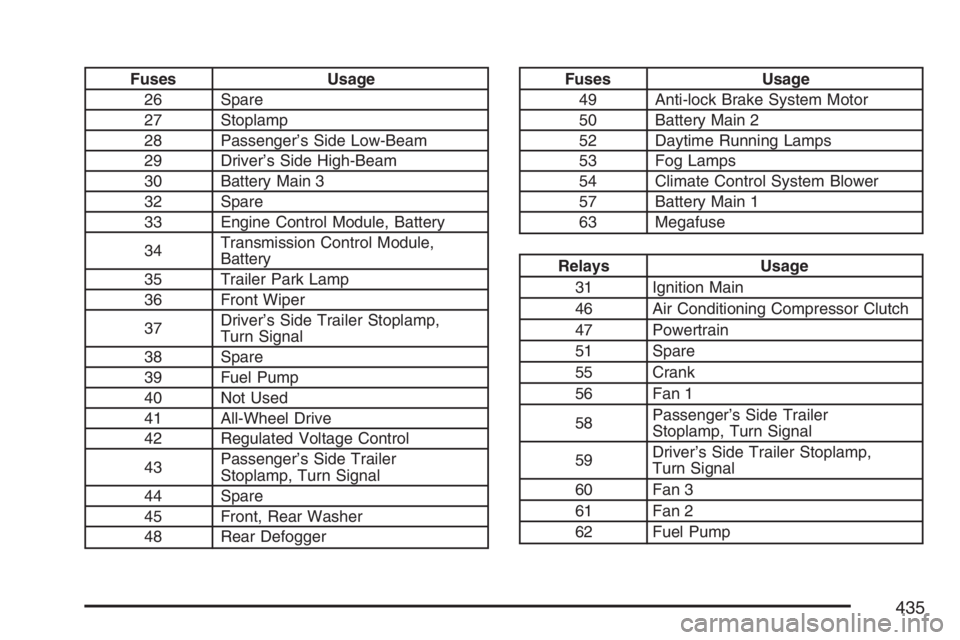
Fuses Usage
26 Spare
27 Stoplamp
28 Passenger’s Side Low-Beam
29 Driver’s Side High-Beam
30 Battery Main 3
32 Spare
33 Engine Control Module, Battery
34Transmission Control Module,
Battery
35 Trailer Park Lamp
36 Front Wiper
37Driver’s Side Trailer Stoplamp,
Turn Signal
38 Spare
39 Fuel Pump
40 Not Used
41 All-Wheel Drive
42 Regulated Voltage Control
43Passenger’s Side Trailer
Stoplamp, Turn Signal
44 Spare
45 Front, Rear Washer
48 Rear DefoggerFuses Usage
49 Anti-lock Brake System Motor
50 Battery Main 2
52 Daytime Running Lamps
53 Fog Lamps
54 Climate Control System Blower
57 Battery Main 1
63 Megafuse
Relays Usage
31 Ignition Main
46 Air Conditioning Compressor Clutch
47 Powertrain
51 Spare
55 Crank
56 Fan 1
58Passenger’s Side Trailer
Stoplamp, Turn Signal
59Driver’s Side Trailer Stoplamp,
Turn Signal
60 Fan 3
61 Fan 2
62 Fuel Pump
435
Page 479 of 490

Center Console Storage Area...................... 138
Chains, Tire................................................. 406
Check
Engine Light............................................ 184
Checking Things Under the Hood................ 346
Chemical Paint Spotting.............................. 428
Child Restraints
Child Restraint Systems............................. 49
Infants and Young Children........................ 46
Lower Anchors and Tethers for Children..... 57
Older Children........................................... 43
Securing a Child Restraint in a Rear
Seat Position.......................................... 64
Securing a Child Restraint in the
Right Front Seat Position........................ 66
Where to Put the Restraint........................ 54
Cigarette Lighter.......................................... 165
Cleaning
Aluminum or Chrome-Plated Wheels........ 426
Exterior Lamps/Lenses............................. 425
Fabric/Carpet........................................... 422
Finish Care.............................................. 425
Inside of Your Vehicle.............................. 420
Instrument Panel, Vinyl, and Other
Plastic Surfaces.................................... 424
Leather.................................................... 423
Tires........................................................ 427Cleaning (cont.)
Underbody Maintenance........................... 428
Washing Your Vehicle .............................. 425
Weatherstrips........................................... 425
Windshield and Wiper Blades................... 426
Climate Control System............................... 166
Air Filter, Passenger Compartment........... 170
Outlet Adjustment..................................... 170
Collision Damage Repair............................. 469
Comfort Guides, Rear Safety Belt................. 39
Compact Spare Tire.................................... 420
Compass............................................129, 131
Content Theft-Deterrent............................... 111
Control of a Vehicle..................................... 294
Convenience Net......................................... 143
Coolant
Engine Temperature Gage........................ 183
Engine Temperature Warning Light........... 182
Heater, Engine......................................... 118
Cooling System........................................... 362
Cruise Control............................................. 155
Cruise Control Light.................................... 189
Cupholder(s)................................................ 137
Customer Assistance Information
Courtesy Transportation........................... 465
Customer Assistance for Text
Telephone (TTY) Users......................... 460
479