2007 PONTIAC G6 Temperature
[x] Cancel search: TemperaturePage 223 of 486

DISP (Display):Press this knob to switch the
display between the time and the temperature or
the radio station frequency and the temperature.
When the ignition is off, press this knob to display
the time.
For RDS, press this knob to change what appears
on the display while using RDS. The display
options are station name, RDS station frequency,
PTY, and the name of the program (if available).
For XM™ (if equipped), press this knob while
in XM mode to retrieve four different categories of
information related to the current song or
channel: Artist, Song Title, Category or PTY,
Channel Number/Channel Name.
To change the default on the display, press the
DISP knob until you see the desired display, then
hold the knob for two seconds. The radio
produces a beep and the selected display is now
the default.AUTOu(Automatic Volume):With automatic
volume, the audio system adjusts automatically
to make up for road and wind noise as you drive.
Set the volume at the desired level. Press this
button to select LOW, MEDIUM, or HIGH. AUTO
VOL LOW, AUTO VOL MEDIUM, or AUTO
VOL HIGH displays. Each higher setting allows for
more volume compensation at faster vehicle
speeds. As you drive, automatic volume increases
the volume, as necessary, to overcome noise at
any speed. The volume level should always sound
the same to you as you drive. AUTO VOL
NONE displays if the radio cannot determine the
vehicle speed or if the engine is not running.
To turn automatic volume off, press this button
until AUTO VOL OFF displays.
Finding a Station
BAND:Press this button to switch between FM1,
FM2, AM, or XM1 or XM2 (if equipped). The
display shows the selection.
ADJ (Adjust):Turn this knob to select radio
stations.
223
Page 231 of 486
CD Messages
CHECK CD:If this message appears on the
display and/or the CD comes out, it could be for
one of the following reasons:
It is very hot. When the temperature returns to
normal, the CD should play.
You are driving on a very rough road.
When the road becomes smoother, the CD
should play.
The CD is dirty, scratched, wet, or
upside down.
The air is very humid. If so, wait about an
hour and try again.
There may have been a problem while
burning the CD.
The label may be caught in the CD player.
If the CD is not playing correctly, for any other
reason, try a known good CD.
If any error occurs repeatedly or if an error cannot
be corrected, contact your dealer. If the radio
displays an error message, write it down
and provide it to your dealer when reporting the
problem.
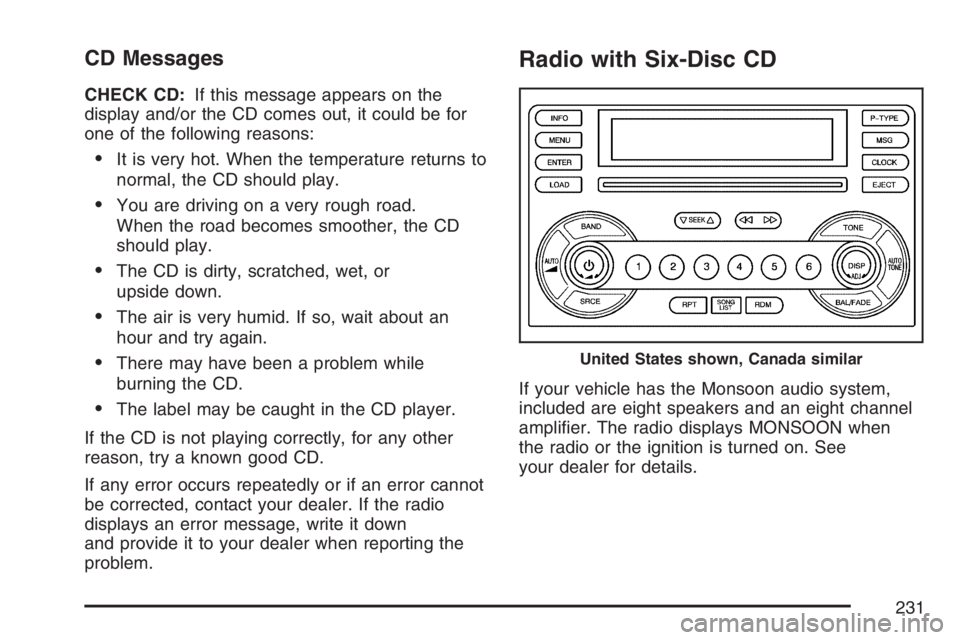
Radio with Six-Disc CD
If your vehicle has the Monsoon audio system,
included are eight speakers and an eight channel
amplier. The radio displays MONSOON when
the radio or the ignition is turned on. See
your dealer for details.
United States shown, Canada similar
231
Page 233 of 486
DISP (Display):Press this knob to switch the
display between time and temperature or
radio station frequency and temperature. When
the ignition is off, press this knob to display
the time.
For RDS, press the DISP knob to change what
appears on the display while using RDS. The
display options are station name, RDS station
frequency, PTY, and the name of the program
(if available).
For XM™ (if equipped), press the DISP knob
while in XM mode to retrieve four different
categories of information related to the current
song or channel: Artist, Song Title, Category
or PTY, Channel Number/Channel Name.
To change the default on the display, press the
DISP knob until you see the desired display, then
hold the knob for two seconds. A beep sounds
and the selected display is now the default.
AUTO
u(Automatic Volume):With automatic
volume, the audio system adjusts automatically
to make up for road and wind noise as you drive.Set the volume at the desired level. Press this
button to select LOW, MEDIUM, or HIGH. AUTO
VOL LOW, AUTO VOL MEDIUM, or AUTO
VOL HIGH displays. Each higher setting allows for
more volume compensation at faster vehicle
speeds. Then as you drive, automatic volume
increases the volume, as necessary, to overcome
noise at any speed. The volume level should
always sound the same to you as you drive. AUTO
VOL NONE displays if the radio cannot determine
the vehicle speed or if the engine is not running.
To turn automatic volume off, press this button
until AUTO VOL OFF displays.
Finding a Station
BAND:Press this button to switch between FM1,
FM2, AM, or XM1 or XM2 (if equipped). The
display shows the selection.
ADJ (Adjust):Turn this knob to select radio
stations.
233
Page 242 of 486

To play the tracks on all of the CDs that are
loaded, in random order, press and hold the
RDM button for more than two seconds.
A beep sounds, RANDOM ALL CDS, and
RDM displays. Press RDM again to turn
off random play. RANDOM OFF displays and
RDM disappears from the display.
xSEEKw:Press the down arrow to go to the
start of the current track, if more than eight seconds
have played. Press the up arrow to go to the
beginning of the next track. If either arrow is held or
pressed more than once, the player continues
moving backward or forward through the CD.
To scan the current CD, press and hold either
SEEK arrow for more than two seconds. The CD
goes to the next track, plays the rst 10 seconds,
then goes to the next track. Press either SEEK
arrow again to stop scanning.
To scan all of the CDs loaded, press and hold either
SEEK arrow for more than four seconds. The CD
goes to the next CD, plays the rst 10 seconds of
the rst track, then goes to the next CD. Press
either SEEK arrow again to stop scanning.DISP (Display):Press this knob to switch
between time, temperature, and the elapsed time
of the track. To change the default on the
display (CD#/Track#/Time,
CD#/Track#/Temperature, or Track#/Elapsed
Time/Temperature), press the knob until you see
the desired display, then hold the knob for
two seconds. The radio produces one beep and
the selected display is now the default.
AUTO TONE/AUTO EQ (Automatic
Equalization):Press this button to select the
desired equalization setting while playing a
CD. The equalization is set whenever a CD is
played. For more information, see “AUTO TONE”
or “AUTO EQ” listed previously in this section.
BAND:Press this button to listen to the
radio when a CD is playing. The inactive CD(s)
remains safely inside the radio for future listening.
SRCE (Source):Press this button to play a
CD or to access the remote device, when listening
to the radio.
242
Page 245 of 486

CD Messages
CHECK CD:If this message appears on the
display and/or the CD comes out, it could be for
one of the following reasons:
It is very hot. When the temperature returns to
normal, the CD should play.
You are driving on a very rough road.
When the road becomes smoother, the CD
should play.
The CD is dirty, scratched, wet, or
upside down.
The air is very humid. If so, wait about an
hour and try again.
There may have been a problem while
burning the CD.
The label may be caught in the CD player.
If the CD is not playing correctly, for any other
reason, try a known good CD.
If any error occurs repeatedly or if an error cannot
be corrected, contact your dealer. If the radio
displays an error message, write it down
and provide it to your dealer when reporting the
problem.
245
Page 298 of 486

Three important considerations have to do with
weight:
the weight of the trailer
the weight of the trailer tongue
and the total weight on your vehicle’s tires.
Weight of the Trailer
How heavy can a trailer safely be?
It should never weigh more than 1,000 lbs
(453 kg). But even that can be too heavy.
It depends on how you plan to use your rig. For
example, speed, altitude, road grades, outside
temperature and how much your vehicle is used to
pull a trailer are all important. It can also depend
on any special equipment that you have on
your vehicle, and the amount of tongue weight the
vehicle can carry. See “Weight of the Trailer
Tongue” later in this section for more information.
Maximum trailer weight is calculated assuming
only the driver is in the tow vehicle and it has all
the required trailering equipment. The weight
of additional optional equipment, passengers and
cargo in the tow vehicle must be subtracted
from the maximum trailer weight.When towing a trailer on long uphill grades and
the outside temperature is above 85°F (29°C),
reduce your vehicle speed to 45 mph (72 km/h) to
avoid overheating the engine cooling system.
You can ask your dealer for additional trailering
information or advice, or you can write us at:
Pontiac-GMC Customer Assistance
P.O. Box 33172
Detroit, MI 48232-5172
In Canada, write to:
General Motors of Canada Limited
Customer Communication Centre, 163-005
1908 Colonel Sam Drive
Oshawa, Ontario L1H 8P7
298
Page 302 of 486

Making Turns
Notice:Making very sharp turns while
trailering could cause the trailer to come in
contact with the vehicle. Your vehicle could be
damaged. Avoid making very sharp turns
while trailering.
When you are turning with a trailer, make wider
turns than normal. Do this so your trailer will not
strike soft shoulders, curbs, road signs, trees or
other objects. Avoid jerky or sudden maneuvers.
Signal well in advance.
Turn Signals When Towing a Trailer
When you tow a trailer, your vehicle may need a
different turn signal asher and/or extra wiring.
Check with your dealer. The arrows on your
instrument panel will ash whenever you signal a
turn or lane change. Properly hooked up, the
trailer lamps will also ash, telling other drivers you
are about to turn, change lanes or stop.When towing a trailer, the arrows on your
instrument panel will ash for turns even if the bulbs
on the trailer are burned out. Thus, you may think
drivers behind you are seeing your signal when
they are not. It is important to check occasionally to
be sure the trailer bulbs are still working.
Driving On Grades
When towing a trailer on long uphill grades and
the outside temperature is above 85°F (29°C),
reduce your vehicle speed to 45 mph (72 km/h) to
avoid overheating the engine cooling system.
Reduce speed and shift to a lower gearbeforeyou
start down a long or steep downgrade. If you do
not shift down, you might have to use your brakes
so much that they would get hot and no longer
work well.
302
Page 328 of 486

If you are in an area of extreme cold, where
the temperature falls below−20°F (−29°C), it is
recommended that you use either an SAE 5W-30
synthetic oil or an SAE 0W-30 oil. Both will
provide easier cold starting and better protection
for the engine at extremely low temperatures.
Engine Oil Additives
Do not add anything to the oil. The recommended
oils with the starburst symbol that meet GM
Standard GM6094M are all you will need for
good performance and engine protection.
Engine Oil Life System
When to Change Engine Oil
Your vehicle has a computer system that lets you
know when to change the engine oil and lter.
This is based on engine revolutions and engine
temperature, and not on mileage. Based on driving
conditions, the mileage at which an oil change will
be indicated can vary considerably. For the oil life
system to work properly, you must reset the system
every time the oil is changed.When the system has calculated that oil life has
been diminished, it will indicate that an oil change is
necessary. A CHANGE OIL SOON message will
come on. SeeDIC Warnings and Messages on
page 212. Change your oil as soon as possible
within the next 600 miles (1 000 km). It is possible
that, if you are driving under the best conditions, the
oil life system may not indicate that an oil change is
necessary for over a year. However, your engine oil
and lter must be changed at least once a year and
at this time the system must be reset. Your dealer
has GM-trained service people who will perform this
work using genuine GM parts and reset the system.
It is also important to check your oil regularly and
keep it at the proper level.
If the system is ever reset accidentally, you must
change your oil at 3,000 miles (5 000 km) since
your last oil change. Remember to reset the oil life
system whenever the oil is changed.
328