Page 146 of 428

Headlamps
The lever on the left side of the steering column
operates the exterior lamps.
The exterior lamp switch has the following four
positions:
2(Headlamps):Turn the switch to this position
to turn on the headlamps, parking lamps, and
taillamps.
;(Parking Lamps):Turn the switch to this
position to turn on the parking lamps and
taillamps only.AUTO (Automatic Headlamp System):Turn the
switch to this position to automatically turn on the
Daytime Running Lamps (DRL) during daytime, and
the headlamps, parking lamps, and taillamps at
night. This position must be selected in order for the
Wiper Activated Headlamps to be activated. See
Wiper Activated Headlamps on page 147.
P(Off/On):This position is the momentary
Off/On switch for the Automatic Headlamp System.
For vehicles rst sold in Canada, the transaxle
must be in the PARK (P) position, before the
Automatic Headlamp System can be turned off.
When operating in AUTO, a momentary turn of the
switch to off/on will turn off the Automatic Headlamp
System. Rotating the switch to off/on again will turn
the Automatic Headlamp System back on. The
Automatic Headlamp System is always turned
on at the beginning of an ignition cycle.
146
Page 148 of 428

The DRL system will be off any time your vehicle is
in PARK (P). The DRL system on U.S. vehicles can
also be turned off by using the off/on switch for one
ignition cycle.
As with any vehicle, you should turn on the
regular headlamp system when you need it.
Fog Lamps
If equipped, the fog
lamp button is located
on the instrument panel,
to the left of the
steering wheel.
The ignition must be on to turn your fog lamps on.
Push the button to turn the fog lamps on. An
indicator light on the cluster will come on when the
fog lamps are on. Push the button again to turn the
fog lamps off.The parking lamps will automatically turn on and
off when the fog lamps are turned on and off.
The fog lamps will turn off while the high-beam
headlamps are turned on.
Some localities have laws that require the
headlamps to be on along with the fog lamps.
Instrument Panel Brightness
The control for this
feature is located on
the instrument panel to
the left of the steering
wheel.
Turn the knob clockwise to brighten the lights or
counterclockwise to dim them.
148
Page 174 of 428
Driver Information Center (DIC)
Your vehicle has a Driver Information Center
(DIC). The DIC display gives you the status of
many of your vehicle’s systems. The DIC is also
used to display driver personalization menu modes
and warning/status messages. All messages will
appear in the DIC display, located at the bottom of
the instrument panel cluster.
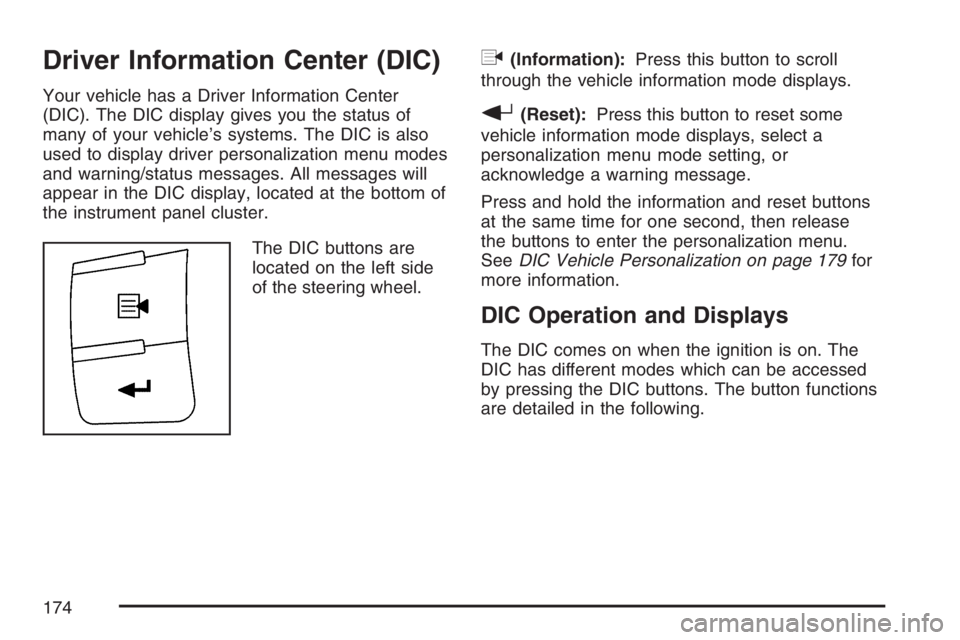
The DIC buttons are
located on the left side
of the steering wheel.
q(Information):Press this button to scroll
through the vehicle information mode displays.
r(Reset):Press this button to reset some
vehicle information mode displays, select a
personalization menu mode setting, or
acknowledge a warning message.
Press and hold the information and reset buttons
at the same time for one second, then release
the buttons to enter the personalization menu.
SeeDIC Vehicle Personalization on page 179for
more information.
DIC Operation and Displays
The DIC comes on when the ignition is on. The
DIC has different modes which can be accessed
by pressing the DIC buttons. The button functions
are detailed in the following.
174
Page 179 of 428

LOW FUEL
This message displays when your vehicle is low
on fuel. Rell the fuel tank as soon as possible.
SeeFuel Gage on page 173,Fuel on page 270,
andFilling the Tank on page 274for more
information.
LOW TRACTION
This message displays when the Enhanced
Traction System (ETS) is actively limiting wheel
spin. Slippery road conditions may exist if this
message displays, so adjust your driving
accordingly. SeeEnhanced Traction System (ETS)
on page 226for more information.
PARKING BRAKE
This message displays if the parking brake is left
engaged. SeeParking Brake on page 118for
more information.
POWER STEERING
This message displays if a problem has been
detected with the electric power steering. Have
your vehicle serviced by your dealer immediately.
SERVICE AIR BAG
This message displays when there is a problem
with the airbag system. Have your vehicle serviced
by your dealer immediately.
TRUNK AJAR
This message displays when the trunk lid is not
closed completely. Make sure that the trunk
lid is closed completely. SeeTrunk on page 98.
DIC Vehicle Personalization
Your vehicle has personalization capabilities that
allow you to program certain features to a preferred
setting. All of the features listed may not be
available on your vehicle. Only the features
available will be displayed on the DIC.
The default settings for the features were set
when your vehicle left the factory, but may have
been changed from their default state since
that time.
179
Page 185 of 428

Exiting Personalization Menu
The personalization menu will be exited when any
of the following conditions occur:
A ten second time period has elapsed.
The ignition is turned off.
The end of the personalization menu list is
reached.
Audio System(s)
Determine which radio your vehicle has and then
read the pages following to familiarize yourself
with its features.
Driving without distraction is a necessity for a safer
driving experience. SeeDefensive Driving on
page 218. By taking a few moments to read this
manual and get familiar with your vehicle’s audio
system, you can use it with less effort, as well as
take advantage of its features. While your
vehicle is parked, set up your audio system
by presetting your favorite radio stations,
setting the tone and adjusting the speakers.Then, when driving conditions permit, you can tune
to your favorite stations using the presets and
steering wheel controls if the vehicle has them.
{CAUTION:
This system provides you with a far greater
access to audio stations and song listings.
Giving extended attention to entertainment
tasks while driving can cause a crash and
you or others can be injured or killed.
Always keep your eyes on the road and
your mind on the drive — avoid engaging
in extended searching while driving.
Keeping your mind on the drive is important for
safe driving. For more information, seeDefensive
Driving on page 218.
Here are some ways in which you can help avoid
distraction while driving.
185
Page 186 of 428

While your vehicle is parked:
Familiarize yourself with all of its controls.
Familiarize yourself with its operation.
Set up your audio system by presetting your
favorite radio stations, setting the tone, and
adjusting the speakers. Then, when driving
conditions permit, you can tune to your favorite
radio stations using the presets and steering
wheel controls if the vehicle has them.
Notice:Before adding any sound equipment
to your vehicle, such as an audio system, CD
player, CB radio, mobile telephone, or two-way
radio, make sure that it can be added by
checking with your dealer. Also, check federal
rules covering mobile radio and telephone
units. If sound equipment can be added, it is
very important to do it properly. Added sound
equipment may interfere with the operation of
your vehicle’s engine, radio, or other systems,
and even damage them. Your vehicle’s systems
may interfere with the operation of sound
equipment that has been added.Your vehicle has a feature called Retained
Accessory Power (RAP). With RAP, the audio
system can be played even after the ignition
is turned off. SeeRetained Accessory Power
(RAP) on page 110for more information.
Setting the Time
(Without Date Display)
If your vehicle has an AM/FM base radio with a
single CD player and preset buttons numbered
one through six, the radio will have a clock button
for setting the time. You can set the time by
following these steps:
1. Press the clock button until the hour numbers
begin ashing on the display. Press the clock
button a second time and the minute
numbers will begin ashing on the display.
2. While either the hour or the minute numbers
are ashing, turn the tune knob, located on
the upper right side of the radio, clockwise
or counterclockwise to increase or decrease
the time.
186
Page 196 of 428

Finding a Station
BAND:Press this button to switch between AM,
FM, or XM™ (if equipped). The selection displays.
f(Tune):Turn this knob to select radio
stations.
©SEEK¨:Press the right or left SEEK arrow
to go to the next or to the previous station and
stay there.
To scan stations, press and hold either SEEK
arrow for a few seconds until a beep sounds. The
radio goes to a station, plays for a few seconds,
then goes on to the next station. Press either
SEEK arrow again to stop scanning.
The radio only seeks and scans stations with a
strong signal that are in the selected band.
4(Information) (XM™ Satellite Radio Service,
MP3, and RDS Features):Press the information
button to display additional text information related
to the current FM-RDS or XM™ station, or MP3
song. A choice of additional information such as:
Channel, Song, Artist, and CAT (category) can
display. Continue pressing the information button to
highlight the desired label, or press the pushbutton
positioned under any one of the labels and the
information about that label displays.
While information is not available, No Info displays.
Storing a Radio Station as a Favorite
Drivers are encouraged to set up their radio station
favorites while the vehicle is parked. Tune to your
favorite stations using the presets, favorites button,
and steering wheel controls if the vehicle has this
feature. SeeDefensive Driving on page 218.
196
Page 214 of 428

Theft-Deterrent Feature
THEFTLOCK®is designed to discourage
theft of your vehicle’s radio. The feature works
automatically by learning a portion of the Vehicle
Identication Number (VIN). If the radio is moved to
a different vehicle, it will not operate and LOCK or
LOCKED will appear on the display.
With THEFTLOCK
®activated, the radio will not
operate if stolen.
Audio Steering Wheel Controls
Radio controls are
located on the right side
of the steering wheel.
If your vehicle has this
feature, some audio
controls can be adjusted
at this location. They
include the following:
xw:Press the up or the down arrow to go to
the next or to the previous stored radio station and
stay there. Press and hold the up or down arrow
longer than three-quarters of a second to advance
to the next or previous station with a strong
signal in the selected band.
When a CD is playing, press the up or the
down arrow to go to the next or previous track.
Press and hold the up or down arrow longer than
three-quarters of a second to continue advancing
ahead or reversing back, to other tracks within
the disc.
214