2007 PEUGEOT 307 CC DAG display
[x] Cancel search: displayPage 35 of 184
!
33
MULTIFUNCTION DISPLAYS
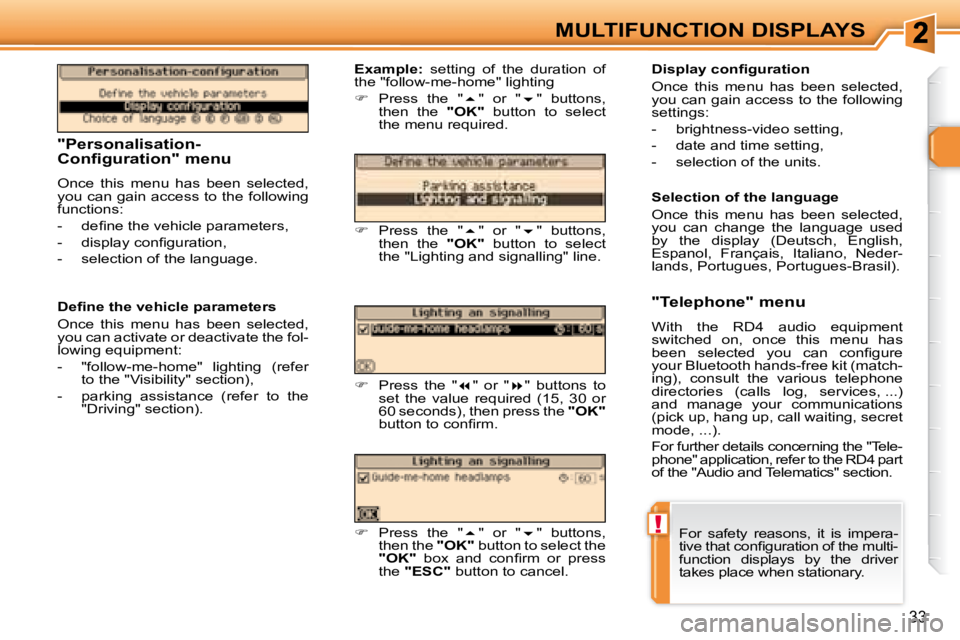
"Personalisation-
Configuration" menu
Once this menu has been selected,
you can gain access to the following
functions:
- dei ne the vehicle parameters,
- display coni guration,
- selection of the language. Display coni guration
Once this menu has been selected,
you can gain access to the following
settings:
- brightness-video setting,
- date and time setting,
- selection of the units.
Example: setting of the duration of
the "follow-me-home" lighting
Press the " " or " " buttons,
then the "OK" button to select
the menu required.
Press the " " or " " buttons,
then the "OK" button to select
the "Lighting and signalling" line.
Press the " " or " " buttons to
set the value required (15, 30 or
60 seconds), then press the "OK"
button to coni rm.
Dei ne the vehicle parameters
Once this menu has been selected,
you can activate or deactivate the fol-
lowing equipment:
- "follow-me-home" lighting (refer
to the "Visibility" section),
- parking assistance (refer to the "Driving" section).
Press the " " or " " buttons,
then the "OK" button to select the
"OK" box and coni rm or press
the "ESC" button to cancel. Selection of the language
Once this menu has been selected,
you can change the language used
by the display (Deutsch, English,
Espanol, Français, Italiano, Neder-
lands, Portugues, Portugues-Brasil).
"Telephone" menu
With the RD4 audio equipment
switched on, once this menu has
been selected you can coni gure
your Bluetooth hands-free kit (match-
ing), consult the various telephone
directories (calls log, services, ...)
and manage your communications
(pick up, hang up, call waiting, secret
mode, ...).
For further details concerning the "Tele-
phone" application, refer to the RD4 part
of the "Audio and Telematics" section.
For safety reasons, it is impera-
tive that coni guration of the multi-
function displays by the driver
takes place when stationary.
Page 36 of 184
34
MULTIFUNCTION DISPLAYS
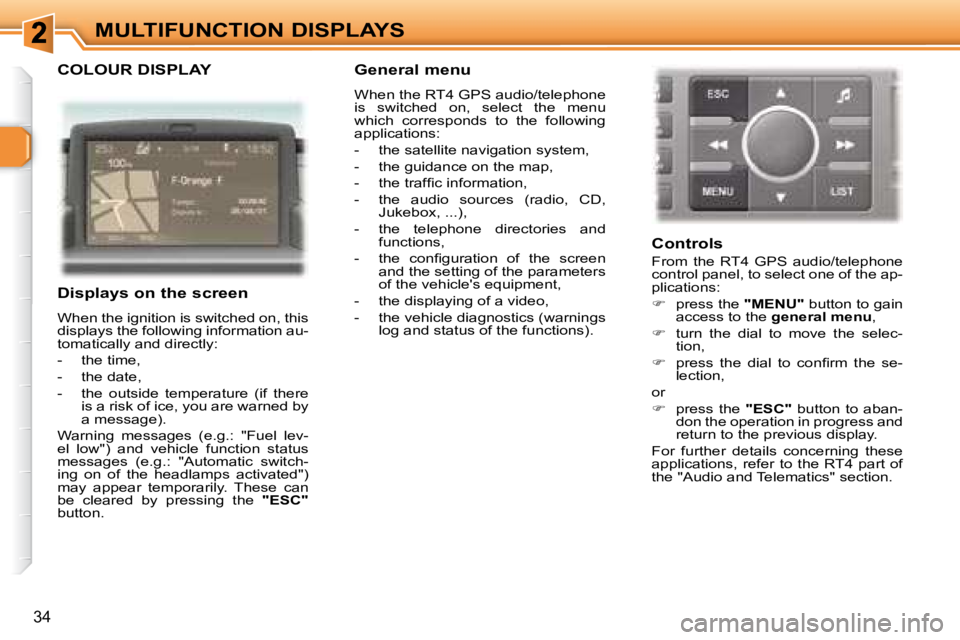
COLOUR DISPLAY
Displays on the screen
When the ignition is switched on, this
displays the following information au-
tomatically and directly:
- the time,
- the date,
- the outside temperature (if there is a risk of ice, you are warned by
a message).
Warning messages (e.g.: "Fuel lev-
el low") and vehicle function status
messages (e.g.: "Automatic switch-
ing on of the headlamps activated")
may appear temporarily. These can
be cleared by pressing the "ESC"
button.
General menu
When the RT4 GPS audio/telephone
is switched on, select the menu
which corresponds to the following
applications:
- the satellite navigation system,
- the guidance on the map,
- the trafi c information,
- the audio sources (radio, CD, Jukebox, ...),
- the telephone directories and functions,
- the coni guration of the screen and the setting of the parameters
of the vehicle's equipment,
- the displaying of a video,
- the vehicle diagnostics (warnings log and status of the functions).
Controls
From the RT4 GPS audio/telephone
control panel, to select one of the ap-
plications:
press the "MENU" button to gain
access to the general menu ,
turn the dial to move the selec-
tion,
press the dial to coni rm the se-
lection,
or
press the "ESC" button to aban-
don the operation in progress and
return to the previous display.
For further details concerning these
applications, refer to the RT4 part of
the "Audio and Telematics" section.
Page 37 of 184
35
MULTIFUNCTION DISPLAYS
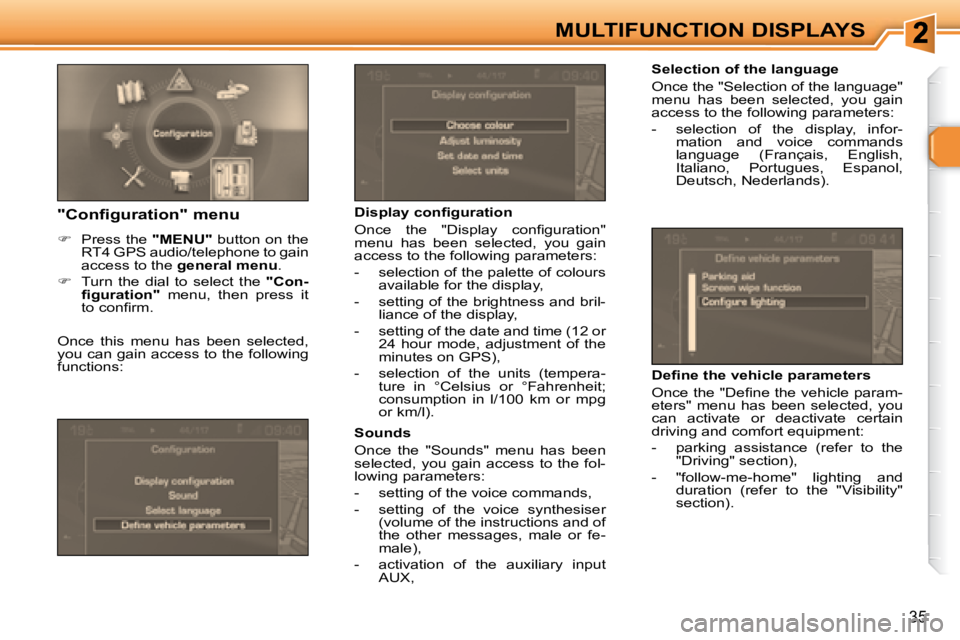
Selection of the language
Once the "Selection of the language"
menu has been selected, you gain
access to the following parameters:
- selection of the display, infor-mation and voice commands
language (Français, English,
Italiano, Portugues, Espanol,
Deutsch, Nederlands).
Display coni guration
Once the "Display coni guration"
menu has been selected, you gain
access to the following parameters:
- selection of the palette of colours available for the display,
- setting of the brightness and bril- liance of the display,
- setting of the date and time (12 or 24 hour mode, adjustment of the
minutes on GPS),
- selection of the units (tempera- ture in °Celsius or °Fahrenheit;
consumption in l/100 km or mpg
or km/l).
Sounds
Once the "Sounds" menu has been
selected, you gain access to the fol-
lowing parameters:
- setting of the voice commands,
- setting of the voice synthesiser (volume of the instructions and of
the other messages, male or fe-
male),
- activation of the auxiliary input AUX, Dei ne the vehicle parameters
Once the "Dei ne the vehicle param-
eters" menu has been selected, you
can activate or deactivate certain
driving and comfort equipment:
- parking assistance (refer to the
"Driving" section),
- "follow-me-home" lighting and duration (refer to the "Visibility"
section). "Configuration" menu
Press the "MENU" button on the
RT4 GPS audio/telephone to gain
access to the general menu .
Turn the dial to select the "Con-
i guration" menu, then press it
to coni rm.
Once this menu has been selected,
you can gain access to the following
functions:
Page 38 of 184
i
!
36
MULTIFUNCTION DISPLAYS
"Video" menu
You can connect video equipment
(camcorder, digital camera, DVD
player, ...) to the three audio/video
sockets, located in the glove box.
Videos can only be displayed
when stationary.
Once this menu has been selected,
you can select:
- "Activate video mode" to activate/ deactivate the video,
- "Video parameters" to set the dis- play format, the brightness, the
contrast and the colours.
Press the "MODE" or "DARK"
button to disconnect the display-
ing of the video.
Press the "SOURCE" button sev-
eral times in succession to select
an audio source other than that of
the video.
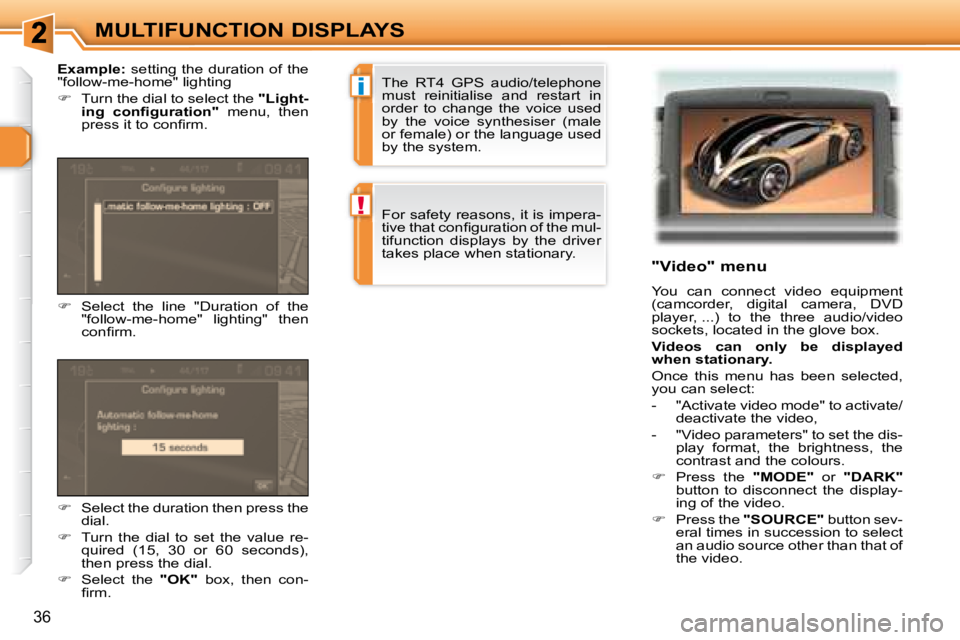
Select the line "Duration of the
"follow-me-home" lighting" then
coni rm.
Example: setting the duration of the
"follow-me-home" lighting
Turn the dial to select the "Light-
ing coni guration" menu, then
press it to coni rm.
Select the duration then press the
dial.
Turn the dial to set the value re-
quired (15, 30 or 60 seconds),
then press the dial.
Select the "OK" box, then con-
i rm. The RT4 GPS audio/telephone
must reinitialise and restart in
order to change the voice used
by the voice synthesiser (male
or female) or the language used
by the system.
For safety reasons, it is impera-
tive that coni guration of the mul-
tifunction displays by the driver
takes place when stationary.
Page 99 of 184
DRIVING
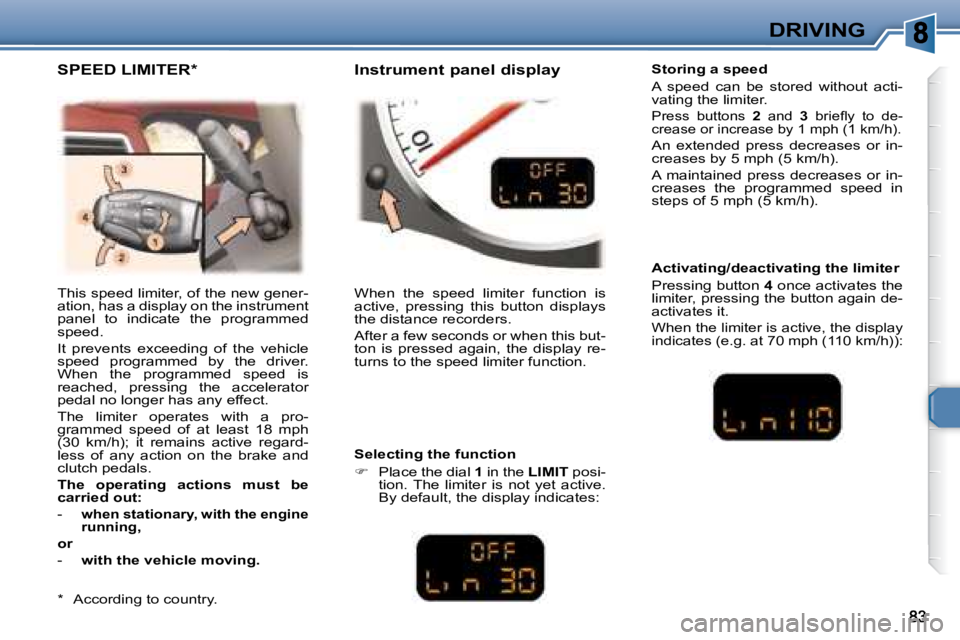
This speed limiter, of the new gener-
ation, has a display on the instrument
panel to indicate the programmed
speed.
It prevents exceeding of the vehicle
speed programmed by the driver.
When the programmed speed is
reached, pressing the accelerator
pedal no longer has any effect.
The limiter operates with a pro-
grammed speed of at least 18 mph
(30 km/h); it remains active regard-
less of any action on the brake and
clutch pedals.
The operating actions must be
carried out:
-
when stationary, with the engine
running,
or
- with the vehicle moving. When the speed limiter function is
active, pressing this button displays
the distance recorders.
After a few seconds or when this but-
ton is pressed again, the display re-
turns to the speed limiter function. Storing a speed
A speed can be stored without acti-
vating the limiter.
Press buttons
2 and 3 briel y to de-
crease or increase by 1 mph (1 km/h).
An extended press decreases or in-
creases by 5 mph (5 km/h).
A maintained press decreases or in-
creases the programmed speed in
steps of 5 mph (5 km/h).
Selecting the function
Place the dial 1 in the LIMIT posi-
tion. The limiter is not yet active.
By default, the display indicates: Activating/deactivating the limiter
Pressing button
4 once activates the
limiter, pressing the button again de-
activates it.
When the limiter is active, the display
indicates (e.g. at 70 mph (110 km/h)):
SPEED LIMITER * Instrument panel display
* According to country.
Page 101 of 184
85
DRIVING
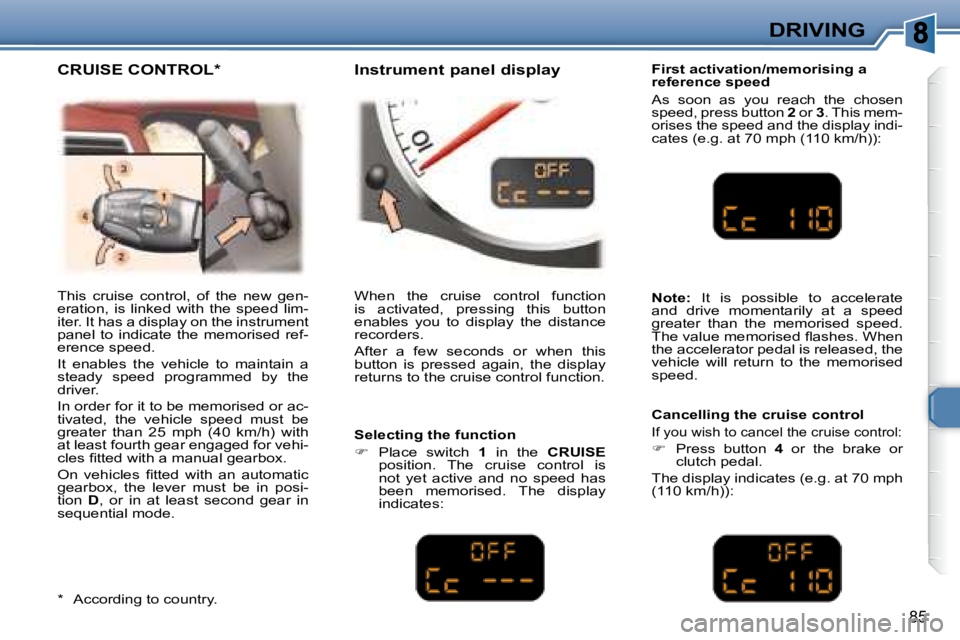
This cruise control, of the new gen-
eration, is linked with the speed lim-
iter. It has a display on the instrument
panel to indicate the memorised ref-
erence speed.
It enables the vehicle to maintain a
steady speed programmed by the
driver.
In order for it to be memorised or ac-
tivated, the vehicle speed must be
greater than 25 mph (40 km/h) with
at least fourth gear engaged for vehi-
cles i tted with a manual gearbox.
On vehicles i tted with an automatic
gearbox, the lever must be in posi-
tion D , or in at least second gear in
sequential mode. When the cruise control function
is activated, pressing this button
enables you to display the distance
recorders.
After a few seconds or when this
button is pressed again, the display
returns to the cruise control function. First activation/memorising a
reference speed
As soon as you reach the chosen
speed, press button
2 or 3 . This mem-
orises the speed and the display indi-
cates (e.g. at 70 mph (110 km/h)):
Selecting the function
Place switch 1 in the CRUISE
position. The cruise control is
not yet active and no speed has
been memorised. The display
indicates:
Note: It is possible to accelerate
and drive momentarily at a speed
greater than the memorised speed.
The value memorised l ashes. When
the accelerator pedal is released, the
vehicle will return to the memorised
speed.
Cancelling the cruise control
If you wish to cancel the cruise control:
Press button 4 or the brake or
clutch pedal.
The display indicates (e.g. at 70 mph
(110 km/h)):
* According to country.
CRUISE CONTROL * Instrument panel display
Page 103 of 184
87
DRIVING
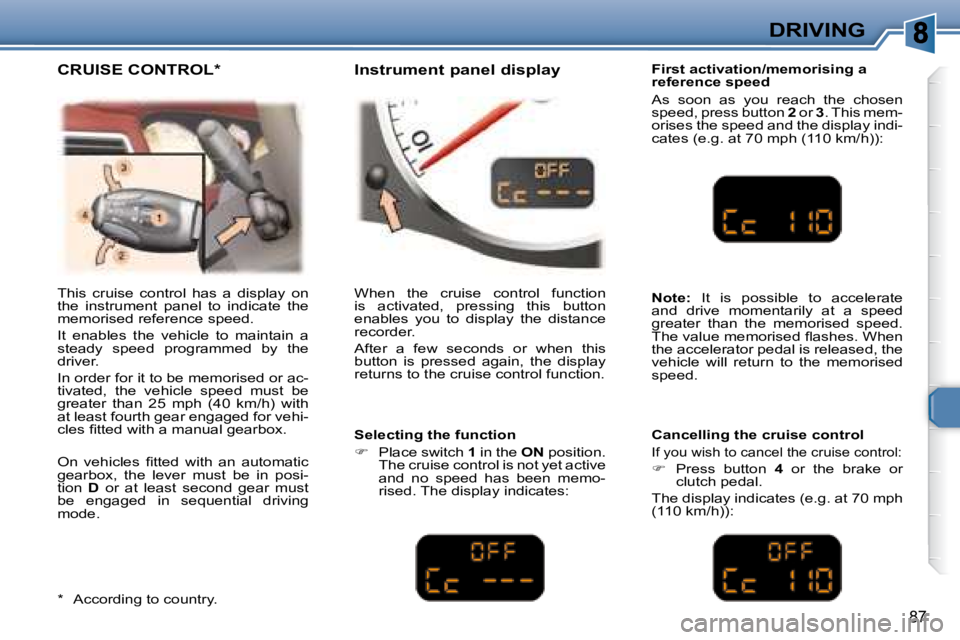
First activation/memorising a
reference speed
As soon as you reach the chosen
speed, press button 2 or 3 . This mem-
orises the speed and the display indi-
cates (e.g. at 70 mph (110 km/h)):
This cruise control has a display on
the instrument panel to indicate the
memorised reference speed.
It enables the vehicle to maintain a
steady speed programmed by the
driver.
In order for it to be memorised or ac-
tivated, the vehicle speed must be
greater than 25 mph (40 km/h) with
at least fourth gear engaged for vehi-
cles i tted with a manual gearbox.
On vehicles i tted with an automatic
gearbox, the lever must be in posi-
tion D or at least second gear must
be engaged in sequential driving
mode. When the cruise control function
is activated, pressing this button
enables you to display the distance
recorder.
After a few seconds or when this
button is pressed again, the display
returns to the cruise control function.
Selecting the function
Place switch 1 in the ON position.
The cruise control is not yet active
and no speed has been memo-
rised. The display indicates:
Note: It is possible to accelerate
and drive momentarily at a speed
greater than the memorised speed.
The value memorised l ashes. When
the accelerator pedal is released, the
vehicle will return to the memorised
speed.
Cancelling the cruise control
If you wish to cancel the cruise control:
Press button 4 or the brake or
clutch pedal.
The display indicates (e.g. at 70 mph
(110 km/h)):
* According to country.
CRUISE CONTROL * Instrument panel display
Page 143 of 184
124
S
O S
SOURCE
MODE BAND ESC
2
abc
5
jkl
8
tuv 3
def
6
mno
9
wxyz
1 4
ghi
7
pqrs
0 # MENU LIST
TA
PTY
DARK
2
1
5
3 4
89 10 15
11 17 18
12 16
14
7
6
13
01
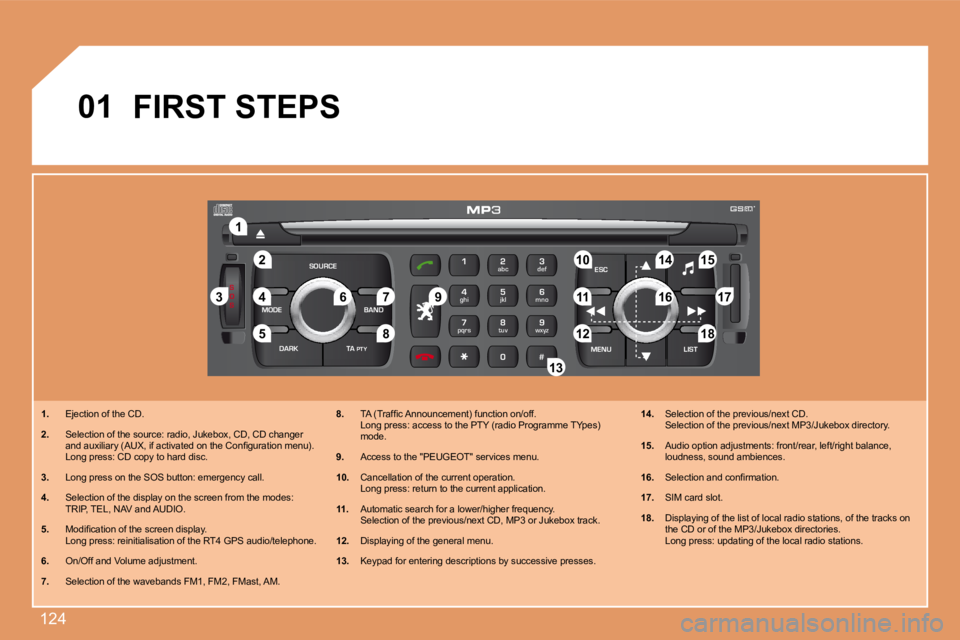
1. Ejection of the CD.
2. Selection of the source: radio, Jukebox, CD, CD ch anger
and auxiliary (AUX, if activated on the Coniguratio n menu).
Long press: CD copy to hard disc.
3. Long press on the SOS button: emergency call.
4. Selection of the display on the screen from the mo des:
TRIP, TEL, NAV and AUDIO.
5. Modiication of the screen display.
Long press: reinitialisation of the RT4 GPS audio /telephone.
6. On/Off and Volume adjustment.
7. Selection of the wavebands FM1, FM2, FMast, AM. 8.
TA (Trafic Announcement) function on/off.
Long press: access to the PTY (radio Programme TY pes)
mode.
9. Access to the "PEUGEOT" services menu.
10. Cancellation of the current operation.
Long press: return to the current application.
11. Automatic search for a lower/higher frequency.
Selection of the previous/next CD, MP3 or Jukebox track.
12. Displaying of the general menu.
13. Keypad for entering descriptions by successive pre sses.14.
Selection of the previous/next CD.
Selection of the previous/next MP3/Jukebox director y.
15. Audio option adjustments: front/rear, left/right b alance,
loudness, sound ambiences.
16. Selection and conirmation.
17. SIM card slot.
18. Displaying of the list of local radio stations, of the tracks on
the CD or of the MP3/Jukebox directories.
Long press: updating of the local radio stations.
FIRST STEPS