2007 NISSAN TIIDA Ext
[x] Cancel search: ExtPage 116 of 5883
![NISSAN TIIDA 2007 Service Repair Manual AV
NORMAL OPERATING CONDITION
AV-111
< SYMPTOM DIAGNOSIS >[AUDIO WITH NAVIGATION]
C
D
E
F
G
H
I
J
K
L
MB A
O
P
NORMAL OPERATING CONDITION
DescriptionINFOID:0000000001728768
BASIC OPERATION
NOTE:
Locat](/manual-img/5/57395/w960_57395-115.png "NISSAN TIIDA 2007 Service Repair Manual AV
NORMAL OPERATING CONDITION
AV-111
< SYMPTOM DIAGNOSIS >[AUDIO WITH NAVIGATION]
C
D
E
F
G
H
I
J
K
L
MB A
O
P
NORMAL OPERATING CONDITION
DescriptionINFOID:0000000001728768
BASIC OPERATION
NOTE:
Locat")
AV
NORMAL OPERATING CONDITION
AV-111
< SYMPTOM DIAGNOSIS >[AUDIO WITH NAVIGATION]
C
D
E
F
G
H
I
J
K
L
MB A
O
P
NORMAL OPERATING CONDITION
DescriptionINFOID:0000000001728768
BASIC OPERATION
NOTE:
Locations stored in the Address Book and other memory functions may be lost if the vehicle's battery is disconnected or becomes dis-
charged. Service the vehicle's battery as necessary and re-enter the information in the Address Book If this occurs.
VEHICLE ICON
Symptoms Possible cause Possible solution
No image is displayed.The brightness is at the lowest setting. Adjust the brightness of the display.
The display is turned off.
Push and hold to turn on the display.
No voice guidance is available.
The volume is too high or too low.The volume is not set correctly, or it is turned off. Adjust the volume of voice guidance.
Volume guidance is not provided for narrow streets
(roads displayed in gray).This is not a malfunction.
No map is displayed on the screen.The map DVD-ROM is not inserted, or it is inserted
upside down.Insert the map DVD-ROM correctly.
A screen other than map screen is displayed. Push “MAP”.
The screen is too dim.
The movement is slow.The temperature in the interior of the vehicle is low.Wait until the interior of the vehicle has
warmed up.
Some pixels in the display are dark-
er or brighter than others.This condition is an inherent characteristic of liquid
crystal displays.This is not a malfunction.
Some menu items cannot be se-
lected.Some menu items become unavailable while the ve-
hicle is driven.Park the vehicle in a safe location, and
then operate the navigation system.
Symptoms Possible cause Possible solution
Names of roads and locations differ
between Plan view and Birdview™.This is because the quantity of the displayed informa-
tion is reduced so that the screen does not become
too crowded. There is also a chance that names of
the roads or locations may be displayed multiple
times, and the names appearing on the screen may
be different because of a processing procedure.This is not a malfunction.
The vehicle icon is not displayed in
the correct position.The vehicle was transported after the ignition switch
was turned off, for example, by a ferry or car trans-
porter.Drive the vehicle for a while on a road
where GPS can be received.
The position and direction of the vehicle may be in-
correct depending on the driving environments and
the levels of positioning accuracy of the navigation
system.This is not a malfunction. Drive the vehicle
for a while to automatically correct the po-
sition and direction of the vehicle icon.
When the vehicle is traveling on a
new road, the vehicle icon is locat-
ed on another road nearby.Because the new road is not stored in the map data,
the system automatically places the vehicle ion on
the nearest road available. Updated road information will be included
in the next version of the map DVD-ROM.
The screen does not switch to the
night screen even after turning on
the headlights. The daytime screen was set the last time the head-
lights were turned on.Set the screen to the night screen mode
using when turning on the headlights.
The map does not scroll even when
the vehicle is moving.The current location map screen is not displayed. Push “MAP”.
The vehicle icon is not displayed. The current location map screen is not displayed. Push “MAP”.
Page 117 of 5883
![NISSAN TIIDA 2007 Service Repair Manual AV-112
< SYMPTOM DIAGNOSIS >[AUDIO WITH NAVIGATION]
NORMAL OPERATING CONDITION
MAP DVD-ROM
ROUTE CALCULATION AND VISUAL GUIDANCE
The GPS indicator on the screen
remains gray.GPS signals cannot be rec](/manual-img/5/57395/w960_57395-116.png "NISSAN TIIDA 2007 Service Repair Manual AV-112
< SYMPTOM DIAGNOSIS >[AUDIO WITH NAVIGATION]
NORMAL OPERATING CONDITION
MAP DVD-ROM
ROUTE CALCULATION AND VISUAL GUIDANCE
The GPS indicator on the screen
remains gray.GPS signals cannot be rec")
AV-112
< SYMPTOM DIAGNOSIS >[AUDIO WITH NAVIGATION]
NORMAL OPERATING CONDITION
MAP DVD-ROM
ROUTE CALCULATION AND VISUAL GUIDANCE
The GPS indicator on the screen
remains gray.GPS signals cannot be received depending on the
vehicle location, such as in a parking garage, on a
road that has numerous tall buildings, etc.Drive on an open, straight road for a while.
GPS signals cannot be received because objects are
placed on top of the display.Remove the objects from top of the dis-
play.
A sufficient amount of GPS satellites are not avail-
able.Wait for the satellites to move locations
available for navigation system.
The location of vehicle icon is mis-
aligned from the actual position.Speed calculations based on the speed sensor may
be incorrect when using tire chains or replacing the
tires.Drive the vehicle for a while (at approxi-
mately 30 km/h (19 MPH) for about 30
minutes) to automatically correct the vehi-
cle icon position.
Contact an NISSAN / INFINITI dealer if
this does not correct the vehicle icon posi-
tion.
The map data has mistake or is incomplete (the vehi-
cle icon position is always misaligned in the same ar-
ea).Updated road information will be included
in the next version of the map DVD-ROM. Symptoms Possible cause Possible solution
Symptom Possible cause Possible solution
The message “Error” appears. Map DVD-ROM is dirty or partially damaged.Check the DVD-ROM and wipe it clean
with a soft cloth.
Replace the DVD-ROM if there is any
damage.
Symptoms Possible cause Possible solution
In the auto reroute calculation, way-
points are not included.Waypoints already passed are not included in the
auto reroute calculation.In case of going to that waypoints again,
edit the route.
Route information is not displayed.Route calculation has not yet been performed.Set the destination and perform route calcu-
lation.
The vehicle is not driven on the suggested route. Drive on the suggested route.
Route guidance is set to off. Turn on route guidance.
Route information is not provided for narrow streets
(roads displayed in gray).This is not a malfunction.
The auto reroute calculation (or de-
tour calculation) suggests the same
route as the one previously sug-
gested. Route calculation took priority conditions into con-
sideration, but the same route was calculated. This is not a malfunction.
A waypoint cannot be added.Five waypoints are already set on the route, includ-
ing ones that already passed.A maximum of 5 waypoints can be set on
the route. In case of going to 6 or more way-
points, perform route calculations multiple
times as necessary.
The suggested route is not dis-
played.Roads near the destination cannot be calculated.Reset the destination to a main or ordinary
road, and recalculate the route.
The starting point and destination are too close. Set a more distant destination.
The starting point and destination are too far away.Divide the way by selecting one or two inter-
mediate destinations, and perform route
calculations multiple times.
There are time restricted roads (by day of week, by
time) near the current vehicle location or destina-
tion.Set Use Time Restricted Roads to off.
A part of the route is not displayed.The suggested route includes narrow streets (roads
displayed in gray).This is not a malfunction.
Page 138 of 5883

BCS
INSPECTION AND ADJUSTMENT
BCS-3
< BASIC INSPECTION >
C
D
E
F
G
H
I
J
K
L B A
O
P N
BASIC INSPECTION
INSPECTION AND ADJUSTMENT
ADDITIONAL SERVICE WHEN REPLACING CONTROL UNIT
ADDITIONAL SERVICE WHEN REPLACING CONTROL UNIT : Description
INFOID:0000000001451449
When replacing BCM, save or print current vehicle specification with CONSULT-III configuration before
replacement.
Configuration has three functions as follows
• READ CONFIGURATION is the function to read (extract) vehicle configuration of current BCM.
WRITE CONFIGURATION - Manual selection is the function to select and write vehicle configuration on
BCM manually.
WRITE CONFIGURATION - Config file is the function to write vehicle configuration with the data extracted
from current BCM.
CAUTION:
• When replacing BCM, you must perform WRITE CONFIGURATION with CONSULT-III.
Complete the procedure of WRITE CONFIGURATION in order.
If you set incorrect WRITE CONFIGURATION, incidents will occur.
Configuration is different for each vehicle model. Confirm configuration of each vehicle model.
ADDITIONAL SERVICE WHEN REPLACING CONTROL UNIT : Special Repair Re-
quirement
INFOID:0000000001451450
1. SAVING VEHICLE SPECIFICATION
Perform “READ CONFIGURATION” with CONSULT-III to save or print current vehicle specification.
>> GO TO 2
2. REPLACE BCM
Replace BCM. Refer to BCS-57, "
Removal and Installation of BCM".
>> GO TO 3
3. WRITING VEHICLE SPECIFICATION
Perform “WRITE CONFIGURATION - Config file” or “WRITE CONFIGURATION - Manual selection” with
CONSULT-III to write vehicle specification. Refer to BCS-4, "
CONFIGURATION : Special Repair Require-
ment".
>> GO TO 4
4. INITIALIZE BCM (NATS)
Perform BCM initialization. (NATS)
>> WORK END
CONFIGURATION
CONFIGURATION : DescriptionINFOID:0000000001451451
Vehicle specification needs to be written with CONSULT-III because it is not written after replacing BCM.
Configuration has three functions as follows
READ CONFIGURATION is the function to read (extract) vehicle configuration of current BCM.
WRITE CONFIGURATION - Manual selection is the function to select and write vehicle configuration on
BCM manually.
WRITE CONFIGURATION - Config file is the function to write vehicle configuration with the data extracted
from current BCM.
CAUTION:
Page 150 of 5883

BCS
POWER CONSUMPTION CONTROL SYSTEM
BCS-15
< FUNCTION DIAGNOSIS >
C
D
E
F
G
H
I
J
K
L B A
O
P N
Sleep condition
Wake-up operation
BCM transmits sleep wake up signal (wake up) to each unit when any condition listed below is established,
and then goes into normal mode from low power consumption mode.
Each unit starts transmissions with CAN communication by receiving sleep wake up signals. Each unit trans-
mits wake up signals to BCM with CAN communication to convey the start of CAN communication.
Wake-up condition
Component Parts LocationINFOID:0000000001451462
CAN sleep condition BCM sleep condition
Receiving the sleep-ready signal (ready) from all units
Ignition switch: OFF
Vehicle security system alarm: No operation
Warning lamp: No operation
Warning chime: No operation
Stop lamp switch: OFF
Key switch status: No change for 2 seconds
Hazard warning lamp: No operation
Exterior lamp: OFF
Door lock status: No change for 2 seconds
CONSULT-III communication status: No communication
Door switch status: No change for 2 secondsThe controls only BCM are completed.
(Interior room lamp battery saver: Time out etc.)
BCM wake-up condition
Ignition switch: OFF → ACC or ON
Stop lamp switch: ON (Depress brake pedal)
Any door switch: OFF → ON
Lighting switch: OFF → 1ST or PASS
Hazard switch: OFF → ON
Back door opener switch OFF → ON
Remote keyless entry receiver: Receiving (with remote keyless entry)
Intelligent Key unit: Receiving (with Intelligent Key)
1. IPDM E/R E46 2. BCM M18, M19, M20 (view with
glove box removed)3. Intelligent Key unit M52 (with Intelli-
gent Key) (view with glove box re-
moved)
4. Combination meter M24
ALMIA0187ZZ
Page 151 of 5883

BCS-16
< FUNCTION DIAGNOSIS >
DIAGNOSIS SYSTEM (BCM)
DIAGNOSIS SYSTEM (BCM)
COMMON ITEM
COMMON ITEM : CONSULT-III Function (BCM - COMMON ITEM)INFOID:0000000001451463
APPLICATION ITEM
CONSULT-III performs the following functions via CAN communication with BCM.
SYSTEM APPLICATION
BCM can perform the following functions for each system.
NOTE:
It can perform the diagnosis modes except the following for all sub system selection items.
1: With remote keyless entry system
2: With Intelligent Key
BCM
Diagnosis mode Function Description
WORK SUPPORT Changes the setting for each system function.
SELF-DIAG RESULTS Displays the diagnosis results judged by BCM. Refer to BCS-54, "
DTCIndex".
CAN DIAG SUPPORT MNTR Monitors the reception status of CAN communication viewed from BCM.
DATA MONITOR The BCM input/output signals are displayed.
ACTIVE TEST The signals used to activate each device are forcibly supplied from BCM.
ECU IDENTIFICATION The BCM part number is displayed.
CONFIGURATION Enables to read and save the vehicle specification.
Enables to write the vehicle specification when replacing BCM.
System Sub system selection itemDiagnosis mode
WORK SUPPORT DATA MONITOR ACTIVE TEST
BCM BCM×
Door lock DOOR LOCK×××
Rear window defogger REAR DEFOGGER××
Warning chime BUZZER××
Interior room lamp timer INT LAMP×××
Remote keyless entry system
1MULTI REMOTE ENT×××
Exterior lamp HEAD LAMP×××
Wiper and washer WIPER×××
Turn signal and hazard warning lamps FLASHER××
Air conditioner AIR CONDITONER×
Intelligent Key system
2INTELLIGENT KEY×
Combination switch COMB SW×
Immobilizer IMMU××
Interior room lamp battery saver BATTERY SAVER×××
Trunk open (sedan)/Back door open
(hatch back)DOOR LOCK××
Vehicle security system THEFT ALM×××
Signal buffer system SIGNAL BUFFER××
PTC heater system PTC HEATER××
Page 218 of 5883

BR-26
< ON-VEHICLE REPAIR >
FRONT DISC BRAKE
4. Remove union bolt, and then remove brake hose from caliper
assembly.
5. Remove torque member mounting bolts from torque member,
and remove caliper assembly from vehicle.
INSTALLATION
1. Install caliper assembly to vehicle, and tighten mounting bolts to the specified torque. Refer to BR-24,
"Component" .
CAUTION:
Before installing torque member to vehicle, wipe oil and grease on mounting surface of steering
knuckle and torque member.
2. Install brake hose to caliper assembly. Refer to BR-14, "
Hydraulic Circuit" .
3. Refill with new brake fluid and bleed air. Refer to BR-8, "
Bleeding Brake System" .
4. Check front disc brake for drag.
5. Install tires to the vehicle.
Brake BurnishingINFOID:0000000001717009
Burnish the new braking surfaces according to following procedure after refinishing or replacing disc rotors,
pads, or if a soft pedal occurs at very low mileage.
CAUTION:
Be careful of vehicle speed because brake does not operate easily until pad and disc rotor are
securely fitted.
Only perform this procedure under safe road and traffic conditions. Use extreme caution.
1. Drive vehicle on straight, flat road.
2. Depress brake pedal with the power to stop vehicle within 3 to 5 seconds until the vehicle stops.
3. Drive without depressing brake pedal for a few minutes to cool brake.
4. Repeat steps 1 to 3 until pad and disc rotor are securely fitted.
WFIA0524E
Page 221 of 5883
REAR DISC BRAKE
BR-29
< ON-VEHICLE REPAIR >
C
D
E
G
H
I
J
K
L
MA
B
BR
N
O
P
3. Drain brake fluid. Refer to BR-8, "Bleeding Brake System".
4. Remove connecting bolt and torque member bolts using power tool, and remove cylinder body.
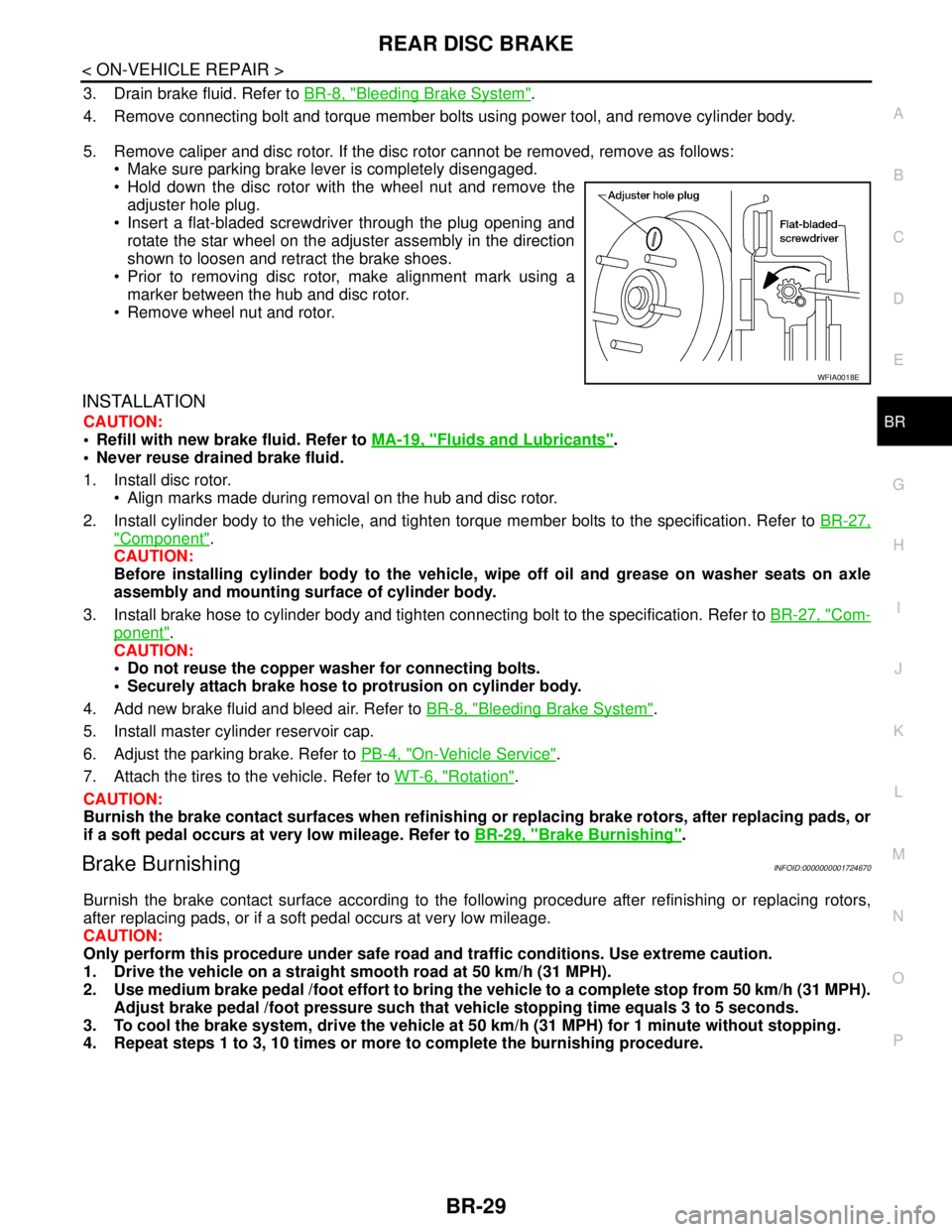
5. Remove caliper and disc rotor. If the disc rotor cannot be removed, remove as follows:
Make sure parking brake lever is completely disengaged.
Hold down the disc rotor with the wheel nut and remove the
adjuster hole plug.
Insert a flat-bladed screwdriver through the plug opening and
rotate the star wheel on the adjuster assembly in the direction
shown to loosen and retract the brake shoes.
Prior to removing disc rotor, make alignment mark using a
marker between the hub and disc rotor.
Remove wheel nut and rotor.
INSTALLATION
CAUTION:
Refill with new brake fluid. Refer to MA-19, "
Fluids and Lubricants".
Never reuse drained brake fluid.
1. Install disc rotor.
Align marks made during removal on the hub and disc rotor.
2. Install cylinder body to the vehicle, and tighten torque member bolts to the specification. Refer to BR-27,
"Component".
CAUTION:
Before installing cylinder body to the vehicle, wipe off oil and grease on washer seats on axle
assembly and mounting surface of cylinder body.
3. Install brake hose to cylinder body and tighten connecting bolt to the specification. Refer to BR-27, "
Com-
ponent".
CAUTION:
Do not reuse the copper washer for connecting bolts.
Securely attach brake hose to protrusion on cylinder body.
4. Add new brake fluid and bleed air. Refer to BR-8, "
Bleeding Brake System".
5. Install master cylinder reservoir cap.
6. Adjust the parking brake. Refer to PB-4, "
On-Vehicle Service".
7. Attach the tires to the vehicle. Refer to WT-6, "
Rotation".
CAUTION:
Burnish the brake contact surfaces when refinishing or replacing brake rotors, after replacing pads, or
if a soft pedal occurs at very low mileage. Refer to BR-29, "
Brake Burnishing".
Brake BurnishingINFOID:0000000001724670
Burnish the brake contact surface according to the following procedure after refinishing or replacing rotors,
after replacing pads, or if a soft pedal occurs at very low mileage.
CAUTION:
Only perform this procedure under safe road and traffic conditions. Use extreme caution.
1. Drive the vehicle on a straight smooth road at 50 km/h (31 MPH).
2. Use medium brake pedal /foot effort to bring the vehicle to a complete stop from 50 km/h (31 MPH).
Adjust brake pedal /foot pressure such that vehicle stopping time equals 3 to 5 seconds.
3. To cool the brake system, drive the vehicle at 50 km/h (31 MPH) for 1 minute without stopping.
4. Repeat steps 1 to 3, 10 times or more to complete the burnishing procedure.
WFIA0018E
Page 312 of 5883
![NISSAN TIIDA 2007 Service Repair Manual NORMAL OPERATING CONDITION
BRC-79
< SYMPTOM DIAGNOSIS >[ABS]
C
D
E
G
H
I
J
K
L
MA
B
BRC
N
O
P
NORMAL OPERATING CONDITION
DescriptionINFOID:0000000001731350
Symptom Result
Slight vibrations are felt on](/manual-img/5/57395/w960_57395-311.png "NISSAN TIIDA 2007 Service Repair Manual NORMAL OPERATING CONDITION
BRC-79
< SYMPTOM DIAGNOSIS >[ABS]
C
D
E
G
H
I
J
K
L
MA
B
BRC
N
O
P
NORMAL OPERATING CONDITION
DescriptionINFOID:0000000001731350
Symptom Result
Slight vibrations are felt on")
NORMAL OPERATING CONDITION
BRC-79
< SYMPTOM DIAGNOSIS >[ABS]
C
D
E
G
H
I
J
K
L
MA
B
BRC
N
O
P
NORMAL OPERATING CONDITION
DescriptionINFOID:0000000001731350
Symptom Result
Slight vibrations are felt on the brake pedal and the operation noises occur, when VDC, TCS or ABS is acti-
vated.
This is a normal condi-
tion due to the VDC,
TCS or ABS activation. Stopping distance is longer than that of vehicles without ABS when the vehicle drives on rough, gravel, or
snow-covered (fresh, deep snow) roads.
The brake pedal moves and generates noises, when TCS or VDC is activated due to rapid acceleration or
sharp turn.
The brake pedal vibrates and motor operation noises occur from the engine room, after the engine starts and
just after the vehicle starts.This is normal, and it is
caused by the ABS op-
eration check.
Depending on the road conditions, the driver may experience a sluggish feel. This is normal, because
TCS places the highest
priority on the optimum
traction (stability). TCS may activate momentarily if wheel speed changes when driving over location where friction coefficient
varies, when downshifting, or when fully depressing accelerator pedal.
The ABS warning lamp, VDC OFF indicator lamp and SLIP indicator lamp may turn ON when the vehicle is
subject to strong shaking or large vibration, such as when the vehicle is rotating on a turntable or located on
a ship while the engine is running. In this case, restart the
engine on a normal
road. If the normal con-
dition is restored, there
is no malfunction. At
that time, erase the self-
diagnosis memory. VDC may not operate normally or the ABS warning lamp, VDC OFF indicator lamp, and SLIP indicator lamp
may illuminate, when running on a special road that is extremely slanted (e.g. bank in a circuit course).
A malfunction may occur in the yaw rate/side/decel G sensor system, when the vehicle turns sharply, such
as during a spin turn, axle turn, or drift driving, while the VDC function is off (VDC OFF indicator lamp illumi-
nated).
The vehicle speed will not increase even though the accelerator pedal is depressed, when inspecting the
speedometer on a 2-wheel chassis dynamometer. Normal (Deactivate the
VDC/TCS function be-
fore performing an in-
spection on a chassis
dynamometer.)
VDC OFF indicator lamp and SLIP indicator lamp may simultaneously turn on when low tire pressure warn-
ing lamp turns on.This is not a VDC sys-
tem error but results
from characteristic
change of tire.