2007 NISSAN MAXIMA air condition
[x] Cancel search: air conditionPage 110 of 336
To close the roof, slide the switch to the CLOSE
position
s2.
The position of the sliding roof lid can be chosen
by the position of the sliding switch.
To fully open or close the roof, completely move
the switch to the open or closed position.
Tilting the sunroof
To tilt the sunroof up, push the tilt switch to the
UP position
s3. When the roof is open, it will
automatically close and then tilt up. To tilt the
sunroof down, push the tilt switch to the DOWN
position
s4.
Restarting the sunroof sliding switch
The sliding switch will become inoperable after
the battery terminal is disconnected, the electri-
cal supply interrupted and/or some abnormality
detected. Use the following reset procedure to
return sunroof operation to normal.
1. If the sunroof lid is open, push the tilting
switch repeatedly toward the DOWN posi-
tion to fully close the lid.
2. Push and hold the tilting switch for more
than 2 seconds toward the DOWN position
to reestablish the lid’s home position.
The sunroof should now operate normally.
Auto reverse function (when closing or
tilting down the sunroof)
The auto reverse function can be activated when
the sunroof is closed or tilted down by automatic
operation when the ignition key is in the ON
position or for about 45 seconds after the ignition
key is turned to the OFF position.
Depending on the environment or driving
conditions, the auto reverse function may
be activated if an impact or load similar to
something being caught in the sunroof oc-
curs.
WARNING
There are some small distances immedi-
ately before the closed position which
cannot be detected. Make sure that all
passengers have their hands, etc., inside
the vehicle before closing the sunroof.
When closing:
If the control unit detects something caught in the
sunroof as it moves to the front, the sunroof will
immediately open backward.
When tilting down:
If the control unit detects something caught in the
sunroof as it tilts down, the sunroof will immedi-
ately tilt up.If the auto reverse function malfunctions and re-
peats opening or tilting up the sunroof, keep
pushing the tilt down switch within 5 seconds
after it happens; the sunroof will fully close gradu-
ally. Make sure nothing is caught in the sunroof.
WARNING
cIn an accident you could be thrown from
the vehicle through an open sunroof. Al-
ways use seat belts and child restraints.
cDo not allow anyone to stand up or ex-
tend any portion of their body out of the
sunroof opening while the vehicle is in
motion or while the sunroof is closing.
CAUTION
cRemove water drops, snow, ice or sand
from the sunroof before opening.
cDo not place heavy objects on the sun-
roof or surrounding area.
Sunshade
Open and close the sunshade by sliding it for-
ward or backward.
If the sunroof does not close
Have your NISSAN dealer check and repair the
sunroof.
2-40Instruments and controls
ZREVIEW COPYÐ2007 Maxima(max)
Owners ManualÐUSA_English(nna)
01/26/07Ðarosenma
X
Page 117 of 336

PROGRAMMING TROUBLE-
DIAGNOSIS
If the HomeLinkTdoes not quickly learn the hand-
held transmitter information:
creplace the hand-held transmitter batteries
with new batteries.
cposition the hand-held transmitter with its
battery area facing away from the
HomeLinkTsurface.
cpress and hold both the HomeLinkTand
hand-held transmitter buttons without inter-
ruption.
cposition the hand-held transmitter1-3
inches (26 - 76 mm) away from the
HomeLinkTsurface. Hold the transmitter in
that position for up to 15 seconds. If
HomeLinkTis not programmed within that
time, try holding the transmitter in another
position – keeping the indicator light in view
at all times.
If you continue to have programming difficulties,
please contact the NISSAN Consumer Affairs
Department. The phone numbers are located in
the Foreword of this manual.
CLEARING THE PROGRAMMED
INFORMATION
Individual buttons cannot be cleared. However,
to clear all programming, press and hold the two
outside buttons and release when the indicator
light begins to flash (approximately 20 seconds) .
REPROGRAMMING A SINGLE
HOMELINKTBUTTON
To reprogram a HomeLinkTUniversal Transceiver
button, complete the following.
1. Press and hold the desired HomeLinkTbut-
ton.Do notrelease the button until step 4
has been completed.
2. When the indicator light begins to flash
slowly (after 20 seconds) , position the
hand-held transmitter1-3inches (26 - 76
mm) away from the HomeLinkTsurface.
3. Press and hold the hand-held transmitter
button.
4. The HomeLinkTindicator light will flash, first
slowly and then rapidly. When the indicator
light begins to flash rapidly, release both
buttons.
The HomeLinkTUniversal Transceiver button has
now been reprogrammed. The new device can be
activated by pushing the HomeLinkTbutton that
was just programmed. This procedure will not
affect any other programmed HomeLinkTbuttons.
IF YOUR VEHICLE IS STOLEN
If your vehicle is stolen, you should change the
codes of any non-rolling code device that has
been programmed into HomeLinkT. Consult the
Owner’s Manual of each device or call the manu-
facturer or dealer of those devices for additional
information.
When your vehicle is recovered, you will
need to reprogram the HomeLinkTUniver-
sal Transceiver with your new transmitter
information.
FCC Notice:
This device complies with FCC rules part 15
and RSS-210 of Industry Canada. Operation
is subject to the following two conditions:
(1) This device may not cause harmful in-
terference and (2) This device must accept
any interference that may be received, in-
cluding interference that may cause undes-
ired operation.
This transmitter has been tested and com-
plies with FCC and DOC/MDC rules.
Changes or modifications not expressly ap-
proved by the party responsible for compli-
ance could void the user’s authority to op-
erate the equipment.
DOC: ISTC 1763K1313
FCC I.D. CV2V67690
Instruments and controls2-47
ZREVIEW COPYÐ2007 Maxima(max)
Owners ManualÐUSA_English(nna)
01/26/07Ðarosenma
X
Page 148 of 336

Confirming memory storage
cTurn the ignition ON and push the SET
switch. If the main memory has not been
stored, the indicator light will come on for
approximately 0.5 seconds. When the
memory has stored the position, the indica-
tor light will stay on for approximately 5 sec-
onds.
cIf the battery cable is disconnected, or if the
fuse opens, the memory storage function will
be canceled and must be restarted before a
stored memory position can be set again.
Drive the vehicle over 25 MPH (40 km/h) to
restart the memory storage function. You
can also restart the memory storage function
using the following procedure.
1. Connect the battery cable or replace the
fuse.
2. Open and close the driver’s door more than
two times with the ignition key in the LOCK
position.
Once the memory storage function has been
restarted, you can store a memory position.
See “Memory storage function” earlier in this
section.
Selecting the memorized position
Set the CVT selector lever to the P (Park) posi-
tion, then:
cWithin 45 seconds of opening the driver’s
door, push the memory switch (1 or 2) fully
for at least 1 second, or
cTurn the ignition switch to the ON position
and push the memory switch (1 or 2) fully for
at least 1 second.
The driver’s seat, steering column, and outside
mirrors will move to the memorized position with
the indicator light blinking, and then the light will
stay on for approximately 5 seconds.
ENTRY/EXIT FUNCTION
This system is designed so that the driver’s seat
and automatic operation steering column (if so
equipped) will automatically move when the CVT
selector lever is in the P (Park) position. This
allows the driver to get into and out of the driver’s
seat more easily.
The driver’s seat will slide backward and the
steering wheel will move up when the driver’s
door is opened and the ignition switch is in the
LOCK position.The driver’s seat and steering wheel will return to
previous position when the driver’s door is closed
and the ignition switch is pushed
The entry/exit function can be adjusted or can-
celed. See “Vehicle electronic systems” in the
“Display screen, heater, air conditioner, audio
and phone systems” section of this manual.
Restarting the entry/exit function
If the battery cable is disconnected or if the fuse
opens, the entry/exit function will be disabled.
Drive the vehicle over 25 MPH (40 km/h) to
restart the entry/exit function. You can also restart
the entry/exit function using the following proce-
dure.
1. Connect the battery cable or replace the
fuse.
2. Open and close the driver’s door more than
two times with the ignition key in the LOCK
position.
The entry/exit function should now work properly.
SYSTEM OPERATION
The automatic drive positioner system will not
work or will stop operating under the following
conditions:
cWhen the vehicle speed is above 4 MPH (7
km/h) .
3-30Pre-driving checks and adjustments
ZREVIEW COPYÐ2007 Maxima(max)
Owners ManualÐUSA_English(nna)
01/26/07Ðarosenma
X
Page 149 of 336

cWhen any of the memory switches are
pushed while the automatic drive positioner
is operating.
cWhen the adjusting switch for the driver’s
seat is turned on while the automatic drive
positioner is operating.
cWhen the memory switch (1 or 2) is not
pushed and held for at least 1 second.
cWhen the seat has been already moved to
the memorized position.
cWhen no seat position is stored in the
memory switch.
cWhen the CVT selector lever is moved from
P (Park) to any other position.
cWhen the driver’s door remains open more
than 45 seconds and the ignition switch is
not in the ON position.
The automatic drive positioner system can be
adjusted and canceled for vehicles with naviga-
tion system. See “Vehicle electronic systems” in
the “Display screen, heater, air conditioner, audio
and phone systems” section of this manual.
Pre-driving checks and adjustments3-31
ZREVIEW COPYÐ2007 Maxima(max)
Owners ManualÐUSA_English(nna)
01/26/07Ðarosenma
X
Page 151 of 336

4 Display screen, heater, air conditioner,
audio and phone systems
Control panel buttons — with monochrome screen....4-2
How to use the TRIP INFO button................4-3
Clock.........................................4-5
How to use the AUDIO button
(for control panel)..............................4-5
Door warning..................................4-6
Control panel buttons — with navigation system.......4-6
How to use the joystick and ENTER button........4-7
How to use the BACK button....................4-7
Setting up the start-up screen...................4-7
How to use the TRIP button.....................4-7
How to use the SETTING button................4-11
button..................................4-18
Ventilators.......................................4-18
Heater and air conditioner (automatic)..............4-19
Automatic operation...........................4-20
Manual operation..............................4-20
Operating tips.................................4-21
Servicing air conditioner...........................4-22
Audio system....................................4-22Radio........................................4-22
FM radio reception............................4-22
AM radio reception............................4-23
Satellite radio reception (if so equipped).........4-23
Audio operation precautions....................4-23
FM/AM/SAT radio with compact disc (CD)
player (Type A)/CD changer (Type B)............4-29
FM/AM/SAT radio with compact disc (CD)
changer......................................4-36
CD care and cleaning..........................4-41
Steering wheel switch for audio control..........4-42
Antenna......................................4-42
Car phone or CB radio............................4-43
BluetoothTHands-Free Phone System
(if so equipped)..................................4-43
Using the system..............................4-45
Control buttons...............................4-47
Getting started................................4-47
List of voice commands........................4-49
Speaker adaptation (SA) mode..................4-54
Troubleshooting guide.........................4-55
ZREVIEW COPYÐ2007 Maxima(max)
Owners ManualÐUSA_English(nna)
01/26/07Ðarosenma
X
Page 152 of 336
WARNING
cDo not disassemble or modify this sys-
tem. If you do, it may result in accidents,
fire, or electrical shock.
cDo not use this system if you notice any
abnormality, such as a frozen screen or
lack of sound. Continued use of the
system may result in accident, fire or
electric shock.
cIn case you notice any foreign object in
the system hardware, spill liquid on it,
or notice smoke or smell coming from
it, stop using the system immediately
and contact your nearest NISSAN
dealer. Ignoring such conditions may
lead to accidents, fire or electrical
shock.
LHA0670
CONTROL PANEL BUTTONS — WITH
MONOCHROME SCREEN
4-2Display screen, heater, air conditioner, audio and phone systems
ZREVIEW COPYÐ2007 Maxima(max)
Owners ManualÐUSA_English(nna)
01/26/07Ðarosenma
X
Page 153 of 336

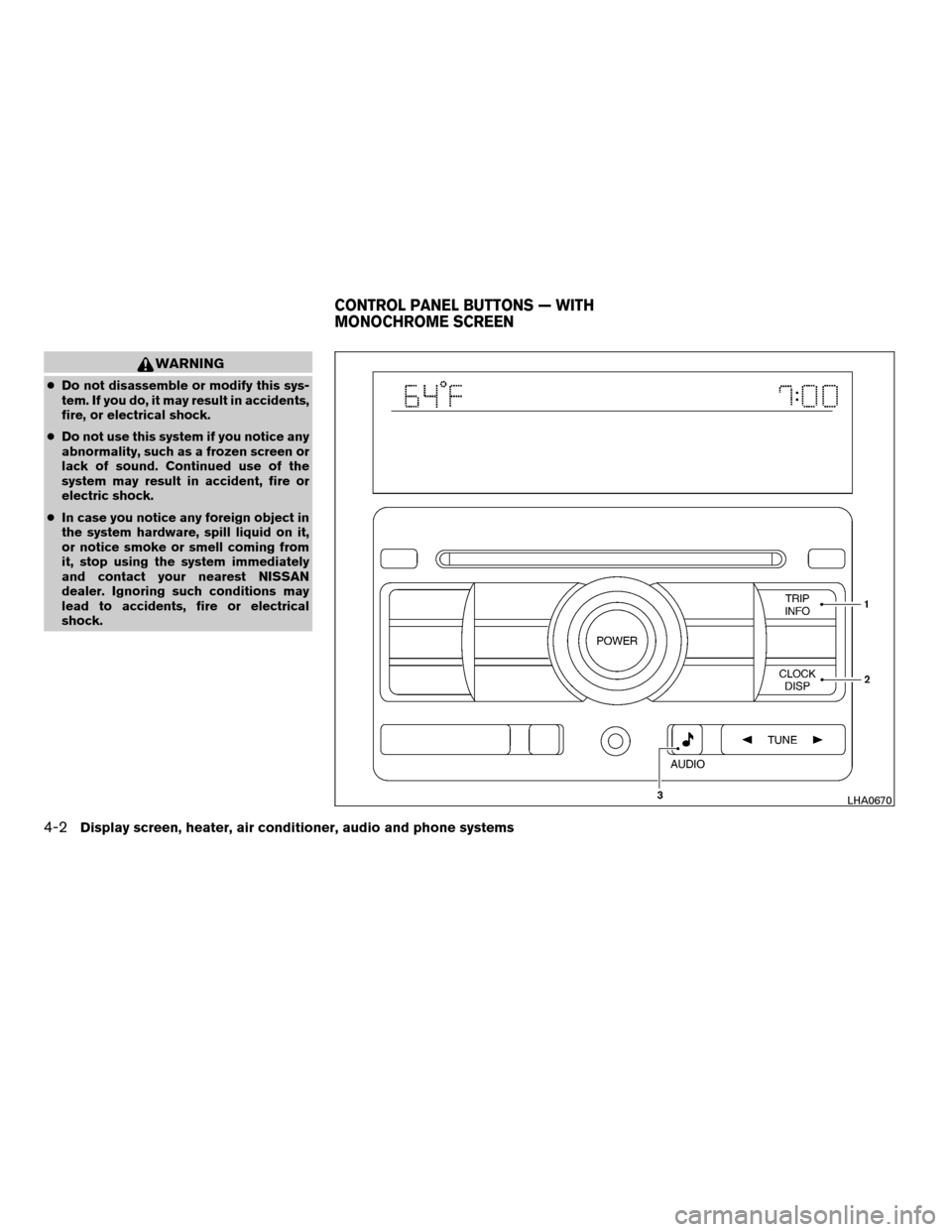
1. TRIP INFO button (P. 4-3)
2. CLOCK DISP button (P. 4-5)
3.
AUDIO button (P. 4-5)
When you use this system, make sure the engine
is running.
If you use the system with the engine not
running (ignition ON or ACC) for a long
time, it will use up all the battery power,
and the engine will not start.
Reference symbols:
TRIP INFO button — This is a button on the
control panel. By pressing this button you can
select the item or perform this action.
HOW TO USE THE TRIP INFO
BUTTON
When the TRIP INFO button is pressed, the
following modes will display on the screen.
Dist. to Empty!Average Speed!Fuel
Economy!Trip Time!Audio or OFF!Dist. to
Empty
Distance to empty (MI or km)
The Distance To Empty (DTE) mode provides you
with an estimation of the distance that can be
driven before refueling. The DTE is constantly
calculated based on the amount of fuel in the fuel
tank and the actual fuel consumption. The display
is updated every 30 seconds. When the fuel level
is low, the DTE display will change to — .
NOTE:
cIf the amount of fuel added while the ignition
switch is OFF is small, the display just before
the ignition switch is turned OFF may con-
tinue to be displayed.cWhen driving uphill or rounding curves, the
fuel in the tank shifts, which may momentarily
change the display.
WHA0701
Display screen, heater, air conditioner, audio and phone systems4-3
ZREVIEW COPYÐ2007 Maxima(max)
Owners ManualÐUSA_English(nna)
01/26/07Ðarosenma
X
Page 154 of 336

Average speed (MPH or km/h)
The Average Speed mode shows the average
speed since the last reset. To calculate the aver-
age speed, driving distance is divided by driving
time.
For approximately the first 30 seconds after a
reset or reconnecting the battery cables, the
display will show —.
Resetting average speed
The average speed calculation can be reset to 0.
Press the TRIP INFO button for more than ap-
proximately 2 seconds.
Fuel economy (MPG or L/100 km)
The Fuel Economy mode shows the average fuel
economy since the last reset.
For approximately the first 30 seconds and 1/3
mile (500 m) after a reset or connecting the
battery cables, the display will show —.
Resetting fuel economy
The fuel economy calculation can be reset to 0.
Press the TRIP INFO button for more than ap-
proximately 2 seconds.
Trip time
The trip time mode displays the trip time since the
last reset.
The maximum time that can be displayed by the
Trip Time screen is 99 hours : 59 minutes : 59
seconds.
Resetting trip time
The Trip Time calculation can be reset to 0. Press
the TRIP INFO button for more than approxi-
mately 2 seconds.
WHA0702WHA0703LHA0671
4-4Display screen, heater, air conditioner, audio and phone systems
ZREVIEW COPYÐ2007 Maxima(max)
Owners ManualÐUSA_English(nna)
01/26/07Ðarosenma
X