2007 NISSAN FRONTIER belt
[x] Cancel search: beltPage 28 of 336
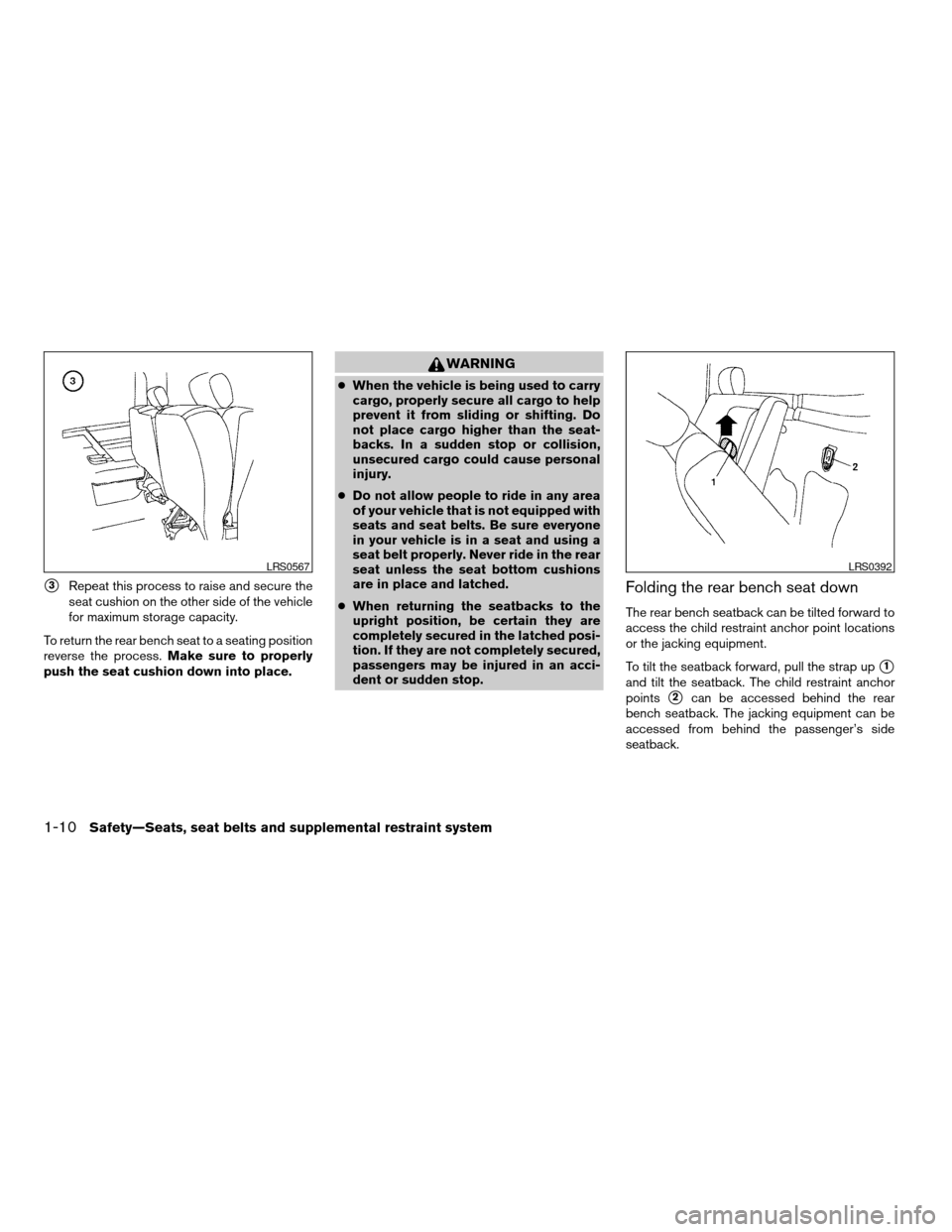
s3Repeat this process to raise and secure the
seat cushion on the other side of the vehicle
for maximum storage capacity.
To return the rear bench seat to a seating position
reverse the process.Make sure to properly
push the seat cushion down into place.
WARNING
cWhen the vehicle is being used to carry
cargo, properly secure all cargo to help
prevent it from sliding or shifting. Do
not place cargo higher than the seat-
backs. In a sudden stop or collision,
unsecured cargo could cause personal
injury.
cDo not allow people to ride in any area
of your vehicle that is not equipped with
seats and seat belts. Be sure everyone
in your vehicle is in a seat and using a
seat belt properly. Never ride in the rear
seat unless the seat bottom cushions
are in place and latched.
cWhen returning the seatbacks to the
upright position, be certain they are
completely secured in the latched posi-
tion. If they are not completely secured,
passengers may be injured in an acci-
dent or sudden stop.
Folding the rear bench seat down
The rear bench seatback can be tilted forward to
access the child restraint anchor point locations
or the jacking equipment.
To tilt the seatback forward, pull the strap up
s1
and tilt the seatback. The child restraint anchor
points
s2can be accessed behind the rear
bench seatback. The jacking equipment can be
accessed from behind the passenger’s side
seatback.
LRS0567LRS0392
1-10Safety—Seats, seat belts and supplemental restraint system
ZREVIEW COPYÐ2007 Truck/Frontier(d22)
Owners ManualÐUSA_English(nna)
12/13/06Ðcathy
X
Page 29 of 336
WARNING
Never allow anyone to ride in the cargo
area or on the rear seat when it is in the
fold-down position. Use of these areas by
passengers without proper restraints
could result in serious injury in an acci-
dent or sudden stop.
PRECAUTIONS ON SEAT BELT
USAGE
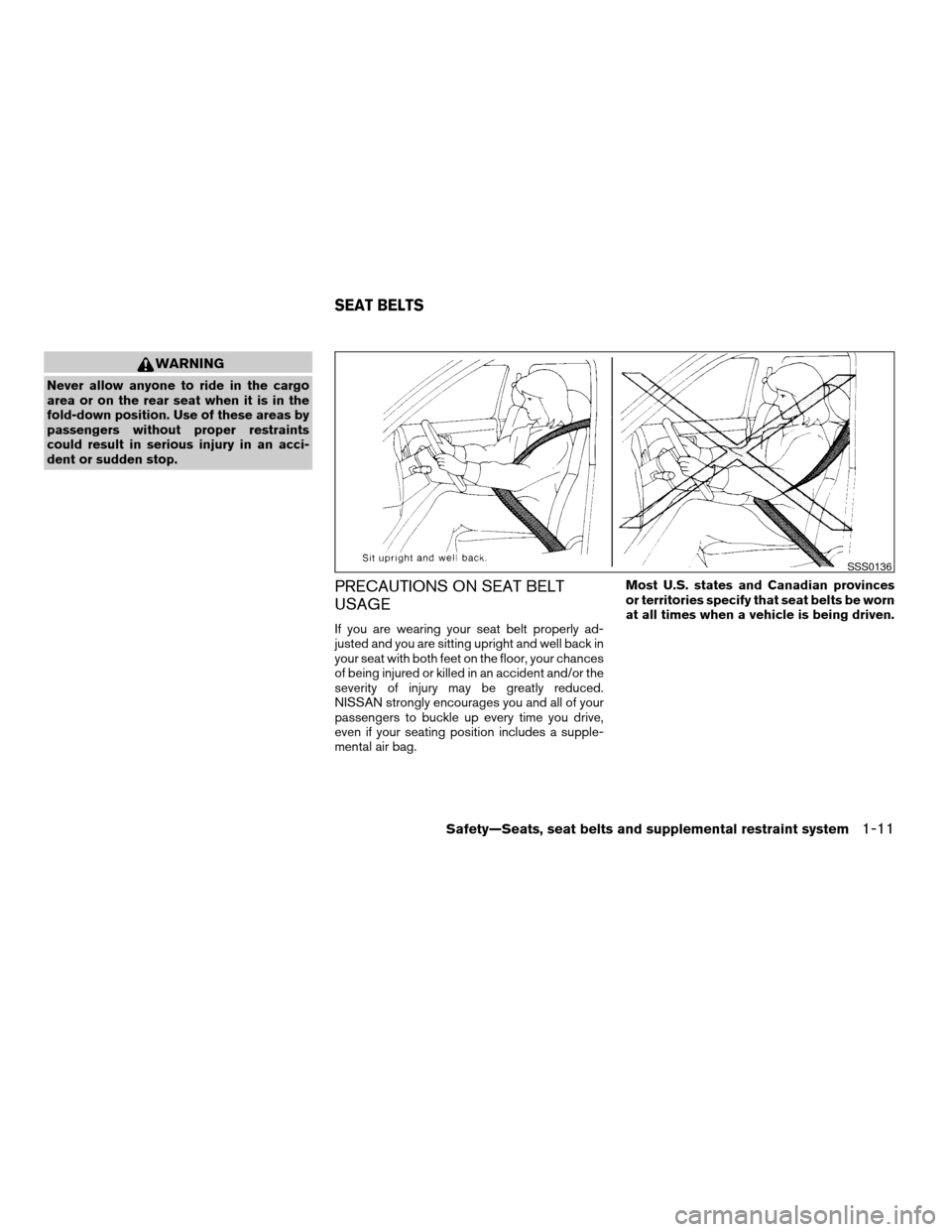
If you are wearing your seat belt properly ad-
justed and you are sitting upright and well back in
your seat with both feet on the floor, your chances
of being injured or killed in an accident and/or the
severity of injury may be greatly reduced.
NISSAN strongly encourages you and all of your
passengers to buckle up every time you drive,
even if your seating position includes a supple-
mental air bag.Most U.S. states and Canadian provinces
or territories specify that seat belts be worn
at all times when a vehicle is being driven.
SSS0136
SEAT BELTS
Safety—Seats, seat belts and supplemental restraint system1-11
ZREVIEW COPYÐ2007 Truck/Frontier(d22)
Owners ManualÐUSA_English(nna)
12/13/06Ðcathy
X
Page 30 of 336
WARNING
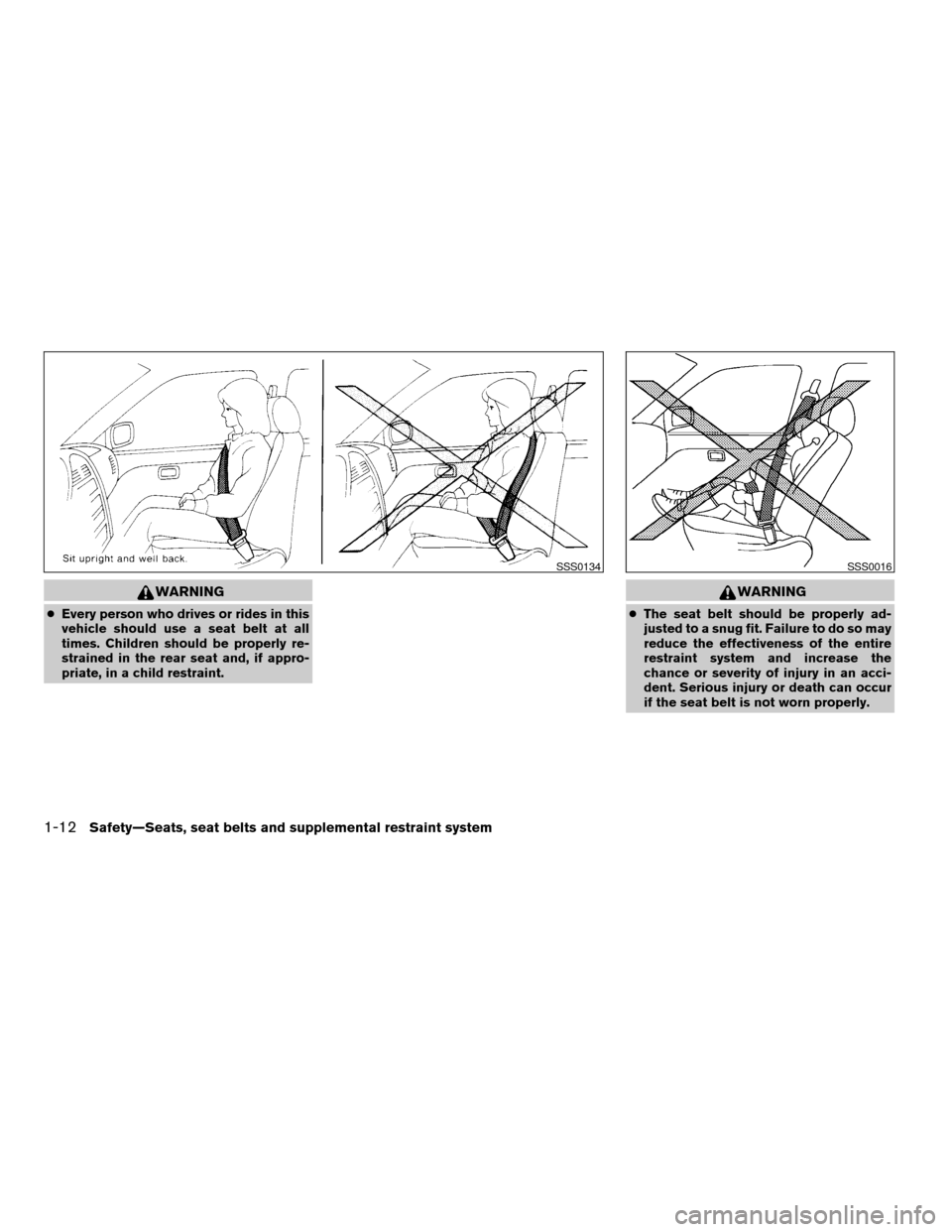
cEvery person who drives or rides in this
vehicle should use a seat belt at all
times. Children should be properly re-
strained in the rear seat and, if appro-
priate, in a child restraint.
WARNING
cThe seat belt should be properly ad-
justed to a snug fit. Failure to do so may
reduce the effectiveness of the entire
restraint system and increase the
chance or severity of injury in an acci-
dent. Serious injury or death can occur
if the seat belt is not worn properly.
SSS0134SSS0016
1-12Safety—Seats, seat belts and supplemental restraint system
ZREVIEW COPYÐ2007 Truck/Frontier(d22)
Owners ManualÐUSA_English(nna)
12/13/06Ðcathy
X
Page 31 of 336
WARNING
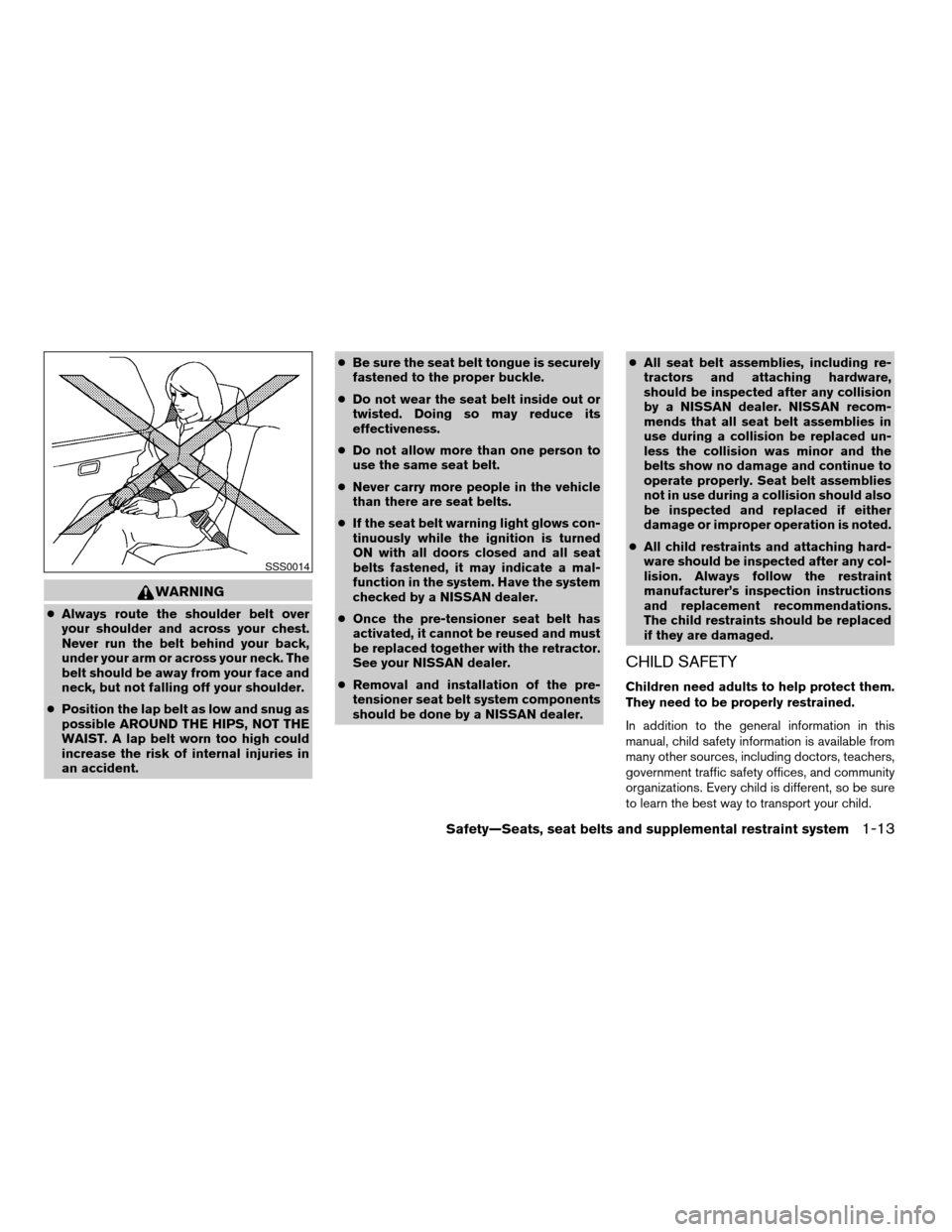
cAlways route the shoulder belt over
your shoulder and across your chest.
Never run the belt behind your back,
under your arm or across your neck. The
belt should be away from your face and
neck, but not falling off your shoulder.
cPosition the lap belt as low and snug as
possible AROUND THE HIPS, NOT THE
WAIST. A lap belt worn too high could
increase the risk of internal injuries in
an accident.cBe sure the seat belt tongue is securely
fastened to the proper buckle.
cDo not wear the seat belt inside out or
twisted. Doing so may reduce its
effectiveness.
cDo not allow more than one person to
use the same seat belt.
cNever carry more people in the vehicle
than there are seat belts.
cIf the seat belt warning light glows con-
tinuously while the ignition is turned
ON with all doors closed and all seat
belts fastened, it may indicate a mal-
function in the system. Have the system
checked by a NISSAN dealer.
cOnce the pre-tensioner seat belt has
activated, it cannot be reused and must
be replaced together with the retractor.
See your NISSAN dealer.
cRemoval and installation of the pre-
tensioner seat belt system components
should be done by a NISSAN dealer.cAll seat belt assemblies, including re-
tractors and attaching hardware,
should be inspected after any collision
by a NISSAN dealer. NISSAN recom-
mends that all seat belt assemblies in
use during a collision be replaced un-
less the collision was minor and the
belts show no damage and continue to
operate properly. Seat belt assemblies
not in use during a collision should also
be inspected and replaced if either
damage or improper operation is noted.
cAll child restraints and attaching hard-
ware should be inspected after any col-
lision. Always follow the restraint
manufacturer’s inspection instructions
and replacement recommendations.
The child restraints should be replaced
if they are damaged.
CHILD SAFETY
Children need adults to help protect them.
They need to be properly restrained.
In addition to the general information in this
manual, child safety information is available from
many other sources, including doctors, teachers,
government traffic safety offices, and community
organizations. Every child is different, so be sure
to learn the best way to transport your child.
SSS0014
Safety—Seats, seat belts and supplemental restraint system1-13
ZREVIEW COPYÐ2007 Truck/Frontier(d22)
Owners ManualÐUSA_English(nna)
12/13/06Ðcathy
X
Page 32 of 336
There are three basic types of child restraint
systems:
cRear facing child restraint
cFront facing child restraint
cBooster seat
The proper restraint depends on the child’s size.
Generally, infants up to about 1 year and less
than 20 pounds (9 kg) should be placed in rear
facing child restraints. Front facing child re-
straints are available for children who outgrow
rear facing child restraints and are at least one
year old. Booster seats are used to help position
a vehicle lap/shoulder belt on a child who can no
longer use a front facing child restraint.
WARNING
cNever install a rear facing child restraint
in the front passenger’s seat. An inflat-
ing supplemental air bag could seri-
ously injure or kill your child. A rear
facing child restraint must only be used
in the rear seat.cInfants and children need special pro-
tection. The vehicle’s seat belts may not
fit them properly. The shoulder belt may
come too close to the face or neck. The
lap belt may not fit over their small hip
bones. In an accident, an improperly
fitting seat belt could cause serious or
fatal injury. Always use appropriate
child restraints.
All U.S. states and Canadian provinces or terri-
tories require the use of approved child restraints
for infants and small children. See “Child Re-
straints” later in this section.
Also, there are other types of child restraints
available for larger children for additional protec-
tion.
NISSAN recommends that all pre-teens
and children be restrained in the rear seat if
available (Crew Cab models) . According to
accident statistics, children are safer when
properly restrained in the rear seat than in
the front seat.
This is especially important because your
vehicle has a supplemental restraint sys-
tem (Air bag system) for the front passen-
ger. See “Supplemental restraint system”
later in this section.
Infants
Infants up to at least 1 year old should be placed
in a rear facing child restraint. NISSAN recom-
mends that infants be placed in child restraints
that comply with Federal Motor Vehicle Safety
Standards or Canadian Motor Vehicle Safety
Standards. You should choose a child restraint
that fits your vehicle and always follow the manu-
facturer’s instructions for installation and use.
Small Children
Children that are over one year old and weigh at
least 20 lbs (9 kg) can be placed in a forward
facing child restraint. Refer to the manufacturer’s
instructions for minimum and maximum weight
and height recommendations. NISSAN recom-
mends that small children be placed in child
restraints that comply with Federal Motor Vehicle
Safety Standards or Canadian Motor Vehicle
Safety Standards. You should choose a child
restraint that fits your vehicle and always follow
the manufacturer’s instructions for installation
and use.
Larger children
Children who are too large for child restraints
should be seated and restrained by the seat belts
which are provided. The seat belt may not fit
properly if the child is less than 4 feet 9 inches
(142.5 cm) tall and weighs between 40 lbs (18
1-14Safety—Seats, seat belts and supplemental restraint system
ZREVIEW COPYÐ2007 Truck/Frontier(d22)
Owners ManualÐUSA_English(nna)
12/13/06Ðcathy
X
Page 33 of 336
kg) and 80 lbs (36 kg) . A booster seat should be
used to obtain proper seat belt fit.
NISSAN recommends that a child be placed in a
commercially available booster seat if the shoul-
der belt in the child’s seating position fits close to
the face or neck or if the lap portion of the seat
belt goes across the abdomen. The booster seat
should raise the child so that the shoulder belt is
properly positioned across the top, middle por-
tion of the shoulder and the lap belt is low on the
hips. A booster seat can only be used in seating
positions that have a three-point type seat belt.
The booster seat should fit the vehicle seat and
have a label certifying that it complies with Fed-
eral Motor Vehicle Safety Standards or Canadian
Motor Vehicle Safety Standards. Once the child
has grown so the shoulder belt is no longer on or
near the face and neck, use the shoulder belt
without the booster seat.
WARNING
Never let a child stand or kneel on any
seat and do not allow a child in the cargo
areas while the vehicle is moving. The
child could be seriously injured or killed in
an accident or sudden stop.
PREGNANT WOMEN
NISSAN recommends that pregnant women use
seat belts. The seat belt should be worn snug,
and always position the lap belt as low as pos-
sible around the hips, not the waist. Place the
shoulder belt over your shoulder and across your
chest. Never run the lap/shoulder belt over your
abdominal area. Contact your doctor for specific
recommendations.
INJURED PERSONS
NISSAN recommends that injured persons use
seat belts. Check with your doctor for specific
recommendations.
THREE-POINT TYPE SEAT BELT
WITH RETRACTOR
WARNING
cEvery person who drives or rides in this
vehicle should use a seat belt at all
times.cDo not ride in a moving vehicle when
the seatback is reclined. This can be
dangerous. The shoulder belt will not
be against your body. In an accident,
you could be thrown into it and receive
neck or other serious injuries. You
could also slide under the lap belt and
receive serious internal injuries.
cFor the most effective protection when
the vehicle is in motion, the seat should
be upright. Always sit well back in the
seat with both feet on the floor and
adjust the seat belt properly.
Safety—Seats, seat belts and supplemental restraint system1-15
ZREVIEW COPYÐ2007 Truck/Frontier(d22)
Owners ManualÐUSA_English(nna)
12/13/06Ðcathy
X
Page 34 of 336
Fastening the seat belts (Front seats
all models and rear seats Crew cab
models)
s1Adjust the seat. See “Seats” earlier in this
section.
s2Slowly pull the seat belt out of the retractor
and insert the tongue into the buckle until
you hear and feel the latch engage.
cThe retractor is designed to lock during
a sudden stop or on impact. A slow
pulling motion permits the seat belt to
move, and allows you some freedom of
movement in the seat.
cIf the seat belt cannot be pulled from
its fully retracted position, firmly pull
the belt and release it. Then smoothly
pull the belt out of the retractor.s3Position the lap belt portionlow and snug
on the hipsas shown.
s4Pull the shoulder belt portion toward the
retractor to take up extra slack. Be sure the
shoulder belt is routed over your shoulder
and across your chest.
The front passenger seat and the rear seating
positions three-point seat belts have a locking
mechanism for child restraint installation. It is
referred to as the automatic locking mode or child
restraint mode.
When the automatic locking mechanism is acti-
vated the seat belt cannot be extended again until
the seat belt tongue is detached from the buckle
Manual front seat shown
WRS0174LRS0594LRS0595
1-16Safety—Seats, seat belts and supplemental restraint system
ZREVIEW COPYÐ2007 Truck/Frontier(d22)
Owners ManualÐUSA_English(nna)
12/13/06Ðcathy
X
Page 35 of 336
and fully retracted. Once retracted, the seat belt
is in the emergency locking mode. See “Child
restraints” later in this section for more informa-
tion.
The automatic locking mode should be
used only for child restraint installation.
During normal seat belt use by a passen-
ger, the locking mode should not be acti-
vated. If it is activated it may cause uncom-
fortable seat belt tension. It can also
change the operation of the front passen-
ger air bag. See “Front passenger air bag
and status light” later in this section.
WARNING
When fastening the seat belts, be certain
that the seatbacks are completely se-
cured in the latched position. If they are
not completely secured, passengers may
be injured in an accident or sudden stop.
Fastening the seat belts (Jump seats
King cab models)
1. Open the jump seat. See “Seats” earlier in
this section.s2Slowly pull the seat belt out of the retractor
and insert the tongue into the buckle until
you hear and feel the latch engage.
cThe retractor is designed to lock during
a sudden stop or on impact. A slow
pulling motion permits the seat belt to
move, and allows you some freedom of
movement in the seat.
cIf the seat belt cannot be pulled from
its fully retracted position, firmly pull
the belt and release it. Then smoothly
pull the belt out of the retractor.
LRS0556LRS0569
Safety—Seats, seat belts and supplemental restraint system1-17
ZREVIEW COPYÐ2007 Truck/Frontier(d22)
Owners ManualÐUSA_English(nna)
12/13/06Ðcathy
X