2007 NISSAN ARMADA hood release
[x] Cancel search: hood releasePage 137 of 344

3 Pre-driving checks and adjustments
Keys .............................................3-2
NISSAN vehicle immobilizer system keys..........3-2
Doors............................................3-3
Locking with key................................3-3
Locking with inside lock knob....................3-4
Locking with power door lock switch.............3-4
Child safety rear door lock.......................3-5
Remote keyless entry system.......................3-5
How to use remote keyless entry system..........3-6
Hood............................................3-9
Lift gate.........................................3-10
Operating the manual lift gate...................3-10
Operating the power lift gate
(if so equipped)...............................3-10
Cancel switch.................................3-13
Lift gate release...............................3-13Glass hatch......................................3-14
Fuel-filler door...................................3-15
Fuel-filler cap.................................3-15
Steering wheel...................................3-16
Tilt operation..................................3-16
Pedal position adjustment.........................3-16
Sun visors.......................................3-17
Vanity mirrors.................................3-18
Mirrors..........................................3-18
Automatic anti-glare rearview mirror.............3-18
Outside mirrors...............................3-19
Automatic drive positioner (if so equipped)..........3-20
Memory storage function.......................3-21
Entry/exit function.............................3-22
System operation..............................3-22
ZREVIEW COPYÐ2007 Armada(wzw)
Owners ManualÐUSA_English(nna)
07/08/06Ðtbrooks
X
Page 145 of 344
The hazard warning lights will flash three times to
confirm that the horn beep feature has been
deactivated.
To activate:Press and hold the
andbuttonsfor at least 2 seconds
once more.
The hazard warning lights will flash once and the
horn will sound once to confirm that the horn
beep feature has been reactivated.
Deactivating the horn beep feature does not si-
lence the horn if the alarm is triggered.
Using the interior lights
Push thebutton on the keyfob once to turn
on the interior lights and puddle lamps (if so
equipped) .
For additional information, refer to “Interior light”
in the “Instruments and controls” section earlier in
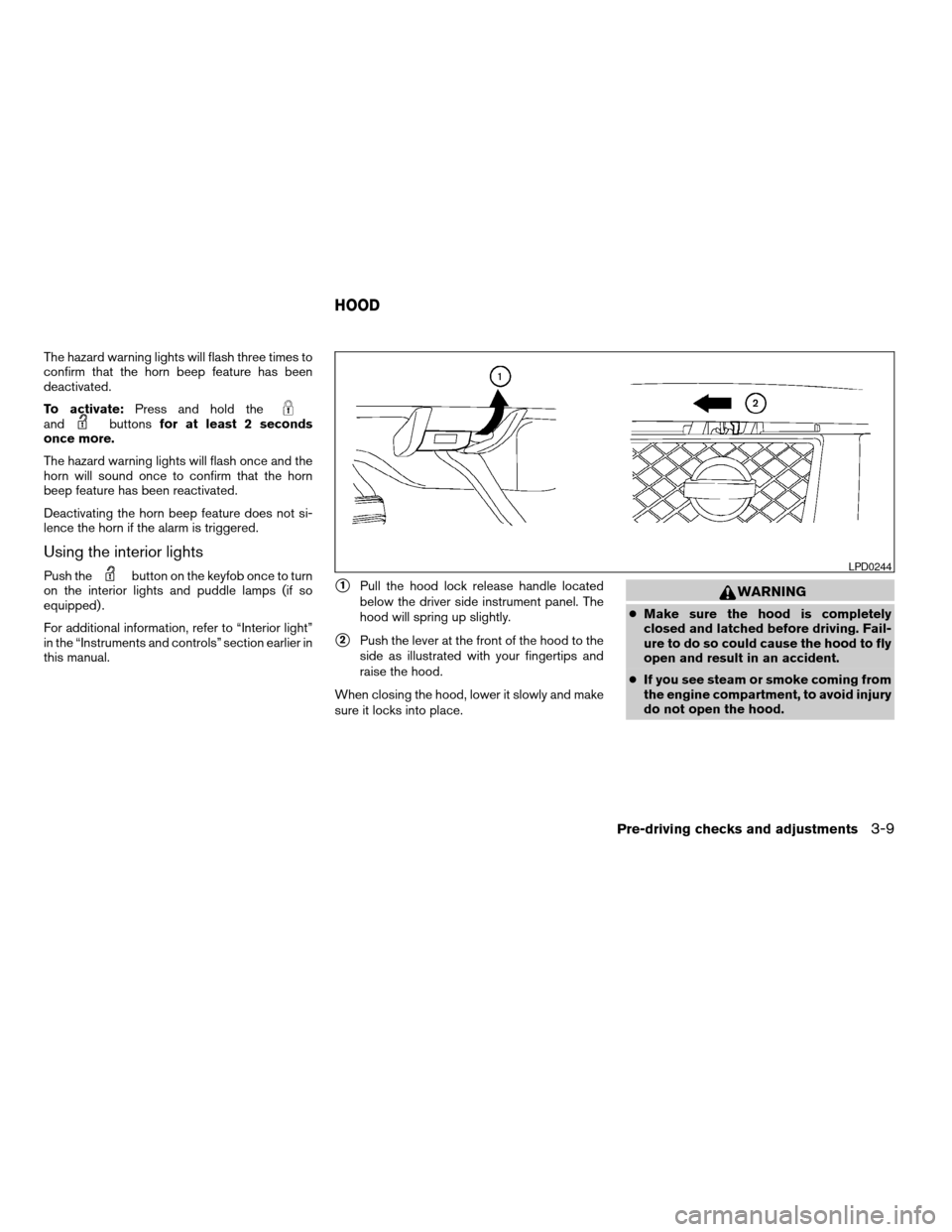
this manual.s1Pull the hood lock release handle located
below the driver side instrument panel. The
hood will spring up slightly.
s2Push the lever at the front of the hood to the
side as illustrated with your fingertips and
raise the hood.
When closing the hood, lower it slowly and make
sure it locks into place.
WARNING
cMake sure the hood is completely
closed and latched before driving. Fail-
ure to do so could cause the hood to fly
open and result in an accident.
cIf you see steam or smoke coming from
the engine compartment, to avoid injury
do not open the hood.
LPD0244
HOOD
Pre-driving checks and adjustments3-9
ZREVIEW COPYÐ2007 Armada(wzw)
Owners ManualÐUSA_English(nna)
07/08/06Ðtbrooks
X
Page 237 of 344
This procedure is described in the vehicle service
manual and can be performed by a NISSAN
dealer.
ANTI-LOCK BRAKING SYSTEM
(ABS)
WARNING
cThe Anti-lock Braking System (ABS) is a
sophisticated device, but it cannot pre-
vent accidents resulting from careless
or dangerous driving techniques. It can
help maintain vehicle control during
braking on slippery surfaces. Remem-
ber that stopping distances on slippery
surfaces will be longer than on normal
surfaces even with ABS. Stopping dis-
tances may also be longer on rough,
gravel or snow covered roads, or if you
are using tire chains. Always maintain a
safe distance from the vehicle in front
of you. Ultimately, the driver is respon-
sible for safety.
cTire type and condition may also affect
braking effectiveness.
– When replacing tires, install the
specified size of tires on all four
wheels.– When installing a spare tire, make
sure that it is the proper size and type
as specified on the Tire and Loading
Information label. See “Tire and
Loading Information label” in the
“Technical and consumer informa-
tion” section of this manual.
– For detailed information, see
“Wheels and tires” in the “Mainte-
nance and do-it-yourself” section of
this manual.
The Anti-lock Braking System (ABS) controls the
brakes so the wheels do not lock during hard
braking or when braking on slippery surfaces.
The system detects the rotation speed at each
wheel and varies the brake fluid pressure to pre-
vent each wheel from locking and sliding. By
preventing each wheel from locking, the system
helps the driver maintain steering control and
helps to minimize swerving and spinning on slip-
pery surfaces.
Using the system
Depress the brake pedal and hold it down. De-
press the brake pedal with firm steady pressure,
but do not pump the brakes. The ABS will oper-
ate to prevent the wheels from locking up. Steer
the vehicle to avoid obstacles.
WARNING
Do not pump the brake pedal. Doing so
may result in increased stopping
distances.
Normal operation
The ABS operates at speeds above3-6MPH(5
- 10 km/h) .
When the ABS senses that one or more wheels
are close to locking up, the actuator rapidly ap-
plies and releases hydraulic pressure.
This action is similar to pumping the brakes very
quickly. You may feel a pulsation in the brake
pedal and hear a noise from under the hood or
feel a vibration from the actuator when it is oper-
ating. This is normal and indicates that the ABS is
operating properly. However, the pulsation may
indicate that road conditions are hazardous and
extra care is required while driving.
Self-test feature
The ABS includes electronic sensors, electric
pumps, hydraulic solenoids and a computer. The
computer has a built-in diagnostic feature that
tests the system each time you start the engine
and move the vehicle at a low speed in forward or
reverse. When the self-test occurs, you may hear
a “clunk” noise and/or feel a pulsation in the brake
Starting and driving5-27
ZREVIEW COPYÐ2007 Armada(wzw)
Owners ManualÐUSA_English(nna)
07/08/06Ðtbrooks
X
Page 264 of 344

Your new NISSAN has been designed to have
minimum maintenance requirements with longer
service intervals to save you both time and
money. However, some day-to-day and regular
maintenance is essential to maintain your NIS-
SAN’s good mechanical condition, as well as its
emission and engine performance.
It is the owner’s responsibility to make sure that
the scheduled maintenance, as well as general
maintenance, is performed.
As the vehicle owner, you are the only one who
can ensure that your vehicle receives proper
maintenance. You are a vital link in the mainte-
nance chain.
Scheduled maintenance
For your convenience, both required and optional
scheduled maintenance items are described and
listed in your “NISSAN Service and Maintenance
Guide.” You must refer to that guide to ensure
that necessary maintenance is performed on your
NISSAN at regular intervals.
General maintenance
General maintenance includes those items which
should be checked during normal day-to-day op-
eration. They are essential for proper vehicle op-
eration. It is your responsibility to perform these
maintenance procedures regularly as prescribed.Performing general maintenance checks requires
minimal mechanical skill and only a few general
automotive tools.
These checks or inspections can be done by you,
a qualified technician, or, if you prefer, a NISSAN
dealer.
Where to go for service
If maintenance service is required or your vehicle
appears to malfunction, have the systems
checked and corrected by a NISSAN dealer.
NISSAN technicians are well-trained specialists
who are kept up-to-date with the latest service
information through technical bulletins, service
tips, and in-dealership training programs. They
are completely qualified to work on NISSAN ve-
hiclesbeforethey work on your vehicle, rather
than after they have worked on it.
You can be confident that a NISSAN dealer’s
service department performs the best job to meet
the maintenance requirements on your vehicle —
in a reliable and economical way.During the normal day-to-day operation of the
vehicle, general maintenance should be per-
formed regularly as prescribed in this section. If
you detect any unusual sounds, vibrations or
smells, be sure to check for the cause or have a
NISSAN dealer do it promptly. In addition, you
should notify a NISSAN dealer if you think that
repairs are required.
When performing any checks or maintenance
work, closely observe the “Maintenance precau-
tions” later in this section.
EXPLANATION OF GENERAL
MAINTENANCE ITEMS
Additional information on the following
items with “*” is found later in this section.
Outside the vehicle
The maintenance items listed here should be
performed from time to time, unless otherwise
specified.
Doors and engine hoodCheck that the doors
and engine hood operate properly. Also ensure
that all latches lock securely. Lubricate hinges,
latches, latch pins, rollers and links as necessary.
Make sure that the secondary latch keeps the
hood from opening when the primary latch is
released.
MAINTENANCE REQUIREMENTS GENERAL MAINTENANCE
8-2Maintenance and do-it-yourself
ZREVIEW COPYÐ2007 Armada(wzw)
Owners ManualÐUSA_English(nna)
07/08/06Ðtbrooks
X
Page 281 of 344
REPLACING
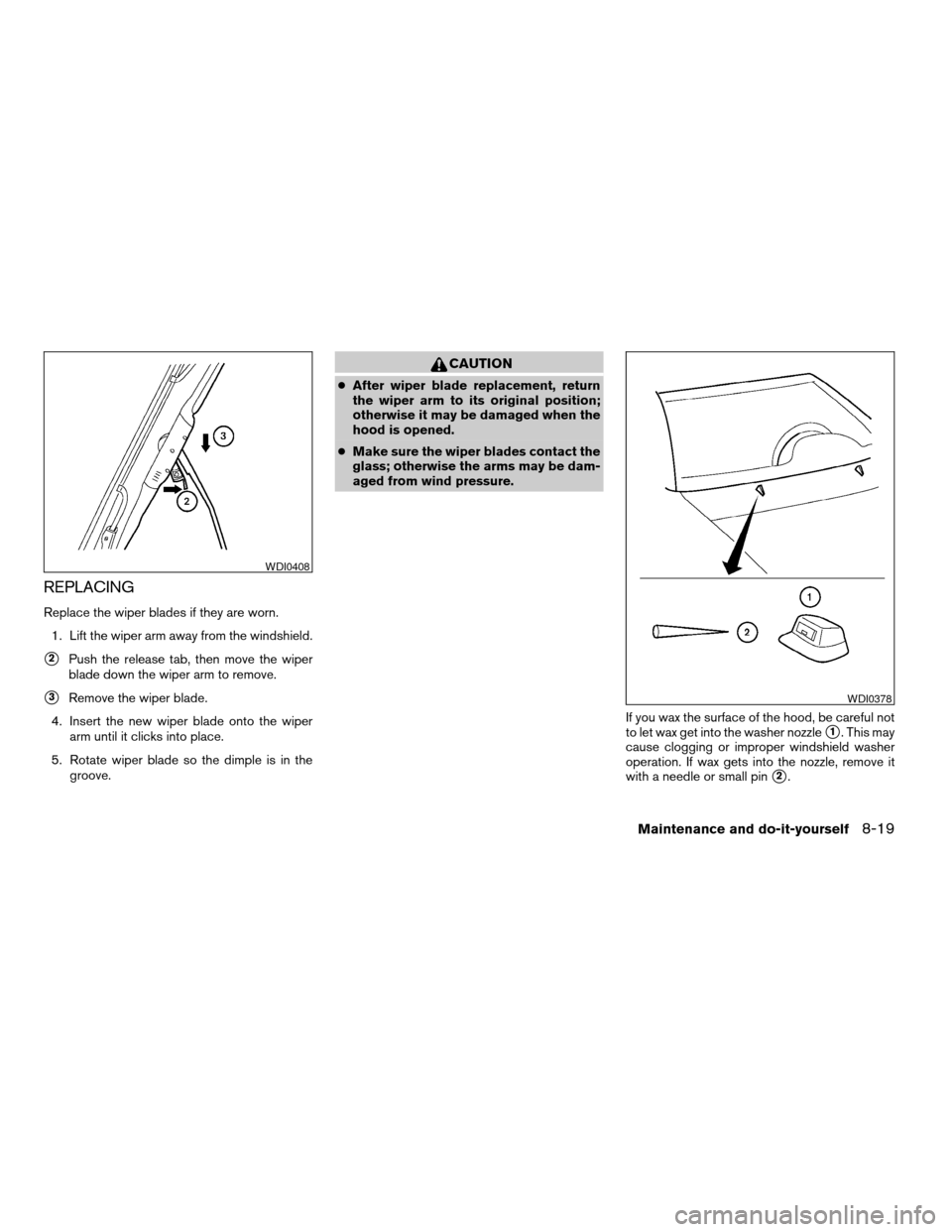
Replace the wiper blades if they are worn.
1. Lift the wiper arm away from the windshield.
s2Push the release tab, then move the wiper
blade down the wiper arm to remove.
s3Remove the wiper blade.
4. Insert the new wiper blade onto the wiper
arm until it clicks into place.
5. Rotate wiper blade so the dimple is in the
groove.
CAUTION
cAfter wiper blade replacement, return
the wiper arm to its original position;
otherwise it may be damaged when the
hood is opened.
cMake sure the wiper blades contact the
glass; otherwise the arms may be dam-
aged from wind pressure.
If you wax the surface of the hood, be careful not
to let wax get into the washer nozzle
s1. This may
cause clogging or improper windshield washer
operation. If wax gets into the nozzle, remove it
with a needle or small pin
s2.
WDI0408
WDI0378
Maintenance and do-it-yourself8-19
ZREVIEW COPYÐ2007 Armada(wzw)
Owners ManualÐUSA_English(nna)
07/08/06Ðtbrooks
X
Page 337 of 344
Fog light switch.................2-28
Front air bag system
(See supplemental restraint system).....1-54
Front seats....................1-2
Fuel
Capacities and recommended
fuel/lubricants.................9-2
Fuel economy................5-17
Fuel gauge..................2-6
Fuel octane rating..............9-4
Fuel recommendation............9-3
Fuel-filler door and cap...........3-15
Fuel economy setting..............4-4
Fuses......................8-21
Fusible links...................8-23
G
Garage door opener, HomeLinkTUniversal
Transceiver...................2-51
Gascap.....................3-15
Gauge
Automatic transmission fluid temperature
gauge.....................2-7
Engine coolant temperature gauge.....2-5
Engine oil pressure gauge..........2-6
Fuel gauge..................2-6
Odometer...................2-4
Speedometer.................2-4
Tachometer..................2-5
Trip odometer.................2-4
Voltmeter...................2-7
General maintenance..............8-2
Glass hatch...................3-14
Glove box....................2-35H
Hazard warning flasher switch.........2-28
Head restraints..................1-8
Active head restraint.............1-9
Headlight and turn signal switch........2-24
Headlight control switch............2-24
Headphones (See NISSAN mobile
entertainment system).............4-42
Heated seats..................2-29
Heater
Heater and air conditioner controls. . . .4-17
Heater operation..............4-18
Rear seat air conditioner..........4-20
HomeLinkTUniversal Transceiver.......2-51
Hood release...................3-9
Hook
Luggage hook................2-41
Horn.......................2-29
I
Ignition switch..................5-8
Immobilizer system..........2-21, 3-2, 5-9
Important vehicle information label.......9-11
In-cabin microfilter...............8-17
Increasing fuel economy............5-17
Indicator lights and audible reminders
(See warning/indicator lights and audible
reminders)....................2-12
Inside automatic anti-glare mirror.......3-18
Instrument brightness control.........2-27
Instrument panel..............0-6, 2-2
Instrument panel dimmer switch........2-27Interior light...................2-49
ISOFIX child restraints.............1-27
J
Jump starting...................6-8
K
Key ........................3-2
Keyfob battery replacement..........8-24
Keyless entry system
(See remote keyless entry system).......3-5
L
Labels
Air conditioner specification label.....9-12
C.M.V.S.S. certification label........9-11
Emission control information label.....9-11
Engine serial number............9-11
F.M.V.S.S. certification label........9-11
Vehicle identification number (VIN)
plate.....................9-10
Warning labels (for SRS)..........1-62
Language setting................4-11
LATCH (Lower Anchors and Tethers for CHildren)
System......................1-27
License plate
Installing the license plate.........9-12
Lift gate.....................3-10
Lift gate release.................3-13
10-3
ZREVIEW COPYÐ2007 Armada(wzw)
Owners ManualÐUSA_English(nna)
07/08/06Ðtbrooks
X
Page 338 of 344

Light
Air bag warning light.........1-62, 2-17
Brake light (See stop light).........8-27
Bulb check/instrument panel........2-13
Bulb replacement..............8-27
Charge warning light............2-14
Fog light switch...............2-28
Headlight and turn signal switch......2-24
Headlight control switch..........2-24
Interior light.................2-49
Light bulbs..................8-25
Low tire pressure warning light......2-15
Low washer fluid warning light.......2-16
Passenger air bag and status light.....1-56
Personal lights...............2-50
Security indicator light...........2-19
Warning/indicator lights and audible
reminders..................2-12
Lights
Map lights..................2-50
Lock
Child safety rear door lock..........3-5
Door locks..................3-3
Lift gate release...............3-13
Power door locks...............3-4
Low fuel warning light.............2-15
Low tire pressure warning light........2-15
Low washer fluid warning light.........2-16
Luggage hook..................2-41
Luggage rack (see roof rack).........2-43
Luggage (See vehicle loading information) . .9-13
Luggage storage
(see vehicle loading information)........2-41M
Maintenance
Changing the maintenance interval.....4-5
Displaying the maintenance notice
reminder....................4-6
General maintenance............8-2
Inside the vehicle...............8-3
Maintenance precautions..........8-5
Outside the vehicle..............8-2
Resetting the maintenance interval.....4-5
Seat belt maintenance...........1-25
Setting....................4-5
Under the hood and vehicle.........8-4
Malfunction indicator light...........2-18
Manual front seat adjustment..........1-2
Manual vent windows..............2-47
Map lights....................2-50
Map pocket...................2-36
Meters and gauges................2-3
Instrument brightness control.......2-27
Mirror
Automatic anti-glare inside mirror.....3-18
Outside mirror control...........3-19
Outside mirrors...............3-19
Vanity mirror.................3-18
N
NISSAN mobile entertainment system
(MES)......................4-39
NISSAN vehicle immobilizer
system................2-21, 3-2, 5-9O
Octane rating (See fuel octane rating).....9-4
Odometer.....................2-4
Oil
Capacities and recommended
fuel/lubricants.................9-2
Changing engine oil.............8-9
Changing engine oil filter..........8-10
Checking engine oil level..........8-8
Engine oil...................8-8
Engine oil and oil filter recommendation . .9-6
Engine oil pressure low/engine coolant
temperature high warning light.......2-14
Engine oil viscosity..............9-6
Outside mirror control.............3-19
Outside mirrors.................3-19
Overheat
If your vehicle overheats..........6-10
Owner’s manual order form..........9-31
Owner’s manual/service manual order
information....................9-31
P
Parking
Parking brake operation..........5-15
Parking/parking on hills...........5-25
Pedal position adjustment...........3-16
Personal lights.................2-50
Power
Power door locks...............3-4
Power outlet.................2-31
Power rear windows............2-45
10-4
ZREVIEW COPYÐ2007 Armada(wzw)
Owners ManualÐUSA_English(nna)
07/08/06Ðtbrooks
X
Page 344 of 344

1. Engine coolant 8-7
2. Battery 8-13
3. Power steering fluid 8-11
4. Automatic transmission fluid 8-11
5. Heater and air conditioner 4-17,
Audio system 4-21
6. Passenger supplemental air bag 1-47
7. Spare tire 6-2
8. Rear door lock 9-13
9. Fuel filler cap 3-15; Fuel recommenda-
tions 9-3, 9-4
10. Seat belts 1-15
11. Door locks 3-3
12. Driver supplemental air bag 1-47
13. Hood release 3-9
14. Meters and gauges 2-3
15. Brake fluid 8-12
16. Engine oil 8-8
17. Window washer fluid 8-12
WGS0021
QUICK REFERENCE
ZREVIEW COPYÐ2007 Armada(wzw)
Owners ManualÐUSA_English(nna)
07/08/06Ðtbrooks
X