2007 NISSAN ARMADA check oil
[x] Cancel search: check oilPage 270 of 344
If the cooling system frequently requires
coolant, have it checked by a NISSAN
dealer.
CHANGING ENGINE COOLANT
A NISSAN dealer can change the engine coolant.
The service procedure can be found in the
NISSAN Service Manual.
Improper servicing can result in reduced
heater performance and engine overheat-
ing.
WARNING
cTo avoid the danger of being scalded,
never change the coolant when the en-
gine is hot.
cNever remove the radiator or engine
coolant reservoir cap when the engine
is hot. Serious burns could be caused
by high pressure fluid escaping from
the radiator.
cAvoid direct skin contact with used
coolant. If skin contact is made, wash
thoroughly with soap or hand cleaner
as soon as possible.
cKeep coolant out of the reach of chil-
dren and pets.Engine coolant must be disposed of properly.
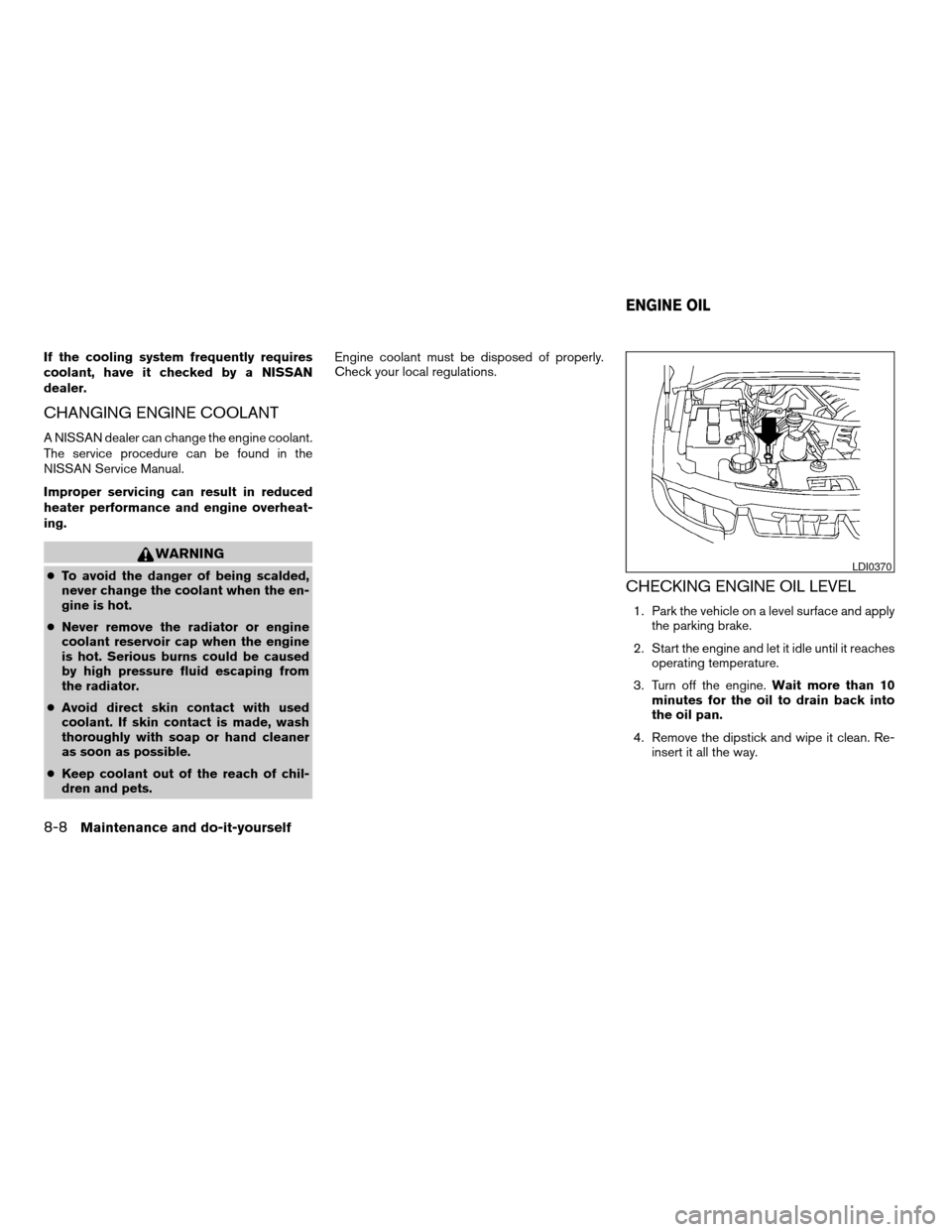
Check your local regulations.CHECKING ENGINE OIL LEVEL
1. Park the vehicle on a level surface and apply
the parking brake.
2. Start the engine and let it idle until it reaches
operating temperature.
3. Turn off the engine.Wait more than 10
minutes for the oil to drain back into
the oil pan.
4. Remove the dipstick and wipe it clean. Re-
insert it all the way.
LDI0370
ENGINE OIL
8-8Maintenance and do-it-yourself
ZREVIEW COPYÐ2007 Armada(wzw)
Owners ManualÐUSA_English(nna)
07/08/06Ðtbrooks
X
Page 271 of 344
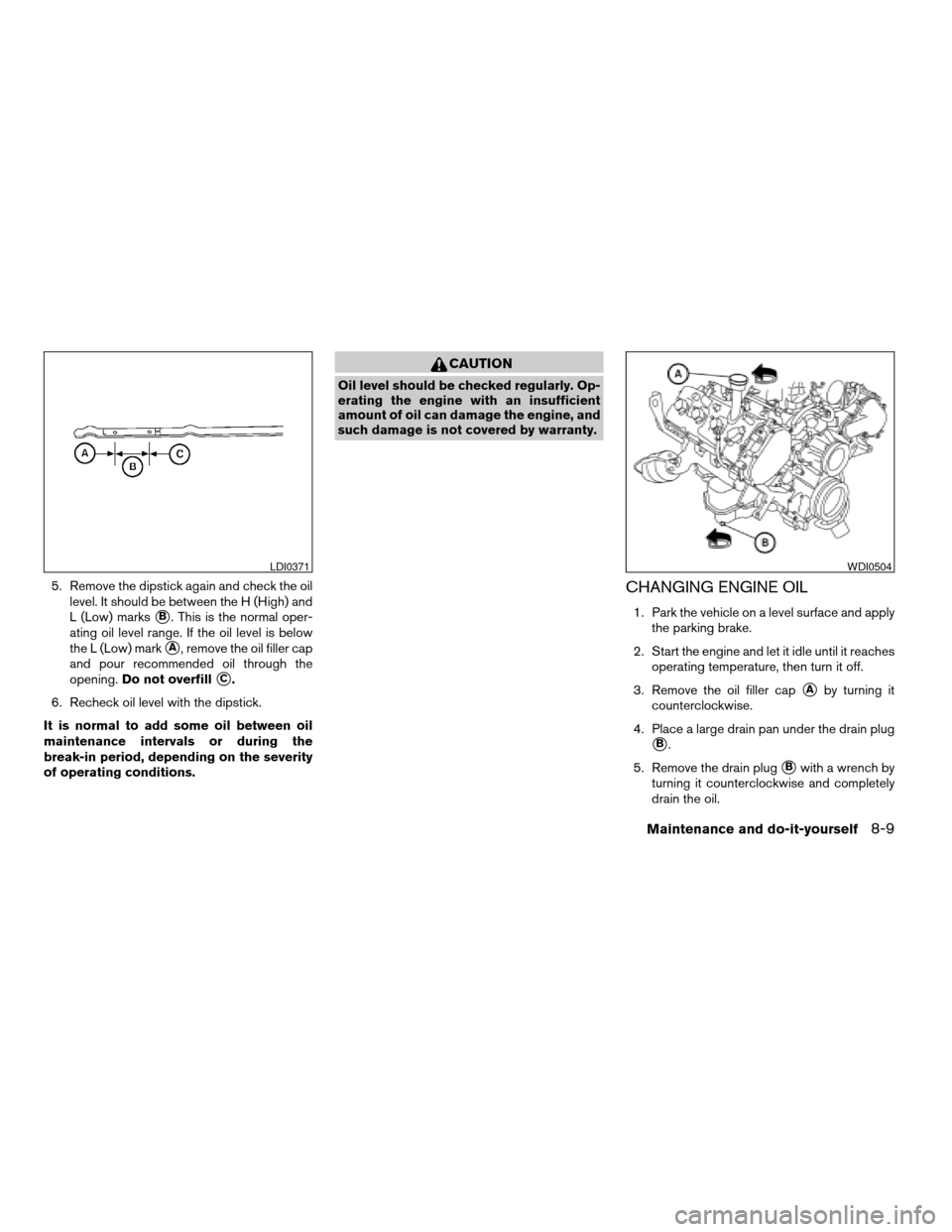
5. Remove the dipstick again and check the oil
level. It should be between the H (High) and
L (Low) marks
sB. This is the normal oper-
ating oil level range. If the oil level is below
the L (Low) mark
sA, remove the oil filler cap
and pour recommended oil through the
opening.Do not overfill
sC.
6. Recheck oil level with the dipstick.
It is normal to add some oil between oil
maintenance intervals or during the
break-in period, depending on the severity
of operating conditions.
CAUTION
Oil level should be checked regularly. Op-
erating the engine with an insufficient
amount of oil can damage the engine, and
such damage is not covered by warranty.
CHANGING ENGINE OIL
1. Park the vehicle on a level surface and apply
the parking brake.
2. Start the engine and let it idle until it reaches
operating temperature, then turn it off.
3. Remove the oil filler cap
sAby turning it
counterclockwise.
4. Place a large drain pan under the drain plug
sB.
5. Remove the drain plug
sBwith a wrench by
turning it counterclockwise and completely
drain the oil.
LDI0371WDI0504
Maintenance and do-it-yourself8-9
ZREVIEW COPYÐ2007 Armada(wzw)
Owners ManualÐUSA_English(nna)
07/08/06Ðtbrooks
X
Page 272 of 344
If the oil filter is to be changed, remove and
replace it at this time. See “Changing engine
oil filter” later in this section.
WARNING
cProlonged and repeated contact with
used engine oil may cause skin cancer.
cTry to avoid direct skin contact with
used oil. If skin contact is made, wash
thoroughly with soap or hand cleaner
as soon as possible.
cKeep used engine oil out of reach of
children.
CAUTION
Be careful not to burn yourself. The engine
oil may be hot.
cWaste oil must be disposed of prop-
erly.
cCheck your local regulations.
6. Clean and reinstall the drain plug and a new
washer. Securely tighten the drain plug with
a wrench. Do not use excessive force.
Drain plug tightening torque:
22 - 29 ft-lb (29 - 39 N·m)7. Refill engine with recommended oil through
the oil filler opening, then install the oil filler
cap securely.
See “Capacities and recommended
fuel/lubricants” in the “Technical and con-
sumer information” section of this manual for
drain and refill capacity.
The drain and refill capacity depends on the
oil temperature and drain time. Use these
specifications for reference only. Always use
the dipstick to determine when the proper
amount of oil is in the engine.
8. Start the engine. Check for leakage around
the drain plug and oil filter. Correct as re-
quired.
9. Turn the engine off and wait more than 10
minutes. Check the oil level with the dipstick.
Add engine oil if necessary.
CHANGING ENGINE OIL FILTER
1. Park the vehicle on a level surface and apply
the parking brake.
2. Turn the engine off.
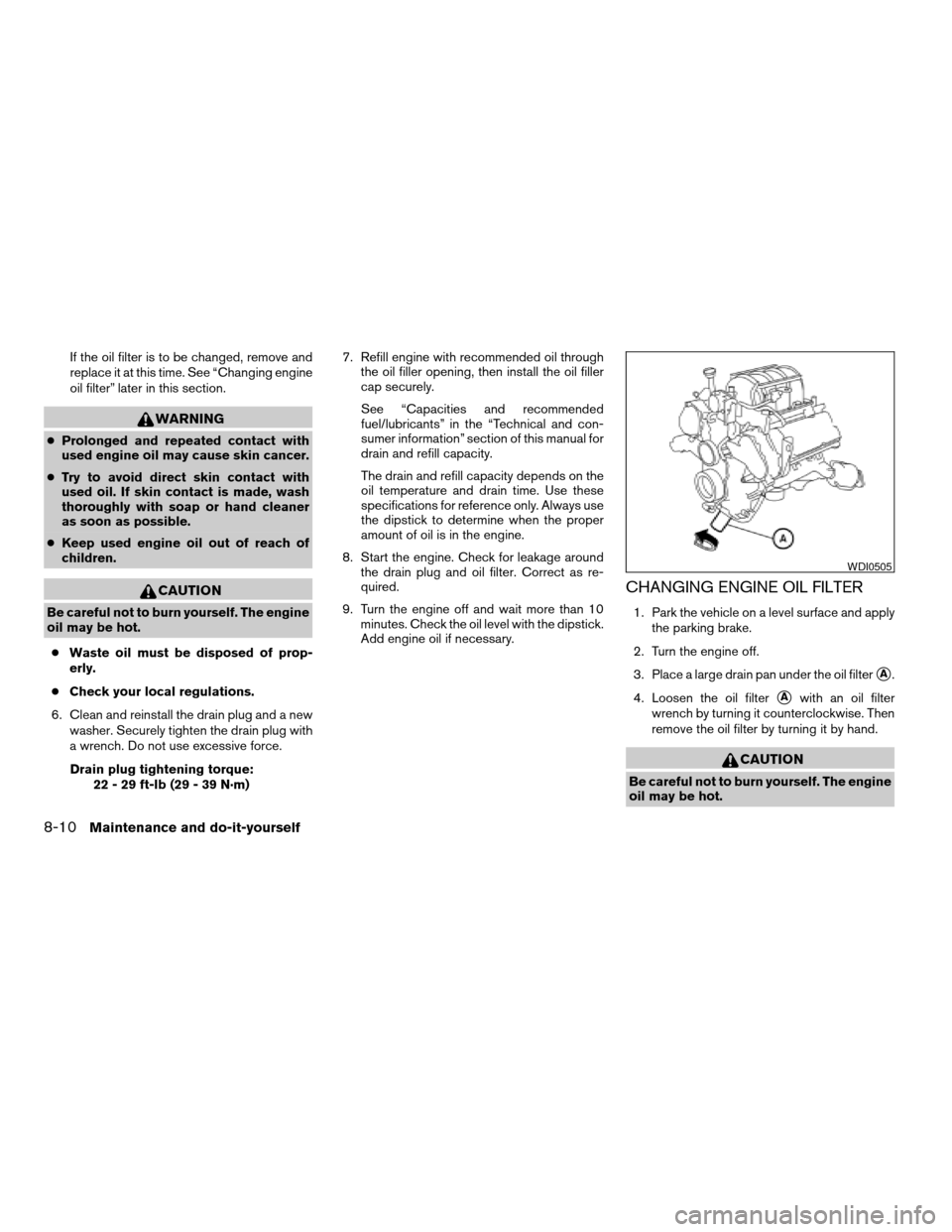
3. Place a large drain pan under the oil filter
sA.
4. Loosen the oil filter
sAwith an oil filter
wrench by turning it counterclockwise. Then
remove the oil filter by turning it by hand.
CAUTION
Be careful not to burn yourself. The engine
oil may be hot.
WDI0505
8-10Maintenance and do-it-yourself
ZREVIEW COPYÐ2007 Armada(wzw)
Owners ManualÐUSA_English(nna)
07/08/06Ðtbrooks
X
Page 273 of 344
5. Wipe the engine oil filter sealing surface with
a clean rag.
Be sure to remove any old gasket material
remaining on the sealing surface of the en-
gine.
6. Coat the gasket on the new filter with clean
engine oil.
7. Screw on the oil filter until a slight resistance
is felt, then tighten an additional 2/3 turn.
8. Start the engine and check for leakage
around the oil filter. Correct as required.
9. Turn the engine off and wait more than 10
minutes. Check the oil level. Add engine oil if
necessary.When checking or replacement is required, we
recommend your NISSAN dealer for servicing.
WARNING
cUse only Genuine NISSAN Matic J ATF.
Do not mix with other fluids.
cUsing automatic transmission fluid
other than Genuine NISSAN Matic J ATF
will cause deterioration in driveability
and automatic transmission durability,
and may damage the automatic trans-
mission, which is not covered by the
NISSAN new vehicle limited warranty.
The specified automatic transmission fluid is also
described on caution labels located in the engine
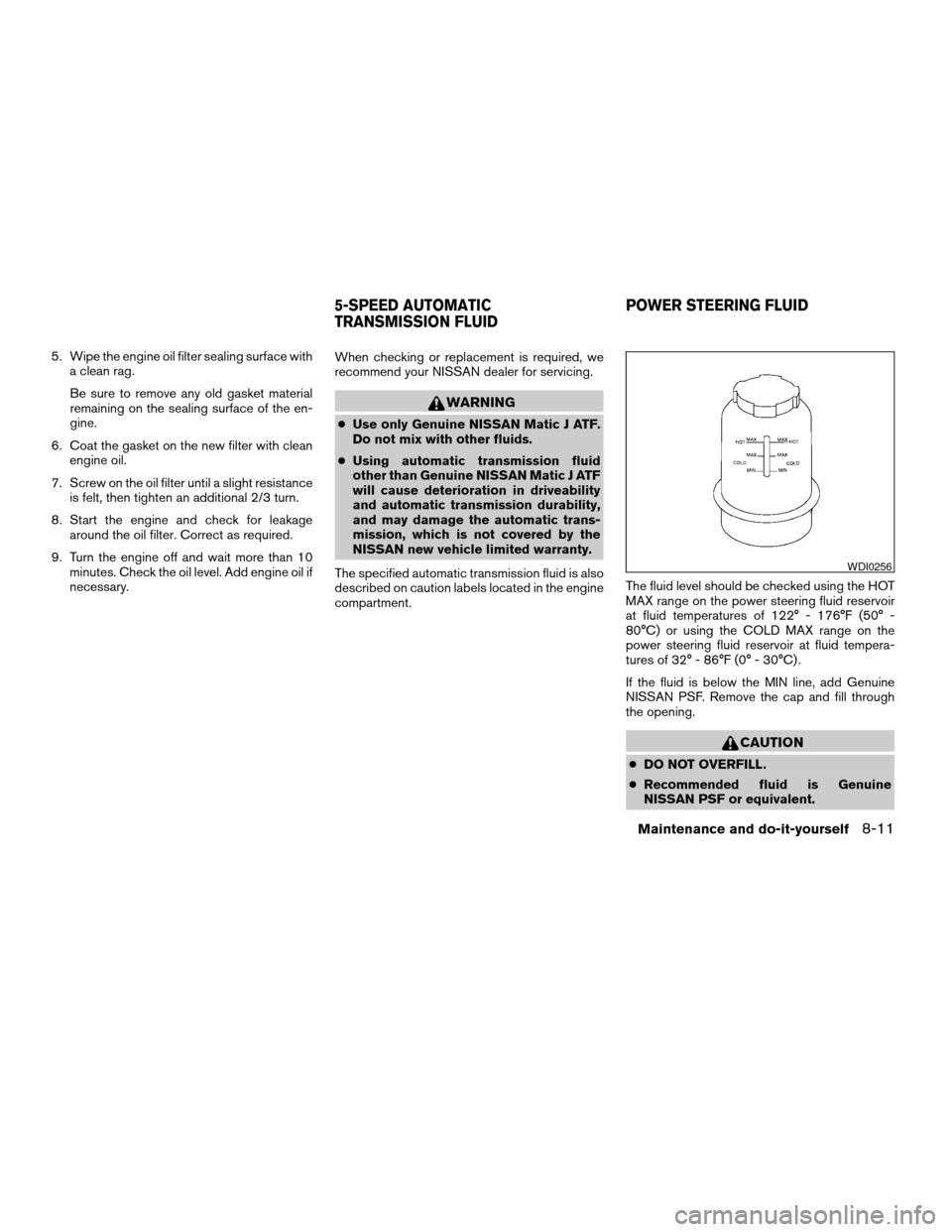
compartment.The fluid level should be checked using the HOT
MAX range on the power steering fluid reservoir
at fluid temperatures of 122° - 176°F (50° -
80°C) or using the COLD MAX range on the
power steering fluid reservoir at fluid tempera-
tures of 32° - 86°F (0° - 30°C) .
If the fluid is below the MIN line, add Genuine
NISSAN PSF. Remove the cap and fill through
the opening.
CAUTION
cDO NOT OVERFILL.
cRecommended fluid is Genuine
NISSAN PSF or equivalent.
WDI0256
5-SPEED AUTOMATIC
TRANSMISSION FLUIDPOWER STEERING FLUID
Maintenance and do-it-yourself8-11
ZREVIEW COPYÐ2007 Armada(wzw)
Owners ManualÐUSA_English(nna)
07/08/06Ðtbrooks
X
Page 329 of 344

cBe careful when passing other vehicles.
Passing while towing a trailer requires con-
siderably more distance than normal pass-
ing. Remember, the length of the trailer must
also pass the other vehicle before you can
safely change lanes.
cDown shift the transmission to a lower gear
for engine braking when driving down steep
or long hills. This will help slow the vehicle
without applying the brakes.
cTo maintain engine braking efficiency and
electrical charging performance, do not use
overdrive.
cAvoid holding the brake pedal down too long
or too frequently. This could cause the
brakes to overheat, resulting in reduced
braking efficiency.
cIncrease your following distance to allow for
greater stopping distances while towing a
trailer. Anticipate stops and brake gradually
cDo not use cruise control while towing a
trailer.
cSome states or provinces have specific
regulations and speed limits for vehicles that
are towing trailers. Obey the local speed
limits.cCheck your hitch, trailer wiring harness con-
nections, and trailer wheel lug nuts after 50
miles (80 km) of travel and at every break.
cWhen stopped in traffic for long periods of
time in hot weather, put the vehicle in the P
(Park) position.
cWhen launching a boat, don’t allow the wa-
ter level to go over the exhaust tail pipe or
rear bumper.
cMake sure you disconnect the trailer lights
before backing the trailer into the water or
the trailer lights may burn out.
When towing a trailer, final drive gear oil
should be replaced and transmission
oil/fluid should be changed more fre-
quently. For additional information, see the
“Maintenance and do-it-yourself” section
earlier in this manual.
Tow mode
Tow mode should be used when pulling a heavy
trailer or hauling a heavy load. Press the tow
button to activate the tow mode. The tow indica-
tor in the instrument panel illuminates when the
tow mode is selected. Press the Tow button
again to turn the tow mode OFF. The Tow mode is
automatically cancelled when the key is turned
OFF.The Tow mode does the following:
cReduces transmissions shifts when pulling a
trailer or hauling a load.
cProvides similar shift feel to driver when the
vehicle is towing.
The Tow mode should be used when the vehicle
and trailer weight is at least 75% of the vehicle’s
GCWR. Tow mode is most useful in the following
driving conditions when towing a heavy trailer or
hauling a heavy load:
cRolling terrain.
cStop and go traffic.
cBusy parking lots.
Driving the vehicle in the Tow mode with no
trailer/load or light trailer/light load will not cause
any damage. However, fuel economy may be
reduced and the transmission/engine driving
characteristics may feel unusual.
When towing a trailer, final drive gear oil
should be replaced and transmission
oil/fluid should be changed more fre-
quently. For additional information, see the
“Maintenance and do-it-yourself” section
earlier in this manual.
Technical and consumer information9-27
ZREVIEW COPYÐ2007 Armada(wzw)
Owners ManualÐUSA_English(nna)
07/08/06Ðtbrooks
X
Page 335 of 344

10 Index
4WD warning light...............2-15
A
Active head restraint...............1-9
Adjusting pedal position............3-16
Air bag (See supplemental restraint
system).....................1-47
Air bag system
Front (See supplemental front impact
air bag system)...............1-54
Air bag warning labels.............1-62
Air bag warning light...........1-62, 2-17
Air cleaner housing filter............8-17
Air conditioner
Air conditioner service...........4-20
Air conditioner specification label.....9-12
Air conditioner system refrigerant and oil
recommendations..............9-7
Heater and air conditioner controls. . . .4-17
Rear seat air conditioner..........4-20
Servicing air conditioner..........4-20
Alarm system
(See vehicle security system).........2-20
Anchor point locations.............1-30
Antenna.....................4-38
Anti-lock brake warning light..........2-13
Anti-lock braking system (ABS)........5-27
Audible reminders................2-20
Audio system..................4-21
Compact Disc (CD) changer.......4-33FM/AM/SAT radio with compact disc
(CD) changer................4-29
Radio....................4-21
Rear audio controls.............4-38
Steering wheel audio control switch. . . .4-36
Autolight switch.................2-25
Automatic
Automatic drive positioner.........3-20
Automatic power window switch.....2-45
Automatic transmission position
indicator light................2-17
Driving with automatic
transmission.............5-10, 5-11
Transmission selector lever lock
release....................5-14
Automatic anti-glare inside mirror.......3-18
Automatic transmission fluid temperature
gauge.......................2-7
AUX jack.....................4-35
B
Back button....................4-3
Battery......................8-13
Charge warning light............2-14
Before starting the engine............5-9
Belts (See drive belts).............8-15
Booster seats..................1-42
Brake
Anti-lock braking system (ABS)......5-27
Brake fluid..................8-12Brake light (See stop light).........8-27
Brake system................5-26
Brake warning light.............2-13
Brake wear indicators........2-20, 8-21
Parking brake operation..........5-15
Self-adjusting brakes............8-21
Brakes......................8-21
Break-in schedule................5-17
Brightness control
Instrument panel..............2-27
Brightness/contrast button...........4-13
Bulb check/instrument panel..........2-13
Bulb replacement................8-27
C
Capacities and recommended
fuel/lubricants...................9-2
Captain’s chair adjustment (2nd row)......1-5
Car phone or CB radio.............4-49
Cargo light...................2-51
Cargo (See vehicle loading information) . . .9-13
CD care and cleaning.............4-35
CD changer (See audio system)........4-33
Child restraint with top tether strap......1-30
Child restraints.......1-17, 1-18, 1-25, 1-27
Precautions on child
restraints............1-25, 1-36, 1-42
Top tether strap anchor point locations . .1-30
Child safety rear door lock............3-5
Chimes, audible reminders...........2-20
ZREVIEW COPYÐ2007 Armada(wzw)
Owners ManualÐUSA_English(nna)
07/08/06Ðtbrooks
X
Page 336 of 344

Cigarette lighter.................2-32
Cleaning exterior and interior..........7-2
Clock......................4-30
(models with navigation system)......4-12
Clock set....................4-12
C.M.V.S.S. certification label..........9-11
Cold weather driving..............5-30
Compass display.................2-8
Console box...............2-33, 2-40
Control panel buttons..............4-2
Brightness/contrast button.........4-13
Back button..................4-3
Enter button..................4-2
Setting button................4-7
Startup screen................4-3
Trip button..................4-3
Controls
Audio controls
(steering wheel)...............4-36
Heater and air conditioner controls. . . .4-17
Rear audio controls.............4-38
Rear seat air conditioner..........4-20
Coolant
Capacities and recommended
fuel/lubricants.................9-2
Changing engine coolant..........8-8
Checking engine coolant level........8-7
Engine coolant temperature gauge.....2-5
Corrosion protection...............7-5
Cruise control..................5-15
Cup holders...................2-37
Curtain side-impact and rollover air bag . . .1-59D
Daytime running light system
(Canada only)..................2-26
Defroster switch
Rear window and outside mirror
defroster switch...............2-24
Digital video disc DVD.............4-39
Dimensions and weights.............9-9
Dimmer switch for instrument panel......2-27
Display controls (see control panel buttons) . .4-2
Distance to empty................4-4
Door locks....................3-3
Door open warning light............2-14
Drive belts....................8-15
Drive positioner, Automatic...........3-20
Driving
Cold weather driving............5-30
Driving with automatic
transmission.............5-10, 5-11
Precautions when starting and driving . . .5-2
E
Economy - fuel.................5-17
Emission control information label.......9-11
Emission control system warranty.......9-29
Engine
Before starting the engine..........5-9
Capacities and recommended
fuel/lubricants.................9-2
Changing engine coolant..........8-8
Changing engine oil.............8-9
Changing engine oil filter..........8-10Checking engine coolant level........8-7
Checking engine oil level..........8-8
Engine compartment check locations. . . .8-6
Engine coolant temperature gauge.....2-5
Engine cooling system............8-7
Engine oil...................8-8
Engine oil and oil filter recommendation . .9-6
Engine oil viscosity..............9-6
Engine serial number............9-11
Engine specifications.............9-8
Starting the engine.............5-10
Engine oil pressure gauge............2-6
Engine oil pressure low/engine coolant
temperature high warning light.........2-14
English/metric setting..............4-11
Enter button....................4-2
Event data recorders..............9-31
Exhaust gas (Carbon monoxide)........5-2
Eyeglass case..................2-35
F
Flashers
(See hazard warning flasher switch)......2-28
Flat tire......................6-2
Floor mat positioning aid.............7-4
Fluid
Brake fluid..................8-12
Capacities and recommended
fuel/lubricants.................9-2
Engine coolant................8-7
Engine oil...................8-8
Power steering fluid.............8-11
Window washer fluid............8-12
F.M.V.S.S. certification label..........9-11
10-2
ZREVIEW COPYÐ2007 Armada(wzw)
Owners ManualÐUSA_English(nna)
07/08/06Ðtbrooks
X
Page 338 of 344

Light
Air bag warning light.........1-62, 2-17
Brake light (See stop light).........8-27
Bulb check/instrument panel........2-13
Bulb replacement..............8-27
Charge warning light............2-14
Fog light switch...............2-28
Headlight and turn signal switch......2-24
Headlight control switch..........2-24
Interior light.................2-49
Light bulbs..................8-25
Low tire pressure warning light......2-15
Low washer fluid warning light.......2-16
Passenger air bag and status light.....1-56
Personal lights...............2-50
Security indicator light...........2-19
Warning/indicator lights and audible
reminders..................2-12
Lights
Map lights..................2-50
Lock
Child safety rear door lock..........3-5
Door locks..................3-3
Lift gate release...............3-13
Power door locks...............3-4
Low fuel warning light.............2-15
Low tire pressure warning light........2-15
Low washer fluid warning light.........2-16
Luggage hook..................2-41
Luggage rack (see roof rack).........2-43
Luggage (See vehicle loading information) . .9-13
Luggage storage
(see vehicle loading information)........2-41M
Maintenance
Changing the maintenance interval.....4-5
Displaying the maintenance notice
reminder....................4-6
General maintenance............8-2
Inside the vehicle...............8-3
Maintenance precautions..........8-5
Outside the vehicle..............8-2
Resetting the maintenance interval.....4-5
Seat belt maintenance...........1-25
Setting....................4-5
Under the hood and vehicle.........8-4
Malfunction indicator light...........2-18
Manual front seat adjustment..........1-2
Manual vent windows..............2-47
Map lights....................2-50
Map pocket...................2-36
Meters and gauges................2-3
Instrument brightness control.......2-27
Mirror
Automatic anti-glare inside mirror.....3-18
Outside mirror control...........3-19
Outside mirrors...............3-19
Vanity mirror.................3-18
N
NISSAN mobile entertainment system
(MES)......................4-39
NISSAN vehicle immobilizer
system................2-21, 3-2, 5-9O
Octane rating (See fuel octane rating).....9-4
Odometer.....................2-4
Oil
Capacities and recommended
fuel/lubricants.................9-2
Changing engine oil.............8-9
Changing engine oil filter..........8-10
Checking engine oil level..........8-8
Engine oil...................8-8
Engine oil and oil filter recommendation . .9-6
Engine oil pressure low/engine coolant
temperature high warning light.......2-14
Engine oil viscosity..............9-6
Outside mirror control.............3-19
Outside mirrors.................3-19
Overheat
If your vehicle overheats..........6-10
Owner’s manual order form..........9-31
Owner’s manual/service manual order
information....................9-31
P
Parking
Parking brake operation..........5-15
Parking/parking on hills...........5-25
Pedal position adjustment...........3-16
Personal lights.................2-50
Power
Power door locks...............3-4
Power outlet.................2-31
Power rear windows............2-45
10-4
ZREVIEW COPYÐ2007 Armada(wzw)
Owners ManualÐUSA_English(nna)
07/08/06Ðtbrooks
X