ENTER:
In MENU mode, press the ENTER button to se-
lect MENU items.
In the display menu, press the ENTER button to
select items for modification, as per the on-
screen instructions.
MENU:
If the media is in PLAY mode and the MENU
button is pressed, the DVD menu will appear on
the screen. Use Navigation Keys to navigate
within the menu, and use ENTER to select the
item.
Press the MENU button again to return to PLAY
mode.
TITLE (Remote control only):
Press TITLE button to return the DVD media to
the “title” of the DVD.
Press TITLE button again to return to the previous
stop point and play.
BACK (Remote control only):
Press the BACK button to exit the current active
menu and return to the previous menu.
SUBTITLE (Remote control only):
Press the SUBTITLE button to call up subtitle
selection menu.Repeatedly press the SUBTITLE button to cycle
through each available subtitle.
AUDIO (Remote control only):
Press the AUDIO button to call up audio menu.
Repeatedly press the AUDIO button to cycle
through each available audio track.
ANGLE (Remote control only):
Press the ANGLE button to call up camera angle
menu.
Repeatedly press the ANGLE button to cycle
through each available angle.
CLEAR (Remote control only):
Press the CLEAR button to clear all numeric
inputs, if actuated prior to expiration of the
3-second timer.
NUMERIC KEYPAD (0–9 &¸10) (Remote
control only):
Press the NUMERIC KEYPAD to directly access
disc chapters, titles or tracks by inputting their
numeric value.
The “¸10” button input numbers greater than or
equal to 10, allowing up three digits to be input
for selecting chapter/title/track number.The subsequent actuation of numeric buttons will
continuously shift the previously input number to
the “left”.
The chapter/title/track number will be automati-
cally selected (if valid, based on media content) if
3 seconds expire without any keypad inputs.
The operator can cancel the input
chapter/title/track number by actuating the
CLEAR control prior to the expiration of the
3-second timer.
These functions can be used only for the DVD
discs which correspond to them.
Auxiliary input jacks
The auxiliary input jacks are located on the control
panel. Compatible devices such as video games,
camcorders and portable video players can be
connected to the auxiliary jacks.
The auxiliary jacks are color coded for identifica-
tion purposes.
cYellow - video input
cWhite - left channel audio input
cRed - right channel audio input
Display screen, heater, air conditioner and audio systems4-45
ZREVIEW COPYÐ2007 Armada(wzw)
Owners ManualÐUSA_English(nna)
07/08/06Ðtbrooks
X
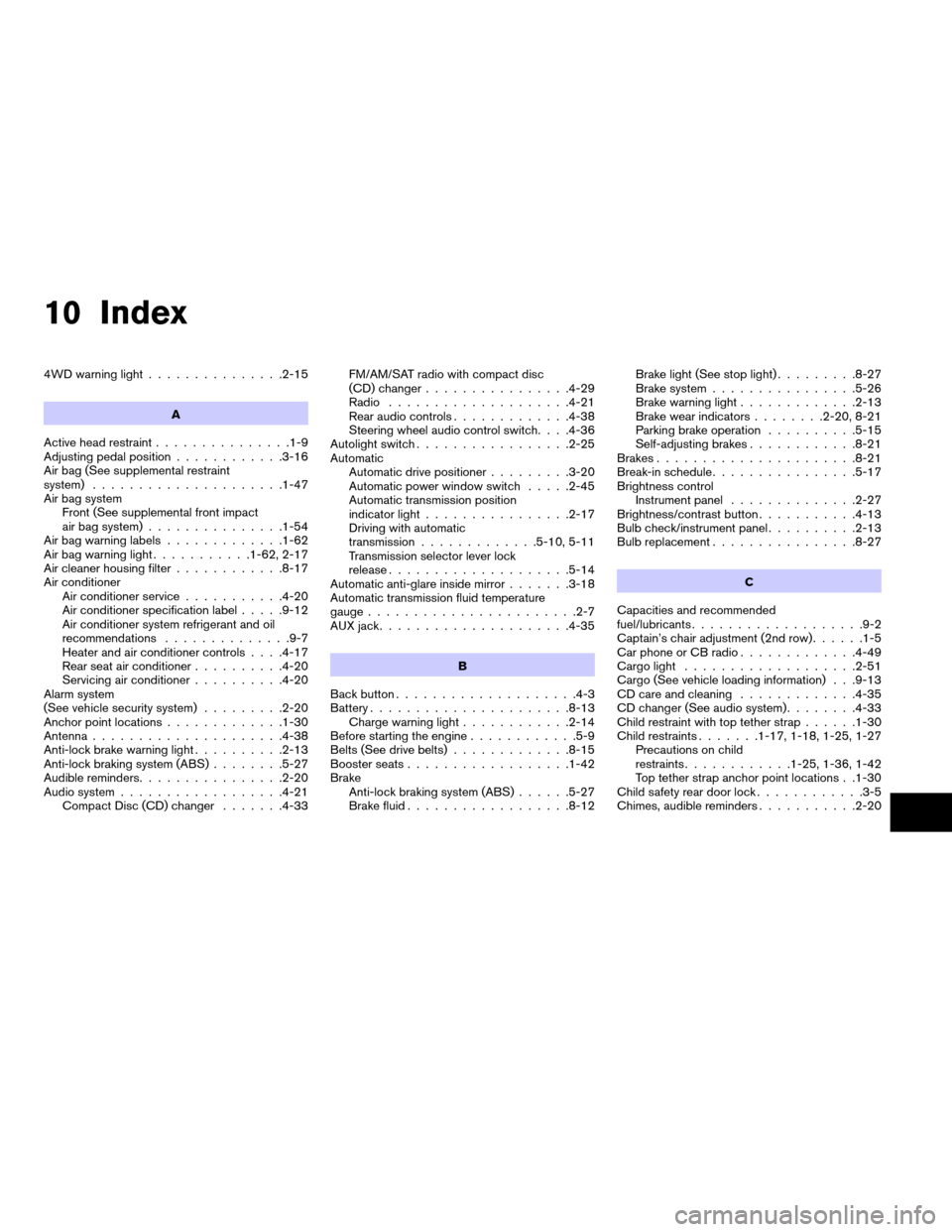
10 Index
4WD warning light...............2-15
A
Active head restraint...............1-9
Adjusting pedal position............3-16
Air bag (See supplemental restraint
system).....................1-47
Air bag system
Front (See supplemental front impact
air bag system)...............1-54
Air bag warning labels.............1-62
Air bag warning light...........1-62, 2-17
Air cleaner housing filter............8-17
Air conditioner
Air conditioner service...........4-20
Air conditioner specification label.....9-12
Air conditioner system refrigerant and oil
recommendations..............9-7
Heater and air conditioner controls. . . .4-17
Rear seat air conditioner..........4-20
Servicing air conditioner..........4-20
Alarm system
(See vehicle security system).........2-20
Anchor point locations.............1-30
Antenna.....................4-38
Anti-lock brake warning light..........2-13
Anti-lock braking system (ABS)........5-27
Audible reminders................2-20
Audio system..................4-21
Compact Disc (CD) changer.......4-33FM/AM/SAT radio with compact disc
(CD) changer................4-29
Radio....................4-21
Rear audio controls.............4-38
Steering wheel audio control switch. . . .4-36
Autolight switch.................2-25
Automatic
Automatic drive positioner.........3-20
Automatic power window switch.....2-45
Automatic transmission position
indicator light................2-17
Driving with automatic
transmission.............5-10, 5-11
Transmission selector lever lock
release....................5-14
Automatic anti-glare inside mirror.......3-18
Automatic transmission fluid temperature
gauge.......................2-7
AUX jack.....................4-35
B
Back button....................4-3
Battery......................8-13
Charge warning light............2-14
Before starting the engine............5-9
Belts (See drive belts).............8-15
Booster seats..................1-42
Brake
Anti-lock braking system (ABS)......5-27
Brake fluid..................8-12Brake light (See stop light).........8-27
Brake system................5-26
Brake warning light.............2-13
Brake wear indicators........2-20, 8-21
Parking brake operation..........5-15
Self-adjusting brakes............8-21
Brakes......................8-21
Break-in schedule................5-17
Brightness control
Instrument panel..............2-27
Brightness/contrast button...........4-13
Bulb check/instrument panel..........2-13
Bulb replacement................8-27
C
Capacities and recommended
fuel/lubricants...................9-2
Captain’s chair adjustment (2nd row)......1-5
Car phone or CB radio.............4-49
Cargo light...................2-51
Cargo (See vehicle loading information) . . .9-13
CD care and cleaning.............4-35
CD changer (See audio system)........4-33
Child restraint with top tether strap......1-30
Child restraints.......1-17, 1-18, 1-25, 1-27
Precautions on child
restraints............1-25, 1-36, 1-42
Top tether strap anchor point locations . .1-30
Child safety rear door lock............3-5
Chimes, audible reminders...........2-20
ZREVIEW COPYÐ2007 Armada(wzw)
Owners ManualÐUSA_English(nna)
07/08/06Ðtbrooks
X