Page 10 of 311
ROADSTER MODELS1. Antenna (P.4-30)
2. Trunk lid release switch (P.3-10)
3. Trunk light (P.2-42, P.8-27)
4. High-mounted stop light (Bulb) (P.8-27)
5. Rear window defroster (P.2-23)
6. Soft top (P.3-13)
7. Interior trunk lid release (P.3-11)
8. License plate lights (Bulb) (P.8-27)
9. Back-up, Turn signal light (Bulb) (P.8-27)
10. Side marker, Stop/Tail light (Bulb) (P.8-27)
11. Fuel
— Fuel-filler door (P.3-23)
— Fuel recommendation (P.9-3)
SSI0003
Illustrated table of contents
0-5
�
06.10.24/Z33-D/V5.0
�
Page 13 of 311
ROADSTER MODELS1. Seat belts (P.1-10)
2. Seats
— Power seats adjustment (P.1-4)
— Ventilated net seats* (P.1-6)
3. Passenger seat
— Power seatback tilt switch (P.1-7)
— Cancel switch (P.1-8)
4. Power window switch (P.2-38)/Power door
lock switch (P.3-4)
5. Outside mirror remote control switch
(P.3-27)
6. Soft top latch lever (P.3-16)
7. Safety switch for soft top latch lever (P.3-16)
8. Interior light (P.2-40)
9. Front passenger air bag status light (P.1-36)
10. Inside mirror (P.3-26)
— Automatic anti-glare inside mirror*
(P.3-26)
— HomeLink
universal transceiver*
(P.2-42)
11. Rear parcel box (P.2-36)
12. Rear parcel box or Navigation system*1
13. Rear floor box (P.2-35)
— Trunk lid cancel switch (P.3-11)
— Secondary trunk lid release (P.3-12)
14. Power outlet (P.2-31)
15. Console box (P.2-34)
16. Parking brake
— Operation (P.5-15)
— Parking/Parking on hills (P.5-19)
— Checking (P.8-20)
SSI0257
0-8
Illustrated table of contents
�
06.10.24/Z33-D/V5.0
�
Page 64 of 311

Windows .............................................................................. 2-38
Power windows ............................................................ 2-38
Automatic adjusting function ...................................... 2-40
Interior lights ........................................................................ 2-40
Room light ...................................................................... 2-40
Map lights ...................................................................... 2-41
Vanity mirror light ............................................................... 2-41
Luggage compartment light (Coupe models) ............. 2-42
Trunk light (Roadster models).......................................... 2-42HomeLink
Universal Transceiver (if so equipped) .... 2-42
Programming HomeLink
........................................... 2-43
Programming HomeLinkfor Canadian
customers ....................................................................... 2-44
Operating the HomeLinkUniversal
Transceiver ..................................................................... 2-45
Programming trouble-diagnosis ............................... 2-45
Clearing the programmed information .................... 2-45
Reprogramming a single HomeLink
button ........ 2-45
If your vehicle is stolen ............................................... 2-45
�
06.10.24/Z33-D/V5.0
�
Page 81 of 311

soon as possible if the warning sound is heard.
Your vehicle has two types of security systems,
as follows:
�Vehicle Security System
�NISSAN Vehicle Immobilizer System
The security condition will be shown by the
security indicator light.
VEHICLE SECURITY SYSTEMThe vehicle security system provides visual and
audible alarm signals if someone opens the
doors or rear hatch/trunk lid when the system is
armed. It is not, however, a motion detection
type system that activates when a vehicle ismoved or when a vibration occurs.
The system helps deter vehicle theft but cannot
prevent it, nor can it prevent the theft of interior
or exterior vehicle components in all situations.
Always secure your vehicle even if parking for a
brief period. Never leave your keys in the vehicle,
and always lock the vehicle when unattended.
Be aware of your surroundings, and park in
secure, well-lit areas whenever possible.
Many devices offering additional protection,
such as component locks, identification markers,
and tracking systems, are available at auto sup-
ply stores and specialty shops. A NISSAN dealer
may also offer such equipment. Check with your
insurance company to see if you may be eligible
for discounts for various theft protection fea-
tures.
SIC2132
SECURITY SYSTEMS
2-18
Instruments and controls
�
06.10.24/Z33-D/V5.0
�
Page 82 of 311

Security indicator lightThis light
�Ablinks whenever the ignition switch
is in the LOCK, OFF or ACC position. This is
normal.
How to arm the vehicle security
system1. Close all windows.
The system can be activated even if the
windows are open.
2. Remove the key from the ignition switch.3. Close and lock all doors and rear hatch/trunk
lid.
Lock all doors by using the key or the keyfob.
When using the keyfob, the hazard indicators
flash twice to indicate all doors are locked.
4. Confirm that the security indicator light
comes on. The security indicator light glows
for about 30 seconds and then blinks. The
system is now activated. If, during this 30
second time period, the door is unlocked by
the key or the keyfob, or the ignition key is
turned to ACC or ON, the system will not
activate.
Even when the driver and/or passengers
are in the vehicle, the system will activate
with all doors and rear hatch/trunk lid
locked and ignition key off. Turn the igni-
tion key to ACC to turn the system off.
Vehicle security system activationThe security system will give the following alarm:
�The headlights blink and the horn sounds
intermittently.
�The alarm automatically turns off after ap-
proximately 50 seconds. However, the alarm
reactivates if the vehicle is tampered with
again. The alarm can be shut off by unlocking
a door with the key, or by pushing theUNLOCK
button on the keyfob.
The alarm is activated by:
�Opening the door without using the key or
keyfob.
�Opening the rear hatch or the trunk lid with-
out using the keyfob.
How to stop an activated alarmThe alarm will stop only by unlocking a door with
the key, or by pushing the UNLOCK
but-
ton on keyfob. The alarm will not stop if the
ignition key is turned to ACC or ON.
If the system does not operate as de-
scribed above, have it checked by a
NISSAN dealer.
NISSAN VEHICLE IMMOBILIZER
SYSTEMThe NISSAN Vehicle Immobilizer System will not
allow the engine to start without the use of the
registered key.
If the engine fails to start using the registered key
(for example, when interference is caused by
another registered key, an automated toll road
device or automated payment device on the key
ring), restart the engine using the following
procedures:
SIC1699A
Instruments and controls
2-19
�
06.10.24/Z33-D/V5.0
�
Page 100 of 311
STOWING GOLF BAGSFollow the instructions here to stow golf bags in
the rear cargo space of your vehicle. Normally
two bags can be stowed in the luggage area
(Coupe models) or one bag in the trunk (Road-
ster models).
However, in some cases you may not be able to
stow the above number of golf bags in your
vehicle, depending on their sizes or types.
Coupe modelsNormally, two standard golf bags can be stowed
across the strut tower bar in the luggage area as
illustrated (A and B). When stowing a golf bag A
in the rear space, insert the top of the golf baginto left side of the luggage area
�1then put the
bag down
�2.
SIC2196
Instruments and controls
2-37
�
06.10.24/Z33-D/V5.0
�
Page 101 of 311
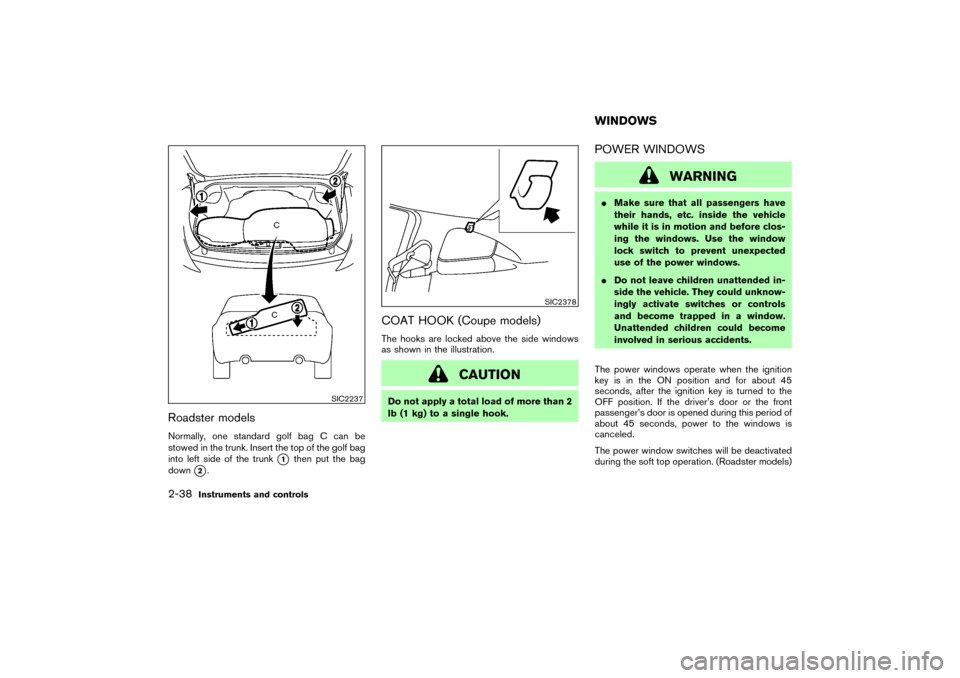
Roadster modelsNormally, one standard golf bag C can be
stowed in the trunk. Insert the top of the golf bag
into left side of the trunk
�1
then put the bag
down
�2.
COAT HOOK (Coupe models)The hooks are locked above the side windows
as shown in the illustration.
CAUTION
Do not apply a total load of more than 2
lb (1 kg) to a single hook.
POWER WINDOWS
WARNING
�Make sure that all passengers have
their hands, etc. inside the vehicle
while it is in motion and before clos-
ing the windows. Use the window
lock switch to prevent unexpected
use of the power windows.
�Do not leave children unattended in-
side the vehicle. They could unknow-
ingly activate switches or controls
and become trapped in a window.
Unattended children could become
involved in serious accidents.
The power windows operate when the ignition
key is in the ON position and for about 45
seconds, after the ignition key is turned to the
OFF position. If the driver’s door or the front
passenger’s door is opened during this period of
about 45 seconds, power to the windows is
canceled.
The power window switches will be deactivated
during the soft top operation. (Roadster models)
SIC2237
SIC2378
WINDOWS
2-38
Instruments and controls
�
06.10.24/Z33-D/V5.0
�
Page 105 of 311

The light illuminates when the rear hatch is
opened. When the rear hatch is closed, the light
will go off.The light illuminates when the trunk lid is
opened. When the trunk lid is closed, the light
will go off.The HomeLink
Universal Transceiver provides a
convenient way to consolidate the functions of
up to three individual hand-held transmitters into
one built-in device.
HomeLink
Universal Transceiver:
�Will operate most Radio Frequency (RF)
devices such as garage doors, gates, home
and office lighting, entry door locks and se-
curity systems.
�Is powered by your vehicle’s battery. No
separate batteries are required. If the vehi-
cle’s battery is discharged or is discon-
nected, HomeLink
will retain all program-
ming.
Once the HomeLinkUniversal Transceiver
is programmed, retain the original trans-
mitter for future programming procedures
(for example, new vehicle purchases).
Upon sale of the vehicle, the programmed
HomeLink
Universal Transceiver buttons
should be erased for security purposes.
For additional information, refer to “Pro-
gramming HomeLink
” later in this sec-
tion.
LUGGAGE COMPARTMENT LIGHT
(Coupe models)TRUNK LIGHT (Roadster models)
HomeLink
UNIVERSAL
TRANSCEIVER (if so equipped)
2-42
Instruments and controls
�
06.10.24/Z33-D/V5.0
�