Page 121 of 473
120 Controls in detailLocking and unlockingLocking�
Press central locking switch1.
If all the doors are closed, the vehicle
locks.
Unlocking
�
Press central unlocking switch2.
The vehicle unlocks.
i
If the vehicle was previously centrally locked
using the SmartKey or the SmartKey with
KEYLESS-GO*, it will not unlock using the central
locking switch.
If the vehicle was previously locked with the cen-
tral locking switch
�
while in the global remote control mode, the
complete vehicle is unlocked when a door is
opened from the inside
�
while in the selective remote control mode,
only the door opened from the inside is un-
locked
Page 129 of 473

128 Controls in detail LightingFor information on how to switch on the
headlamps and use the turn signals, see
“Switching on headlamps” (
�page 55)
and “Turn signals” (
�page 56).
Exterior lamp switch
The exterior lamp switch is located on the
dashboard to the left of the steering wheel.
MOff
Daytime running lamp mode
(
�page 130)
UAutomatic headlamp mode
Daytime running lamp mode
(�page 130)
CParking lamps (also tail lamps, li-
cense plate lamps, side marker
lamps, instrument panel lamps)Canada only: When the engine is
running, the low beam headlamps
are also switched on.
BLow beam headlamps (or high
beam headlamps when the combi-
nation switch is pushed forward)
and parking lamps
ˆStanding lamps, right (turn left one
stop)
‚Standing lamps, left (turn left two
stops)
CIndicator lamp for parking lamps
‡Indicator lamp for front fog lamps
†Indicator lamp for rear fog lamp
i
If you drive in countries where vehicles drive
on the other side of the road than the country in
which the vehicle is registered, you must have
the headlamps modified for symmetrical low
beams. Relevant information can be obtained at
any authorized Mercedes-Benz Center.
i
With the SmartKey removed from the starter
switch or the engine turned off with
KEYLESS-GO* and the driver’s door open, a
warning sounds if the parking lamps or the low
beam headlamps are switched on.
The message $
Turn off lamps
appears in
the multifunction display.
Page 130 of 473
129 Controls in detail
Lighting
Manual headlamp mode
The low beam headlamps and parking
lamps can be switched on or off with the
exterior lamp switch (
�page 55).
Automatic headlamp mode
The following lamps switch on and off au-
tomatically depending on the brightness of
the ambient light:
�
Low beam headlamps
�
Tail lamps
�
Parking lamps
�
License plate lamps
�
Side marker lamps
�
Turn the exterior lamp switch to posi-
tion U.
With the SmartKey in starter switch
position1 or the KEYLESS-GO
start/stop button pressed once, only
the parking lamps and side marker
lamps will switch on and off automati-
cally.
When the engine is running, the low
beam headlamps, the tail and parking
lamps, the license plate lamps, and the
side marker lamps will switch on and
off automatically.
Warning!
G
If the exterior lamp switch is set toU,�
the headlamps may switch off unexpect-
edly when the system senses bright am-
bient light, for example light from
oncoming traffic.
�
the headlamps will not be automatically
switched on under foggy conditions.
To minimize risk to you and to others, acti-
vate headlamps by turning exterior lamp
switch to B when driving or when traffic
and / or ambient lighting conditions require
you to do so.
In low ambient lighting conditions, only
switch from position U to B with the
vehicle at a standstill in a safe location.
Switching from U to B will briefly
switch off the headlamps. Doing so while
driving in low ambient lighting conditions
may result in an accident.
The automatic headlamp feature is only an
aid to the driver. The driver is responsible for
the operation of the vehicle’s lights at all
times.
Page 134 of 473
133 Controls in detail
Lighting
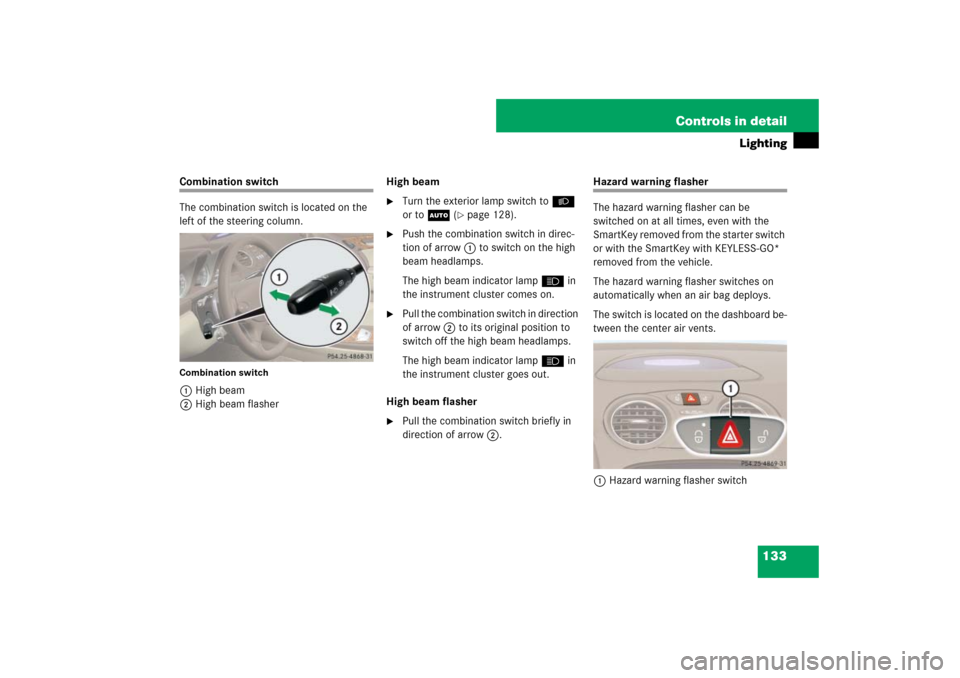
Combination switch
The combination switch is located on the
left of the steering column.Combination switch1High beam
2High beam flasherHigh beam
�
Turn the exterior lamp switch toB
or toU (
�page 128).
�
Push the combination switch in direc-
tion of arrow1 to switch on the high
beam headlamps.
The high beam indicator lamp A in
the instrument cluster comes on.
�
Pull the combination switch in direction
of arrow 2 to its original position to
switch off the high beam headlamps.
The high beam indicator lamp A in
the instrument cluster goes out.
High beam flasher
�
Pull the combination switch briefly in
direction of arrow2.
Hazard warning flasher
The hazard warning flasher can be
switched on at all times, even with the
SmartKey removed from the starter switch
or with the SmartKey with KEYLESS-GO*
removed from the vehicle.
The hazard warning flasher switches on
automatically when an air bag deploys.
The switch is located on the dashboard be-
tween the center air vents.
1Hazard warning flasher switch
Page 135 of 473
134 Controls in detailLightingSwitching on the hazard warning
flasher�
Press hazard warning flasher
switch1.
All turn signals are flashing.
Switching off the hazard warning
flasher
�
Press hazard warning flasher switch1
again.
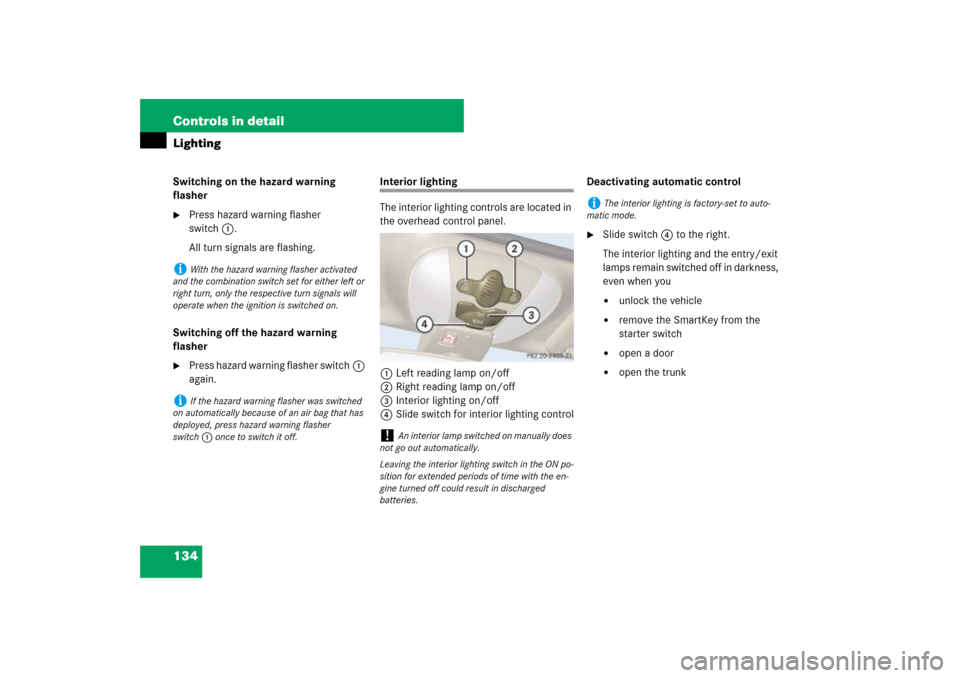
Interior lighting
The interior lighting controls are located in
the overhead control panel.
1Left reading lamp on/off
2Right reading lamp on/off
3Interior lighting on/off
4Slide switch for interior lighting controlDeactivating automatic control
�
Slide switch4 to the right.
The interior lighting and the entry/exit
lamps remain switched off in darkness,
even when you�
unlock the vehicle
�
remove the SmartKey from the
starter switch
�
open a door
�
open the trunk
i
With the hazard warning flasher activated
and the combination switch set for either left or
right turn, only the respective turn signals will
operate when the ignition is switched on.
i
If the hazard warning flasher was switched
on automatically because of an air bag that has
deployed, press hazard warning flasher
switch1 once to switch it off.
!
An interior lamp switched on manually does
not go out automatically.
Leaving the interior lighting switch in the ON po-
sition for extended periods of time with the en-
gine turned off could result in discharged
batteries.
i
The interior lighting is factory-set to auto-
matic mode.
Page 136 of 473
135 Controls in detail
Lighting
Activating automatic control�
Slide switch4 to the left.
The interior lighting switches on in
darkness when you �
unlock the vehicle
�
remove the SmartKey from the
starter switch
�
open a door
�
open the trunk
In addition, the entry/exit lamps in the
door trays come on when you open a
door.
The interior lighting switches off after
approximately 10 seconds if the interi-
or lighting delayed switch-off feature is
set to
On in the control system
(
�page 161).Manual control
Switching interior lighting on and off
�
Press switch3.
The interior lighting switches on.
�
Press switch3 once more.
The interior lighting switches off.
Switching reading lamps on and off
�
Press reading lamp switch1 or2 to
switch on the desired reading lamp.
�
Press reading lamp switch1 or2
again to switch off the respective read-
ing lamp.
Courtesy lighting
For better orientation in the dark, courtesy
lamps will illuminate the interior of your ve-
hicle as follows:
With parking lamps switched on:�
the door handles
�
the driver and passenger footwells
With SmartKey in starter switch position1:
�
the door handles
�
the center console
Trunk lamp
The trunk lamp switches on when the trunk
is opened.
If the trunk lid remains open, the trunk
lighting switches off automatically after ap-
proximately 10 minutes.
i
If a door remains open, the interior lighting
switches off automatically after approximately
5minutes.
i
If you turn the SmartKey in the starter
switch to position0 and switch off the head-
lamps, the door handle lamps will remain lit for
approximately 5 minutes.
Page 140 of 473

139 Controls in detail
Control system
�Control system
The control system is activated as soon
as the SmartKey in the starter switch is
turned to position1 or as soon as the
KEYLESS-GO start/stop button is in
position 1. The control system enables
you to�
call up information about your vehicle
�
change vehicle settings
For example, you can use the control sys-
tem to find out when your vehicle is next
due for service, to set the language for
messages in the instrument cluster dis-
play, and much more.
The control system relays information to
the multifunction display.
Multifunction display
The multifunction display consists of the
display fields in the speedometer and the
tachometer. In its default state, the left
multifunction display shows the main
odometer and the outside temperature,
while the trip odometer appears in the
right multifunction display. This default
setting is referred to as the standard
display.
1Main odometer
2Outside temperature
3Current gear selector lever position
4Trip odometer
5Automatic transmission program mode
Warning!
G
A driver’s attention to the road and traffic
conditions must always be his /her primary
focus when driving.
For your safety and the safety of others,
selecting features through the multifunction
steering wheel should only be done by the
driver when traffic and road conditions per-
mit it to be done safely.
Bear in mind that at a speed of just
30 mph (approximately 50 km / h), your
vehicle is covering a distance of 44 feet
(approximately 14 m) every second.
Page 148 of 473
147 Controls in detail
Control system
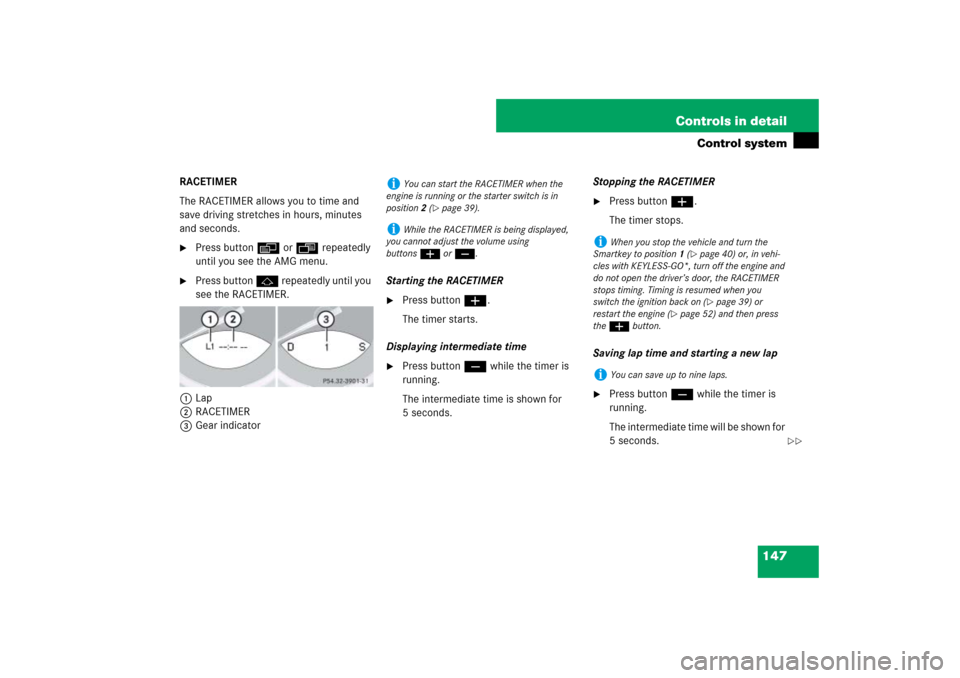
RACETIMER
The RACETIMER allows you to time and
save driving stretches in hours, minutes
and seconds.�
Press button è or ÿ repeatedly
until you see the AMG menu.
�
Press button j repeatedly until you
see the RACETIMER.
1Lap
2RACETIMER
3Gear indicatorStarting the RACETIMER
�
Press button æ.
The timer starts.
Displaying intermediate time
�
Press button ç while the timer is
running.
The intermediate time is shown for
5 seconds.Stopping the RACETIMER
�
Press button æ.
The timer stops.
Saving lap time and starting a new lap
�
Press button ç while the timer is
running.
The intermediate time will be shown for
5 seconds.
i
You can start the RACETIMER when the
engine is running or the starter switch is in
position2 (
�page 39).
i
While the RACETIMER is being displayed,
you cannot adjust the volume using
buttonsæ or ç.
i
When you stop the vehicle and turn the
Smartkey to position 1 (
�page 40) or, in vehi-
cles with KEYLESS-GO*, turn off the engine and
do not open the driver’s door, the RACETIMER
stops timing. Timing is resumed when you
switch the ignition back on (�page 39) or
restart the engine (
�page 52) and then press
the æbutton.
i
You can save up to nine laps.
��
