Page 33 of 473
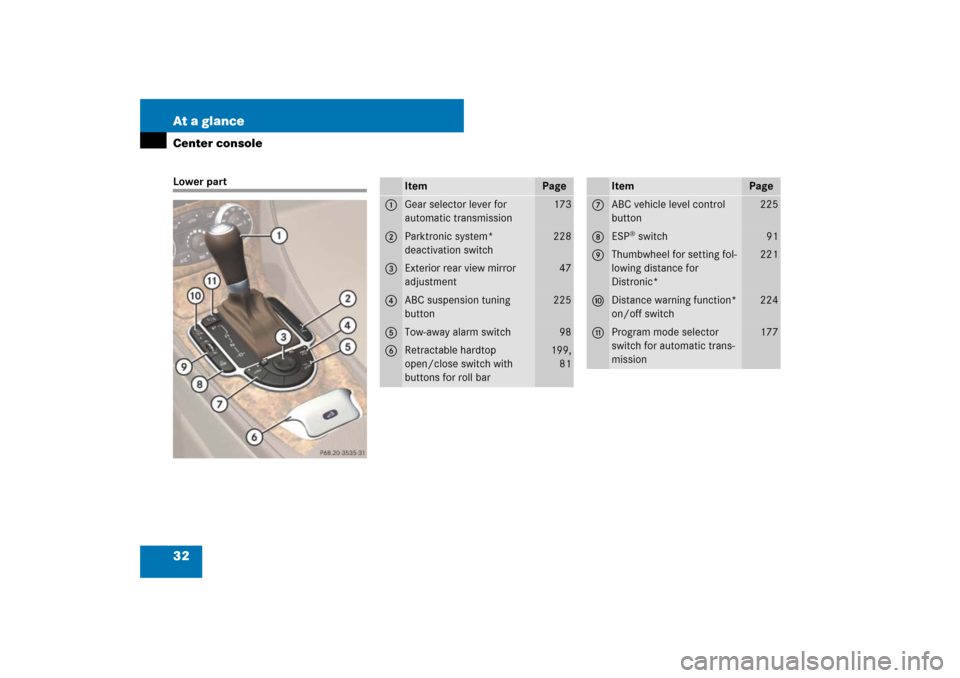
32 At a glanceCenter consoleLower part
Item
Page
1
Gear selector lever for
automatic transmission
173
2
Parktronic system*
deactivation switch
228
3
Exterior rear view mirror
adjustment
47
4
ABC suspension tuning
button
225
5
Tow-away alarm switch
98
6
Retractable hardtop
open/close switch with
buttons for roll bar
199,
81
Item
Page
7
ABC vehicle level control
button
225
8
ESP
® switch
91
9
Thumbwheel for setting fol-
lowing distance for
Distronic*
221
a
Distance warning function*
on/off switch
224
b
Program mode selector
switch for automatic trans-
mission
177
Page 49 of 473

48 Getting startedAdjustingInterior rear view mirror�
Manually adjust the interior rear view
mirror.
For more information, see “Rear view mir-
rors” (
�page 180).
Exterior rear view mirrorsThe buttons are located on the lower part
of the center console.
1Driver’s side exterior rear view mirror
button
2Passenger-side exterior rear view mir-
ror button
3Adjustment button
�
Switch on the ignition (
�page 39).
�
Press button1 or button2 to select
the desired exterior rear view mirror.
�
Push adjustment button3 up, down,
left, or right according to the desired
setting.For more information, see “Good visibility”
(
�page 180).
Warning!
G
Exercise care when using the passenger
side exterior rear view mirror. The mirror
surface is convex (outwardly curved surface
for a wider field of view). Objects in mirror
are closer than they appear. Check your in-
terior rear view mirror or glance over your
shoulder before changing lanes.
!
If an exterior rear view mirror was forcibly
pushed forward (hit from the rear) or forcibly
pushed rearward (hit from the front), reposition
it by applying firm pressure until it snaps into
place. The mirror housing is then properly posi-
tioned and you can adjust the mirror in the usual
manner.
i
At low ambient temperatures, the exterior
rear view mirrors will be heated automatically.
i
The memory function (
�page 126) lets you
store the setting for the exterior rear view mir-
rors together with the settings for the steering
wheel and the seat position.
Page 83 of 473
82 Safety and SecurityOccupant safetyThe roll bar raises automatically in an acci-
dent or in a critical driving situation. You
can also raise and lower the roll bar manu-
ally using the buttons provided.
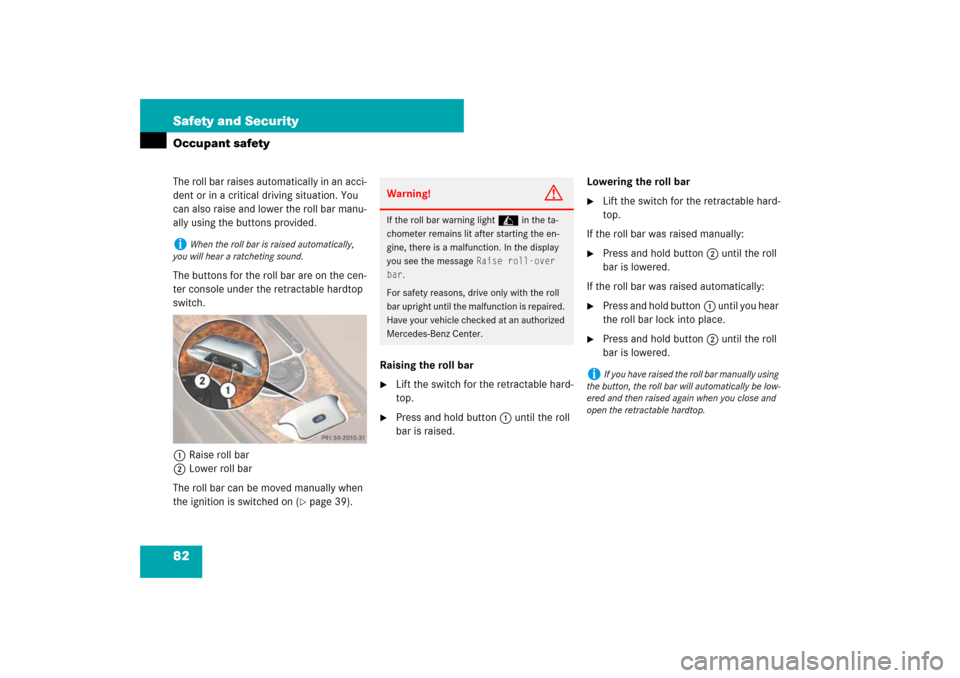
The buttons for the roll bar are on the cen-
ter console under the retractable hardtop
switch.
1Raise roll bar
2Lower roll bar
The roll bar can be moved manually when
the ignition is switched on (
�page 39).Raising the roll bar
�
Lift the switch for the retractable hard-
top.
�
Press and hold button1 until the roll
bar is raised.Lowering the roll bar
�
Lift the switch for the retractable hard-
top.
If the roll bar was raised manually:
�
Press and hold button2 until the roll
bar is lowered.
If the roll bar was raised automatically:
�
Press and hold button1 until you hear
the roll bar lock into place.
�
Press and hold button2 until the roll
bar is lowered.
i
When the roll bar is raised automatically,
you will hear a ratcheting sound.
Warning!
G
If the roll bar warning light in the ta-
chometer remains lit after starting the en-
gine, there is a malfunction. In the display
you see the message
Raise roll-over
bar
.
For safety reasons, drive only with the roll
bar upright until the malfunction is repaired.
Have your vehicle checked at an authorized
Mercedes-Benz Center.
i
If you have raised the roll bar manually using
the button, the roll bar will automatically be low-
ered and then raised again when you close and
open the retractable hardtop.
Page 467 of 473

466 Index
Loss of 110
Messages in display 379
Reprogramming 109
Selective setting 109
Unlocking 106
Snow chains 318
Spare fuses 424
Spare fuses see Vehicle tool kit
Spare tire see Spare wheel 405
Spare wheel 388, 389, 405, 440
Collapsible tire 410, 440
Inflating collapsible tire 410
Tire inflation pressure 410
Speed settings
Cruise control 212
Speedometer 27
Setting units 156
Sporty driving style 228
SRS
Indicator lamp 342
Messages in the multifunction
display 361
Standing lamps 128, 398
Standing water
Driving instructions 267
Starter battery 281, 414Starter switch 25, 40
Starter switch positions 39
Starting difficulties 53
Starting position 40
Starting the engine
With the SmartKey 52
With the SmartKey with
KEYLESS-GO* 53
Steering column
In/out adjustment 46
Length adjustment 46
Up/down adjustment 46
Steering wheel
Adjusting 45
Buttons 30
Cleaning 328
Heating* 240
Height adjustment 46
Steering wheel adjustment lever 25
Steering wheel gearshift control* 175
Stopping
Windows 198
Storage compartment
Center console 234Storage compartments 233
Armrest 234
Cup holder 238
Glove box 233
In door 233
Locking compartments
separately 235
Locking storage compartments 235
Parcel net 236
Rear 235
Seats 234
Storage tray 234
Unlocking compartments
separately 236
Unlocking storage
compartments 236, 392
Ventilated glove box 195
Storing tires 285
Submenus 143
Convenience 162
Instrument cluster 156, 157
Lighting 159
Selecting 154
Settings menus 154
Time 157
Vehicle 162