203 Control systems
COMAND address book
Creating a new address book entry�
Select “Telephone” � “Telephone” �
“Address Book” � “New Entry”.
The input menu appears with the data
fields and the input characters.
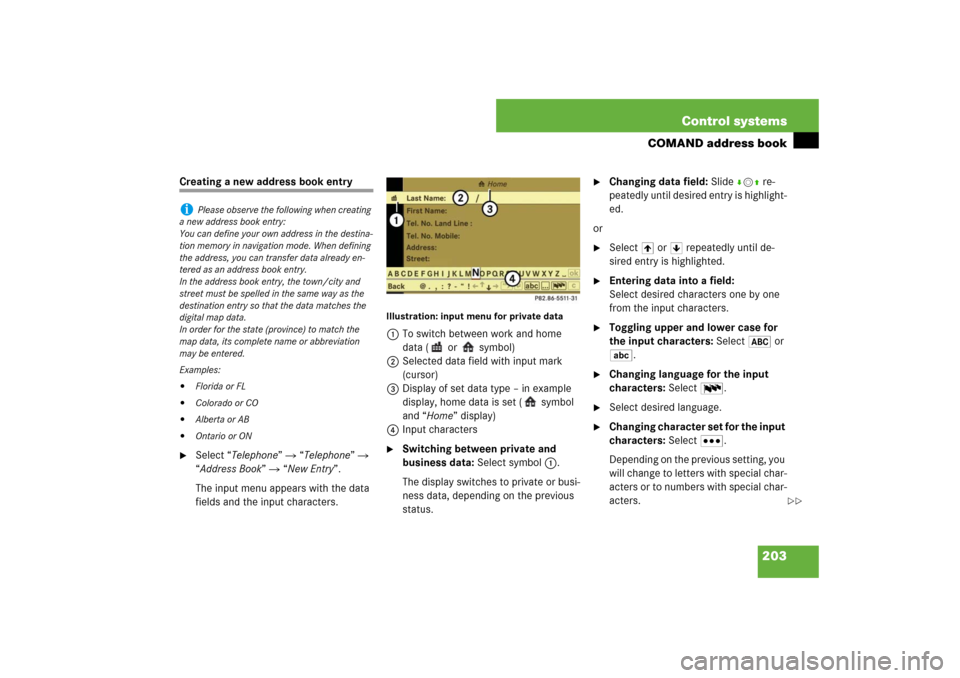
Illustration: input menu for private data1To switch between work and home
data ( or symbol)
2Selected data field with input mark
(cursor)
3Display of set data type – in example
display, home data is set ( symbol
and “Home” display)
4Input characters�
Switching between private and
business data: Select symbol 1.
The display switches to private or busi-
ness data, depending on the previous
status.
�
Changing data field: Slide rmq re-
peatedly until desired entry is highlight-
ed.
or
�
Select [ or ] repeatedly until de-
sired entry is highlighted.
�
Entering data into a field:
Select desired characters one by one
from the input characters.
�
Toggling upper and lower case for
the input characters: Select& or
(.
�
Changing language for the input
characters: Select!.
�
Select desired language.
�
Changing character set for the input
characters: Select#.
Depending on the previous setting, you
will change to letters with special char-
acters or to numbers with special char-
acters.
i
Please observe the following when creating
a new address book entry:
You can define your own address in the destina-
tion memory in navigation mode. When defining
the address, you can transfer data already en-
tered as an address book entry.
In the address book entry, the town/city and
street must be spelled in the same way as the
destination entry so that the data matches the
digital map data.
In order for the state (province) to match the
map data, its complete name or abbreviation
may be entered.
Examples:
�
Florida or FL
�
Colorado or CO
�
Alberta or AB
�
Ontario or ON
��
676 Technical termsPCMCIA
(P
ersonal C
omputer M
emory C
ard
I
nternational A
ssociation)
Portable memory cards designed to be
inserted into laptop computers to en-
able additional functions.
PIN code
(P
ersonal I
dentification N
umber code)
Your PIN code prevents unauthorized
persons from using your ->GSM mobile
phone. The PIN code is a number
string, which you have to enter when
switching on the telephone.
Poly-V-belt drive
Drives engine components (alternator,
AC compressor, etc.) from the engine.Power train
Collective term designating all compo-
nents used to generate and transmit
motive power to the drive axles, includ-
ing:
�
Engine
�
Clutch/torque converter
�
Transmission
�
Transfer case
�
Drive shaft
�
Differential
�
Axle shafts/axles
PRE-SAFE
®
(Pre
ventive Occupant Safe
ty System)
Vehicles equipped with PRE-SAFE
®
take preventive measures when the
system senses certain driving dynam-
ics suggesting a possible accident.
Production options weight
(
�page 527)Program mode selector switch
Used to switch the automatic transmis-
sion between standard operationS and
comfort operationC.
PSI
(P
ounds per s
quare i
nch)
(
�page 527)
PUK
(Personal U
nblocking K
ey)
Must be entered if the wrong ->PIN was
entered three consecutive times.
Recommended tire inflation pressure
(
�page 527)
REST
(Residual engine heat utilization)
Feature that uses the engine heat
stored in the coolant to heat the vehi-
cle interior for a short time after the en-
gine has been turned off.