Page 162 of 595
161 Controls in detail
Control system
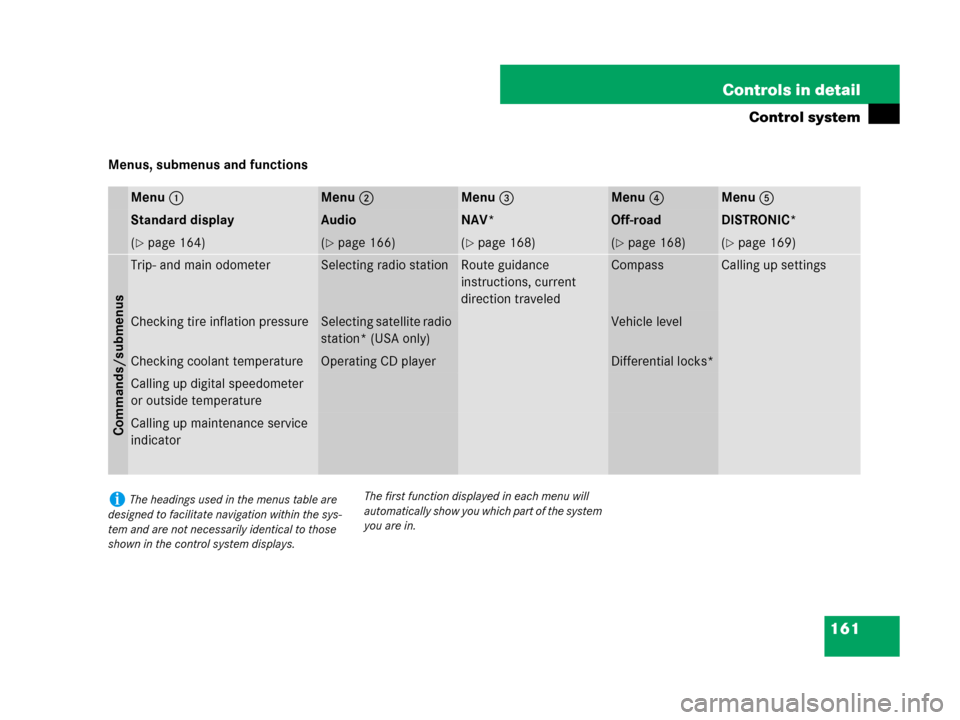
Menus, submenus and functions
Menu1Menu2Menu3Menu4Menu5
Standard displayAudioNAV*Off-roadDISTRONIC*
(�page 164)(�page 166)(�page 168)(�page 168)(�page 169)
Commands/submenus
Trip- and main odometerSelecting radio stationRoute guidance
instructions, current
direction traveledCompassCalling up settings
Checking tire inflation pressureSelecting satellite radio
station* (USA only)Vehicle level
Checking coolant temperatureOperating CD playerDifferential locks*
Calling up digital speedometer
or outside temperature
Calling up maintenance service
indicator
iThe headings used in the menus table are
designed to facilitate navigation within the sys-
tem and are not necessarily identical to those
shown in the control system displays.The first function displayed in each menu will
automatically show you which part of the system
you are in.
Page 164 of 595
163 Controls in detail
Control system
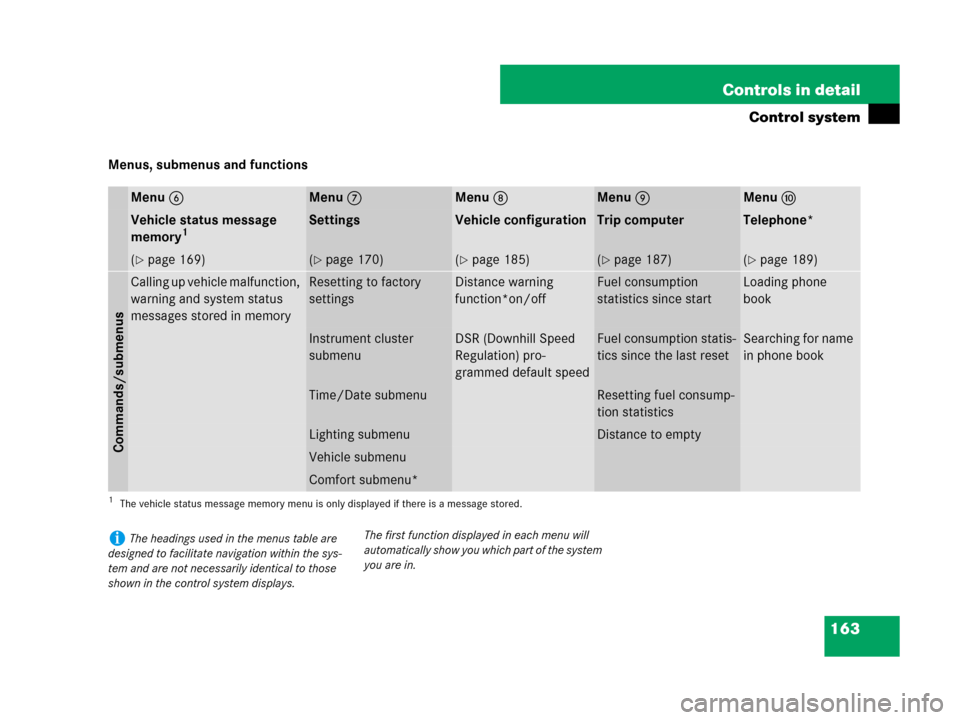
Menus, submenus and functions
Menu6Menu7Menu8Menu9Menua
Vehicle status message
memory1
1The vehicle status message memory menu is only displayed if there is a message stored.
SettingsVehicle configurationTrip computerTelephone*
(�page 169)(�page 170)(�page 185)(�page 187)(�page 189)
Commands/submenus
Calling up vehicle malfunction,
warning and system status
messages stored in memoryResetting to factory
settingsDistance warning
function*on/offFuel consumption
statistics since startLoading phone
book
Instrument cluster
submenuDSR (Downhill Speed
Regulation) pro-
grammed default speedFuel consumption statis-
tics since the last resetSearching for name
in phone book
Time/Date submenuResetting fuel consump-
tion statistics
Lighting submenuDistance to empty
Vehicle submenu
Comfort submenu*
iThe headings used in the menus table are
designed to facilitate navigation within the sys-
tem and are not necessarily identical to those
shown in the control system displays.The first function displayed in each menu will
automatically show you which part of the system
you are in.
Page 334 of 595
333 Controls in detail
Useful features
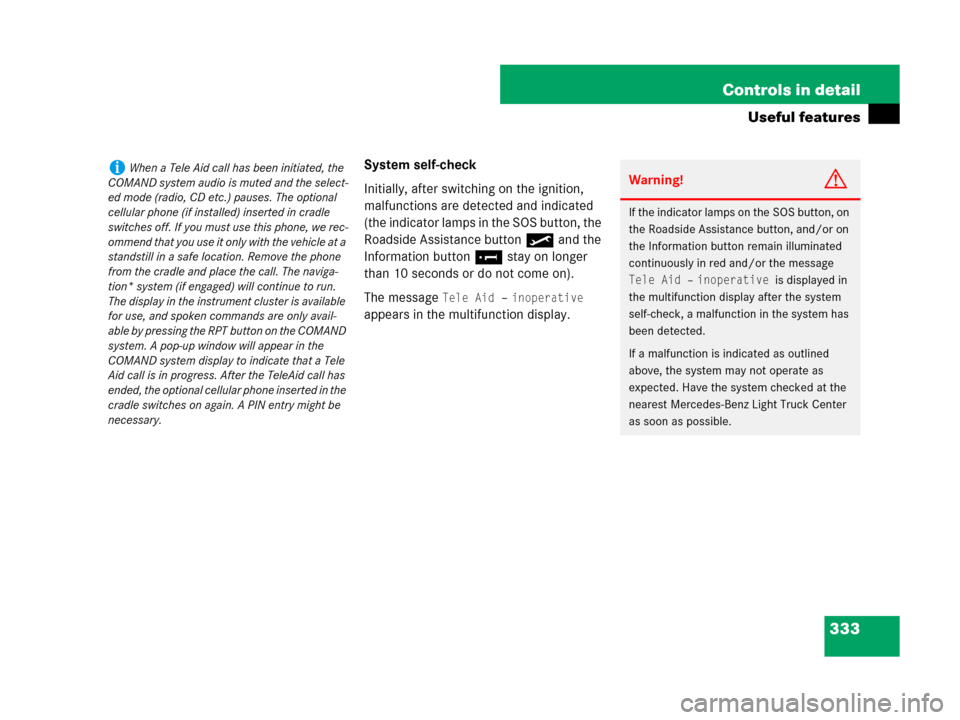
System self-check
Initially, after switching on the ignition,
malfunctions are detected and indicated
(the indicator lamps in the SOS button, the
Roadside Assistance button• and the
Information button¡ stay on longer
than 10 seconds or do not come on).
The message
Tele Aid – inoperative
appears in the multifunction display.
iWhen a Tele Aid call has been initiated, the
COMAND system audio is muted and the select-
ed mode (radio, CD etc.) pauses. The optional
cellular phone (if installed) inserted in cradle
switches off. If you must use this phone, we rec-
ommend that you use it only with the vehicle at a
standstill in a safe location. Remove the phone
from the cradle and place the call. The naviga-
tion* system (if engaged) will continue to run.
The display in the instrument cluster is available
for use, and spoken commands are only avail-
able by pressing the RPT button on the COMAND
system. A pop-up window will appear in the
COMAND system display to indicate that a Tele
Aid call is in progress. After the TeleAid call has
ended, the optional cellular phone inserted in the
cradle switches on again. A PIN entry might be
necessary.Warning!G
If the indicator lamps on the SOS button, on
the Roadside Assistance button, and/or on
the Information button remain illuminated
continuously in red and/or the message
Tele Aid – inoperative is displayed in
the multifunction display after the system
self-check, a malfunction in the system has
been detected.
If a malfunction is indicated as outlined
above, the system may not operate as
expected. Have the system checked at the
nearest Mercedes-Benz Light Truck Center
as soon as possible.
Page 340 of 595
339 Controls in detail
Useful features
As an alternative, you may unlock the vehi-
cle via Internet using the ID and password
sent to you shortly after the completion of
your acquaintance call.
The Response Center will then unlock your
vehicle with the remote door unlocking
feature.Stolen Vehicle Recovery services
In the event your vehicle was stolen:
�Report the incident to the police.
The police will issue a numbered
incident report.
�Pass this number on to the
Mercedes-Benz Response Center along
with your password issued to you when
you subscribed to the service.
The Response Center will then attempt
to covertly contact the vehicle’s
Tele Aid system. Once the vehicle is
located, the Response Center will
contact the local law enforcement and
you. The vehicle’s location will only be
provided to law enforcement.
Garage door opener
The integrated remote control is capable of
operating up to three separately controlled
devices. It provides a convenient way to re-
place up to three hand-held remote con-
trols used to operate devices such as
garage door openers, gate openers, or oth-
er devices compatible with HomeLink
® or
some other systems.
Before the integrated remote control can
be used, it must be programmed to the ga-
rage door opener, gate operator or other
device you wish to operate. See the follow-
ing instructions for programming informa-
tion.iThe remote door unlock feature is available
if the relevant cellular phone network is avail-
able.
The SOS button will flash and the message
Connecting call will appear in the multifunc-
tion display to indicate receipt of the door unlock
command.
Once the vehicle is unlocked, a Response Center
specialist may attempt to establish voice contact
with the vehicle occupants.
If the tailgate recessed handle was pulled for
more than 20 seconds before door unlock autho-
rization was received by the Response Center,
you must wait 15 minutes before pulling the tail-
gate recessed handle again.
iWhen the anti-theft alarm stays on for more
than 30 seconds, a call is initiated automatically
to the Response Center. See anti-theft alarm
system (
�page 111).