Page 247 of 595
246 Controls in detail
3-zone automatic climate control*
Increasing the temperature
�Turn temperature control3
(
�page 243) slightly clockwise.
The rear automatic climate control will
correspondingly adjust the interior air
temperature for the rear passenger
compartment.
Decreasing the temperature
�Turn temperature control3
(
�page 243) slightly counterclock-
wise.
The rear automatic climate control will
correspondingly adjust the interior air
temperature for the rear passenger
compartment.Adjusting air volume
Adjusting manually
Five blower speeds are available.
�Press button� to decrease or
buttonQ to increase air volume to
the desired level.
The indicator lamp on the buttonU
goes out. The selected blower speed is
shown by the indicator lamps for air
volume settings9 (
�page 243).
Adjusting automatically
�Press buttonU.
The indicator lamp on the button
comes on. The air volume is adjusted
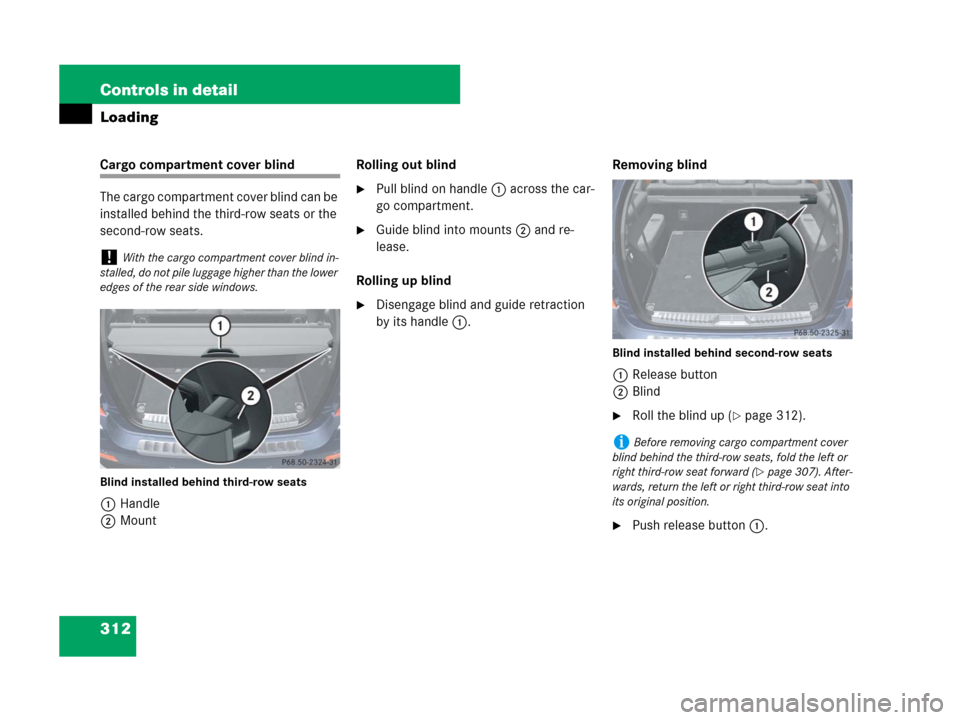
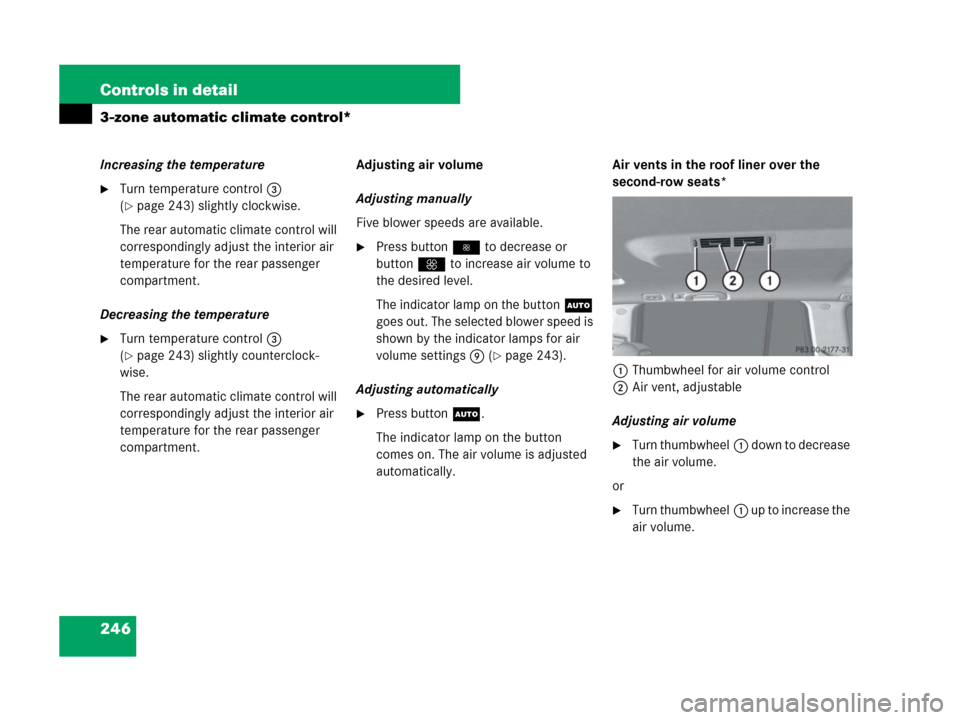
automatically.Air vents in the roof liner over the
second-row seats*
1Thumbwheel for air volume control
2Air vent, adjustable
Adjusting air volume
�Turn thumbwheel1 d o w n t o d e c r e a s e
the air volume.
or
�Turn thumbwheel1 u p t o i n c r e a s e t h e
air volume.
Page 255 of 595
254 Controls in detail
Power tilt/sliding sunroof*
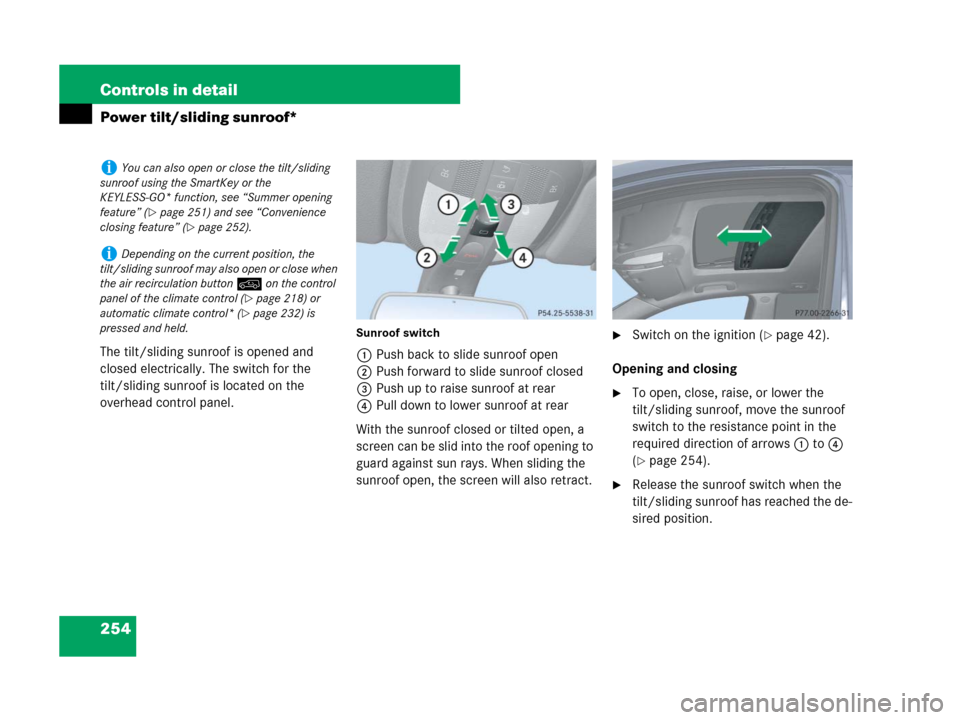
The tilt/sliding sunroof is opened and
closed electrically. The switch for the
tilt/sliding sunroof is located on the
overhead control panel.
Sunroof switch
1Push back to slide sunroof open
2Push forward to slide sunroof closed
3Push up to raise sunroof at rear
4Pull down to lower sunroof at rear
With the sunroof closed or tilted open, a
screen can be slid into the roof opening to
guard against sun rays. When sliding the
sunroof open, the screen will also retract.
�Switch on the ignition (�page 42).
Opening and closing
�To open, close, raise, or lower the
tilt/sliding sunroof, move the sunroof
switch to the resistance point in the
required direction of arrows1to4
(
�page 254).
�Release the sunroof switch when the
tilt/sliding sunroof has reached the de-
sired position.
iYou can also open or close the tilt/sliding
sunroof using the SmartKey or the
KEYLESS-GO* function, see “Summer opening
feature” (
�page 251) and see “Convenience
closing feature” (
�page 252).
iDepending on the current position, the
tilt/sliding sunroof may also open or close when
the air recirculation button: on the control
panel of the climate control (
�page 218) or
automatic climate control* (
�page 232) is
pressed and held.
Page 285 of 595

284 Controls in detail
Driving systems
Raised level
Only select the raised level if appropriate
for the driving situation encountered.
Otherwise:
�fuel consumption may increase
�handling characteristics of the vehicle
may be unfavorable
�Start the engine (�page 41).
If indicator lamp2 (
�page 283) is off.
�Press switch1 (�page 283).
Indicator lamp2 flashes. The vehicle
adjusts to the raised level.The following message appears in the mul-
tifunction display while the level is being
set:
When the raised level is reached, indicator
lamp2 (
�page 283) comes on continu-
ously and the following message appears
in the multifunction display for 5 seconds:Highway level
�Start the engine (�page 41).
If indicator lamp2 (
�page 283) is on.
�Press switch1 (�page 283).
Indicator lamp2 flashes. The vehicle
adjusts to the highway level.
The following message appears in the
multifunction display while the level is
being set:
iYou can select the raised level at speeds up
to 40 mph (64 km/h). At higher speeds, the
messagen
Level selection not
permitted
appears in the multifunction dis-
play.
iThe message can be cleared by pressing
theèÿk or buttonj on the
multifunction steering wheel.
!Keep in mind that in rough or uneven roads,
adjusting the vehicle to a lower level may cause
the vehicle underbody to come in contact with
the road and result in damage to the vehicle un-
derbody. Always make sure the vehicle has suffi-
cient ground clearance before adjusting it to a
lower level.
Page 286 of 595
285 Controls in detail
Driving systems
When the highway level is reached, indica-
tor lamp2 (
�page 283) goes out. The
following message appears in the multi-
function display for 5 seconds:Vehicles with enhanced Off-road
Package*
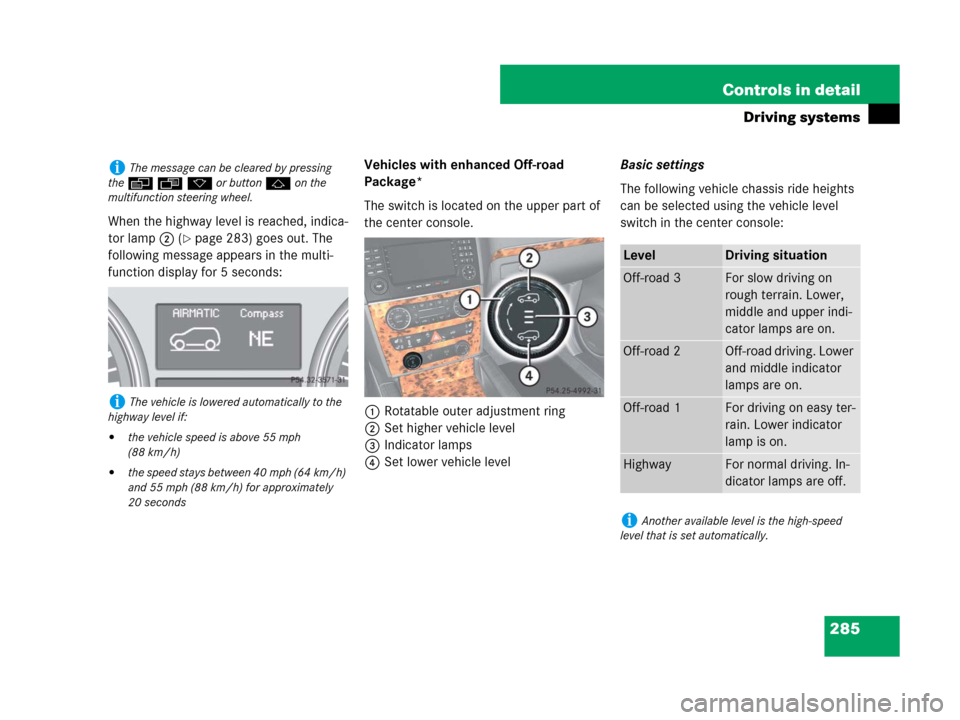
The switch is located on the upper part of
the center console.
1Rotatable outer adjustment ring
2Set higher vehicle level
3Indicator lamps
4Set lower vehicle levelBasic settings
The following vehicle chassis ride heights
can be selected using the vehicle level
switch in the center console:
iThe message can be cleared by pressing
theèÿk or buttonj on the
multifunction steering wheel.
iThe vehicle is lowered automatically to the
highway level if:
�the vehicle speed is above 55 mph
(88 km/h)
�the speed stays between 40 mph (64 km/h)
and 55 mph (88 km/h) for approximately
20 seconds
LevelDriving situation
Off-road 3For slow driving on
rough terrain. Lower,
middle and upper indi-
cator lamps are on.
Off-road 2Off-road driving. Lower
and middle indicator
lamps are on.
Off-road 1For driving on easy ter-
rain. Lower indicator
lamp is on.
HighwayFor normal driving. In-
dicator lamps are off.
iAnother available level is the high-speed
level that is set automatically.
Page 288 of 595
287 Controls in detail
Driving systems
If you are driving too fast while using
off-road level 3, you will see the following
message in the multifunction display:
�Reduce speed to
under 20 mph
(30 km/h)
Additional an acoustic signal sounds.
Only use the off-road levels when neces-
sary.
Otherwise:
�fuel consumption may increase
�handling characteristics of the vehicle
may be unfavorable
�Start the engine (�page 41).
�Turn outer adjustment ring1
(
�page 285) repeatedly until indicator
lamp3 (
�page 285) of the desired
level flashes.
�Off-road level 1, lower indicator
lamp flashes
�Off-road level 2, lower and middle
indicator lamps flashes
�Off-road level 3, lower, middle and
upper indicator lamps flashes
The vehicle adjusts to the correspond-
ing off-road level.
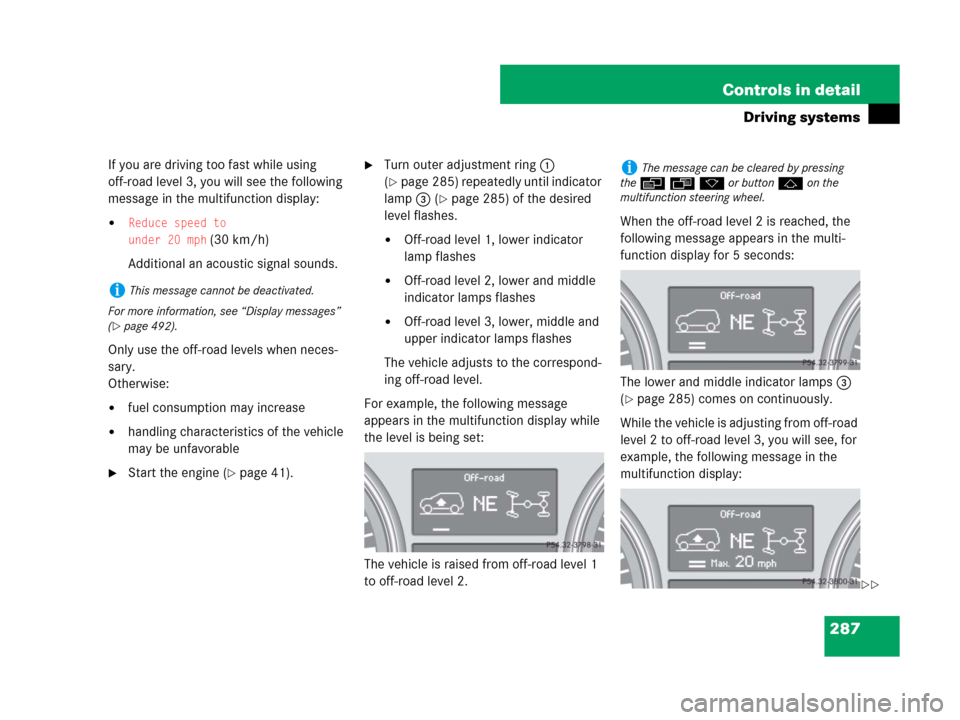
For example, the following message
appears in the multifunction display while
the level is being set:
The vehicle is raised from off-road level 1
to off-road level 2.When the off-road level 2 is reached, the
following message appears in the multi-
function display for 5 seconds:
The lower and middle indicator lamps3
(
�page 285) comes on continuously.
While the vehicle is adjusting from off-road
level 2 to off-road level 3, you will see, for
example, the following message in the
multifunction display:
iThis message cannot be deactivated.
For more information, see “Display messages”
(
�page 492).
iThe message can be cleared by pressing
theèÿk or buttonj on the
multifunction steering wheel.
��
Page 290 of 595

289 Controls in detail
Driving systems
You will see, for example, the following
message in the multifunction display:
�At speeds above 60 mph (96 km/h)
the off-road level 1 setting is canceled
and the vehicle is lowered to the high-
way level.
You will see, for example, the following
message in the multifunction display:
�Depending on the ADS setting
(
�page 280), the vehicle will be low-
ered to the high-speed level when trav-
eling at higher speeds. At speeds below
25 mph (40 km/h) at the latest, it will
be returned to the highway level.
Highway level
�Start the engine (�page 41).If one or more of the indicator lamps
(
�page 283) are on:
�Press switch2 (�page 285)
repeatedly until all lit indicator
lamps3 flash.
The vehicle adjusts to the highway
level.
The following message appears in the
multifunction display while the level is
being set:
iThe setting is stored when you turn off the
engine.
!Keep in mind that in rough or uneven roads,
adjusting the vehicle to a lower level may cause
the vehicle underbody to come in contact with
the road and result in damage to the vehicle un-
derbody. Always make sure the vehicle has suffi-
cient ground clearance before adjusting it to a
lower level.
iThe message can be cleared by pressing
theèÿk or buttonj on the
multifunction steering wheel.
Page 313 of 595
312 Controls in detail
Loading
Cargo compartment cover blind
The cargo compartment cover blind can be
installed behind the third-row seats or the
second-row seats.
Blind installed behind third-row seats
1Handle
2MountRolling out blind
�Pull blind on handle1 across the car-
go compartment.
�Guide blind into mounts2 and re-
lease.
Rolling up blind
�Disengage blind and guide retraction
by its handle1.Removing blind
Blind installed behind second-row seats
1Release button
2Blind
�Roll the blind up (�page 312).
�Push release button1.
!With the cargo compartment cover blind in-
stalled, do not pile luggage higher than the lower
edges of the rear side windows.
iBefore removing cargo compartment cover
blind behind the third-row seats, fold the left or
right third-row seat forward (
�page 307). After-
wards, return the left or right third-row seat into
its original position.
Page 314 of 595
313 Controls in detail
Loading
�Pull blind2 to the left against the
spring pressure until the spring in the
cover audibly engages.
�Remove the blind.
Installing blind
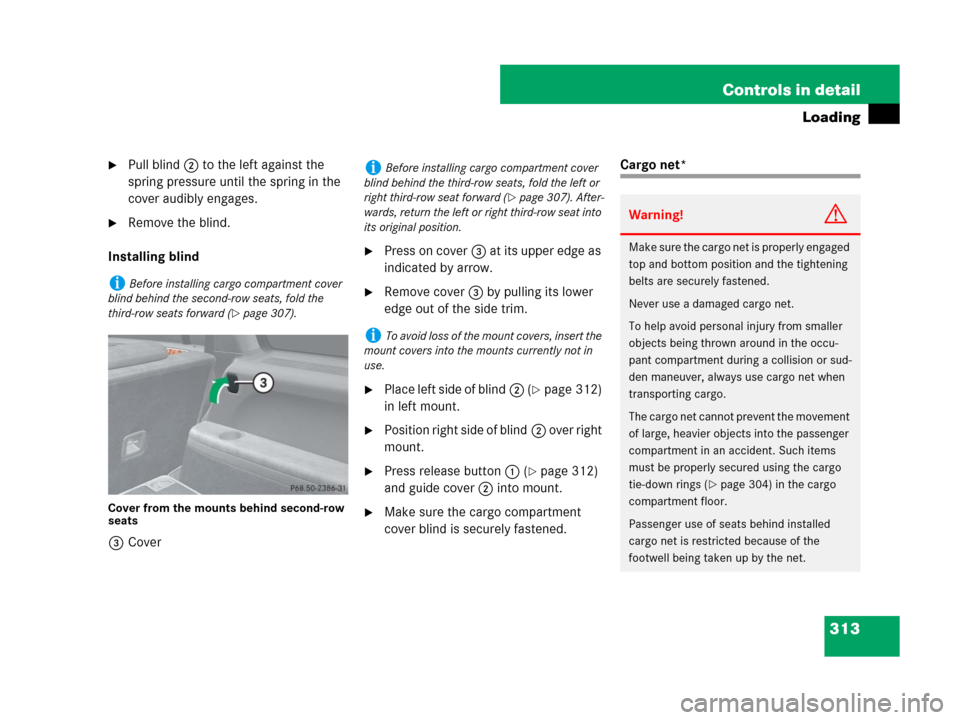
Cover from the mounts behind second-row
seats
3Cover
�Press on cover3 at its upper edge as
indicated by arrow.
�Remove cover3 by pulling its lower
edge out of the side trim.
�Place left side of blind2 (�page 312)
in left mount.
�Position right side of blind2 over right
mount.
�Press release button1 (�page 312)
and guide cover2 into mount.
�Make sure the cargo compartment
cover blind is securely fastened.
Cargo net*
iBefore installing cargo compartment cover
blind behind the second-row seats, fold the
third-row seats forward (
�page 307).
iBefore installing cargo compartment cover
blind behind the third-row seats, fold the left or
right third-row seat forward (
�page 307). After-
wards, return the left or right third-row seat into
its original position.
iTo avoid loss of the mount covers, insert the
mount covers into the mounts currently not in
use.
Warning!G
Make sure the cargo net is properly engaged
top and bottom position and the tightening
belts are securely fastened.
Never use a damaged cargo net.
To help avoid personal injury from smaller
objects being thrown around in the occu-
pant compartment during a collision or sud-
den maneuver, always use cargo net when
transporting cargo.
The cargo net cannot prevent the movement
of large, heavier objects into the passenger
compartment in an accident. Such items
must be properly secured using the cargo
tie-down rings (
�page 304) in the cargo
compartment floor.
Passenger use of seats behind installed
cargo net is restricted because of the
footwell being taken up by the net.