Page 54 of 595
53 Getting started
Adjusting
�Push adjustment button2 up, down,
left, or right according to the desired
setting.
For more information, see “Rear view mir-
rors” (
�page 210).
iIf you do not make adjustments to the
selected exterior rear view mirror within
15 seconds, the indicator lamp goes out. You will
then have to select the desired exterior rear view
mirror again before any adjustments can be
made. Adjustments can only be made with the
indicator lamp for the respective exterior rear
view mirror button illuminated.
!If an exterior rear view mirror was forcibly
pushed forward (hit from the rear) or forcibly
pushed rearward (hit from the front), reposition
it by applying firm pressure until it snaps into
place. The mirror housing is then properly posi-
tioned and you can adjust the mirror in the usual
manner.
!Vehicle with power folding exterior rear view
mirrors*:
If an exterior rear view mirror housing is forcibly
pushed forward (hit from the rear) or forcibly
pushed rearward (hit from the front), press fold
button1 (
�page 212) to fold mirrors in, then
press fold button1 (
�page 212) again to fold
mirrors out. Do not force mirrors by hand as this
may damage the adjustment mechanism.
The mirror housing is then properly positioned
and you can adjust the mirror in the usual man-
ner.
iThe memory function* (�page 143) lets
you store the settings for the exterior rear view
mirrors together with the setting for the steering
wheel column and the seat positions.
At low ambient temperatures, the exterior rear
view mirrors will be heated automatically.
iAt low ambient temperatures, the exterior
rear view mirrors will be heated automatically.
Page 114 of 595
113 Controls in detail
Locking and unlocking
Seats
Memory function*
Lighting
Instrument cluster
Control system
Automatic transmission
Transfer case
Differential locks*
Good visibility
Climate control
3-zone automatic climate control*
Power windows
Power tilt/sliding sunroof*
Driving systems
Loading
Useful features
Page 133 of 595

132 Controls in detail
Seats
For information on seat adjustment, see
the “Getting started” section (
�page 45).
For more information on seats, see “Load-
ing” (
�page 297).
Easy-entry/exit feature for third-row
seats
This feature allows for easier access to and
exit from the vehicle’s third-row seats.Easy-entry feature for third-row seats
The lever for the easy-entry feature is lo-
cated on the rear of the seat base of the
passenger side second-row seat.
1Easy-entry lever
�Pull and hold easy-entry lever1 in di-
rection of arrow at resistance point.
The seat backrest folds forward.1Easy-entry lever
�Pull and hold easy-entry lever1 once
again in direction of arrow at resistance
point.
�Lift up the right second-row seat until it
folds forward.
You should now have sufficient space
to access the vehicle’s third-row seat.
Warning!G
To help avoid personal injury, the
second-row seat backrests must be properly
locked either in the upright position or,
when using the expanded cargo compart-
ment, in the fully folded position while the
vehicle is in motion.
!Make sure that the head restraint is pushed
all the way down (
�page 137).
iVehicles with memory function*:
The front passenger seat moved slightly forward.
Page 134 of 595

133 Controls in detail
Seats
Easy-entry/exit position
While the easy-entry feature is activated,
you will see, for example, the following
message in the multifunction display:
2nd row of seats
Right not locked
�Return seat into its original position
(
�page 134).
The message in the multifunction dis-
play disappears.For setting the front passenger seat back
into the stored position, see “Recalling po-
sitions from memory” (
�page 144).
For information on how to fold down the
second-row seats completely, see “Folding
second-row seats” (
�page 308).
Easy-exit feature for third-row seats
The easy-exit strap is located on the right
rear of the second-row seat base.
1Easy-exit strap
�To exit the vehicle when seated on a
third-row seat, pull up and hold
easy-exit strap1.
The right second-row seat backrest
folds forward.
�Pull and hold once easy-entry strap1.
�Lift up the right second-row seat until it
folds forward.
You should now have sufficient space
to exit the vehicle’s third-row seat.
While the easy-entry feature is activated,
you will see, for example, the following
message in the multifunction display:
2nd row of seats
Right not locked
iVehicles with memory function*:
The front passenger seat moved slightly forward.
��
Page 135 of 595

134 Controls in detail
Seats
�Return seat into its original position
(
�page 134).
The message in the multifunction dis-
play disappears.
For setting the front passenger seat back
into the stored position, see “Recalling po-
sitions from memory” (
�page 144).
For information on how to fold down the
second-row seats completely, see “Folding
second-row seats” (
�page 308).
Returning second-row seats to their
original position�Fold seat (�page 133) back until it au-
dibly engages.
�Fold seat backrest (�page 132) back
into original position until it engages.
To make sure the seat backrest has en-
gaged, lean firmly against the backrest.Emergency exit for third-row seats
1Emergency release
2Seat backrest
Warning!G
When occupants have entered or exited the
vehicle using the easy-entry/exit feature,
before driving off make sure
�the seats are properly locked
�the seat backrests are in an upright po-
sition and are properly locked
If a seat and seat backrest are not properly
locked, the seat could move forward and the
seat backrest could fold. You could slide un-
der the seat belt during braking, vehicle ma-
neuvers, or in an accident. If you slide under
it, the belt would apply force at the abdomen
or neck. That could cause serious or even fa-
tal injuries.
iIf, due to an accident or other situation, it is
not possible for you to exit the vehicle on the
side of the easy-entry seat (
�page 132), you
can fold the left side of the seat backrest in the
second row of seats down in order to open the
left rear door.
!Make sure that the head restraint is pushed
all the way down (
�page 137).
��
Page 144 of 595
143 Controls in detail
Memory function*
�Memory function*
Prior to operating the vehicle, the driver
should check and adjust the seat height,
seat position fore and aft, and seat back-
rest angle if necessary, to ensure adequate
control, reach and comfort. The head
restraint should also be adjusted for
proper height. See also the section on
air bags (
�page 76) for proper seat posi-
tioning.
In addition, adjust the steering wheel to
ensure adequate control, reach, operation
and comfort. Both the interior and exterior
rear view mirrors should be adjusted for
adequate rear vision.
Fasten seat belts. Infants and small chil-
dren should be seated in a properly se-
cured restraint system that complies with
U.S. Federal Motor Vehicle Safety Stan-
dards 213 and 225 and Canadian Motor
Vehicle Safety Standards 213 and 210.2.With the memory function you can store up
to three different configurations.
Each stored position on the driver’s side
includes the following settings:
�Seat position
�Multicontour seat*: previously saved
setting
�Steering wheel position
�Exterior rear view mirrors’ positionEach stored position on the passenger side
includes the following settings:
�Seat position
�Multicontour seat*: previously saved
setting
Warning!G
Do not activate the memory function while
driving. Activating the memory function
while driving could cause the driver to lose
control of the vehicle.
Page 145 of 595
144 Controls in detail
Memory function*
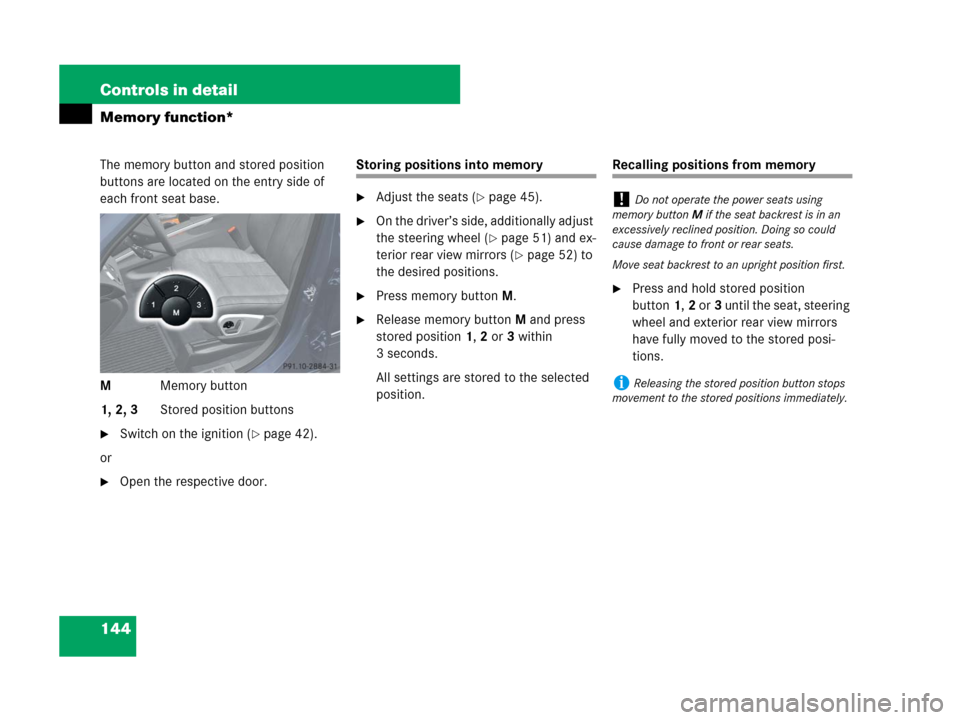
The memory button and stored position
buttons are located on the entry side of
each front seat base.
MMemory button
1, 2, 3Stored position buttons
�Switch on the ignition (�page 42).
or
�Open the respective door.
Storing positions into memory
�Adjust the seats (�page 45).
�On the driver’s side, additionally adjust
the steering wheel (
�page 51) and ex-
terior rear view mirrors (
�page 52) to
the desired positions.
�Press memory buttonM.
�Release memory buttonM and press
stored position1,2 or3 within
3 seconds.
All settings are stored to the selected
position.
Recalling positions from memory
�Press and hold stored position
button1,2 or3 until the seat, steering
wheel and exterior rear view mirrors
have fully moved to the stored posi-
tions.
!Do not operate the power seats using
memory buttonM if the seat backrest is in an
excessively reclined position. Doing so could
cause damage to front or rear seats.
Move seat backrest to an upright position first.
iReleasing the stored position button stops
movement to the stored positions immediately.
Page 164 of 595
163 Controls in detail
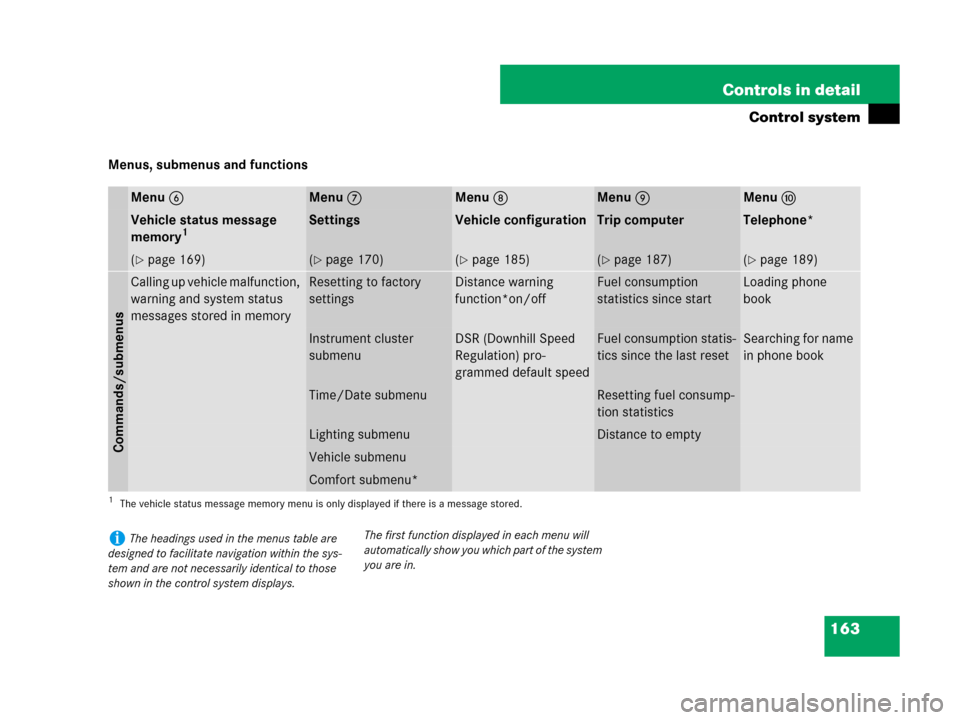
Control system
Menus, submenus and functions
Menu6Menu7Menu8Menu9Menua
Vehicle status message
memory1
1The vehicle status message memory menu is only displayed if there is a message stored.
SettingsVehicle configurationTrip computerTelephone*
(�page 169)(�page 170)(�page 185)(�page 187)(�page 189)
Commands/submenus
Calling up vehicle malfunction,
warning and system status
messages stored in memoryResetting to factory
settingsDistance warning
function*on/offFuel consumption
statistics since startLoading phone
book
Instrument cluster
submenuDSR (Downhill Speed
Regulation) pro-
grammed default speedFuel consumption statis-
tics since the last resetSearching for name
in phone book
Time/Date submenuResetting fuel consump-
tion statistics
Lighting submenuDistance to empty
Vehicle submenu
Comfort submenu*
iThe headings used in the menus table are
designed to facilitate navigation within the sys-
tem and are not necessarily identical to those
shown in the control system displays.The first function displayed in each menu will
automatically show you which part of the system
you are in.