Page 224 of 595

223 Controls in detail
Climate control
Adjusting air distribution
�Move air vent slider2 to the left, right,
up, or down to direct the air in the de-
sired direction.
Front defroster
You can use this setting to defrost the
windshield, for example if it is iced up. You
can also use it to defog the windshield and
door windows.
Activating
�Press button0 or, depending on
vehicle production date, button|
(
�page 218).
The indicator lamp on the button
comes on.The climate control switches to the follow-
ing functions automatically:
�most efficient blower speed and
heating power, depending on outside
temperature
�air flows onto the windshield and the
door windows (side air vents must be
open)
�the air conditioning compressor
switches on at outside temperatures
above approximately 41°F (5°C) for
air-drying
Adjustments
You can adjust the air volume and the tem-
perature when the front defroster is
switched on. The air flow will remain on the
windshield and door windows.
�Press button� to decrease or
buttonQ to increase air volume
(
�page 218) to the desired level.The air volume decreases/increases to
the next lower/higher blower speed
and heating switches to the tempera-
ture that was set before the front de-
froster was switched on.
The indicator lamp on button0 or,
depending on vehicle production date,
button| goes out. The indicator
lamp on button9 comes on.
or
�Turn temperature control1
and/or7 (
�page 218) slightly in any
direction.
Heating switches to the temperature
that was set before the front defroster
was switched on.
The indicator lamp on button0 or,
depending on vehicle production date,
button| goes out. The indicator
lamp on button9 comes on.iKeep this setting selected only until the
windshield or the door windows are clear again.
��
Page 228 of 595

227 Controls in detail
Climate control
Deactivating
It is possible to deactivate the air condi-
tioning (cooling) function of the climate
control system. The air in the vehicle will
then no longer be cooled or dehumidified.
�Press button9 (�page 218).
The indicator lamp on the button goes
out.
Activating
Moist air can fog up the windows. You can
dehumidify the air with the air condition-
ing.
�Press button9 (�page 218) again.
The indicator lamp on the button
comes on.
The air conditioning uses the refrigerant
R134a. This refrigerant is free of CFCs
which are harmful to the ozone layer.
Residual heat and ventilation
With the engine switched off, it is possible
to continue to heat or ventilate the interior
for up to 30 minutes. This feature makes
use of the residual heat produced by the
engine.Activating
�Switch off the ignition (�page 42).
�Press button9 (�page 218).
The indicator lamp on the button
comes on.
Deactivating
�Press button9 (�page 218).
The indicator lamp on the button goes
out.
!If the air conditioning cannot be turned on
again, this indicates that the air conditioning is
losing refrigerant. The compressor has turned
off.
Have the air conditioning checked at the nearest
authorized Mercedes-Benz Light Truck Center.
iHow long the system will provide heating
depends on
�the coolant temperature
�the battery voltage
Regardless of the temperature and air volume
set on the climate control panel, the interior tem-
perature is set to 72°F (22°C) and the blower
runs on low speed to protect the vehicle battery.
iThe residual heat is automatically turned off:
�when the ignition is switched on
�after about 30 minutes
�if the coolant temperature is too low
�if the battery voltage drops
Page 239 of 595

238 Controls in detail
3-zone automatic climate control*
�Press button� to decrease or
buttonQ to increase air volume
(
�page 232) to the desired level.
The air volume decreases/increases to
the next lower/higher blower speed
and heating switches to the tempera-
ture that was set before the front de-
froster was switched on.
The indicator lamp on button0 or,
depending on vehicle production date,
button| goes out. The indicator
lamp on button9 comes on.
or
�Turn temperature control1
and/or7 (
�page 232) slightly in any
direction.
Heating switches to the temperature
that was set before the front defroster
was switched on.
The indicator lamp on button0 or,
depending on vehicle production date,
button| goes out. The indicator
lamp on button9 comes on.Deactivating
�Press button0 or, depending on
vehicle production date, button|
(
�page 232).
The indicator lamp on the button goes
out. Defrosting is turned off.
The previous settings are once again in
effect.Windshield fogged on the outside
�Switch the windshield wipers on
(
�page 64).
�Press buttonU (�page 232).
The indicator lamp on buttonU
goes out. Air volume and air
distribution are controlled separately
for each zone.
If the automatic air distribution and
air volume are switched off:
�Press buttons8 andY
(
�page 232).
iThe air conditioning compressor remains on
even if the indicator lamp in button0 or, de-
pending on vehicle production date, button|
goes out. This helps to prevent the windshield
from fogging.
iTo switch off, you can also press
button´ orU (
�page 232).
iKeep this setting selected only until the
windshield is clear again.
Page 296 of 595
295 Controls in detail
Driving systems
Rear view camera*
Warning!G
The rear view camera is only an aid and may
display obstacles from a distorted perspec-
tive or inaccurately, or may not display ob-
stacles at all. The rear view camera does not
relieve you of the responsibility to be cau-
tious, take care and pay careful attention.
The rear view camera may not show objects
which are:
�very close to the rear bumper
�under the rear bumper
�above the tailgate handle
You are responsible for safety at all times
and must continue to pay attention to the
immediate surroundings when parking and
maneuvering. This includes the area behind,
in front of and beside the vehicle. Otherwise
you could endanger yourself or others.
Warning!G
Make sure that no persons or animals are in
or near the area in which you are
parking/maneuvering. Otherwise, they
could be injured.
Warning!G
The rear view camera either will not function
or will not function to its full capability if:
�the tailgate is open
�it is raining very hard, snowing or foggy
�it is night or you are parking/maneuver-
ing your vehicle in an area where it is
very dark
�the camera is exposed to a very bright
white light
�the immediate surroundings are illumi-
nated with fluorescent light (the display
may flicker)
�there is a sudden change in tempera-
ture, e.g. if you drive into a heated ga-
rage from the cold (lens condensation)
�the camera lens is dirty or covered
�the rear of your vehicle is damaged
In this case, have the position and set-
ting of the camera checked by a quali-
fied specialist workshop.
Mercedes-Benz recommends that you
visit a Mercedes-Benz Light Truck
Center for this purpose.
Do not use the rear view camera in these sit-
uations. Otherwise you could injure yourself
or others and/or damage property including
your vehicle while parking/maneuvering.
Page 482 of 595
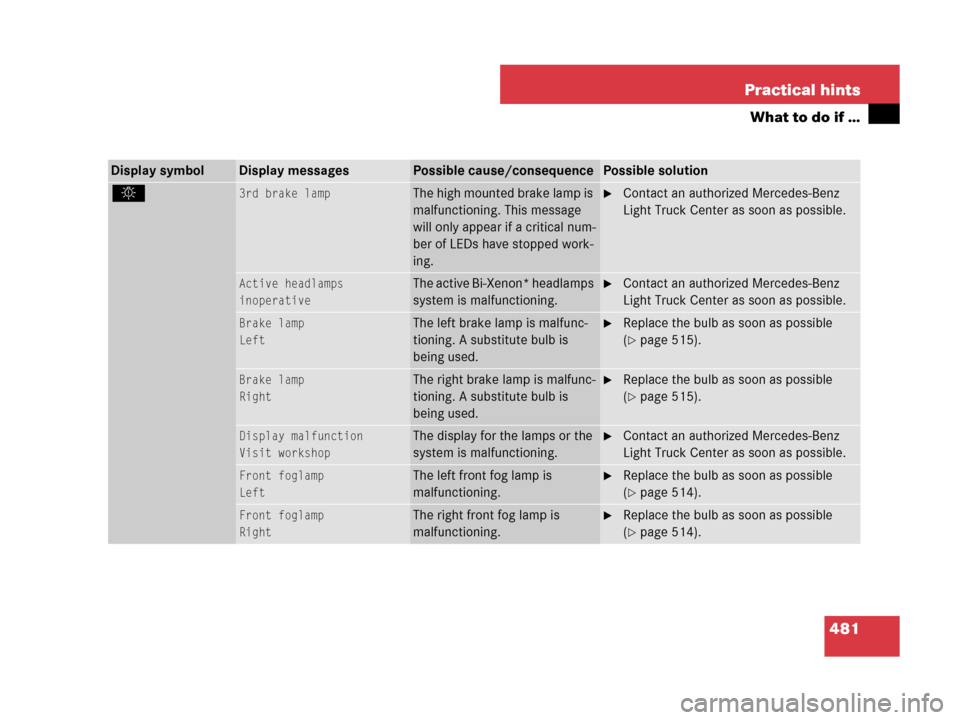
481 Practical hints
What to do if …
Display symbolDisplay messagesPossible cause/consequencePossible solution
. 3rd brake lampThe high mounted brake lamp is
malfunctioning. This message
will only appear if a critical num-
ber of LEDs have stopped work-
ing.�Contact an authorized Mercedes-Benz
Light Truck Center as soon as possible.
Active headlamps
inoperativeThe active Bi-Xenon* headlamps
system is malfunctioning.�Contact an authorized Mercedes-Benz
Light Truck Center as soon as possible.
Brake lamp
LeftThe left brake lamp is malfunc-
tioning. A substitute bulb is
being used.�Replace the bulb as soon as possible
(
�page 515).
Brake lamp
RightThe right brake lamp is malfunc-
tioning. A substitute bulb is
being used.�Replace the bulb as soon as possible
(
�page 515).
Display malfunction
Visit workshopThe display for the lamps or the
system is malfunctioning.�Contact an authorized Mercedes-Benz
Light Truck Center as soon as possible.
Front foglamp
LeftThe left front fog lamp is
malfunctioning.�Replace the bulb as soon as possible
(
�page 514).
Front foglamp
RightThe right front fog lamp is
malfunctioning.�Replace the bulb as soon as possible
(
�page 514).
Page 485 of 595
484 Practical hints
What to do if …
Display symbolDisplay messagesPossible cause/consequencePossible solution
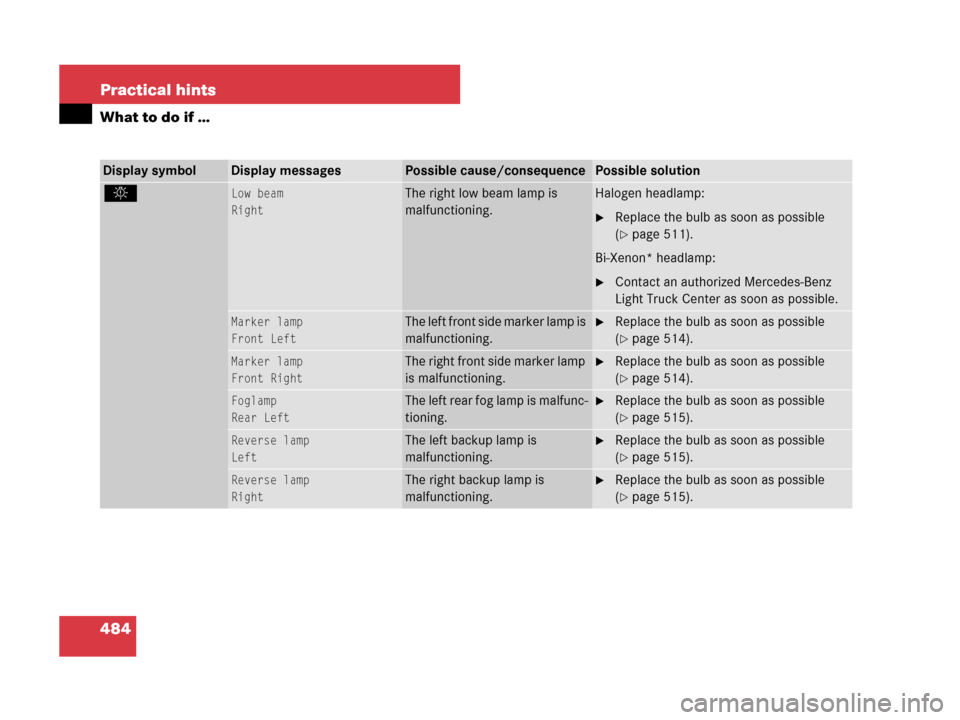
. Low beam
RightThe right low beam lamp is
malfunctioning.Halogen headlamp:
�Replace the bulb as soon as possible
(
�page 511).
Bi-Xenon* headlamp:
�Contact an authorized Mercedes-Benz
Light Truck Center as soon as possible.
Marker lamp
Front LeftThe left front side marker lamp is
malfunctioning.�Replace the bulb as soon as possible
(
�page 514).
Marker lamp
Front RightThe right front side marker lamp
is malfunctioning.�Replace the bulb as soon as possible
(
�page 514).
Foglamp
Rear LeftThe left rear fog lamp is malfunc-
tioning.�Replace the bulb as soon as possible
(
�page 515).
Reverse lamp
LeftThe left backup lamp is
malfunctioning.�Replace the bulb as soon as possible
(
�page 515).
Reverse lamp
RightThe right backup lamp is
malfunctioning.�Replace the bulb as soon as possible
(
�page 515).
Page 509 of 595
508 Practical hints
Replacing bulbs
Bulbs
Safe vehicle operation depends on proper
exterior lighting and signaling. It is there-
fore essential that all bulbs and lamp as-
semblies are in good working order at all
times.
Correct headlamp adjustment is extremely
important. Have headlamps checked and
readjusted at regular intervals and when a
bulb has been replaced. See an authorized
Mercedes-Benz Light Truck Center for
headlamp adjustment.iIf the headlamps or front fog lamps are
fogged up on the inside as a result of high humid-
ity, driving the vehicle a distance with the lights
on should clear up the fogging.iSubstitute bulbs will be brought into use
when the following lamps malfunction:
�Turn signal lamps
�Brake lamps
�Parking lamps
�Tail lamps
Read and observe the messages in the multi-
function display (
�page 481).
Page 510 of 595
509 Practical hints
Replacing bulbs
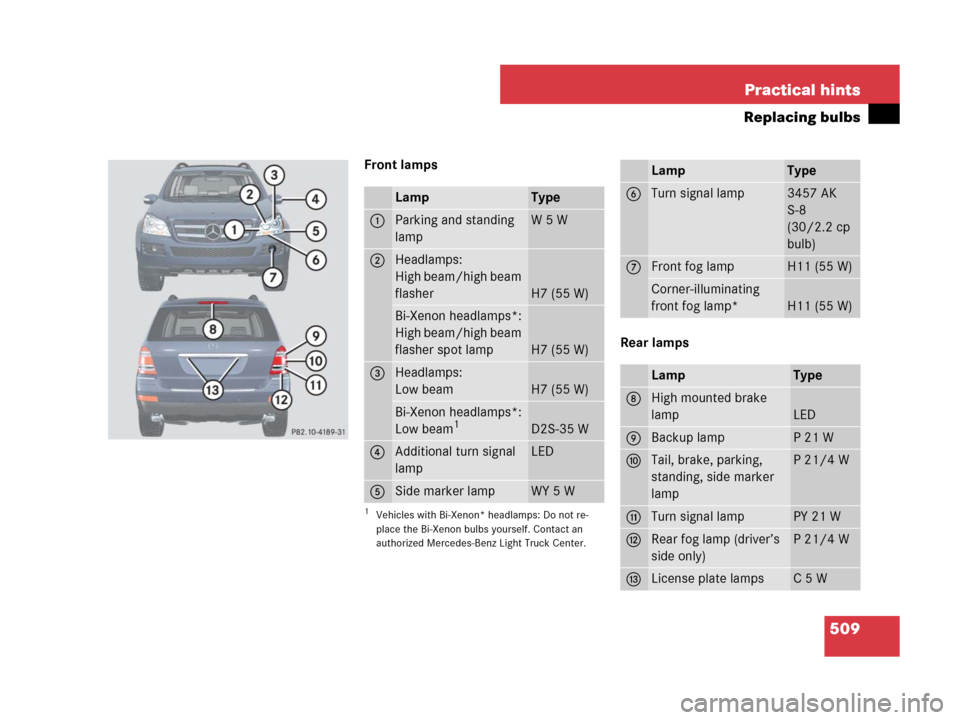
Front lamps
Rear lamps
LampType
1Parking and standing
lampW5W
2Headlamps:
High beam/high beam
flasher
H7 (55 W)
Bi-Xenon headlamps*:
High beam/high beam
flasher spot lamp
H7 (55 W)
3Headlamps:
Low beam
H7 (55 W)
Bi-Xenon headlamps*:
Low beam1
1Vehicles with Bi-Xenon* headlamps: Do not re-
place the Bi-Xenon bulbs yourself. Contact an
authorized Mercedes-Benz Light Truck Center.
D2S-35 W
4Additional turn signal
lampLED
5Side marker lampWY 5 W
LampType
6Turn signal lamp3457 AK
S-8
(30/2.2 cp
bulb)
7Front fog lampH11 (55 W)
Corner-illuminating
front fog lamp*
H11 (55 W)
LampType
8High mounted brake
lamp
LED
9Backup lampP21W
aTail, brake, parking,
standing, side marker
lampP21/4W
bTurn signal lampPY 21 W
cRear fog lamp (driver’s
side only)P21/4W
dLicense plate lampsC5W