Page 65 of 206

65 Audio
MP3 CD operation
� MP3 CD operation
Safety instructions
WarningG
In order to avoid distraction which could
lead to an accident, the driver should insert
CDs with the vehicle at a standstill and
operate the audio system only if permitted
by road, weather and traffic conditions.
Bear in mind that at a speed of just 30 mph
(approximately 50 km/h), your car covers a
distance of 44 feet (approximately 14 m)
every second.
WarningG
The CD drive is a Class 1 laser product.
There is a danger of invisible laser radiation
when you open or damage the cover.
Do not remove the cover. The CD drive does
not contain any parts which can be serviced
by the user. For safety reasons, have any ne-
cessary service work performed by qualified
personnel.
Tips on data storage media
!
Do not attach labels of any type to the
CD. They may become detached and
damage the drive.
!
Your CD drive has been designed to
play CDs which correspond to the IEC
60908 standard. Therefore only CDs
not exceeeding a thickness of 1.3 mm
can be used.
If you insert thicker data carriers, e.g.
ones that have data on both sides (one
side with DVD data, the other side with
audio data), they will become stuck and
damage the drive.
Do not play single CDs (80mm) with an
adapter. An adapter could become
stuck and damage the drive. Only use
12 cm diameter CDs.
Page 78 of 206
78 Satellite radio*
Important notes
� Important notes
In chapter “Satellite radio”, you will find
detailed information regarding
�selecting a station and a program cate-
gory
�memory functions
�sound adjustments
If you have not done so already, please fa-
miliarize yourself with these functions by
reading chapter “At a glance”.
i
A subscription to Sirius satellite radio
service provider is required for the sa-
tellite radio operation described here.
i
Note that categories and channels
shown in illustrations are dependent on
programming content delivered by the
service provider. Programming content
is subject to change. Therefore, channel
and categories shown in illustrations
and descriptions contained in this ma-
nual may differ from the channels and
categories delivered by the service pro-
vider.
Satellite radio service may be unavai-
lable or interrupted from time to time
for a variety of reasons, such as envi-
ronmental or topographic conditions
and other things we can’t control. Ser-
vice might also not be available in cer-
tain places (e.g., in tunnels, parking
garages, or within or next to buildings)
or near other technologies.
i
Sirius Satellite Radio provides approxi-
mately 100 channels, so called
streams, of digital-quality radio, among
others music, sports, news, and enter-
tainment commercial-free.
Sirius Satellite Radio uses a fleet of
high-power satellites to broadcast
24 hours per day, coast-to-coast, in the
contiguous U.S.
This diverse, satellite-delivered pro-
gramming is available for a monthly
subscription fee. For more information,
call the Sirius Service Center
(
�page 79) or contact
www.siriusradio.com.
Page 79 of 206
79 Satellite radio*
Subscribing
� Subscribing
�Press B to switch to satellite radio
operation.
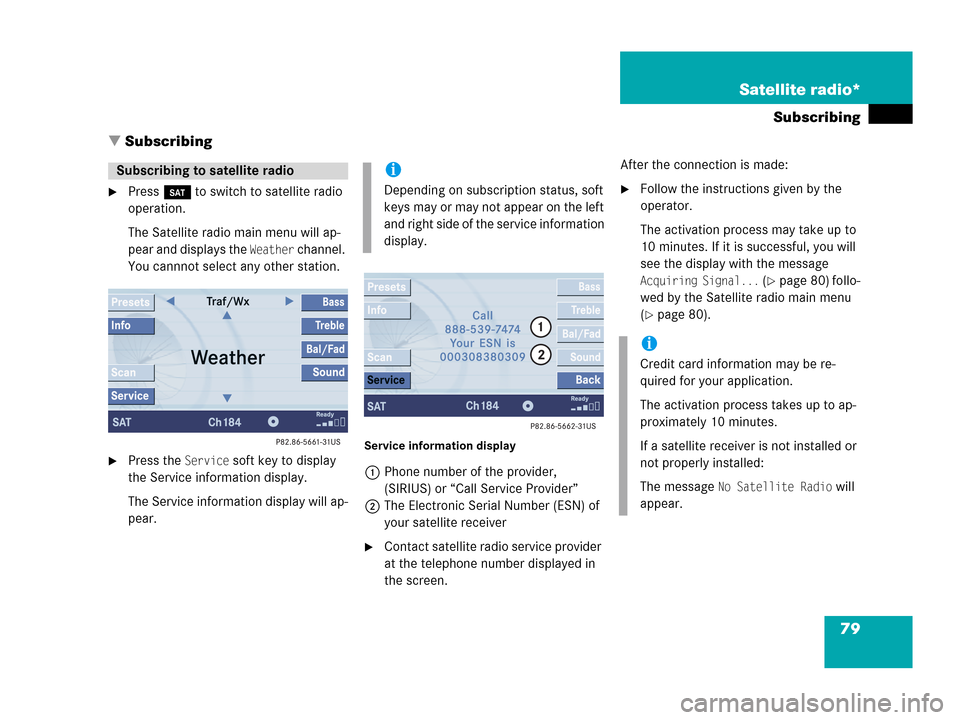
The Satellite radio main menu will ap-
pear and displays the
Weather channel.
You cannnot select any other station.
�Press the Service soft key to display
the Service information display.
The Service information display will ap-
pear.
Service information display
1Phone number of the provider,
(SIRIUS) or “Call Service Provider”
2The Electronic Serial Number (ESN) of
your satellite receiver
�Contact satellite radio service provider
at the telephone number displayed in
the screen.After the connection is made:
�Follow the instructions given by the
operator.
The activation process may take up to
10 minutes. If it is successful, you will
see the display with the message
Acquiring Signal... (�page 80) follo-
wed by the Satellite radio main menu
(
�page 80).
Subscribing to satellite radioi
Depending on subscription status, soft
keys may or may not appear on the left
and right side of the service information
display.
i
Credit card information may be re-
quired for your application.
The activation process takes up to ap-
proximately 10 minutes.
If a satellite receiver is not installed or
not properly installed:
The message
No Satellite Radio will
appear.
Page 85 of 206
85 Satellite radio*
Satellite radio operation
You can call the provider service center for
questions or releases, whenever you need.
�Press the Service soft key.
The Service information display will ap-
pear.
1Phone number of the provider,
(SIRIUS) or “Call Service Provider”
2The Electronical Serial Number (ESN)
of your satellite receiver
�Press the Back soft key to switch back
to the Satellite radio main menu.While receiving a new channel list the mes-
sage
Updating station list will appear.
The station last tuned will be muted until
the update is completed. You cannot ope-
rate the satellite radio.
After completion of the update, the
Satellite radio main menu will appear.
The station last tuned to will begin to play.Refer to chapter “At a glance” on how to
adjust sound settings.
�Volume (�page 33)
�Balance control and fader (�page 34)
�Bass and treble control (�page 35)
�Sound functions* (�page 36)
Displaying service informationStation list updatesSound settings
Page 93 of 206

93 Telephone*
Telephone operation
You can make an emergency call to an
emergency rescue station with a mobile
communication network.
The emergency call will be placed as long
as the corresponding mobile communicati-
on network is available. To do this, switch
the telephone on if you have not already
done so.
�TDMA or CDMA mobile phone
The emergency call will also be placed
if the phone is locked (
�page 94).
�GSM mobile phone
If no SIM card is in the phone or SIM
PIN is not entered, you can only make
an emergency call at the mobile phone.
Emergency calls may not be possible with
all mobile phone networks or if certain net-
work services and/or telephone functions
are active. Check with your local network
operating company.
If you cannot make an emergency call, you
must initiate rescue measures yourself.
Emergency call “911”
i
This function places a call to the local
911 provider. It does not initiate a
Tele Aid* call.
WarningG
The 911 emergency call system is a public
service. Using it without due cause is a cri-
minal offense.
Page 96 of 206

96 Telephone*
Telephone operation
If no SIM card is in the telephone, the
message
Please insert SIM card
(Emergency Call 911 only possible
with phone)
appears.
�Insert a SIM card. Refer to the mo-
bile phone operator’s manual.
Entry incorrect:
You will hear a warning sound. The mes-
sage
Code incorrect will appear.
�You need to re-enter your code.Entering the PUK
If you enter your code incorrectly three
times in a row, you need to enter the PUK
number.
The PUK can only be entered at the mobile
phone. Refer to the mobile phone
operator’s manual.When the COMAND is switched on, you
can switch to telephone operation from
any other system (e.g. radio):
�Press a.
The Telephone menu will appear.
Telephone menu
!
If the code is entered incorrectly three
times in a row, the SIM card will be
blocked. The message
SIM-card blo-
cked
is displayed briefly. After that the
message
PIN blocked. Please enter
PUK on cell phone
is displayed.
i
The PUK number is provided by your
telephone service provider.
Switching to telephone operation
Page 110 of 206

110 Navigation*
Important notes
� Important notes
WarningG
For safety reasons, you should only enter a
destination when the vehicle is stationary.
When the vehicle is in motion, a passenger
should enter the destination. Study manual
and select route before driving.
Do not watch display screen or operate but-
tons while the vehicle is in motion - let voice
instructions guide you. Stop at a safe locati-
on before using buttons or making correc-
tions.
Traffic regulations always have priority over
any route recommendations given.
Bear in mind that at a speed of just 30 mph
(approximately 50 km/h), your car is co-
vering a distance of 44 feet (approximately
14 m) every second.
The route calculated by COMAND is a re-
commendation on how to best reach your
selected destination.
During route guidance, you will not receive
any information on
�Traffic lights
�Stop and yield signs
�Parking or stopping zones
�One-way streets
�Narrow bridges
�Similar traffic regulation data
You should therefore always strictly observe
traffic regulations while driving. Drive care-
fully and always obey traffic laws and road
signs even if they contradict COMAND in-
structions.
WarningG
The Navigation DVD module contains a
Class 1 laser product. There is a danger of
invisible laser radiation if the cover is ope-
ned or damaged.
Do not remove the cover. The Navigation
DVD module does not contain any parts ser-
viceable by the user. For safety reasons,
have any necessary service work performed
by qualified personnel.
The display unit can cause injury if contac-
ted when open. Return the display unit after
inserting a Navigation DVD to its closed
position (
�page 172).
Page 175 of 206
175 Service
Service main menu
SMS*
Tele Aid*

