Page 27 of 206
27 At a glance
Multifunction steering wheel
�Switch the multifunction display to the
respective system if you wish to
operate the system using the buttons
on the multifunction steering wheel.
�On the multifunction steering wheel,
press è or ÿ repeatedly until
one of the following, Radio, Single CD
or MP3 CD, CD changer*, Satellite
radio* or Telephone* display appears
in the multifunction display of the
instrument cluster.Radio operation
1Waveband
2Station frequencySingle CD/ CD changer* operation
1Current CD
2Current track
Selecting the multifunction display
Page 28 of 206
28 At a glance
Multifunction steering wheel
MP3 CD operation
1MP3 mode
2Current MP3 trackSatellite radio* operation
1SAT mode and preset channel number
2Channel nameTelephone* operation
List with a phone book entry
On display will appear either:
�the main display with the READY
message
�a list with either a phone book entry or
one of the last 10 outgoing calls
�In order to close the list display,
press t.
This switches to the telephone main
display.
Page 29 of 206
29 At a glance
Menu system
� Menu system
The menu system allows for easy
operation of COMAND.
Main menus are provided for the following
main functions:
�Audio (AM/FM radio, CD,
CD changer*, MP3 CD)
�Satellite radio*
�Telephone*
�Navigation*
�ServiceCalling up main menus Menu display
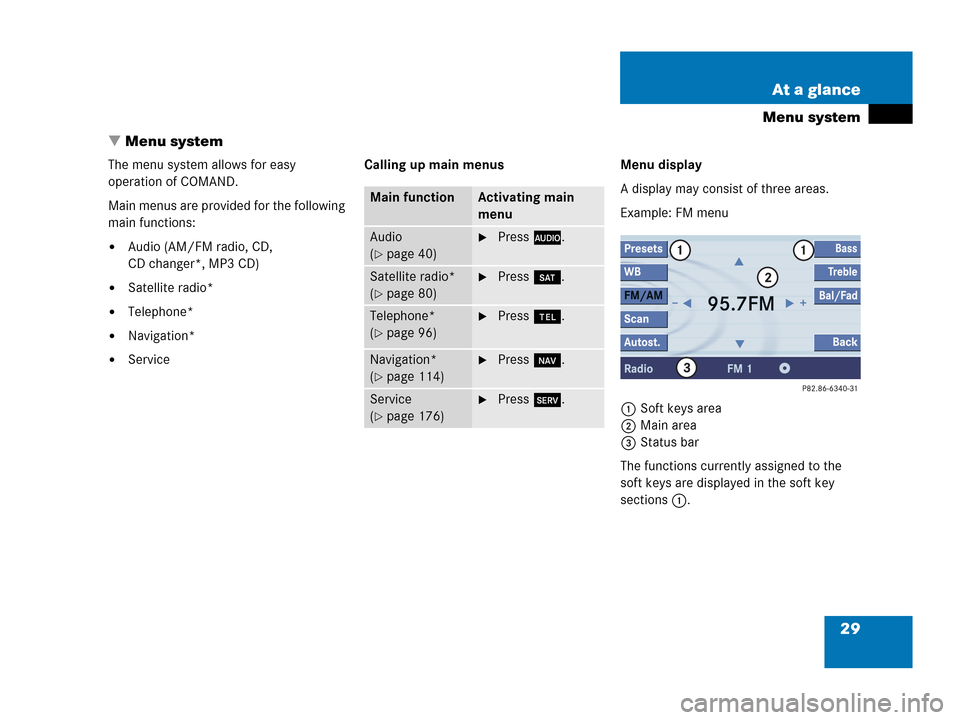
A display may consist of three areas.
Example: FM menu
1Soft keys area
2Main area
3Status bar
The functions currently assigned to the
soft keys are displayed in the soft key
sections 1.
Main functionActivating main
menu
Audio
(
�page 40)
�Press A.
Satellite radio*
(
�page 80)
�Press B.
Telephone*
(
�page 96)
�Press a.
Navigation*
(
�page 114)
�Press b.
Service
(
�page 176)
�Press C.
Page 30 of 206
30 At a glance
Menu system
The main area 2 shows messages and
settings.
You can change the settings by operating
the system.
The status bar 3 is divided into three
areas.
Left side:
The current operating mode is indicated. In
this example: RadioCenter:
The status of the current operating mode
or other selectable functions are indicated.
In this example:�FM = current waveband
�1 = memory location of station,
e.g. “1”
Right side:
General status information is indicated
independent of the operating mode.
In this example:
�Ready = Telephone* is ready for
operation
� = Reception strength of the
mobile phone*Menu functions and submenus
Using the soft keys, functions can be
switched ON or OFF, or submenus can be
called up.
E.g. the radio menu:�The FM/AM soft key switches between
FM and AM band.
�The Scan soft key starts/stops the
channel scan.
i
A maximum of five soft keys may be
displayed on each side of the main
area2.
Page 34 of 206
34 At a glance
Quick reference COMAND
Common balance and fader settings apply
to the following systems:
�Radio operation
�CD operation (CD)
�CD changer* operation (CD)
�MP3 CD operation (MP3)
�Satellite radio*
When you make balance or fader settings,
the system will automatically save the
settings for the current operating mode
and others.Setting balance and fader
In any audio source operation:
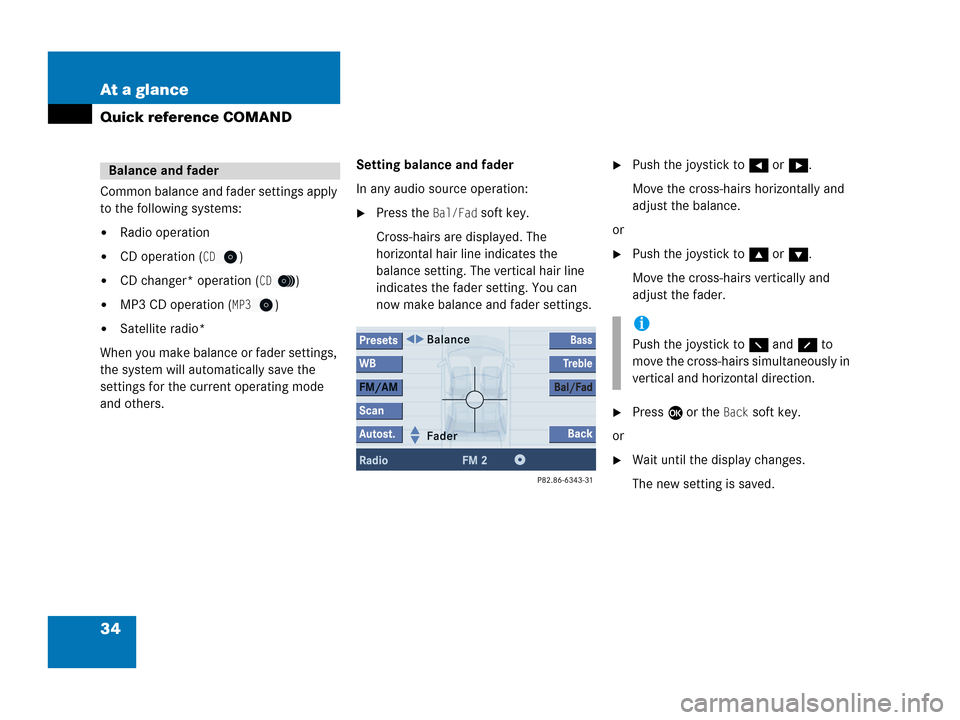
�Press the Bal/Fad soft key.
Cross-hairs are displayed. The
horizontal hair line indicates the
balance setting. The vertical hair line
indicates the fader setting. You can
now make balance and fader settings.
�Push the joystick to H or h.
Move the cross-hairs horizontally and
adjust the balance.
or
�Push the joystick to g or G.
Move the cross-hairs vertically and
adjust the fader.
�Press E or the Back soft key.
or
�Wait until the display changes.
The new setting is saved.
Balance and fader
i
Push the joystick to F and f to
move the cross-hairs simultaneously in
vertical and horizontal direction.
Page 35 of 206
35 At a glance
Quick reference COMAND
Different bass and treble settings are
possible for the following operating modes:
�Radio: FM-, AM- and
Weather (WB) bands
�Single CD (CD) and CD changer*
(
CD)
�MP3 CD operation (MP3)
�Satellite radio*
When you adjust bass or treble, the
settings apply to other sources within the
group, but not to the other modes. For
example, if you adjust the bass while
listening to FM, that same bass level
applies to AM and Weather band, but not
to satellite radio* or CD/MP3 CD.Activating the Bass or Treble menu
In any audio source operation:
�Press the Bass or Treble soft key.
The Bass or Treble menu will appear.
Setting Bass and Treble
�Push the joystick to H or h.
Bass or Treble is adjusted.
�Press E or the Back soft key.
or
�Wait until the display changes.
The new setting is saved.
Bass and Treble
i
Press the Bass or Treble soft key and
keep it depressed to move the cursor
continuously. Release the soft key to
set the current value.
Page 36 of 206

36 At a glance
Quick reference COMAND
If your vehicle is equipped with the
premium sound system*, the sound
functions* will be available for the
following operating modes:
�Radio: FM-, AM- and
Weather (WB) bands
�Single CD (CD) and CD changer*
(
CD)
�MP3 CD operation (MP3)
�Satellite radio*
The following sound functions* are
available:
�Default Settings:
COMAND sets the default settings
(Bass, Treble, Bal/Fad) for the active
source mode.
�Standard:
COMAND sets the sound linear for the
center of the vehicle.
�Speech:
Playback optimized for language
comprehensibility.
�LOGIC7 Surround:
Surround playback.
You can use different sound functions* for
the modes mentioned above.
E.g.:
For radio operation the function
Standard, for CD operation the function
LOGIC7 Surround.Activating the sound functions*
In any audio source operation:
�Activate the main menu for the
respective operating mode
(
�page 29).
�Press the Sound soft key.
The Sound menu will appear.
�Push the joystick to g or G to
select the desired function.
�Press E.
The function is activated.
Sound functions*
i
LOGIC7 Surround sound offers a sound
quality superior to conventional stereo
sound.
If the radio reception is poor, the
system should be switched back to
standard stereo playback. Switching
back to standard stereo playback may
improve audio quality.
Page 37 of 206
37 At a glance
Quick reference COMAND
The Rear view camera is activated by
shifting into reverse gear. The area behind
the vehicle appears in the COMAND
screen if COMAND is already switched on.
If COMAND is switched on while in reverse,
the Rear view camera display will appear
immediately following the COMAND
startup screens.Switch back to the COMAND operating
mode
�Shift into P, N or D.
or
�Press A, c, b, C, a,
B while in reverse to activate the
corresponding main menu (
�page 29).
Rear view camera*i
The following audio sources remain
available while the Rear view camera is
activated:
�FM/AM radio, Weather band WB
�CD (CD drive, CD changer*)
�MP3 CD
�Satellite radio*
�Telephone (ringing, talking)
�Navigation announcements
For additional information about the
Rear view camera please refer to the
separate Operator’s Manual.