Page 143 of 522

142 Controls in detailLightingHigh beam�
Turn the exterior lamp switch to
positionB (
�page 137).
�
Push the combination switch in direc-
tion of arrow1 to switch on the high
beam.
The high beam headlamp indicator
lampA in the instrument cluster
comes on (
�page 26).
�
Pull the combination switch in direction
of arrow2 to its original position to
switch off the high beam.
The high beam headlamp indicator
lampA in the instrument cluster
goes out.
High beam flasher
�
Pull the combination switch briefly in
direction of arrow2.
Corner-illuminating front fog lamps*
The corner-illuminating front fog lamps im-
prove illumination of the area in the direc-
tion into which you are turning.
The corner-illuminating front fog lamps will
operate with the engine running and with�
the exterior lamp switch in
positionB (
�page 137)
or
�
the exterior lamp switch in
positionU (
�page 137)
or
�
the daytime running lamp mode
activated (
�page 139).Driving forward
Switching on corner-illuminating front
fog lamps
�
Switch on the left or right turn signal
(�page 57), depending on whether
you are turning left or right.
The respective front fog lamp comes on
and illuminates the area in the direc-
tion into which you are turning.
or
�
Turn steering wheel in desired direc-
tion.
The front fog lamp on the side of your
steering direction comes on.
i
With the automatic headlamp mode activat-
ed: The corner-illuminating front fog lamps will
only come on in low ambient lighting conditions.
i
If you are driving faster than 25 mph
(40 km/h), the corner-illuminating function is
not available.
i
If you have switched on the turn signal for
one side but turn the steering wheel in the oppo-
site direction, the corner-illuminating front fog
lamp comes on for the side indicated by the turn
signal.
The corner-illuminating front fog lamp remains lit
for a maximum of 3 minutes. Afterward, it goes
out even if the turn signal is still switched on.
Page 146 of 522
145 Controls in detail
Lighting
Interior lighting in the front
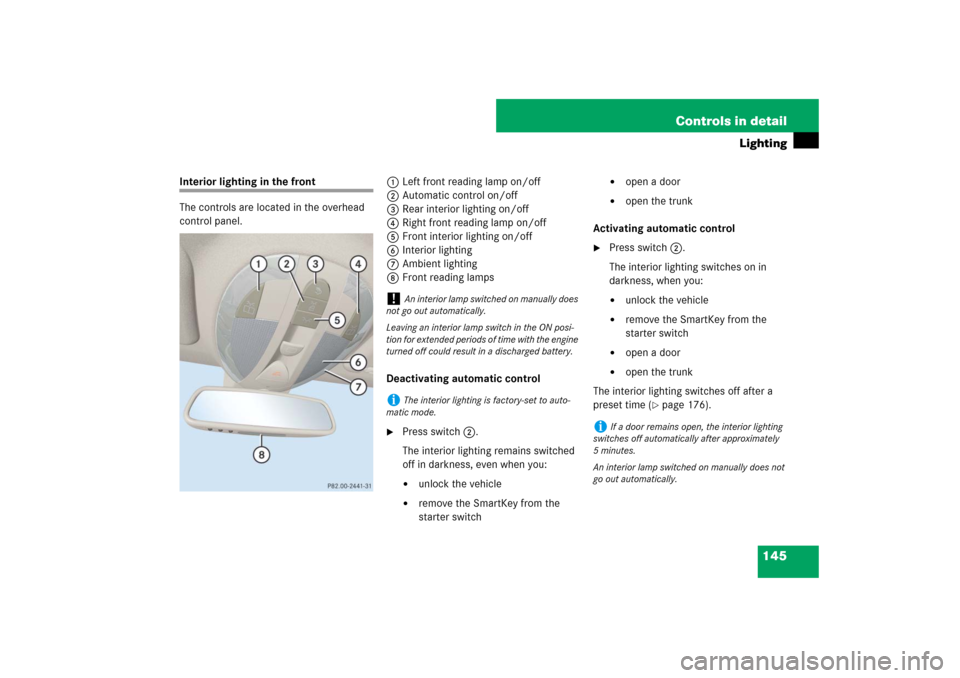
The controls are located in the overhead
control panel.1Left front reading lamp on/off
2Automatic control on/off
3Rear interior lighting on/off
4Right front reading lamp on/off
5Front interior lighting on/off
6Interior lighting
7Ambient lighting
8Front reading lamps
Deactivating automatic control
�
Press switch2.
The interior lighting remains switched
off in darkness, even when you:�
unlock the vehicle
�
remove the SmartKey from the
starter switch
�
open a door
�
open the trunk
Activating automatic control
�
Press switch2.
The interior lighting switches on in
darkness, when you:�
unlock the vehicle
�
remove the SmartKey from the
starter switch
�
open a door
�
open the trunk
The interior lighting switches off after a
preset time (
�page 176).
!
An interior lamp switched on manually does
not go out automatically.
Leaving an interior lamp switch in the ON posi-
tion for extended periods of time with the engine
turned off could result in a discharged battery.
i
The interior lighting is factory-set to auto-
matic mode.
i
If a door remains open, the interior lighting
switches off automatically after approximately
5minutes.
An interior lamp switched on manually does not
go out automatically.
Page 152 of 522

151 Controls in detail
Control system
�Control system
The control system is activated as soon as
the SmartKey in the starter switch is
turned to position1 or as soon as the
KEYLESS-GO start/stop button* is in
position1. The control system enables you
to:�
call up information about your vehicle
�
change vehicle settings
For example, you can use the control sys-
tem to find out when your vehicle is next
due for service, to set the language for
messages in the instrument cluster dis-
play, and much more.
The control system relays information to
the multifunction display.
Multifunction display
1Outside temperature
2Trip odometer
3Automatic transmission program mode
4Main odometer
5Current gear selector lever position
Above illustration shows the standard
display.
For more information on menus displayed
in the multifunction display, see “Menus”
(�page 154).
i
The displays for the audio systems (radio,
CD player) will appear in English, regardless of
the language selected.
Warning!
G
A driver’s attention to the road and traffic
conditions must always be his/her primary
focus when driving.
For your safety and the safety of others, se-
lecting features through the multifunction
steering wheel should only be done by the
driver when traffic and road conditions per-
mit it to be done safely.
Bear in mind that at a speed of just 30 mph
(approximately 50 km/h), your vehicle is
covering a distance of 44 feet (approximate-
ly 14 m) every second.
Page 162 of 522

161 Controls in detail
Control system
AUDIO menu
The functions in the
AUDIO
menu operate
the audio equipment which you currently
have turned on.
If no audio equipment is currently turned
on, the message
AUDIO off
appears in the
multifunction display.
The following functions are available:Selecting radio station
�
Turn on COMAND and select radio. Re-
fer to separate COMAND operating in-
structions.
�
Press buttonè orÿ repeatedly
until you see the currently tuned sta-
tion in the multifunction display.
1Waveband setting
2Station frequency
�
Press buttonk orj repeatedly
until the desired station is found.Selecting satellite radio station*
(USA only)
The satellite radio is treated as a radio ap-
plication.
�
Select SAT radio with the correspond-
ing softkey in the radio menu.
1SAT mode and preset number
2Setting for station selection using
memory
3Channel name or number
�
Press buttonk orj repeatedly
until the desired channel is found.
Function
Page
Selecting radio station
161
Selecting satellite radio station*
161
Operating CD player
162
i
You can only store new stations using the
corresponding feature on the radio, see separate
operating instructions.
You can also operate the radio in the usual man-
ner.
��
Page 163 of 522

162 Controls in detailControl system
Operating CD player
Selecting CD track�
Turn on COMAND and select CD or
CD changer. Refer to separate
COMAND operating instructions.
�
Press buttonè orÿ repeatedly
until the settings for the CD currently
being played appear in the multifunc-
tion display.
1Current CD (for CD changer)
2Current track
�
Press buttonk orj repeatedly
until the desired track is selected.Selecting MP3-CD track
�
Turn on COMAND and select MP3-CD.
Refer to separate COMAND operating
instructions.
�
Press buttonè orÿ repeatedly
until the settings for the MP3-CD cur-
rently being played appear in the multi-
function display.
1MP3 mode
2Current track
�
Press buttonk orj repeatedly
until the desired track is selected.
i
Additional optional satellite radio equipment
and a subscription to satellite radio service pro-
vider are required for satellite radio operation.
Contact an authorized Mercedes-Benz Center
for details and availability for your vehicle.
For more information, refer to separate
COMAND operating instructions.
i
The COMAND system and the CD changer
can play audio CDs as well as MP3-CDs.
i
To select a CD from the CD changer maga-
zine, press a number on the COMAND system
key pad located in the center console.
��
Page 167 of 522
166 Controls in detailControl systemSettings menu
In the
Settings
menu there are two func-
tions:
�
The function
To reset: Press reset
button for 3 seconds
, with which you
can reset all the settings to the original
factory settings.
�
A collection of submenus with which
you can make individual settings for
your vehicle.
�
Press buttonè orÿ repeatedly
until the
Settings
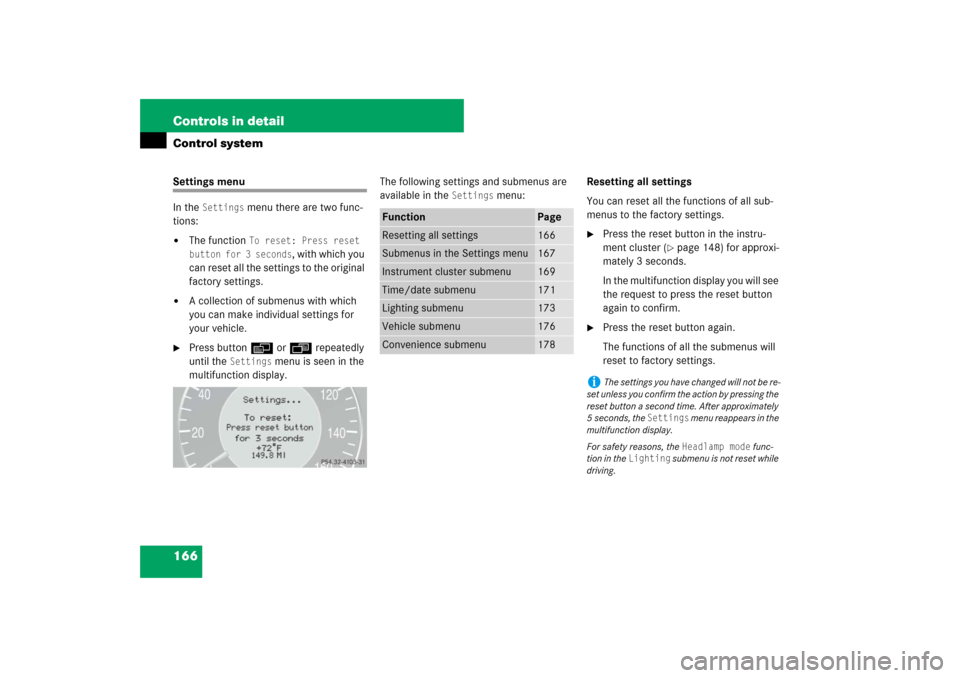
menu is seen in the
multifunction display.The following settings and submenus are
available in the
Settings
menu:Resetting all settings
You can reset all the functions of all sub-
menus to the factory settings.
�
Press the reset button in the instru-
ment cluster (
�page 148) for approxi-
mately 3 seconds.
In the multifunction display you will see
the request to press the reset button
again to confirm.
�
Press the reset button again.
The functions of all the submenus will
reset to factory settings.
Function
Page
Resetting all settings
166
Submenus in the Settings menu
167
Instrument cluster submenu
169
Time/date submenu
171
Lighting submenu
173
Vehicle submenu
176
Convenience submenu
178
i
The settings you have changed will not be re-
set unless you confirm the action by pressing the
reset button a second time. After approximately
5seconds, the
Settings
menu reappears in the
multifunction display.
For safety reasons, the Headlamp mode
func-
tion in the
Lighting
submenu is not reset while
driving.
Page 169 of 522
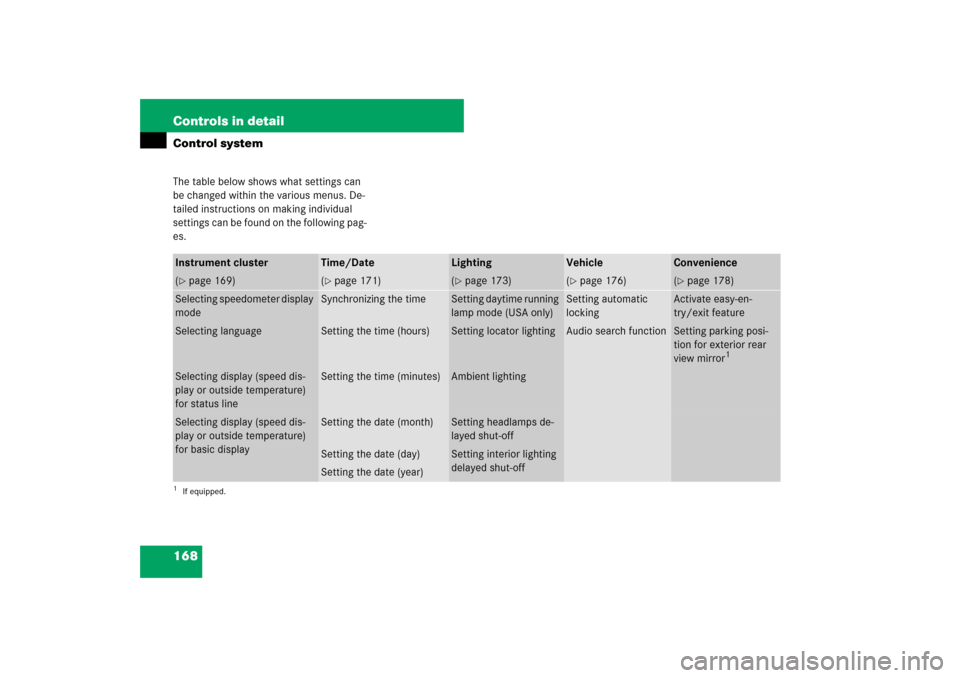
168 Controls in detailControl systemThe table below shows what settings can
be changed within the various menus. De-
tailed instructions on making individual
settings can be found on the following pag-
es.Instrument cluster
Time/Date
Lighting
Vehicle
Convenience
(�page 169)
(�page 171)
(�page 173)
(�page 176)
(�page 178)
Selecting speedometer display
mode
Synchronizing the time
Setting daytime running
lamp mode (USA only)
Setting automatic
locking
Activate easy-en-
try/exit feature
Selecting language
Setting the time (hours)
Setting locator lighting
Audio search function
Setting parking posi-
tion for exterior rear
view mirror
1
1If equipped.Selecting display (speed dis-
play or outside temperature)
for status line
Setting the time (minutes)
Ambient lighting
Selecting display (speed dis-
play or outside temperature)
for basic display
Setting the date (month)
Setting headlamps de-
layed shut-off
Setting the date (day)
Setting interior lighting
delayed shut-off
Setting the date (year)
Page 170 of 522

169 Controls in detail
Control system
Instrument cluster submenu
Access the
Instr. cluster
submenu via
the
Settings
menu. Use the
Instr. clus-
ter
submenu to change the instrument
cluster display settings. The following
functions are available:Selecting speedometer display mode
�
Move the selection marker with
buttonæ orç to the
Instr.
cluster
submenu.
�
Press buttonj ork repeatedly
until the message
Display unit
Speed-/odometer appears in the multi-
function display.
The selection marker is on the current
setting.
�
Press button æ or ç to set
speedometer unit to
km or
miles
.Selecting language
�
Move the selection marker with
buttonæ orç to the
Instr.
cluster
submenu.
�
Press buttonj ork repeatedly
until the message
Language
appears in
the multifunction display.
The selection marker is on the current
setting.
�
Press buttonæ orç to select
the language to be used for the multi-
function display messages.
Function
Page
Selecting speedometer display
mode
169
Selecting language
169
Selecting display (speed display
or outside temperature) for sta-
tus line display
170
Selecting display (speed display
or outside temperature) for basic
display
170
��