Page 124 of 481

123 Controls in detailSeats
Seat heating*
The red indicator lamps on the switch
show the heating level selected.
1Front seat heating switch
1Rear seat heating switch (Canada only)
�
Switch on the ignition (
�page 38).Switching seat heating on
�
Press switch1.
Three red indicator lamps in the switch
come on.
�
Continue pressing switch1 until de-
sired seat heating level is reached.
Switching seat heating off
�
Press switch1 repeatedly until all in-
dicator lamps go out.
Level3
Three indicator lamps on
(highest level).
The seat heating automatically
switches to level2 after approxi-
mately 5 minutes.
2
Two indicator lamps on.
The seat heating automatically
switches to level1 after approxi-
mately 10 minutes.
1
One indicator lamp on
(lowest level).
The seat heating automatically
switches off after approximately
20 minutes.
off
No indicator lamp on.
i
If one or more of the lamps on the seat heat-
ing switch are flashing, there is insufficient volt-
age available since too many electrical
consumers are turned on. The seat heating
switches off automatically.
The seat heating will switch back on again auto-
matically as soon as sufficient voltage is avail-
able.
Page 125 of 481
124 Controls in detailSeatsSeat ventilation*
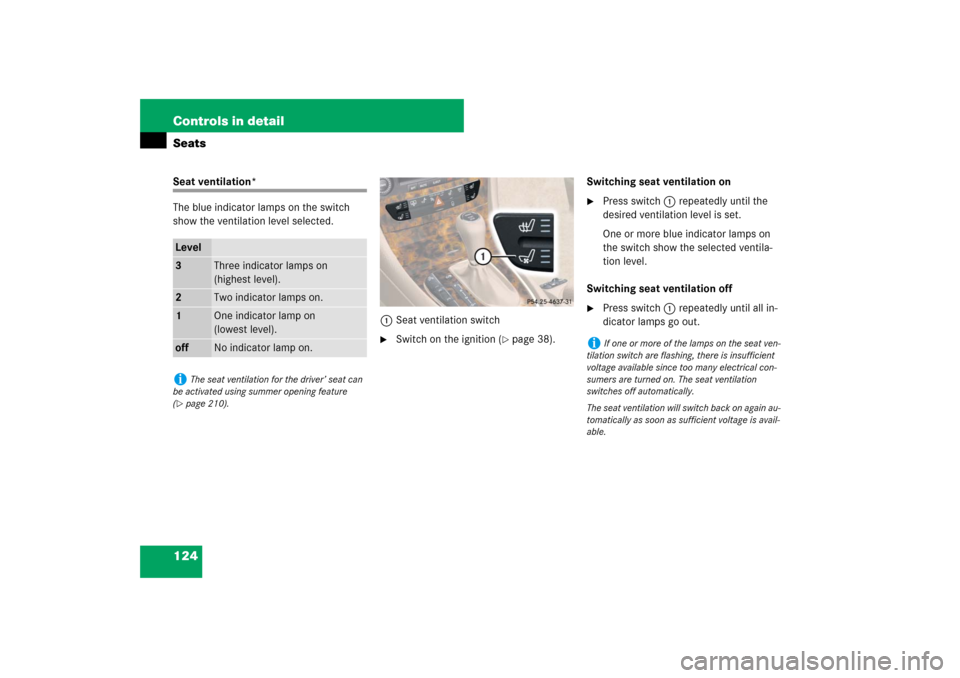
The blue indicator lamps on the switch
show the ventilation level selected.
1Seat ventilation switch
�
Switch on the ignition (
�page 38).Switching seat ventilation on
�
Press switch1 repeatedly until the
desired ventilation level is set.
One or more blue indicator lamps on
the switch show the selected ventila-
tion level.
Switching seat ventilation off
�
Press switch1 repeatedly until all in-
dicator lamps go out.
Level3
Three indicator lamps on
(highest level).
2
Two indicator lamps on.
1
One indicator lamp on
(lowest level).
off
No indicator lamp on.
i
The seat ventilation for the driver’ seat can
be activated using summer opening feature
(
�page 210).
i
If one or more of the lamps on the seat ven-
tilation switch are flashing, there is insufficient
voltage available since too many electrical con-
sumers are turned on. The seat ventilation
switches off automatically.
The seat ventilation will switch back on again au-
tomatically as soon as sufficient voltage is avail-
able.
Page 127 of 481

126 Controls in detailMemory functionMMemory button
1, 2, 3Stored position button�
Switch on the ignition (
�page 38).
or
�
Open the respective door.
Storing positions into memory�
Adjust the seats, steering wheel and
exterior rear view mirrors to the de-
sired position (
�page 41).
�
Press memory buttonM.
�
Release memory buttonM and press
memory position button 1, 2 or 3 with-
in 3 seconds.
All the settings are stored to the select-
ed position.
Recalling positions from memory�
Press and hold memory position
button1, 2 or3 until the seat, steering
wheel and exterior rear view mirrors
have completely moved to the stored
positions.
!
Do not operate the power seats using the
memory button if the seat backrest is in an ex-
cessively reclined position. Doing so could cause
damage to front or rear seats.
First move seat backrest to an upright position.
i
Releasing the memory position button stops
movement to the stored positions immediately.
The multicontour seat* will continue to be ad-
justed.
Page 128 of 481
127 Controls in detail
Memory function
Storing exterior rear view mirror parking position
For easier parking, you can adjust the pas-
senger-side exterior rear view mirror so
that you can see the right rear wheel as
soon as you engage reverse gearR.
For information on activating the parking
position, see “Activating exterior rear view
mirror parking position” (
�page 187).
1Passenger-side exterior rear view
mirror button
2Adjustment button
3Memory button
�
Stop the vehicle.
�
Switch on the ignition (
�page 38).
�
Press button1.
The passenger-side exterior rear view
mirror is selected.
�
Adjust the exterior rear view mirror
with button2 so that you see the rear
wheel and the road curb.
�
Press memory buttonM3.
�
Within 3 seconds, press bottom of ad-
justment button2.
The parking position is stored if the
mirror does not move.
i
If the mirror does move, repeat the above
steps. After the setting is stored, you can move
the mirror again.
Page 135 of 481

134 Controls in detailLightingDriving in reverse
Switching on corner-illuminating front
fog lamps�
Place the gear selector lever in
positionR.
The front fog lamp opposite to your
steering direction comes on.
Switching off corner-illuminating front
fog lamps
�
Place the gear selector lever out of
positionR.
The respective front fog lamp goes out.
Hazard warning flasher
The hazard warning flasher can be
switched on at all times, even with the
SmartKey removed from the starter switch
or with the SmartKey with KEYLESS-GO*
removed from the vehicle.
The hazard warning flasher switches on
automatically when an air bag deploys.
The hazard warning flasher switch is locat-
ed on the center console.
1Hazard warning flasher switchSwitching on hazard warning flasher
�
Press the hazard warning flasher
switch1.
All turn signals are flashing.
Switching off hazard warning flasher
�
Press hazard warning flasher switch1
again.
i
With the hazard warning flasher activated
and the combination switch set for either left or
right turn, only the respective left or right turn
signals will operate when the ignition is switched
on.
i
If the hazard warning flasher has been acti-
vated automatically, press hazard warning flash-
er switch1 once to switch off.
Page 139 of 481

138 Controls in detailInstrument clusterFor a full view illustration of the instrument
cluster, see “At a glance” (
�page 26).
1Reset button
The instrument cluster is activated when
you
�
open a door
�
switch on the ignition
�
press the reset button1
�
switch on the exterior lamps
You can modify the instrument cluster set-
tings in the instrument cluster submenu of
the control system (
�page 157).Adjusting instrument cluster
illumination
Use the reset button (
�page 138) to ad-
just the illumination brightness for the in-
strument cluster.To brighten illumination
�
Turn the reset button (
�page 138)
clockwise.
The instrument cluster illumination will
brighten.
To dim illumination
�
Turn the reset button (
�page 138)
counterclockwise.
The instrument cluster illumination will
dim.
Warning!
G
No messages will be displayed if either the
instrument cluster or the multifunction dis-
play is inoperative.
As a result, you will not be able to see infor-
mation about your driving conditions, such
as speed or outside temperature, warn-
ing/indicator lamps, malfunction/warning
messages or the failure of any systems.
Driving characteristics may be impaired.
If you must continue to drive, please do so
with added caution. Visit an authorized
Mercedes-Benz Center as soon as possible.
i
The instrument cluster illumination is
dimmed or brightened automatically to suit am-
bient light conditions.
The instrument cluster illumination will also be
adjusted automatically when you switch on the
vehicle’s exterior lamps.
Page 150 of 481

149 Controls in detail
Control system
Displaying intermediate time�
Press button ç while the timer is
running.
The intermediate time is shown for
5 seconds.
Stopping the RACETIMER
�
Press button æ.
The timer stops.
Saving lap time and starting a new lap
�
Press button ç while the timer is
running.The intermediate time will be shown for
5 seconds.
�
Press button ç within the next
5 seconds.
The intermediate time shown will be
saved as a lap time.
The RACETIMER begins timing the new
lap. The new lap begins to be timed as
soon as the intermediate time is called
up.
1Gear indicator
2RACETIMER
3Best lap time
4Lap numberResetting current lap
�
Press button æ while the timer is
running.
The timer stops.
�
Press button ç.
The lap time is reset to “0”.
Deleting all laps
�
Press button æ while the timer is
running.
The timer stops.
�
Press the reset button twice
(�page 26).
�
Press button æ.
The timer starts. The saved laps are de-
leted.
i
When you stop the vehicle and turn the
Smartkey to position 1 (
�page 38) or, in vehi-
cles with KEYLESS-GO*, turn off the engine and
do not open the driver’s door, the RACETIMER
stops timing. Timing is resumed when you
switch the ignition back on (�page 38) or
restart the engine (
�page 51) and then press
theæbutton.
i
You can save up to nine laps.
i
It is not possible to delete a single saved lap.
i
When you switch off the engine, the
RACETIMER will be reset to “0” after
30 seconds. All laps are deleted.
Page 186 of 481

185 Controls in detail
Good visibility
�Good visibility
For information on windshield wipers, see
“Windshield wipers” (
�page 56).
Headlamp cleaning system*
The button is located on the left side of the
dashboard.
1Headlamp cleaning button�
Switch on the ignition (
�page 38).
�
Press button1.
The headlamps are cleaned with a
high-pressure water jet.For more information on filling up the
washer reservoir, see “Windshield washer
system and headlamp cleaning system*”
(
�page 292).
Rear view mirrors
For more information on setting the rear
view mirrors, see “Mirrors” (
�page 46).
Auto-dimming mirrors
The reflection brightness of the exterior
rear view mirror on the driver’s side and
the interior rear view mirror will respond
automatically to glare when
�
the ignition is switched on
and
�
incoming light from headlamps falls on
the sensor in the interior rear view mir-
ror
The rear view mirrors will not react if
�
reverse gear is engaged
�
the interior lighting is turned on
i
The headlamps will automatically be
cleaned when you have
�
switched on the headlamps
and
�
operated the windshield wipers with wind-
shield washer fluid fifteen times
When you switch off the ignition, the counter re-
sets.
