Page 89 of 202
87 Satellite radio*
Satellite radio operation
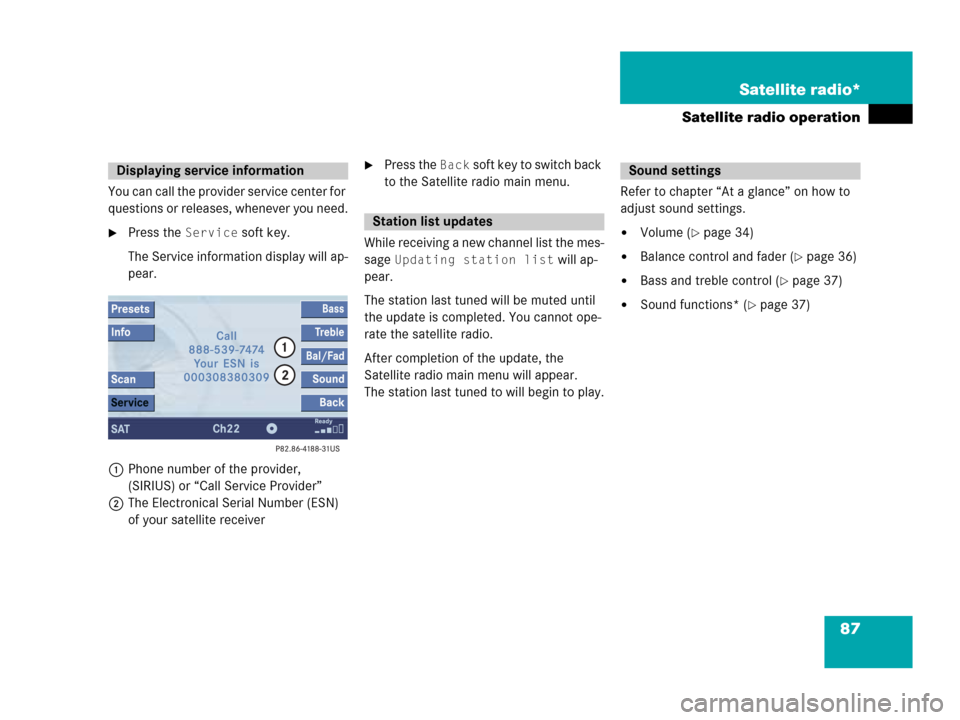
You can call the provider service center for
questions or releases, whenever you need.
�Press the Service soft key.
The Service information display will ap-
pear.
1Phone number of the provider,
(SIRIUS) or “Call Service Provider”
2The Electronical Serial Number (ESN)
of your satellite receiver
�Press the Back soft key to switch back
to the Satellite radio main menu.
While receiving a new channel list the mes-
sage
Updating station list will ap-
pear.
The station last tuned will be muted until
the update is completed. You cannot ope-
rate the satellite radio.
After completion of the update, the
Satellite radio main menu will appear.
The station last tuned to will begin to play.Refer to chapter “At a glance” on how to
adjust sound settings.
�Volume (�page 34)
�Balance control and fader (�page 36)
�Bass and treble control (�page 37)
�Sound functions* (�page 37)
Displaying service information
Station list updates
Sound settings
Page 100 of 202
98 Telephone*
Telephone operation
If no SIM card is in the telephone, the
message
Please insert SIM card
(Emergency Call 911 only pos-
sible with phone)
appears.
�Insert a SIM card. Refer to the mo-
bile phone operator’s manual.
Entry incorrect:
You will hear a warning sound. The mes-
sage
Code incorrect will appear.
�You need to re-enter your code.Entering the PUK
If you enter your code incorrectly three
times in a row, you need to enter the PUK
number.
The PUK can only be entered at the mobile
phone. Refer to the mobile phone
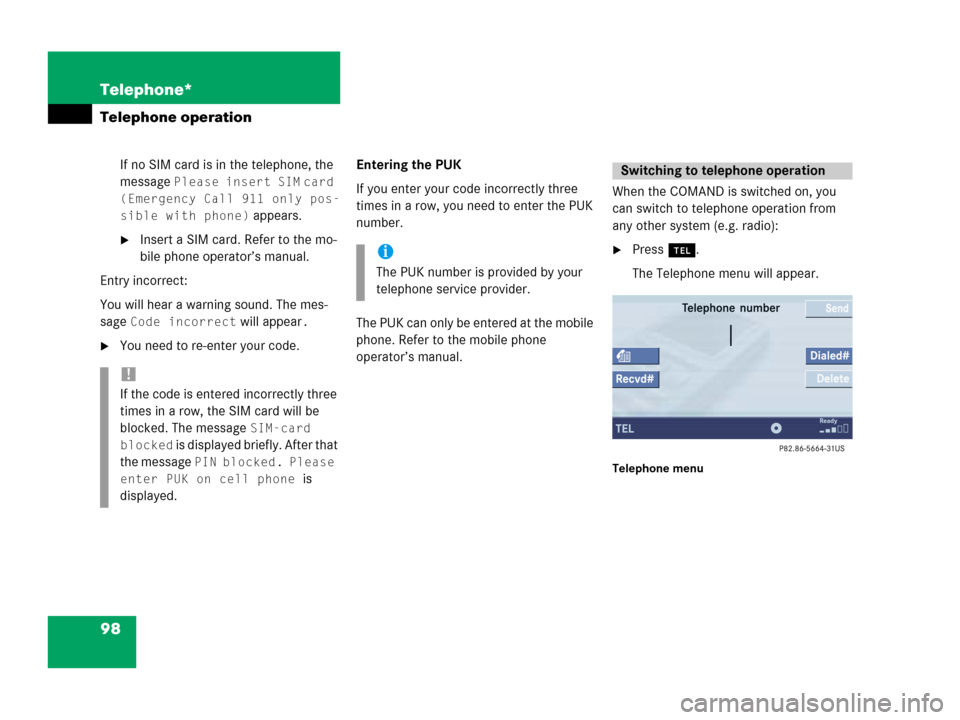
operator’s manual.When the COMAND is switched on, you
can switch to telephone operation from
any other system (e.g. radio):
�Press a.
The Telephone menu will appear.
Telephone menu
!
If the code is entered incorrectly three
times in a row, the SIM card will be
blocked. The message
SIM-card
blocked
is displayed briefly. After that
the message
PIN blocked. Please
enter PUK on cell phone
is
displayed.
i
The PUK number is provided by your
telephone service provider.
Switching to telephone operation
Page 179 of 202
177 Service
SMS*
� SMS*
With the SMS Received list, you can
receive SMS messages provided that SMS
messaging is available from your mobile
phone service provider.
�Activate the Service main menu
(
�page 176).
�Press the SMS soft key.
The Received list will appear.The status bar shows date and time of
the message.
One line is provided for each message.
Symbol = = Message unread
Symbol z = SMS message
i
The functions described here apply if
your vehicle is equipped with mobile
phone cradle* and a Mercedes-Benz
specified mobile phone*.
i
If you have received new SMS
messages, n is displayed on the
status bar. Additionally, a message
received tone is played.
i
If another system is active (e.g. radio),
a window with the message
Received
a new SMS
appears when SMS
message is coming in.
SMS Received list
i
If there is no SMS message, the SMS
soft key appears greyed out.
Page 191 of 202

189 Glossary
Audio source
This includes the systems radio and CD
(CD drive in the control unit, CD chan-
ger*).
Autostore
Enters the stations with the best recep-
tion (signal strength) into the autostore
memory in order of their reception
quality (from strong to weak).
Balance
Defines sound-center left/right.
Bit rate (MP3)
Measurement of transmission speed.
Indicates the number of bits transmit-
ted per time unit.
CD
(Compact Disc)
Digital storage medium in disc form.CD-R
(CD
Recordable)
->CD which can be written to once,
read many times but not deleted.
CD-RW
(CD
Rewritable)
->CD which can be read, written and
deleted.
COMAND
(Co
ckpit Management and Data Sys-
tem)
Information and operating center for
vehicle sound and communications
systems, including the radio and
CD player, as well as for other optional
equipment (CD changer*, telephone*,
etc.).Coordinates
Indicate the geographical position on
the earth’s surface.
DVD
(D
igital Versatile Disc)
Digital storage medium for storing lar-
ge amounts of data.
Emergency call
This function places a call to a local
911 provider. It does not initiate a
->Tele Aid* call. Please note that the
911 emergency call system is a public
service. Using it without due cause is a
criminal offense.
Page 197 of 202

195 Index
Menu
functions . . . . . . . . . . . . . . . . . . . . . . 32
main area . . . . . . . . . . . . . . . . . . . . . 31
soft keys area . . . . . . . . . . . . . . . . . . 31
status bar . . . . . . . . . . . . . . . . . . . . . 31
Menu display . . . . . . . . . . . . . . . . . . . 31
Menu system . . . . . . . . . . . . . . . . . . . 31
MP3 CD
fast forward/reverse . . . . . . . . . . . . 75
loading . . . . . . . . . . . . . . . . . . . . . . . 69
MP3 track scan . . . . . . . . . . . . . . . . . 74
playback options. . . . . . . . . . . . . . . . 75
Repeat folder . . . . . . . . . . . . . . . . . . 76
Repeat track . . . . . . . . . . . . . . . . . . . 76
selecting a folder . . . . . . . . . . . . . . . 71
switching to MP3 CD mode . . . . . . . 69
track select . . . . . . . . . . . . . . . . . . . . 73
Multifunction steering wheel. . . . . . 28
Muting
audio . . . . . . . . . . . . . . . . . . . . . . . . . 41
CD operation. . . . . . . . . . . . . . . . . . . 62
MP3 CD operation . . . . . . . . . . . . . . 75N
Navigation
Important notes . . . . . . . . . . . . . . . 112
Navigation displays. . . . . . . . . . . . . 137
Navigation DVD . . . . . . . . . . . . . . . . 113
loading/ejecting . . . . . . . . . . . . . . . 113
NAVIGATION IS INITIALIZING. PLEASE
WAIT.. . . . . . . . . . . . . . . . . . . . . . . . . 174
NO SERV . . . . . . . . . . . . . . . . . . . . 92, 99
O
OFF MAP . . . . . . . . . . . . . . . . . . . . . . 145
OFF ROAD. . . . . . . . . . . . . . . . . . . . . 144
Opening
the Audio menu. . . . . . . . . . . . . . . . . 40
Operating elements
CD . . . . . . . . . . . . . . . . . . . . . . . . 11, 14
CD changer* . . . . . . . . . . . . . . . . . . . 16
MP3 CD. . . . . . . . . . . . . . . . . . . . . . . 18
navigation* . . . . . . . . . . . . . . . . . . . . 24
radio . . . . . . . . . . . . . . . . . . . . . . . . . 12
Satellite radio* . . . . . . . . . . . . . . . . . 20
service . . . . . . . . . . . . . . . . . . . . . . . 26
telephone* . . . . . . . . . . . . . . . . . . . . 22
Outgoing calls . . . . . . . . . . . . . . . . . 101
P
Partially digitized areas. . . . . . . . . . 140
Phone book. . . . . . . . . . . . . . . . . . . . 108
PHONE NOT AVAILABLE . . . . . . . 93, 99
PHONE NOT INSERTED . . . . . . . . 93, 99
PHONE OFF. . . . . . . . . . . . . . . . . . . . . 94
PIN BLOCKED. PLEASE ENTER
PUK ON CELL PHONE . . . . . . . . . . . . 98
PIN-code
entering . . . . . . . . . . . . . . . . . . . . . . . 97
PIN-CODE INCORRECT. . . . . . . . . . . . 98
PLEASE INSERT SIM CARD
(EMERGENCY CALL 911 ONLY
POSSIBLE WITH PHONE). . . . 93, 94, 98
Points of Interest. . . . . . . . . . . . . . . 163
Program category . . . . . . . . . . . . . . . 83
PUK
entering . . . . . . . . . . . . . . . . . . . . . . . 98
Q
Quick-dialing. . . . . . . . . . . . . . . . . . . 105
R
Radio operation
muting . . . . . . . . . . . . . . . . . . . . . . . . 41
Radio station
saving station manually. . . . . . . . . . . 47