Page 434 of 723
433 Controls in detail
Driving systems
Warning indicators
Visual signals indicate to the driver the rel-
ative distance between the sensors and an
obstacle.
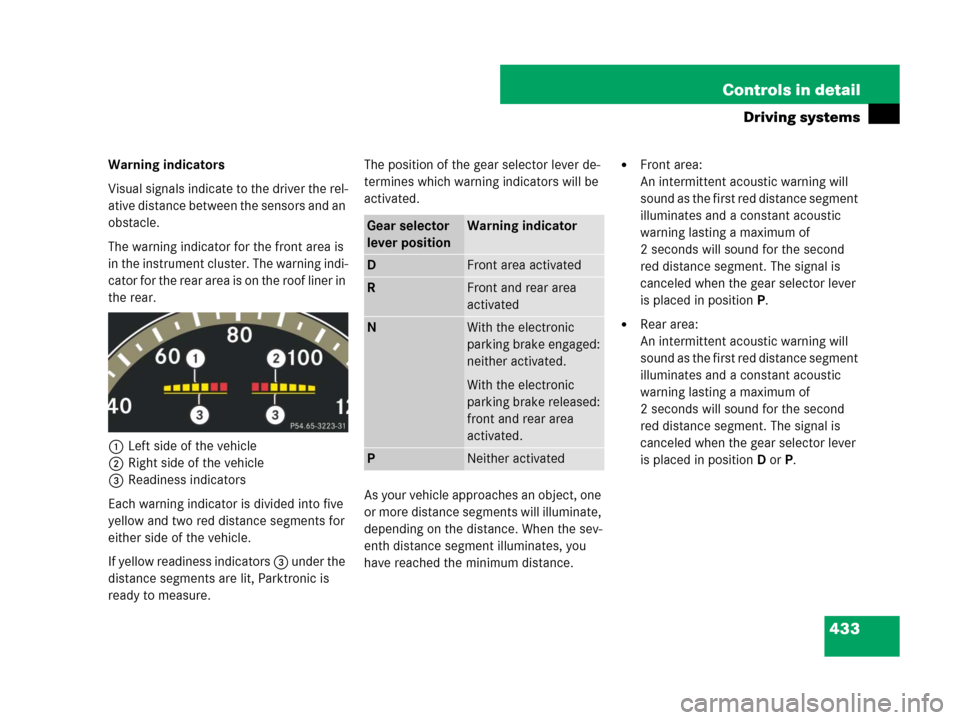
The warning indicator for the front area is
in the instrument cluster. The warning indi-
cator for the rear area is on the roof liner in
the rear.
1Left side of the vehicle
2Right side of the vehicle
3Readiness indicators
Each warning indicator is divided into five
yellow and two red distance segments for
either side of the vehicle.
If yellow readiness indicators 3 under the
distance segments are lit, Parktronic is
ready to measure.The position of the gear selector lever de-
termines which warning indicators will be
activated.
As your vehicle approaches an object, one
or more distance segments will illuminate,
depending on the distance. When the sev-
enth distance segment illuminates, you
have reached the minimum distance.�Front area:
An intermittent acoustic warning will
sound as the first red distance segment
illuminates and a constant acoustic
warning lasting a maximum of
2 seconds will sound for the second
red distance segment. The signal is
canceled when the gear selector lever
is placed in position P.
�Rear area:
An intermittent acoustic warning will
sound as the first red distance segment
illuminates and a constant acoustic
warning lasting a maximum of
2 seconds will sound for the second
red distance segment. The signal is
canceled when the gear selector lever
is placed in position D orP.
Gear selector
lever positionWarning indicator
DFront area activated
RFront and rear area
activated
NWith the electronic
parking brake engaged:
neither activated.
With the electronic
parking brake released:
front and rear area
activated.
PNeither activated
Page 438 of 723
437 Controls in detail
Driving systems
Front sensors
Rear sensorsWarning indicators
Visual signals indicate to the driver the rel-
ative distance between the sensors and an
obstacle.
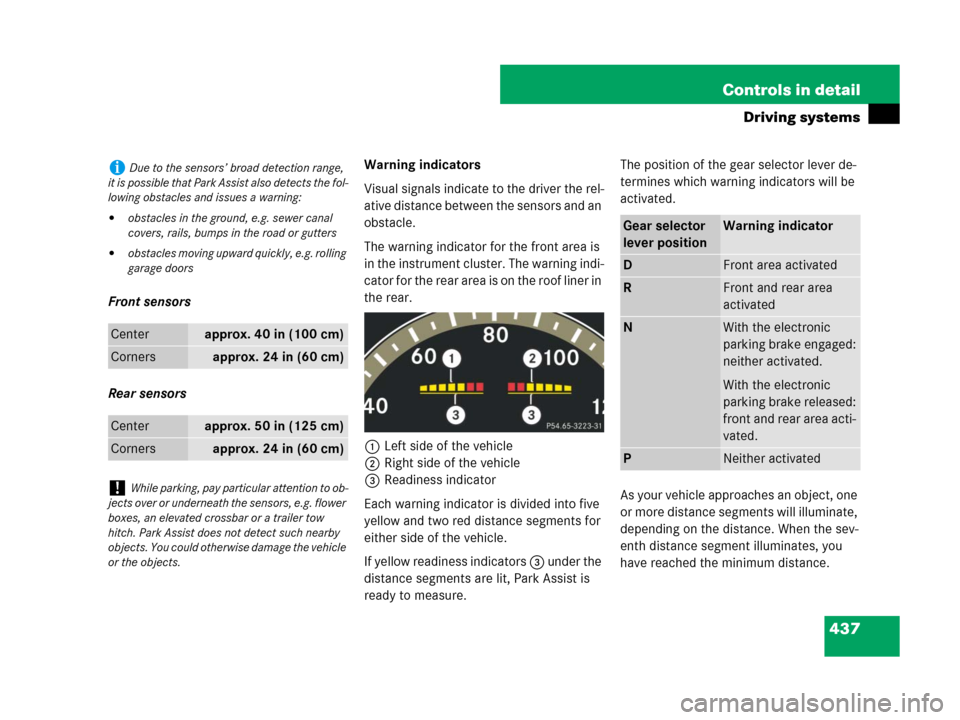
The warning indicator for the front area is
in the instrument cluster. The warning indi-
cator for the rear area is on the roof liner in
the rear.
1Left side of the vehicle
2Right side of the vehicle
3Readiness indicator
Each warning indicator is divided into five
yellow and two red distance segments for
either side of the vehicle.
If yellow readiness indicators 3 under the
distance segments are lit, Park Assist is
ready to measure.The position of the gear selector lever de-
termines which warning indicators will be
activated.
As your vehicle approaches an object, one
or more distance segments will illuminate,
depending on the distance. When the sev-
enth distance segment illuminates, you
have reached the minimum distance.
iDue to the sensors’ broad detection range,
it is possible that Park Assist also detects the fol-
lowing obstacles and issues a warning:
�obstacles in the ground, e.g. sewer canal
covers, rails, bumps in the road or gutters
�obstacles moving upward quickly, e.g. rolling
garage doors
Centerapprox. 40 in (100 cm)
Cornersapprox. 24 in (60 cm)
Centerapprox. 50 in (125 cm)
Cornersapprox. 24 in (60 cm)
!While parking, pay particular attention to ob-
jects over or underneath the sensors, e.g. flower
boxes, an elevated crossbar or a trailer tow
hitch. Park Assist does not detect such nearby
objects. You could otherwise damage the vehicle
or the objects.
Gear selector
lever positionWarning indicator
DFront area activated
RFront and rear area
activated
NWith the electronic
parking brake engaged:
neither activated.
With the electronic
parking brake released:
front and rear area acti-
vated.
PNeither activated
Page 567 of 723
564 Operation
Vehicle care
Carpets
�Use Mercedes-Benz approved Carpet
and Fabric Care for cleaning the
carpets.
Headliner and shelf below rear window
�Use a soft bristle brush or a dry-sham-
poo cleaner in case of excessive dirt.
Seat belts
�Only use clear, lukewarm water and
soap.Upholstery
Using aftermarket seat covers or wearing
clothing that have the tendency to give off
coloring (e.g. when wet, etc.) may cause
the upholstery to become permanently dis-
colored. By lining the seats with a proper
intermediate cover, contact-discoloration
will be prevented.Leather upholstery
�Wipe leather upholstery with a damp
cloth and dry thoroughly or clean with
Mercedes-Benz approved Leather
Care.
Exercise particular care when cleaning per-
forated leather as its underside should not
become wet.
Wood trims
�Dampen cloth using water and use
damp cloth to clean wood trims in your
vehicle.
!The webbing must not be treated with
chemical cleaning agents. Do not dry the web-
bing at temperatures above 176°F (80°C) or in
direct sunlight.
Warning!G
Do not bleach or dye seat belts as this may
severely weaken them. In a crash they may
not be able to provide adequate protection.
Warning!G
Only use seat covers which have been
tested and approved by Mercedes-Benz for
your vehicle model. Using other seat covers
may interfere with or prevent the activation
of the front side impact air bags or the rear
side impact air bags. Contact an authorized
Mercedes-Benz Center for availability.
!Do not use solvents like tar remover or
wheel cleaner nor polishes or waxes as these
may be abrasive.
Page 705 of 723

702 Index
G
Garage door opener 490
Gasoline see Fuel
GAWR 545
Gear range
Automatic transmission 398
Limiting 398
Shifting into optimal 401
Gear selector lever 389
Gearshift pattern 389
Messages
in display 585, 589, 591, 592, 631
Position 392
Shifting procedure 392
Transmission position 393
Glove box 470
Gloves, Vehicle tool kit 632
GPS
Reception (COMAND) 153
Tele Aid 482
Gross Axle Weight Rating see GAWR
Gross Vehicle Weight Rating see GVWR
Gross Vehicle Weight see GVW
GVW 545
GVWR 545H
Hands-free microphone 37
Hard plastic trim items, cleaning 563
Hazard warning flasher 369
Head restraints 348
Adjustment 348
Folding back and placing
upright rear head restraints 349
Front seat 348
Rear seat 349
Headlamp cleaning system 367, 519
Washer fluid 685, 691
Headlamps
Automatic control 364
Automatic headlamp mode 271
Cleaning lenses 558
Cleaning system 519
Manual headlamp mode 271
Messages in display 617
Refilling washer fluid 519
Replacing bulbs 642, 644Headliner and shelf below rear window,
Cleaning and care of 564
Heated steering wheel* 352
Height adjustments
Vehicle level (ABC) 429
High beam
Replacing bulbs 642
High beam flasher 367
High beam headlamp
Indicator lamp 31
High mounted brake lamp 642
Hood 512
Message in display 613
Opening 512
Horn 29
Hydroplaning 503