2007 LINCOLN NAVIGATOR wheel
[x] Cancel search: wheelPage 50 of 312
For rear wash cycle, rotate (and hold as desired) the rear wiper/washer
control to either
position.
From either position, the control will automatically return to the INT 2
or OFF position.
POWER TILT STEERING
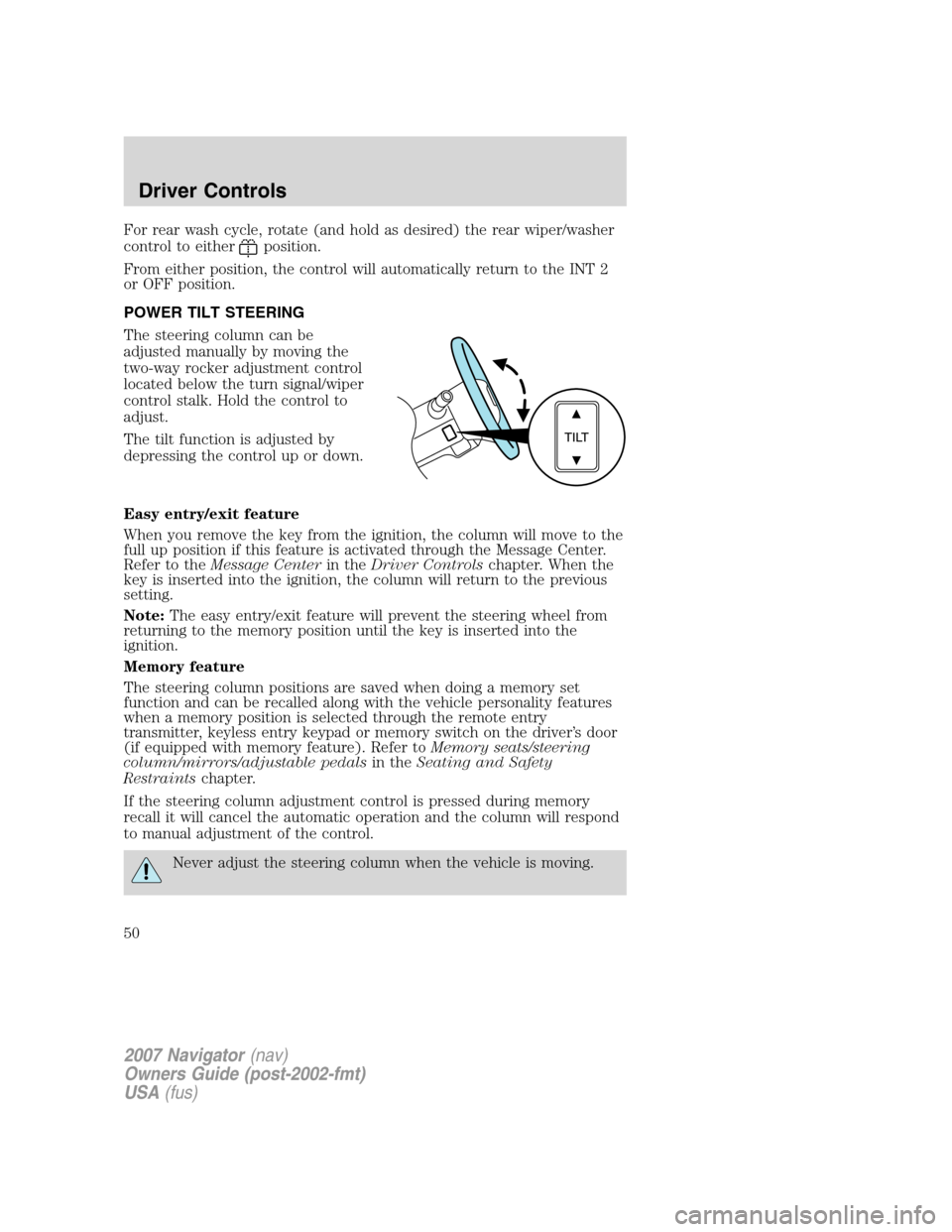
The steering column can be
adjusted manually by moving the
two-way rocker adjustment control
located below the turn signal/wiper
control stalk. Hold the control to
adjust.
The tilt function is adjusted by
depressing the control up or down.
Easy entry/exit feature
When you remove the key from the ignition, the column will move to the
full up position if this feature is activated through the Message Center.
Refer to theMessage Centerin theDriver Controlschapter. When the
key is inserted into the ignition, the column will return to the previous
setting.
Note:The easy entry/exit feature will prevent the steering wheel from
returning to the memory position until the key is inserted into the
ignition.
Memory feature
The steering column positions are saved when doing a memory set
function and can be recalled along with the vehicle personality features
when a memory position is selected through the remote entry
transmitter, keyless entry keypad or memory switch on the driver’s door
(if equipped with memory feature). Refer toMemory seats/steering
column/mirrors/adjustable pedalsin theSeating and Safety
Restraintschapter.
If the steering column adjustment control is pressed during memory
recall it will cancel the automatic operation and the column will respond
to manual adjustment of the control.
Never adjust the steering column when the vehicle is moving.
2007 Navigator(nav)
Owners Guide (post-2002-fmt)
USA(fus)
Driver Controls
50
Page 62 of 312

Setting speed control
The controls for using your speed
control are located on the steering
wheel for your convenience.
1. Press the ON control and release
it.
2. Accelerate to the desired speed.
3. Press the SET + control and
release it.
4. Take your foot off the accelerator
pedal.
5. The indicator
light on the
instrument cluster will turn on.
Note:
•Vehicle speed may vary momentarily when driving up and down a
steep hill.
•If the vehicle speed increases above the set speed on a downhill, you
may want to apply the brakes to reduce the speed.
•If the vehicle speed decreases more than 10 mph (16 km/h) below
your set speed on an uphill, your speed control will disengage.
Disengaging speed control
To disengage the speed control:
•Depress the brake pedal.
Disengaging the speed control will not erase previous set speed.
2007 Navigator(nav)
Owners Guide (post-2002-fmt)
USA(fus)
Driver Controls
62
Page 64 of 312

Turning off speed control
There are two ways to turn off the speed control:
•Depress the brake pedal. This will
not erase your vehicle’s
previously set speed.
•Press the speed control OFF
control.
Note:When you turn off the speed
control or the ignition, your speed
control set speed memory is erased.
STEERING WHEEL CONTROLS
These controls allow you to operate some radio and climate control
features.
Radio control features
Press MEDIA to select:
•AM, FM1, FM2
•CD (if equipped)
•DVD/FES (if equipped)
•SAT1, SAT2 or SAT3 (Satellite
Radio mode if equipped).
•LINE IN (Auxiliary input jack)
In AM, FM1, or FM2 mode:
•Press
SEEKto
select preset stations within the
selected radio band or press and
hold to select the next/previous
radio frequency.
In Satellite radio mode (if
equipped):
•Press
SEEKto
advance through preset channels or subscribed channels.
2007 Navigator(nav)
Owners Guide (post-2002-fmt)
USA(fus)
Driver Controls
64
Page 81 of 312

Warning display Status
Park brake engaged Warning can be reset. Will return after
10 minutes. If within the 10 minutes,
the condition is cleared and set again,
it will return immediately. Will return
on ignition cycle.
Press reset to clear This can be reset, it will remain on
the display for 4 seconds.
Park aid
equipped)This cannot be reset. Pressing reset
will change the option from ON to
OFF. It appears on the display when
the vehicle is in reverse and will not
go away until the vehicle is no longer
in reverse.
DRIVER DOOR AJAR.Displayed when the driver door is not
completely closed.
PASSENGER DOOR AJAR.Displayed when the passenger door is not
completely closed.
REAR LEFT DOOR AJAR.Displayed when the rear left door is not
completely closed.
REAR RIGHT DOOR AJAR.Displayed when the rear right door is not
completely closed.
DOOR AJAR.Displayed when there is an error with the door ajar system.
LIFTGATE/GLASS AJAR.Displayed when the liftgate or liftgate glass
is not completely closed.
LOW TIRE PRESSURE.Displayed when one or more tires on your
vehicle have low tire pressure. Refer toInflating Your Tiresin the
Tires, Wheels and Loadingchapter.
TIRE PRESSURE MONITOR FAULT.Displayed when the Tire Pressure
Monitoring System is malfunctioning. If the warning stays on or continues
to come on, have the system inspected by your authorized dealer.
TIRE PRESSURE SENSOR FAULT.Displayed when a tire pressure
sensor is malfunctioning, or your spare tire is in use. For more
information on how the system operates under these conditions, refer to
Understanding Your Tire Pressure Monitoring Systemin theTires,
Wheels and Loadingchapter. If the warning stays on or continues to
come on, have the system inspected by your authorized dealer.
2007 Navigator(nav)
Owners Guide (post-2002-fmt)
USA(fus)
Driver Controls
81
Page 88 of 312

LUGGAGE RACK
Your vehicle is equipped with a roof
rack for transporting items on the
exterior of the vehicle. The
maximum recommended load to be
carried on the roof rack is 200 lbs
(90 kg), evenly distributed. The
cross-bars can be adjusted by using
the thumbwheels at each end. Use
the tie-down loops on the
thumbwheels to secure load.
To adjust the position of the
cross-bar (if equipped):
1. Loosen the thumbwheel at both
ends of the cross-bar (both
cross-bars are adjustable).
2. Slide the cross-bar to the desired
location.
3. Firmly retighten the thumbwheels
at each end of the cross-bar.
Be sure to check that the thumbwheels are tight each time load is added
or removed from the roof rack, and periodically while traveling.
Always ensure that the load is secure before traveling.
Ford Motor Company recommends loading the roof rack only when
equipped with (optional) cross-bars, to avoid unintended damage to the
roof panel.
2007 Navigator(nav)
Owners Guide (post-2002-fmt)
USA(fus)
Driver Controls
88
Page 157 of 312

NOTICE TO UTILITY VEHICLE AND TRUCK OWNERS
Utility vehicles and trucks handle
differently than passenger cars in
the various driving conditions that
are encountered on streets,
highways and off-road. Utility
vehicles and trucks are not designed
for cornering at speeds as high as
passenger cars any more than
low-slung sports cars are designed
to perform satisfactorily under
off-road conditions.
Utility vehicles have a significantly higher rollover rate than
other types of vehicles. To reduce the risk of serious injury or
death from a rollover or other crash you must:
•Avoid sharp turns and abrupt maneuvers;
•Drive at safe speeds for the conditions;
•Keep tires properly inflated;
•Never overload or improperly load your vehicle; and
•Make sure every passenger is properly restrained.
In a rollover crash, an unbelted person is significantly more likely
to die than a person wearing a seat belt. All occupants must
wear seat belts and children/infants must use appropriate restraints to
minimize the risk of injury or ejection.
Study yourOwner’s Guideand any supplements for specific information
about equipment features, instructions for safe driving and additional
precautions to reduce the risk of an accident or serious injury.
VEHICLE CHARACTERISTICS
4WD and AWD Systems (if equipped)
A vehicle equipped with AWD or 4WD (when selected) has the ability to
use all four wheels to power itself. This increases traction which may
enable you to safely drive over terrain and road conditions that a
conventional two-wheel drive vehicle cannot.
2007 Navigator(nav)
Owners Guide (post-2002-fmt)
USA(fus)
Tires, Wheels and Loading
157
Page 158 of 312

Power is supplied to all four wheels
through a transfer case or power
transfer unit. 4WD vehicles allow
you to select different drive modes
as necessary. Information on
transfer case operation and shifting
procedures can be found in the
Drivingchapter. Information on
transfer case maintenance can be found in theMaintenance and
Specificationschapter. You should become thoroughly familiar with this
information before you operate your vehicle.
On some 4WD models, the initial shift from two-wheel drive to 4WD
while the vehicle is moving can cause a momentary clunk and ratcheting
sound. These sounds are normal as the front drivetrain comes up to
speed and is not cause for concern.
Do not become overconfident in the ability of 4WD and AWD
vehicles. Although a 4WD or AWD vehicle may accelerate better
than two-wheel drive vehicle in low traction situations, it won’t stop
any faster than two-wheel drive vehicles. Always drive at a safe speed.
How your vehicle differs from other vehicles
SUV and trucks can differ from
some other vehicles in a few
noticeable ways. Your vehicle may
be:
•Higher – to allow higher load
carrying capacity and to allow it
to travel over rough terrain
without getting hung up or
damaging underbody components.
•Shorter – to give it the capability
to approach inclines and drive
over the crest of a hill without
getting hung up or damaging
underbody components. All other
things held equal, a shorter
wheelbase may make your vehicle
quicker to respond to steering inputs than a vehicle with a longer
wheelbase.
2007 Navigator(nav)
Owners Guide (post-2002-fmt)
USA(fus)
Tires, Wheels and Loading
158
Page 159 of 312

•Narrower — to provide greater
maneuverability in tight spaces,
particularly in off-road use.
As a result of the above dimensional
differences, SUV’s and trucks often
will have a higher center of gravity
and a greater difference in center of
gravity between the loaded and
unloaded condition.
These differences that make your
vehicle so versatile also make it
handle differently than an ordinary
passenger car.
INFORMATION ABOUT UNIFORM TIRE QUALITY GRADING
New vehicles are fitted with tires
that have a rating on them called
Tire Quality Grades. The Quality
grades can be found where
applicable on the tire sidewall
between tread shoulder and
maximum section width. For
example:
•Treadwear 200 Traction AA Temperature A
These Tire Quality Grades are determined by standards that the United
States Department of Transportation has set.
Tire Quality Grades apply to new pneumatic tires for use on passenger
cars. They do not apply to deep tread, winter-type snow tires,
space-saver or temporary use spare tires, tires with nominal rim
diameters of 10 to 12 inches or limited production tires as defined in
Title 49 Code of Federal Regulations Part 575.104(c)(2).
U.S. Department of Transportation-Tire quality grades:The U.S.
Department of Transportation requires Ford Motor Company to give you
the following information about tire grades exactly as the government
has written it.
2007 Navigator(nav)
Owners Guide (post-2002-fmt)
USA(fus)
Tires, Wheels and Loading
159