Page 35 of 312

Dual automatic temperature control with heated and cooled seats
and rear passenger compartment climate control (if equipped)
1.
Defrost:Distributes outside air through the windshield defroster
vents. Can be used to clear thin ice or fog from the windshield.
2.Rear temperature control:Press to enable the auxiliary system and
set the desired rear cabin airflow temperature with the front control. The
rear cabin airflow temperature will match the driver airflow temperature
setting when only the center rear temperature bar (REAR)is
illuminated. The rear cabin airflow temperature will be warmer or cooler
than the driver airflow temperature setting when more than one rear
temperature bar (REAR) is illuminated.
3.Passenger temperature control:Press to increase/decrease the
temperature for the passenger in the front of the vehicle.
4.
RRear defroster:Press to activate/deactivate the rear window
defroster. Refer toRear window defrosterlater in this chapter for more
information.
5. R
Rear fan speed control:Press to enable the auxiliary system
or to adjust the rear fan speed from the front control. The rear fan speed
settings available are 4, 3, 2, 1 and O (OFF).
6.
Passenger heated seat control:Press once to activate the high
heat setting (3 indicator lights). Continue pressing to scroll through the
other settings; medium heat (2 indicator lights), low heat (1 indicator
light) or off.
2007 Navigator(nav)
Owners Guide (post-2002-fmt)
USA(fus)
Climate Controls
35
Page 36 of 312

7.Passenger cooled seat control:Press once to activate the high
cool setting (3 indicator lights). Continue pressing to scroll through the
other settings; medium cool (2 indicator lights), low cool (1 indicator
light) or off.
8.REAR:Press to enable the control located in the rear seat. Press
again to turn the auxiliary system off.
9.
Airflow direction control:Press to toggle through the air
distribution modes listed below. The selected mode will be shown in the
display.
:Distributes air through the instrument panel vents.
:Distributes air through the instrument panel and the floor vents.
:Distributes air through the floor vents.
:Distributes air through the windshield defroster vents and the floor
vents.
10.
Driver heated seat control:Press once to activate the high
heat setting (3 indicator lights). Continue pressing to scroll through the
other settings; medium heat (2 indicator lights), low heat (1 indicator
light) or off.
11.
Driver cooled seat control:Press once to activate the high
cool setting (3 indicator lights). Continue pressing to scroll through the
other settings; medium cool (2 indicator lights), low cool (1 indicator
light) or off.
12. F
Front fan speed control:Press to manually increase or
decrease the fan speed. To return to full automatic control, press AUTO.
13.OFF:Outside air is shut out and the climate system is turned off.
14.Driver temperature control:Press to increase or decrease the
temperature on the driver side of the cabin. Sets the passenger side
temperature also when DUAL is disengaged.Note:The recommended
vehicle cabin setting is between 72°F (22°C) and 75°F (24°C).
15.AUTO:Press to engage full automatic operation, and select the
desired temperature using the temperature control. The system will
automatically determine fan speed, airflow location, A/C on or off, and
outside or recirculated air, to heat or cool the vehicle to reach the
desired temperature.
16.A/C:Press to activate/deactivate air conditioning. Use with
recirculated air to improve cooling performance and efficiency. Engages
automatically in AUTO,
, and.
2007 Navigator(nav)
Owners Guide (post-2002-fmt)
USA(fus)
Climate Controls
36
Page 38 of 312

AUXILIARY CLIMATE CONTROL (IF EQUIPPED)
1.Fan speed:Turn to select the
desired fan speed.
2.Temperature/mode selection:
The distribution of air from the
overhead and floor registers is based
on the temperature selected. Turn
to select for comfort.
To use the rear climate controls,
ensure thatREARis pressed on the main climate control face.
REAR WINDOW DEFROSTER
The rear defroster control is located
on the climate control panel and
works to clear the rear window of
fog and thin ice.
The ignition must be in the 3 (RUN)
position to operate the rear window
defroster.
The rear defroster turns off automatically after 10 minutes or when the
ignition is turned to the 1 (LOCK) position. To manually turn off the
defroster before 10 minutes have passed, push the control again.
Do not use razor blades or other sharp objects to clean the inside
of the rear window or to remove decals from the inside of the
rear window. This may cause damage to the heated grid lines and
will not be covered by your warranty.
2007 Navigator(nav)
Owners Guide (post-2002-fmt)
USA(fus)
Climate Controls
38
Page 54 of 312

CLOCK
Press the right control to increase
the time displayed.
Press the left control to decrease
the time displayed.
AUXILIARY POWER POINT (12VDC)
Power outlets are designed for accessory plugs only. Do not insert
any other object in the power outlet as this will damage the
outlet and blow the fuse. Do not hang any type of accessory or
accessory bracket from the plug. Improper use of the power
outlet can cause damage not covered by your warranty.
An auxiliary power point is located
by the passenger’s ankle near the
floor in the front console bin.
Do not use the power point for
operating the cigarette lighter
element (if equipped).
To prevent the fuse from being
blown, do not use the power
point(s) over the vehicle capacity of
12 VDC/180W.
To prevent the battery from being discharged, do not use the power
point longer than necessary when the engine is not running.
Always keep the power point caps closed when not being used.
2007 Navigator(nav)
Owners Guide (post-2002-fmt)
USA(fus)
Driver Controls
54
Page 55 of 312

A second auxiliary power point is
located on the rear side of the
center console. The power point is
accessible from the rear seats.
A third auxiliary power point is
located on the right rear quarter
panel. The power point is accessible
from the liftgate.
Cigar lighter (if equipped)
Do not plug optional electrical accessories into the cigarette lighter
socket.
Do not hold the lighter in with your hand while it is heating, this will
damage the lighter element and socket. The lighter will be released from
its heating position when it is ready to be used.
Improper use of the lighter can cause damage not covered by your
warranty.
POWER WINDOWS
Do not leave children unattended in the vehicle and do not let
children play with the power windows. They may seriously injure
themselves.
When closing the power windows, you should verify they are free
of obstructions and ensure that children and/or pets are not in
the proximity of the window openings.
1
2
3
4
2007 Navigator(nav)
Owners Guide (post-2002-fmt)
USA(fus)
Driver Controls
55
Page 64 of 312
Turning off speed control
There are two ways to turn off the speed control:
•Depress the brake pedal. This will
not erase your vehicle’s
previously set speed.
•Press the speed control OFF
control.
Note:When you turn off the speed
control or the ignition, your speed
control set speed memory is erased.
STEERING WHEEL CONTROLS
These controls allow you to operate some radio and climate control
features.
Radio control features
Press MEDIA to select:
•AM, FM1, FM2
•CD (if equipped)
•DVD/FES (if equipped)
•SAT1, SAT2 or SAT3 (Satellite
Radio mode if equipped).
•LINE IN (Auxiliary input jack)
In AM, FM1, or FM2 mode:
•Press
SEEKto
select preset stations within the
selected radio band or press and
hold to select the next/previous
radio frequency.
In Satellite radio mode (if
equipped):
•Press
SEEKto
advance through preset channels or subscribed channels.
2007 Navigator(nav)
Owners Guide (post-2002-fmt)
USA(fus)
Driver Controls
64
Page 229 of 312
Fuse/Relay
LocationFuse Amp
RatingPower Distribution Box
Description
7 40A** Power running boards
8 40A** Heated/cooled seats
9 60A** ABS (pump)
10 20A** Rear console power point
11 30A** Auxiliary blower
12 25A* Trailer tow connector (park
lamps)
13 30A* Trailer tow connector (battery
charge)
14 — Not used
15 — Not used
16 — A/C clutch relay
17 — Driver side HID low beam
headlamp relay
18 — Fuel pump relay
19 — Back-up relay
20 — Trailer tow connector relay (left
turn signal)
21 — Trailer tow connector relay (right
turn signal)
22 — Passenger side HID low beam
headlamp relay
23 15A* Heated mirrors
24 40A** Blower motor
25 — Not used
26 — Not used
27 30A** Power liftgate
28 40A** Rear window defroster, Heated
mirror
29 30A** Passenger seat
30 10A* A/C clutch
31 15A* Brake lamps
2007 Navigator(nav)
Owners Guide (post-2002-fmt)
USA(fus)
Roadside Emergencies
229
Page 266 of 312
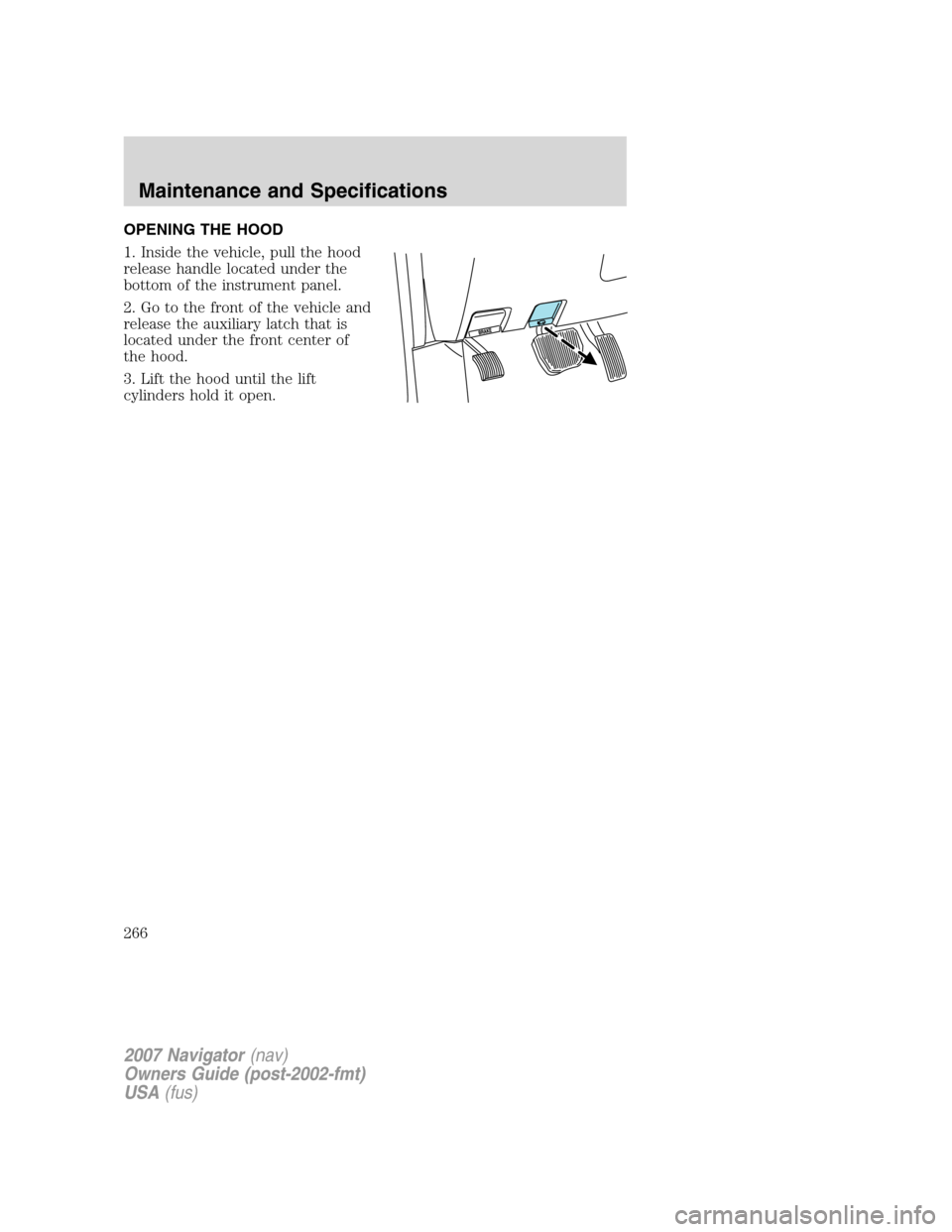
OPENING THE HOOD
1. Inside the vehicle, pull the hood
release handle located under the
bottom of the instrument panel.
2. Go to the front of the vehicle and
release the auxiliary latch that is
located under the front center of
the hood.
3. Lift the hood until the lift
cylinders hold it open.
2007 Navigator(nav)
Owners Guide (post-2002-fmt)
USA(fus)
Maintenance and Specifications
266