Page 3 of 436

1
2
3
4
5
6
7
iii
2-3. Operating the lights and windshield wipers ...................... 111
Headlight switch ............................... 111
Fog light switch ................................ 113
Windshield wipers and washer............................................... 114
Rear window wiper and washer............................................... 117
2-4. Using other driving systems..... 118 Cruise control ................................. 118
Four-wheel drive system.............. 121
Rear height control air suspension..................................... 123
Electronic modulated suspension..................................... 129
DAC (Downhill Assist Control system)............................................ 130
Driving assist systems.................. 132
2-5. Driving information .................. 135 Off-road precautions .................. 135
Cargo and luggage ...................... 140
Vehicle load limits ......................... 144
Winter driving tips ........................ 146
Trailer towing .................................. 150
Dinghy towing ................................ 160 3-1. Using the air conditioning
system and defogger .............. 162
Automatic air conditioning system (without navigation
system)............................................ 162
Rear cooler system....................... 168
Rear window and outside rear view mirror defoggers ............. 169
3-2. Using the audio system.............. 171 Audio system type .......................... 171
Using the radio............................... 173
Using the CD player..................... 181
Playing MP3 and WMA discs ................................................. 188
Optimal use of the audio system ............................................. 194
Using the AUX adapter ............. 197
Using the steering switches ...... 198
3-3. Using the rear audio system ....................................... 200
Rear seat entertainment system features ......................... 200
Using the DVD player (DVD video)............................... 205
Using the DVD player (video CD) .................................... 212
Using the DVD player (audio CD/CD text) ................. 214
3Interior features
Page 6 of 436
vi
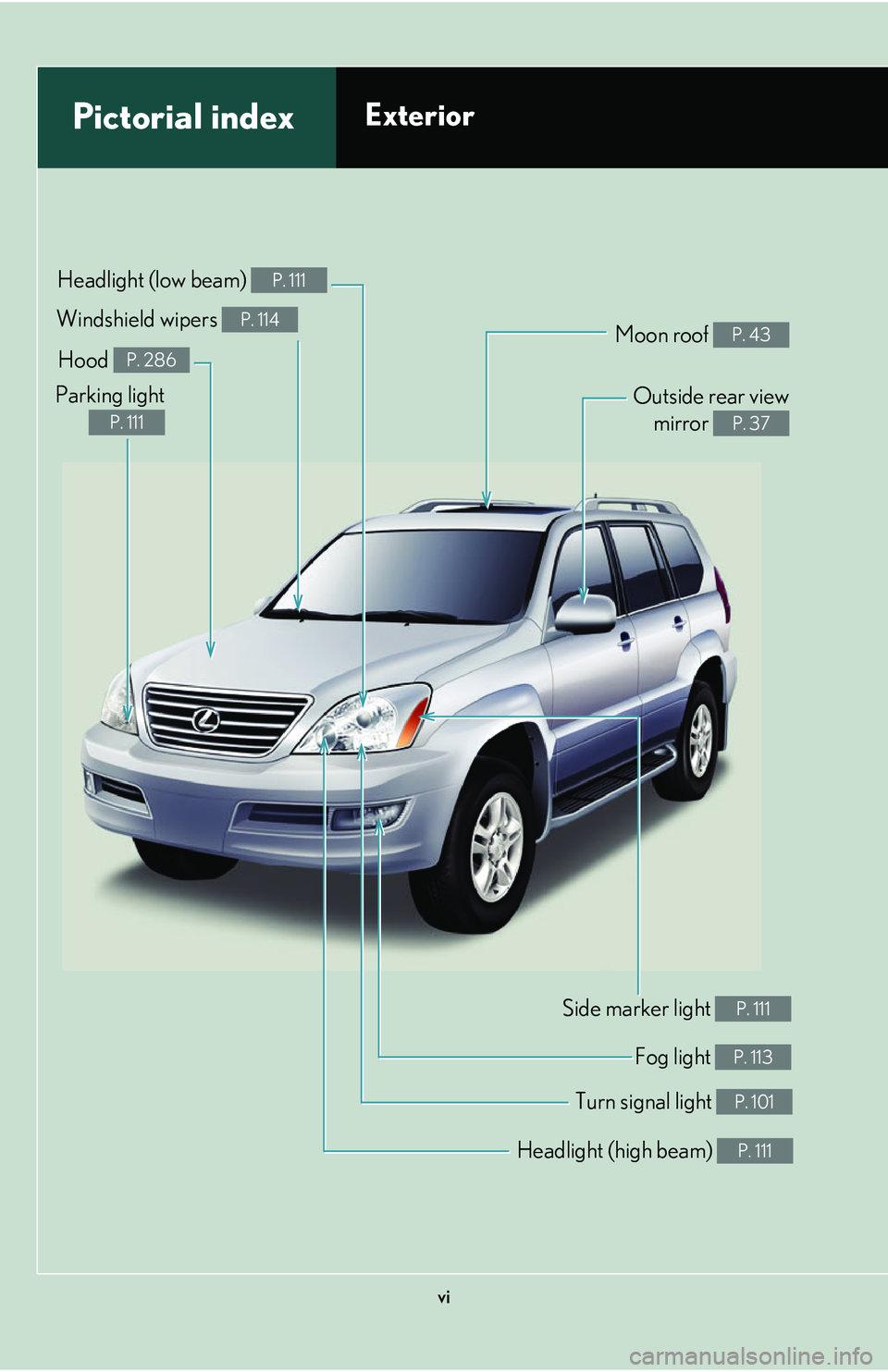
Headlight (high beam) P. 111
Pictorial indexExterior
Turn signal light P. 101
Fog light P. 113
Side marker light P. 111
Headlight (low beam) P. 111
Hood P. 286
Parking light
P. 111
Windshield wipers P. 114Moon roof P. 43
Outside rear viewmirror
P. 37
Page 12 of 436
xii
Pictorial indexInstrument panel
Gauges and meters P. 103
Ignition switch P. 95
Windshield wiper and
washer switch
P. 114
Headlight switch
Turn signal switch
Fog light switch P. 111
P. 101
P. 113
Cruise control switch P. 118
Emergency flashersGlove box
P. 228
Page 78 of 436
58
1-7. Safety information
The main SRS airbag system components are shown above. The SRS air-
bag system is controlled by the airb ag sensor assembly. The airbag sen-
sor assembly consists of a safing sensor and an airbag sensor.
In certain types of severe frontal or side impacts, the SRS airbag system
triggers the airbag inflators. A chemica l reaction in the inflators quickly
fills the airbags with non-toxic gas to he lp restrain the motion of the occu-
pants.
■If the SRS airbags deploy (inflate)
●Bruising and slight abrasion s may result from contact with a deploying (inflating)
SRS airbag.
●A loud noise and white powder will be emitted.
●Parts of the airbag module (steering wheel hub, airbag cover and inflator) as
well as the front seats, and parts of the front pillar and roof side rail, may be hot
for several minutes. The airbag itself may also be hot.
●The windshield may crack.
Page 86 of 436

66
1-7. Safety information
CAUTION
■SRS airbag precautions
●Do not use seat accessories which cover the parts where the SRS side airbags
inflate as they may interfere with inflation of the airbags.
●Do not strike or apply significant levels of force to the area of the SRS airbag
components shown on P. 57. Doing so ca n cause the SRS airbags to malfunction.
●Do not touch any of the component parts immediately after the SRS airbags have
deployed (inflated) as they may be hot.
●If breathing becomes difficult after the SRS airbag has deployed, open a door or
window to allow fresh air in, or leave the vehicle if it is safe to do so. Wash off any
residue as soon as possible to prevent skin irritation.
●If the areas where the SRS airbags are stored, such as the steering wheel pad and
front pillar garnish, are damaged or cracked, have them replaced by your Lexus
dealer.
●Do not attach anything to or lean anything
against areas such as the dashboard or
steering wheel pad of the instrument panel.
These items can become projectiles when
the SRS driver and front passenger airbags
deploy.
●Do not attach anything to areas such as the
door, windshield glass, side door glass,
front and rear pillars, roof side rail or assist
grip.
●Do not hang coat hangers or other hard
objects on the coat hooks. All of these
items could become projectiles and seri-
ously injure or kill you, should the SRS cur-
tain shield airbag deploy.
Page 107 of 436
When driving2
87
2-1. Driving procedures ................. 88Driving the vehicle ...................... 88
Starting the engine ...................... 95
Automatic transmission ............. 98
Turn signal lever ........................... 101
Parking brake ............................... 102
2-2. Instrument cluster................... 103 Gauges and meters .................. 103
Indicators and warning lights.............................................. 105
Trip information display............ 108 2-3. Operating the lights and
windshield wipers.................... 111
Headlight switch............................ 111
Fog light switch ............................. 113
Windshield wipers and washer ........................................... 114
Rear window wiper and washer ........................................... 117
2-4. Using other driving systems ..................................... 118
Cruise control ............................... 118
Four-wheel drive system ........... 121
Rear height control air suspension ................................ 123
Electronic modulated suspension .................................. 129
DAC (Downhill Assist Control system) ....................... 130
Driving assist systems............... 132
2-5. Driving information................ 135 Off-road precautions ............... 135
Cargo and luggage................... 140
Vehicle load limits ...................... 144
Winter driving tips ..................... 146
Trailer towing................................ 150
Dinghy towing ............................. 160
Page 131 of 436
111
2
When driving
2-3. Operating the lights and windshield wipers
Headlight switch
Turning on the high beam headlightsWith the headlights on, push the
lever forward to turn on the high
beams.
Pull the lever back to the center
position to turn the high beams off.
Pull the lever toward you to turn
on the high beams.
Release to turn them off. You can
flash the high beams with the head-
lights on or off.
The headlights can be operated manually or automatically.
The side marker, parking,
tail, license plate and
instrument panel lights
turn on.
The headlights and all lights listed above turn
on.
The headlights and all the lights listed above turn
on and off automatically.
(When the ignition
switch is in the “ON”
position.)
U.S.A.
Canada
Page 132 of 436

112
2-3. Operating the lights and windshield wipers
■Daytime running light system
To make your vehicle more visible to other drivers, the front turn signal lights turn on
automatically whenever the engine is started and the parking brake is released.
■Headlight control sensor
■Automatic light off system
The headlights and tail lights turn off 30 seconds after a door is opened or closed if
the ignition switch is turned to the “ACC ” or “LOCK” position while the headlights
are turned on. (The lights turn off immedi ately if the “LOCK” button on the key is
pressed after all doors are locked.)
To turn the lights on again, turn the igniti on switch to the “ON” position, or turn the
light switch “OFF” once and th en back to the or position.
■Customization
Settings (e.g. light sensor sensitivity) can be changed. ( P. 400)
NOTICE
■To prevent battery discharge
Do not leave the lights on longer than necessary when the engine is not running.
The sensor may not function properly if an
object is placed on the sensor, or anything
that blocks the sensor is affixed to the wind-
shield.
Doing so interferes with the sensor detecting
the level of ambient light and may cause the
automatic headlight system to malfunction.