Page 76 of 325
367
Knowing your vehicle
Repairing or scrapping the vehi-
cles Repairing steering wheel, instrumentpanel, center console or roofs, or
installing car audio around center con-
sole or painting front sheet metal could
disable the air bag system. Have them
checked by an authorized Kia dealer.
When leaving the vehicle at an autho- rized Kia dealer, inform that the vehicle
is equipped with air bag system, and
leave the owner’s manual in the vehi-
cle.
Since air bag system contains explo- sive chemical substances, contact an
authorized Kia dealer when scrapping
the vehicle.
WARNING
Do not modify your steeringwheel, seat or any other part of
the Supplemental Restraint
System. Modification could make
the system inoperable.
Do not work on the system’s com- ponents or wiring. This could
cause the air bags to inflate inad-
vertently, possibly seriously injur-
ing someone. Working on the sys-
tem could also disable the sys-
tem so that the air bags would not
deploy in a collision.
Any work on the SRS system, such as removing, installing,
repairing, or any work on the
steering wheel must be per-
formed by a qualified Kia techni-
cian. Improper handling of the air
bag system may result in serious
personal injury.
Page 108 of 325

399
Knowing your vehicle
The steering wheel audio remote control
button is installed to promote safe driv-
ing.✽ ✽NOTICEDo not operate audio remote control
buttons simultaneously.MODEPress the MODE button to select Radio,
CD (Compact Disc) or CDC (Compact
Disc Changer, if equipped).
Each press of the button changes the
display as follows:
VOLUME (▲
/▼)
Press the VOLUME ( ▲) button to
increase volume.
Press the VOLUME ( ▼) button to
decease volume.SEEK (▲/▼)If the SEEK ( ▲ ▲
/▼
▼
) button is pressed
for 0.8 second or more, it will work as
follows in each mode.
RADIO mode
It will function as the AUTO SEEK select
button.
CDP mode
It will function as the FF/REW button.
CDC mode
It will function as the DISC UP/DOWN
button. If the SEEK (
▲ ▲
/▼
▼
) button is pressed
for less than 0.8 second, it will work as
follows in each mode. (if equipped)
RADIO mode
It will function as the PRESET STATION
select buttons.
CDP mode
It will function as the TRACK UP/DOWN
button.
CDC mode
It will function as the TRACK UP/DOWN
button.
Detailed information for audio control
buttons is described in the following
pages in this section.
AUDIO REMOTE CONTROL (IF EQUIPPED)
M ODE
OBL063200N
RADIO(FM1 ➝FM2➝AM) ➝ CD ➝ CDC** : if equipped
Page 127 of 325
Knowing your vehicle118
3Using External Controls1. The Dimmer control
The Dimmer control setting determines
the brightness of the entire vehicle's dis-
plays.
Turn the scroll wheel up or down to
increase or decrease the brightness of
the vehicle's instrument panels, backlit
displays and the audio system's LCD
screen and backlit controls.
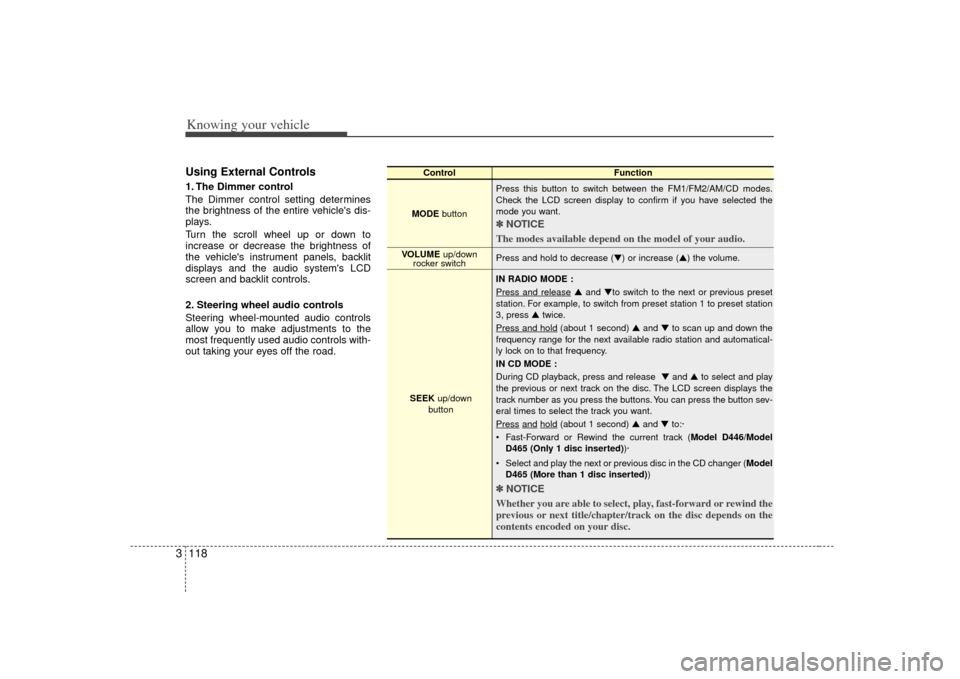
2. Steering wheel audio controls
Steering wheel-mounted audio controls
allow you to make adjustments to the
most frequently used audio controls with-
out taking your eyes off the road.
Control Function
MODE button Press this button to switch between the FM1/FM2/AM/CD modes.
Check the LCD screen display to confirm if you have selected the
mode you want.
✽ ✽
NOTICE
The modes available depend on the model of your audio. Press and hold to decrease (▼) or increase (▲) the volume.
IN RADIO MODE :
Press and release
▲ and ▼to switch to the next or previous preset
station. For example, to switch from preset station 1 to preset station
3, press ▲ twice.
Press and hold
(about 1 second) ▲ and ▼to scan up and down the
frequency range for the next available radio station and automatical-
ly lock on to that frequency.
IN CD MODE :
During CD playback, press and release ▼ and ▲to select and play
the previous or next track on the disc. The LCD screen displays the
track number as you press the buttons. You can press the button sev-
eral times to select the track you want.
Press
and
hold
(about 1 second) ▲ and ▼to:·
Fast-Forward or Rewind the current track ( Model D446/Model
D465 (Only 1 disc inserted) )·
Select and play the next or previous disc in the CD changer (Model D465 (More than 1 disc inserted) )
✽ ✽
NOTICE
Whether you are able to select, play, fast-forward or rewind the
previous or next title/chapter/track on the disc depends on the
contents encoded on your disc.
VOLUME up/down
rocker switch
SEEK up/down
button
Page 131 of 325
4
Ignition switch / 4-2
Starting the engine / 4-4
Automatic transmission / 4-5
Four wheel drive (4WD) / 4-10
Limited slip differential / 4-19
Brake system / 4-20
Steering wheel / 4-25
Cruise control system / 4-27
Electronic stability control / 4-30
Rear parking assist system / 4-33
Instrument cluster / 4-36
Gauges / 4-37
Warnings and indicators / 4-39
Multi-meter / 4-45
Lighting / 4-51
Wipers and washers / 4-54
Defroster / 4-57
Hazard warning flasher / 4-58
Manual climate control system / 4-59
Automatic climate control system / 4-66
Windshield defrosting and defogging / 4-75
Driving your vehicle
Page 132 of 325

Driving your vehicle24Illuminated ignition switch
(if equipped)Whenever a door is opened, the ignition
switch will be illuminated for your con-
venience, provided the ignition switch is
not in the ON position. The light will go off
approximately 30 seconds after closing
the door or when the ignition switch is
turned on.
Ignition switch and anti-theft
steering column lock
Ignition switch positionLOCKThe steering wheel locks to protect
against theft. The ignition key can be
removed only in the LOCK position.
When turning the ignition switch to the
LOCK position, push the key inward at
the ACC position (Type A) and turn the
key toward the LOCK position.
ACC (Accessory)
The steering wheel is unlocked and elec-
trical accessories are operative.
ON
The warning lights can be checked
before the engine is started. This is the
normal running position after the engine
is started.Do not leave the ignition switch ON if theengine is not running to prevent batterydischarge.
IGNITION SWITCH
PUSH
LOCKACCONSTART
E2BLA401A
1KMA30131KMB3013
Type AType B
Page 133 of 325

43
Driving your vehicle
START
Turn the ignition key to the START posi-
tion to start the engine. The engine will
crank until you release the key; then it
returns to the ON position. The brake
warning lamp can be checked in this
position.✽ ✽NOTICEIf difficulty is experienced in turning the
ignition key, turn the steering wheel
right and left to release the tension and
then turn the key.
Automatic transmissionWhen turning the ignition switch to the
LOCK position, the shift lever must be in
the P (Park) position.
WARNING
- Ignition key
• Never turn the ignition switch to
LOCK or ACC while the vehicle is
moving. This would result in loss
of directional control and braking
function, which could cause an
immediate accident.
Before leaving the driver’s seat, always make sure the shift lever
is engaged in 1
stgear for manual
transmission or P (Park) for auto-
matic transmission, set the park-
ing brake fully and shut the
engine off. Unexpected and sud-
den vehicle movement may occur
if these precautions are not
taken.
(Continued)
(Continued)
Never reach for the ignitionswitch, or any other controls
through the steering wheel while
the vehicle is in motion. The pres-
ence of your hand or arm in this
area could cause a loss of vehicle
control, an accident and serious
bodily injury or death.
Do not place any movable objects around the driver’s seat as they
may move while driving, interfere
with the driver and lead to an
accident.
Page 137 of 325

47
Driving your vehicle
Transmission rangesP (park)Always come to a complete stop before
shifting into P. This position locks the
transmission and prevents the front
wheels from rotating.
R (reverse)Use this position to drive the vehicle
backward.N (neutral)The wheels and transmission are not
locked. The vehicle will roll freely even on
the slightest incline unless the parking
brake or service brakes are applied.D (drive)This is the normal forward driving posi-
tion. The transmission will automatically
shift through a 4-gear sequence, provid-
ing the best fuel economy and power.
For extra power when passing another
vehicle or climbing grades, depress the
accelerator fully, at which time the trans-
mission will automatically downshift to
the next lower gear.
(Continued)
Before leaving the driver’s seat,always make sure the shift lever
is in the P (PARK) position. Set
the parking brake fully, shut the
engine off and take the key with
you. Unexpected and sudden
vehicle movement can occur if
you do not follow these precau-
tions in the order specified.
Never leave a child unattended in a vehicle.
WARNING
- Automatic
transmission
Shifting into P (Park) while thevehicle is in motion will cause the
drive wheels to lock which will
cause you to lose control of the
vehicle.
Do not use the P (Park) position in place of the parking brake.
Always make sure the shift lever
is latched in the P (Park) position
so that it cannot be moved unless
the lock release button is pushed
in, AND set the parking brake
fully.
(Continued)
CAUTION
The transmission may be damagedif you shift into P (Park) while thevehicle is in motion.
CAUTION
Always come to a complete stopbefore shifting into or out of R(Reverse); you may damage the transmission if you shift into Rwhile the vehicle is in motion.
Page 140 of 325

Driving your vehicle10
4For safe four-wheel drive opera-
tion Your vehicle allows you to drive in on-
road and off-road conditions.
However, do not try to drive in deep standing water, mud, or over steep
hills.
When you are driving up or down hills drive as close to straight up and down
the hill as possible. Use extreme cau-
tion in going up or down steep hills,
since you may flip your vehicle over
depending on the grade, terrain and
water/mud conditions.
You must learn how to corner in a 4WDvehicle as soon as possible. Do not
rely on your experience in convention-
al 2WD vehicles in choosing safe cor-
nering speed. You must drive more
slowly.
Drive off-road carefully because your vehicle may be damaged by rocks or
roots of trees. Become familiar with the
off-road conditions you are going to
drive before you start.FOUR WHEEL DRIVE (4WD) (IF EQUIPPED)
WARNING -
Four wheel
drive
Driving across the contour of steep
hills can be extremely dangerous.
This danger can come from slight
changes in the wheel angle which
can destabilize the vehicle or, even
if the vehicle is maintaining stabili-
ty under power, it can lose that sta-
bility if the vehicle stops its forward
motion. Your vehicle may roll over
without warning and without time
for you to correct a mistake that
could cause serious injury or death.
WARNING
Reduce speed when you turn cor-
ners. The center of gravity of 4WD
vehicles is higher than that of con-
ventional 2WD vehicles, making
them more likely to roll over when
you turn corners too fast.
WARNING
Do not grab inside of the steering
wheel when you are driving off-
road. Your arm may be hurt by a
sudden steering maneuver or from
steering wheel rebound due to
impact with objects on the ground.
This may cause you to lose steering
wheel control.