Page 108 of 325

399
Knowing your vehicle
The steering wheel audio remote control
button is installed to promote safe driv-
ing.✽ ✽NOTICEDo not operate audio remote control
buttons simultaneously.MODEPress the MODE button to select Radio,
CD (Compact Disc) or CDC (Compact
Disc Changer, if equipped).
Each press of the button changes the
display as follows:
VOLUME (▲
/▼)
Press the VOLUME ( ▲) button to
increase volume.
Press the VOLUME ( ▼) button to
decease volume.SEEK (▲/▼)If the SEEK ( ▲ ▲
/▼
▼
) button is pressed
for 0.8 second or more, it will work as
follows in each mode.
RADIO mode
It will function as the AUTO SEEK select
button.
CDP mode
It will function as the FF/REW button.
CDC mode
It will function as the DISC UP/DOWN
button. If the SEEK (
▲ ▲
/▼
▼
) button is pressed
for less than 0.8 second, it will work as
follows in each mode. (if equipped)
RADIO mode
It will function as the PRESET STATION
select buttons.
CDP mode
It will function as the TRACK UP/DOWN
button.
CDC mode
It will function as the TRACK UP/DOWN
button.
Detailed information for audio control
buttons is described in the following
pages in this section.
AUDIO REMOTE CONTROL (IF EQUIPPED)
M ODE
OBL063200N
RADIO(FM1 ➝FM2➝AM) ➝ CD ➝ CDC** : if equipped
Page 113 of 325
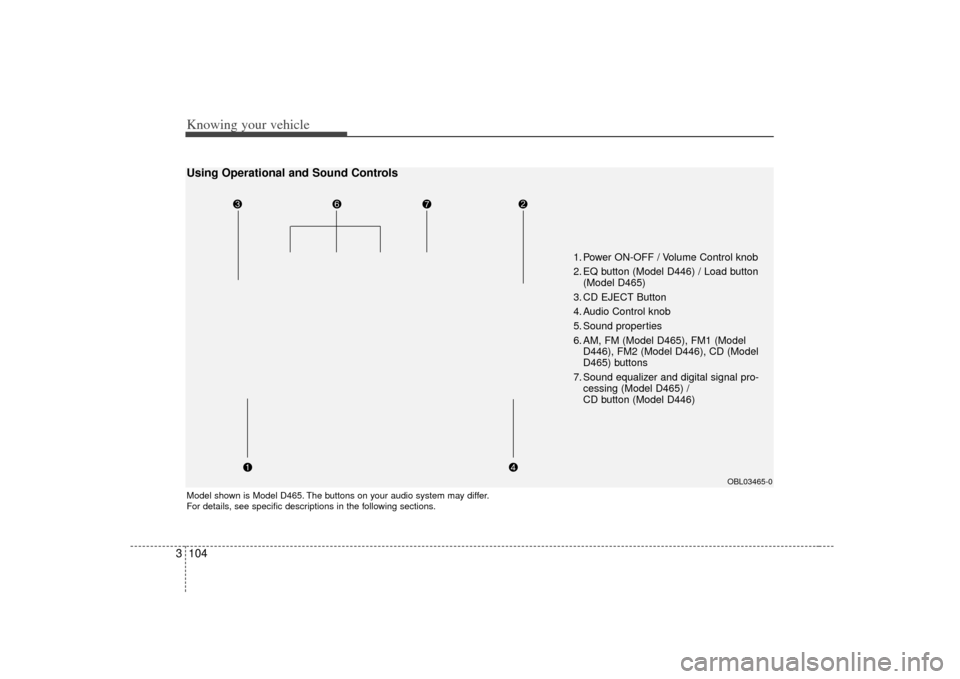
Knowing your vehicle104
3
1. Power ON-OFF / Volume Control knob
2. EQ button (Model D446) / Load button
(Model D465)
3. CD EJECT Button
4. Audio Control knob
5. Sound properties
6. AM, FM (Model D465), FM1 (Model D446), FM2 (Model D446), CD (Model
D465) buttons
7. Sound equalizer and digital signal pro- cessing (Model D465) /
CD button (Model D446)
Model shown is Model D465. The buttons on your audio system may differ.
For details, see specific descriptions in the following sections.
OBL03465-0
Using Operational and Sound Controls
Page 116 of 325

3 107
Knowing your vehicle
5. AM, FM, FM1, FM2, CD buttonsModel D446: AM, FM1, FM2, CD
Model D465: AM, FM, CD
Use the input source selector buttons to
select/switch operation modes. Press the
AMband selector button, FM/FM1/FM2
band selector button(s) or CD or button
to resume operation in the corresponding
mode.
Pressing any of these buttons automati-
cally switches the audio system on.
The LCD screen displays either the radio
frequency you are tuned into or the track
currently played back.✽ ✽ NOTICE• Remember that station Presets (1-6)
stored in FM1 mode can only be
accessed in FM1 mode. Similarly,
FM2 presets can only be accessed in
FM2 mode.
• For Model D465: Press the FM band selector button
repeatedly to switch between the FM1
and FM2 modes.
6. Sound equalizer and digital signal
processing Both Model D446 and Model D465: EQ
button
EQ button:
Press the EQ button repeatedly to select
the sound equalizer setting you want.
The 6 settings are: ROCK, POP, JAZZ,
CLASSIC, TALK and equalizer off. If no
icon is displayed in the LCD screen, the
equalizer is switched off.
The 5 preset equalizer settings have
been optimized for the 5 common genres
of music. For example, the ROCKsetting
enhances bass reproduction with rock
music whereas the CLASSIC setting
enhances the clarity of string instruments
during audio reproduction of classical
music. You may want to experiment with
the different settings to confirm your per-
sonal preferences.
✽ ✽ NOTICEIf you store a station Preset (1~6) with a
specific equalizer setting, that setting is
automatically used across other stations
preset.
Page 117 of 325
Knowing your vehicle108
3
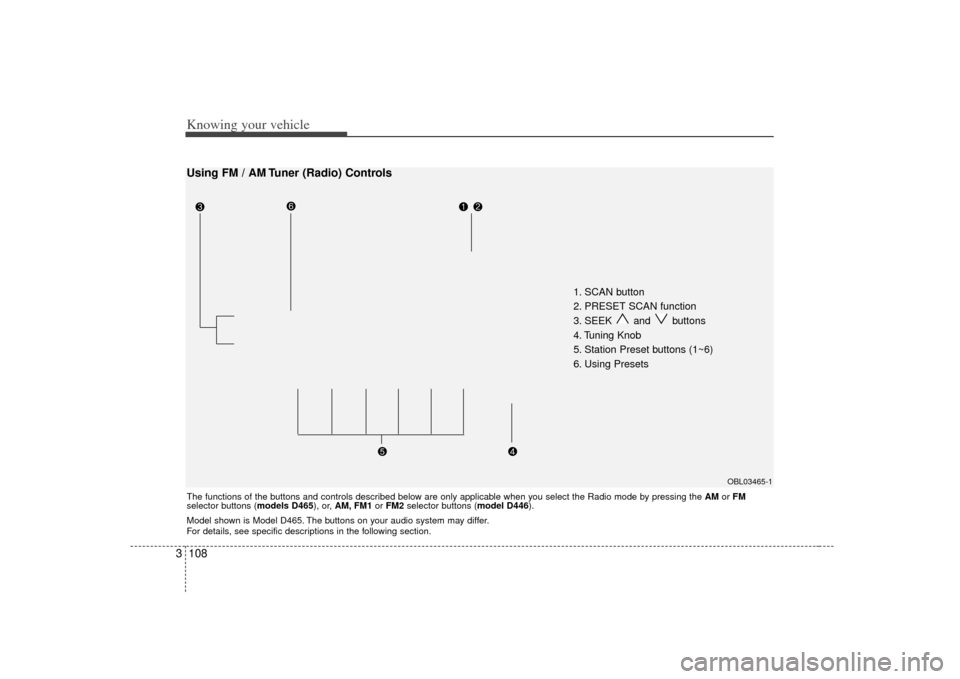
1. SCAN button
2. PRESET SCAN function
3. SEEK and buttons
4. Tuning Knob
5. Station Preset buttons (1~6)
6. Using Presets
OBL03465-1
Using FM / AM Tuner (Radio) ControlsThe functions of the buttons and controls described below are only applicable when you select the Radio mode by pressing the AMor FM
selector buttons (models D465), or, AM, FM1 or FM2 selector buttons (model D446).
Model shown is Model D465. The buttons on your audio system may differ.
For details, see specific descriptions in the following section.
Page 118 of 325
3 109
Knowing your vehicle
1. SCAN buttonFrequency band scan function
Press the SCANbutton for the tuner to
scan for radio signals in the selected fre-
quency band (AM or FM). Once the tuner
locks onto the signal of a transmitting
station, it plays that station for 5 seconds
before scanning for the next available
station in the selected frequency band.
If you want to keep listening to a particu-
lar station and want to stop the scanning,
press the SCAN button again.
This function is useful for providing you
with a good overview of all the radio sta-
tions within range of your tuner.2. PRESET SCAN functionPress and hold the SCAN button for
more than 2 seconds. Each preset radio
stations will be automatically played for 5
seconds. If you want to keep listening to
a particular preset station and want to
stop the scanning, press the SCAN but-
ton again.
3. SEEK and buttonsAutomatic Channel Selection function
Press the and buttons to scan up
and down the frequency range for the
next available radio station and automat-
ically lock on to that frequency.
The LCD screen displays the frequency
of the radio station transmitting a clear
and strong signal.
Use this function to search for a radio
station you want. If you like a particular
station, you can store it as one of 6
Presets using the Preset buttons below.✽ ✽
NOTICEThis function is not effective if you are
experiencing poor reception in your
vicinity.
4. Tuning KnobManual Channel Selection
Rotate the knob clockwise or counter-
clockwise to manually advance up or
down the frequency range. The tuning
knob also gives you fine-grain control
which you can use to manually fine-tune
your frequency selection. This is useful if
you are searching for a radio signal
which is not strong enough for you to use
the Automatic Channel Selection func-
tion✽ ✽NOTICEThe speed at which you advance up or
down the frequency range depends on
how fast you turn the knob.
Page 119 of 325

Knowing your vehicle110
35. Station Preset buttons (1~6) There are 6 Station Preset buttons which
you can use to store the frequencies of
your 6 favorite radio stations. Saving a
station as a preset gives you one-touch
access to the station you want.
Remember that the 6 presets stations
you store are for the specific radio band
mode you are in. That means that you
can store up to 6 stations in AM mode, 6
in FM1 mode, and 6 in FM2 mode. This
means that you can store up to 18 of your
favorite stations in the preset memory.✽ ✽
NOTICE• To switch between FM1 and FM2
mode:
Use the FM1 and FM2 buttons (for
Model D446)
Press the FM button to switch
between FM1 and FM2 modes (For
Model D465)
• Remember that if you store a station as preset 1 in FM2 mode, you must
first select FM2 mode before you can
use that preset button.
• This function is not effective if you are experiencing poor reception in your
vicinity.
6. Using PresetsTo save a radio station as a preset:
1. Take note of the band selection dis-
played on the LCD screen (AM, FM1 or
FM2)
2. Tune in to the radio station you want using either the SEEK UP and DOWN
buttons or the Tuning Knob.
3. Choose the Preset button (1~6) you want to use to store the radio station.
4. Press and hold the Preset button for more than 2 seconds.
The system beeps to indicate that it
has saved the new station and displays
the frequency and preset number on
the LCD screen.✽ ✽ NOTICESaving a new station erases the previous
setting saved in that preset.
To tune in to a preset station:
1. Select the band (AM, FM1 or FM2) you
want using the band selector buttons.
2. Press the preset button corresponding to the radio station you want.
The system automatically jumps to the
preset station. The frequency and pre-
set number is displayed on the LCD
screen.
Buttons not in use in Radio mode:
The following buttons and functions are
not used in Radio mode.
• REW button
FF button
RPT button
RDM button
MARK button
NFO button
Page 120 of 325
3 111
Knowing your vehicle
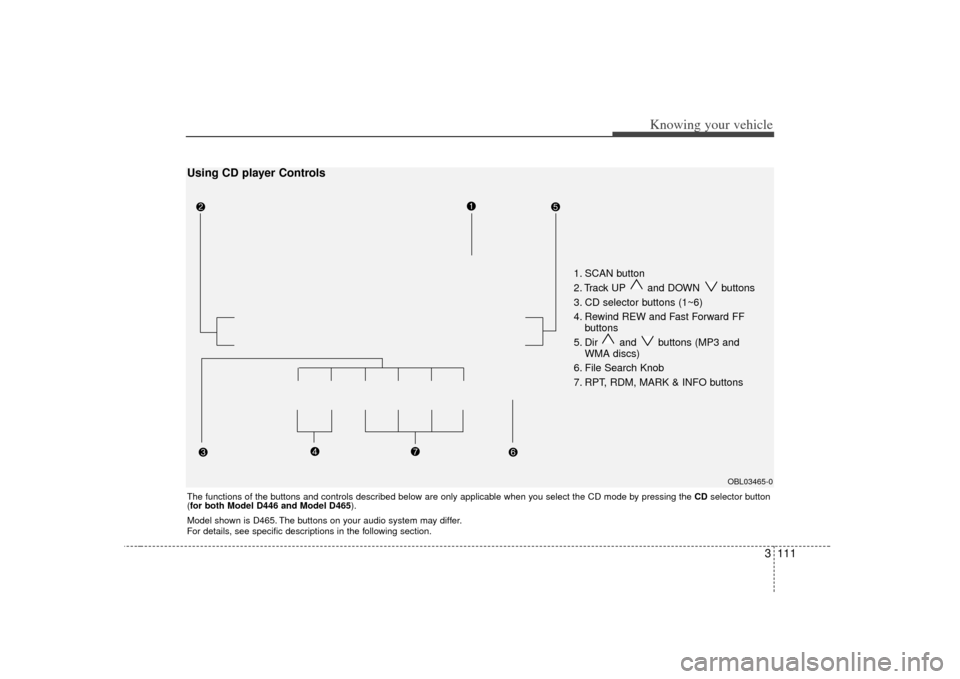
1. SCAN button
2. Track UP and DOWN buttons
3. CD selector buttons (1~6)
4. Rewind REW and Fast Forward FFbuttons
5. Dir and buttons (MP3 and WMA discs)
6. File Search Knob
7. RPT, RDM, MARK & INFO buttons
OBL03465-0
The functions of the buttons and controls described below are only applicable when you select the CD mode by pressing the CDselector button
(for both Model D446 and Model D465 ).Using CD player ControlsModel shown is D465. The buttons on your audio system may differ.
For details, see specific descriptions in the following section.
Page 121 of 325

Knowing your vehicle112
31. SCAN buttonDisc Scan function
Model D446:
During CD playback, press the SCAN
button to play the first 10 seconds (pre-
view) of all tracks on the current CD.
Model D465:
To preview the first track of all the CDs in
the CD changer, press and hold the
SCAN button for more than 2 seconds.
Once you hear a track you want, press
the SCAN button again to resume nor-
mal playback.2. Track UP and DOWN but- tons During CD playback, press the and buttons to select and play the
next or previous track on the current disc.
The LCD screen displays the track num-
ber as you press the buttons. You can
press the button several times to select
the track you want.
3. CD selector buttons (1~6) Model D446:
The CDselector buttons are not used
with Model D446.
Model D465:
Press the CD selector button correspon-
ding to the CD you want. The CD player
automatically interrupts playback and
loads the selected CD.✽ ✽ NOTICEIf no CD is loaded in the selected posi-
tion, the LCD screen displays the No
Disc indicator.4. Rewind REW and Fast Forward FF
buttonsDuring CD playback, press and hold the
REW or FF buttons to rewind or fast-for-
ward playback of the current track. The
LCD screen displays the elapsed time of
the track you are rewinding or fast-for-
warding.
Release the REW or FF button when you
have reached the point you want.
Playback resumes automatically at the
selected point.
5. Dir and buttons (MP3 and WMA discs)During MP3/WMA CD playback, press
the DIR or buttons to switch to the
next or previous directory on the CD. The
LCD screen displays the name of the
directory you have switched to. You can
press the button several times to search
for the directory you want. The directories
are displayed in sequence (i.e. ascend-
ing or descending alphabetical order).
To access the directory displayed, press
the File Search knob to ENTER your
selection.✽ ✽ NOTICEThe Directory UP and DOWN buttons
can only be used when you are playing a
CD which has organized its tracks in the
form of directories. Normally, only MP3
or WMA CDs will contain a directory
tree which you can navigate using these
buttons.