Page 68 of 325
359
Knowing your vehicle
Why didn’t my air bag go off in a
collision? (Inflation and non-inflation conditionsof the air bag)There are many types of accidents in
which the air bag would not be expected
to provide additional protection.
These include rear impacts, second or
third collisions in multiple impact acci-
dents, as well as low speed impacts. In
other words, just because your vehicle is
damaged and even if it is totally unus-
able, don’t be surprised that the air bags
did not inflate.
Air bag collision sensors(1) SRS control module
(2) Front impact sensor
(3) Side impact sensor
OBL063003/OBL036004/OBL063001/1VQA2079
Page 69 of 325

Knowing your vehicle60
3
WARNING
Do not hit or allow any objects to
impact the locations where air
bag or sensors are installed.
This may cause unexpected air
bag deployment, which could
result in severe personal injury or
death.
If the installation location or angle of the sensors is altered in
any way, the air bags may deploy
when they should not or they may
not deploy when they should,
causing severe injury or death.
Therefore, do not try to perform
maintenance on or around the air
bag sensors. Have the vehicle
checked and repaired by the
authorized Kia dealer.
Problems may arise if the sensor installation angles are changed
due to the deformation of front
bumper, body or B pillar where
side collision sensors are
installed. Have the vehicle
checked and repaired by the
authorized Kia dealer.
(Continued)
(Continued)
Your vehicle has been designedto absorb impact and deploy the
air bag(s) in certain collisions.
Installing aftermarket bumper
guards or replacing a bumper
with non-genuine parts may
adversely affect your vehicles
collision and air bag deployment
performance.
Air bag inflation conditionFront air bag
Front air bags (driver’s and front passen-
ger’s air bags and driver’s knee air bag)
are designed to inflate when the impact
is delivered to front collision sensors
depending on the intensity, speed or
angles of impact of the front collision -
generally from an area a little to the left to
a little to the right of straight ahead.
OBL0367001N
Page 70 of 325

361
Knowing your vehicle
Curtain air bag
Curtain air bags are designed to inflate
when the impact signal is delivered to the
side collision sensors, depending on the
severity, speed, and/or angle of the
impact or rollover.Although the front air bags (driver’s and
front passenger’s air bags and driver’s
knee air bag) are designed to inflate only
in frontal collision, it may inflate in any
collision if front impact sensors detect a
sufficient impact.
Curtain air bags are designed to inflate
only in side impact collision, but may
inflate in any collision if side impact sen-
sors detect a sufficient impact.
If the vehicle chassis is impacted by
bumps or objects on unimproved roads
or sidewalks, air bags may deploy. Drive
carefully on unimproved roads or on sur-
faces not designed for vehicle traffic to
prevent unintended air bag deployment.
To protect occupants, front air bags and
pre-tensioner safety belts may deploy in
certain side impact collisions.
Air bag non-inflation conditions In collisions, the vehicle safety belts
are sufficient to protect the vehicle
occupants and the air bags may not
deploy. In some cases, deploying air
bags in low-speed collisions can cause
a secondary impact to the occupants
(light abrasions, cuts, burns, etc.), or
loss of vehicle control.
OVQ036018N
S2BLA351
1VQA2086
Page 98 of 325
389
Knowing your vehicle
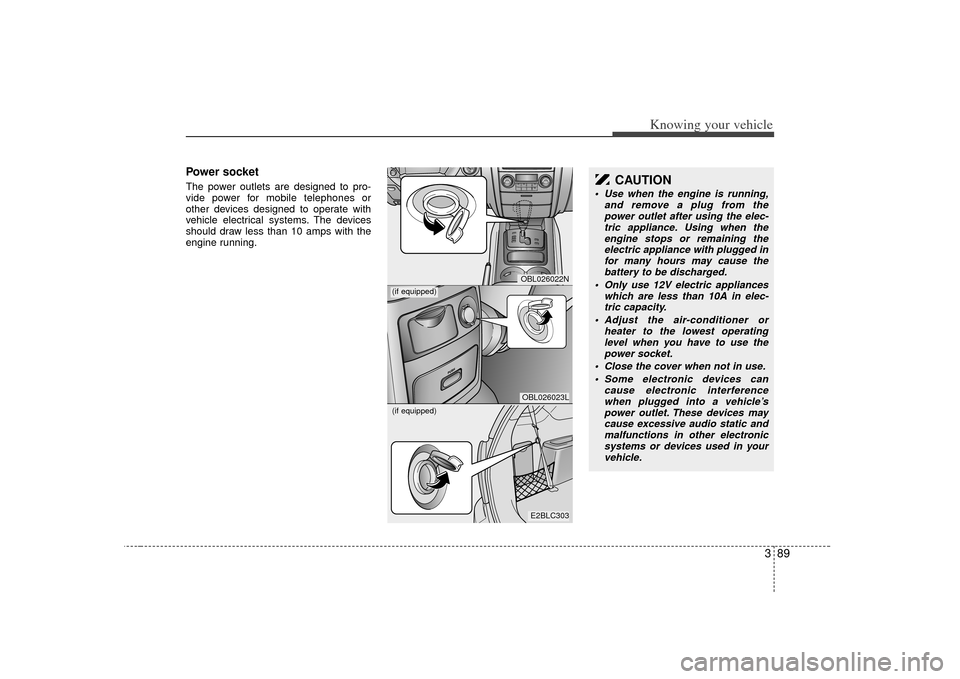
Power socketThe power outlets are designed to pro-
vide power for mobile telephones or
other devices designed to operate with
vehicle electrical systems. The devices
should draw less than 10 amps with the
engine running.
E2BLC303OBL026023LOBL026022N
(if equipped)(if equipped)
CAUTION
Use when the engine is running,and remove a plug from thepower outlet after using the elec- tric appliance. Using when theengine stops or remaining the electric appliance with plugged infor many hours may cause thebattery to be discharged.
Only use 12V electric appliances which are less than 10A in elec-tric capacity.
Adjust the air-conditioner or heater to the lowest operatinglevel when you have to use thepower socket.
Close the cover when not in use. Some electronic devices can cause electronic interferencewhen plugged into a vehicle’s power outlet. These devices maycause excessive audio static and malfunctions in other electronicsystems or devices used in your vehicle.
Page 151 of 325

421
Driving your vehicle
Disc brakes wear indicator Your vehicle has disc brakes.
When your brake pads are worn and it's
time for new pads, you will hear a high-
pitched warning sound from your front
brakes or rear brakes (if equipped). You
may hear this sound come and go or it
may occur whenever you depress the
brake pedal.
Please remember that some driving
conditions or climates may cause a
brake squeal when you first apply (or
lightly apply) the brakes. This is nor-
mal and does not indicate a problem
with your brakes.
✽ ✽NOTICETo avoid costly brake repairs, do not
continue to drive with worn brake pads.
Parking brake To apply the parking brake, pull the park-
ing brake handle fully and firmly upward
while applying the service brake.
WARNING
- Brake wear
This brake wear warning sound
means your vehicle needs service.
If you ignore this audible warning,
you will eventually lose braking per-
formance, which could lead to a
serious accident.
CAUTION
Always replace brake pads as com-
plete front or rear axle sets toensure smooth brake performance.
E2BLA416Z
CAUTION
Driving with the parking brakeapplied will cause excessive brake pad and brake rotor wear.
Page 164 of 325

Driving your vehicle34
4Non-operational conditions of
rear parking assist systemRear parking assist system may not
operate normally when:1. Moisture is frozen to the sensor. (It will operate normally when moisture
melts.)
2. Sensor is covered with foreign matter, such as snow or water, or the sensor
cover is blocked. (It will operate nor-
mally when the material is removed or
the sensor is no longer blocked.)
3. Driving on uneven road surfaces (unpaved roads, gravel, bumps, gradi-
ent).
4. Objects generating excessive noise (vehicle horns, loud motorcycle
engines, or truck air brakes) are within
range of the sensor.
5. Heavy rain or water spray exists.
6. Wireless transmitters or mobile phones are within range of the sensor.
7. Sensor is covered with snow.
8. Trailer towing
Detecting range may decrease when:1. Sensor is coverd with foreign matter such as snow or water. (Sensing range
will return to normal when removed.)
2. Outside air temperature is extremely hot or cold.Following objects may not be recog-nized by the sensor:1. Sharp or slim objects such as ropes, chains or small poles.
2. Objects which tend to absorb sensor frequency such as clothes, spongy
material or snow.
3. Undetectable objects smaller than 1 m (40 in.) and narrower than 14 cm (6 in.)
in diameter.
CAUTION
1. The rear parking assist system may not sound sequentiallydepending on the speed andshapes of the objects detected.
2. The rear parking assist system may malfunction if the vehiclebumper height or sensor installa-tion has been modified or dam- aged. Any non-factory installedequipment or accessories mayalso interfere with the sensor per-formance.
3. Sensor may not recognize objects less than 40 cm (15 in.)from the sensor, or it may sensean incorrect distance. Use cau- tion.
4. When the sensor is covered with snow, dirt or water, sensor maybe inoperative until the debris isremoved using a soft cloth
5. Do not push, scratch or strike the sensor. Sensor damage couldoccur.
Page 173 of 325

443
Driving your vehicle
Air bag warning
(if equipped) This warning light will illuminate for
approximately 6 seconds each time you
turn the ignition switch to the ON posi-
tion.
If this indicator does not go out, or if it illu-
minates while the vehicle is being driven,
see an authorized Kia Dealer for immedi-
ate service.
Auto cruise indicator
(if equipped)CRUISE indicator
The indicator light illuminates when the
cruise control system is enabled.
SET indicator
The indicator light illuminates when the
cruise function switch (COAST/SET or
RES/ACCEL) is ON.
ESC indicator
(Electronic Stability
Control) (if equipped) The ESC indicator will illuminate when
the ignition switch is turned ON, but
should go off after approximately 3 sec-
onds. When the ESC is on, it monitors
the driving conditions and under normal
driving conditions, the ESC light will
remain off. When a slippery or low trac-
tion condition is encountered, the ESC
will operate, and the ESC indicator will
blink to indicate the ESC is operating.ESC OFF indicator
(if equipped)The ESC OFF indicator will illuminate
when the ignition switch is turned ON,
but should go off after approximately 3
seconds. To switch to ESC OFF mode,
press the ESC OFF button. The ESC
OFF indicator will illuminate indicating
the ESC is deactivated. If this indicator
stays on in the ESC ON mode, the ESC
may have a malfunction. Take your car to
the authorized Kia dealer and have the
system checked.
AIR
BAG
CRUISESET
ESCESC OFF
Page 189 of 325
459
Driving your vehicle
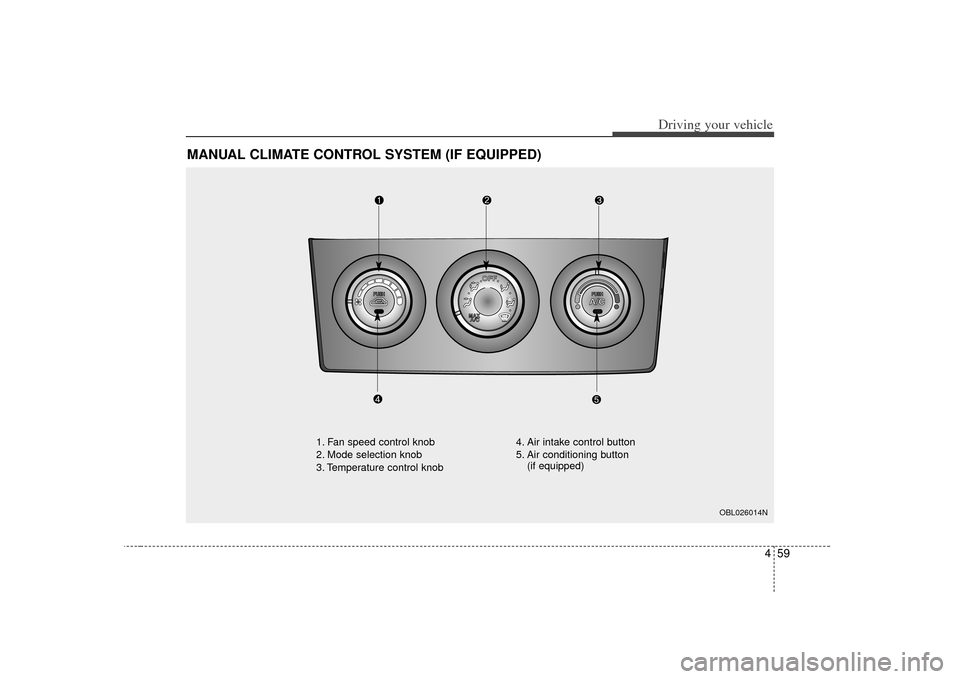
MANUAL CLIMATE CONTROL SYSTEM (IF EQUIPPED)
OBL026014N
1. Fan speed control knob
2. Mode selection knob
3. Temperature control knob4. Air intake control button
5. Air conditioning button
(if equipped)