2007 KIA CERATO ESP
[x] Cancel search: ESPPage 124 of 329
Knowing your vehicle
114
3
1 23456789
4. CD SCAN (BSM) Button
When the CD SCAN (BSM) button is pressed, the six channels from thehighest field intensity are selected
next and stored in memory. The sta-tions selected are stored in thesequence frequency from the first
preset key.
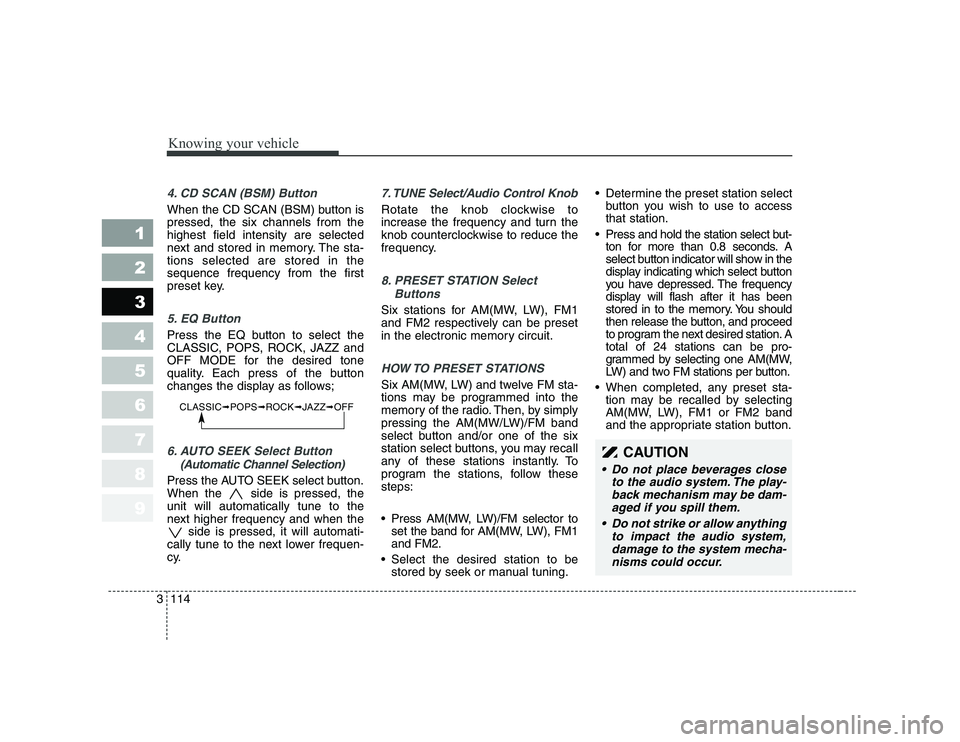
5. EQ Button
Press the EQ button to select the
CLASSIC, POPS, ROCK, JAZZ and
OFF MODE for the desired tone
quality. Each press of the button
changes the display as follows;
6. AUTO SEEK Select Button
(Automatic Channel Selection)
Press the AUTO SEEK select button.
When the side is pressed, theunit will automatically tune to the
next higher frequency and when the side is pressed, it will automati-
cally tune to the next lower frequen-
cy.
7. TUNE Select/Audio Control Knob
Rotate the knob clockwise to
increase the frequency and turn the
knob counterclockwise to reduce the
frequency.
8. PRESET STATION Select
Buttons
Six stations for AM(MW, LW), FM1
and FM2 respectively can be preset
in the electronic memory circuit.
HOW TO PRESET STATIONS
Six AM(MW, LW) and twelve FM sta-
tions may be programmed into the
memory of the radio. Then, by simply
pressing the AM(MW/LW)/FM band
select button and/or one of the six
station select buttons, you may recall
any of these stations instantly. To
program the stations, follow thesesteps:
Press AM(MW, LW)/FM selector toset the band for AM(MW, LW), FM1 and FM2.
Select the desired station to be stored by seek or manual tuning. Determine the preset station select
button you wish to use to accessthat station.
Press and hold the station select but- ton for more than 0.8 seconds. A
select button indicator will show in the
display indicating which select button
you have depressed. The frequency
display will flash after it has been
stored in to the memory. You should
then release the button, and proceed
to program the next desired station. Atotal of 24 stations can be pro-
grammed by selecting one AM(MW,
LW) and two FM stations per button.
When completed, any preset sta- tion may be recalled by selecting
AM(MW, LW), FM1 or FM2 band
and the appropriate station button.
CLASSIC ➟POPS ➟ROCK ➟JAZZ ➟OFF
CAUTION
Do not place beverages close
to the audio system. The play-back mechanism may be dam-aged if you spill them.
Do not strike or allow anything to impact the audio system,damage to the system mecha-nisms could occur.
Page 134 of 329
![KIA CERATO 2007 Owners Manual Knowing your vehicle
124
3
1 23456789
1. CD loading slot
Push [LOAD] button to open CD slot.
Please face printed side upward and
gently push in. This CDC supports
only 12 cm CDs.
2. CD load button](/manual-img/2/57948/w960_57948-133.png "KIA CERATO 2007 Owners Manual Knowing your vehicle
124
3
1 23456789
1. CD loading slot
Push [LOAD] button to open CD slot.
Please face printed side upward and
gently push in. This CDC supports
only 12 cm CDs.
2. CD load button")
Knowing your vehicle
124
3
1 23456789
1. CD loading slot
Push [LOAD] button to open CD slot.
Please face printed side upward and
gently push in. This CDC supports
only 12 cm CDs.
2. CD load button
Pressing the "LODE" button opens
an empty tray of lowest order in the
CDC deck. When a CD is loaded, the
slot closes and the CD plays. To load
CDs in all empty slots, press the
"LOAD" button for more than 1.5 sec-
onds. Be sure to insert only one CD
into slot at a time. Then, lastly loaded
CD is played. IF you do not load CDs
or press any button for 10 seconds
after pressing the "LOAD" button, the
LOAD function will be canceled.
3. CD eject button
Push button to eject the CD dur-
ing CD playback. Push this button formore than 1.5 seconds to eject all
the CDs. If CD number 3 is currently
playing, ejecting order is 3,4,5,6,1,2. 4. LCD display It indicates location of CD in CD
deck. When loading and ejecting CD,
corresponding CD indicator number
blinks.
5. CD/AUX selection button
CD Select
When power is off while CD is loaded
or radio/AUX is playing, push [CD]
button to play CDC. When there is no
available CD, "no disc" message will
be indicated for 2 seconds and
returns to previous mode.
AUX-IN Select
When the AUX device (such as
portable MP3 players) is connect-
ed to vehicle's AUX-IN terminal,
you can switch to AUX-IN mode by
pressing CD/AUX button.
With a CD loaded and AUX device connected at the same time, this
button switches between AUX-IN
mode and CD mode. AUX 3.5mm STEREO MINI PLUG
✽✽
NOTICE
Page 153 of 329
Driving your vehicle
18
4
1 23456789
Anti-lock brake system (ABS) (if equipped) The ABS system continuously sens-
es the speed of the wheels. If the
wheels are going to lock, the ABSsystem repeatedly modulates the
hydraulic brake pressure to the
wheels.
When you apply your brakes under
conditions which may lock the
wheels, you may hear a “tik-tik’’
sound from the brakes, or feel a cor-
responding sensation in the brake
pedal. This is normal and it means
your ABS system is active.
In order to obtain the maximum ben-
efit from your ABS system in anemergency situation, do not attempt
to modulate your brake pressure and
do not try to pump your brakes.
Press your brake pedal as hard as
possible or as hard as the situation
warrants and allow the ABS system
to control the force being delivered to
the brakes.
WARNING
- ABS Brakes
Your ABS is not a substitute for
good driving judgement. You
can still have an accident. In
fact, your ABS system will prob-
ably not be able to prevent an
accident in the following drivingconditions:
Dangerous driving, such as neglecting safety precautions,
speeding, or driving too close
to the vehicle in front of you.
Driving at high speed in situa- tions providing considerably
less traction, such as wet con-
ditions where hydroplaning
could occur.
(Continued)
(Continued)
Driving too fast on poor roadsurfaces. The ABS is
designed to improve maxi-
mum braking effectiveness on
typical highways and roads in
good condition. On poor roadsurfaces in poor condition,
the ABS may actually reduce
braking effectiveness.
Page 184 of 329
449
1 23456789
Driving your vehicle
Daytime running light (if equipped)
Daytime Running Lights (DRL) can
make it easier for others to see the
front of your vehicle during the day.
DRL can be helpful in many different
driving conditions, and it is especial-
ly helpful after dawn and before sun-set.
The DRL system will make your low-
beam headlights turn OFF when:
1. The headlight switch is ON.
2. The parklight switch is ON.
3. Engine stops.Headlight leveling device (if equipped)
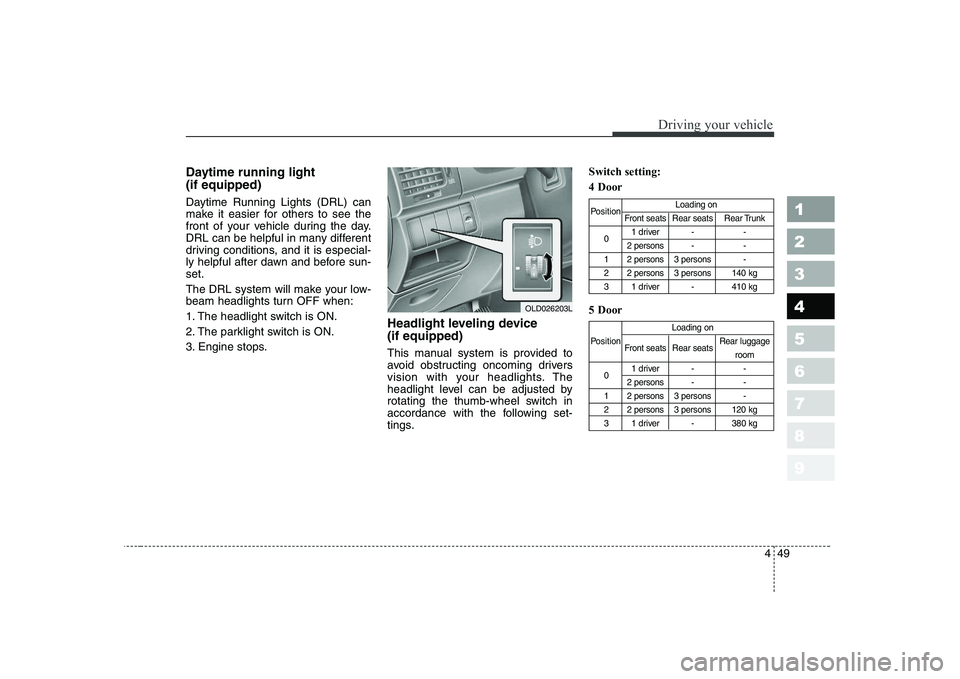
This manual system is provided to
avoid obstructing oncoming drivers
vision with your headlights. The
headlight level can be adjusted by
rotating the thumb-wheel switch in
accordance with the following set-
tings.Switch setting: 4 Door 5 Door
Position
Loading on
Front seats Rear seats Rear Trunk
0 1 driver - -
2 persons - -
1 2 persons 3 persons -
2 2 persons 3 persons 140 kg
3 1 driver - 410 kg
Loading on
Position Front seats Rear seats Rear luggage
room
0 1 driver - -
2 persons - -
1 2 persons 3 persons -
2 2 persons 3 persons 120 kg
3 1 driver - 380 kg
OLD026203L
Page 209 of 329
Driving your vehicle
74
4
1 23456789
level for bi-level operation, set the
mode to the position and
adjust the temperature control to
maintain maximum comfort.
maximum cooling is desired, set the temperature con-
trol to the minimum 17°C/62°F
and set the air intake to the recir-culated air position, then set the
fan speed control to the highestspeed.✽✽NOTICE
When using the air conditioning sys-
tem, monitor the temperature gauge
closely while driving up hills or inheavy traffic when outside tempera-
tures are high. Air conditioning sys-tem operation may cause engineoverheating. Continue to use the
blower fan but turn the air condi-
tioning system off if the temperaturegauge indicates engine overheating. Air conditioning system oper- ation tips
If the vehicle has been parked in direct sunlight during hot weather,
open the windows for a short time
to let the hot air inside the vehicle
escape.
To help reduce moisture inside of windows on rainy humid days,decrease the humidity inside the
vehicle by operating the air condi-tioning system.
During air conditioning system operation, you may occasionallynotice a slight change in enginespeed at idle as the air condition-
ing compressor cycles on. This is
a normal system operation charac-
teristics.
Use the air conditioning system every month if only for a few min-
utes to ensure maximum system
performance.
When using the air conditioning system, you may notice clear water
dripping (or even pudding) on the
ground under the passenger side
of the vehicle. This is a normal sys-
tem operation characteristics.
Page 211 of 329

Driving your vehicle
76
4
1 23456789
Manual climate control system
To defog inside windshield
1. Select any fan speed except “OFF”.
2. Select desired temperature.
3. Select the or position.
4. The outside (fresh) air and air con- ditioning will be selected.
If the air-conditioning and outside (fresh) air position are not selected
automatically, press the correspon-
ding button manually.
To defrost outside windshield
1. Set the fan speed to the highest (extreme right) position.
2. Set the temperature to the extreme hot position.
3. Select the position.
4. The outside (fresh) air and air con- ditioning will be selected.
If the air-conditioning and outside (fresh) air position are not selected
automatically, press the correspon-
ding button manually.
WINDSHIELD DEFROSTING AND DEFOGGING
OLD026139OLD026140
CAUTION
Do not use the or posi- tion during cooling operation inextremely humid weather. The difference between the tempera-ture of the outside air and thatof the windshield could cause the outer surface of the wind-shield to fog up, causing loss ofvisibility. In this case, set themode selection knob to the position and fan speed controlknob to the lower speed.
Page 212 of 329
477
1 23456789
Driving your vehicle
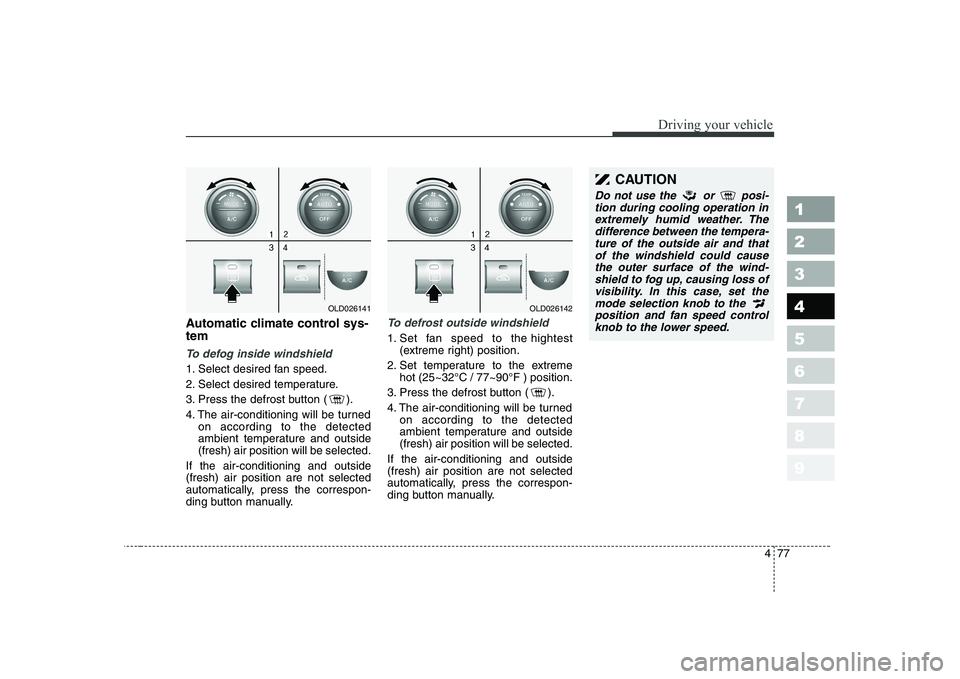
Automatic climate control sys- tem
To defog inside windshield
1. Select desired fan speed.
2. Select desired temperature.
3. Press the defrost button ( ).
4. The air-conditioning will be turnedon according to the detected
ambient temperature and outside(fresh) air position will be selected.
If the air-conditioning and outside(fresh) air position are not selected
automatically, press the correspon-
ding button manually.
To defrost outside windshield
1. Set fan speed to the hightest (extreme right) position.
2. Set temperature to the extreme hot (25~32°C / 77~90°F ) position.
3. Press the defrost button ( ).
4. The air-conditioning will be turned on according to the detected
ambient temperature and outside(fresh) air position will be selected.
If the air-conditioning and outside(fresh) air position are not selected
automatically, press the correspon-
ding button manually.
OLD026141OLD026142
CAUTION
Do not use the or posi- tion during cooling operation inextremely humid weather. The difference between the tempera-ture of the outside air and thatof the windshield could cause the outer surface of the wind-shield to fog up, causing loss ofvisibility. In this case, set the mode selection knob to the position and fan speed controlknob to the lower speed.
Page 213 of 329
Driving your vehicle
78
4
1 23456789
For maximum defrosting, set the
temperature control to the extreme
right/hot position and the fan speedcontrol to the highest speed.
If warm air to the floor is desired while defrosting or defogging, setthe mode to the floor-defrost posi-tion.
Before driving, clear all snow and ice from the windshield, rear win-
dow, outside rear view mirrors, and
all side windows.
Clear all snow and ice from the hood and air inlet in the cowl grill to
improve heater and defroster effi-ciency and to reduce the probabili-
ty of fogging up inside of the wind-shield. Defogging logic
Manual climate control system
To reduce the probability of fogging up the inside of the windshield, the
air intake control is set to the outside(fresh) air position automatically if
any of following occur.
The mode is selected to the or
while the system is acti-
vated.
The ignition switch is turned on while the mode is selected to the or .
In this case, the air conditioning will
automatically operate if the mode is
selected to the or .
If you don’t want the air-conditioning or outside (fresh) air position, press
the corresponding button to cancel
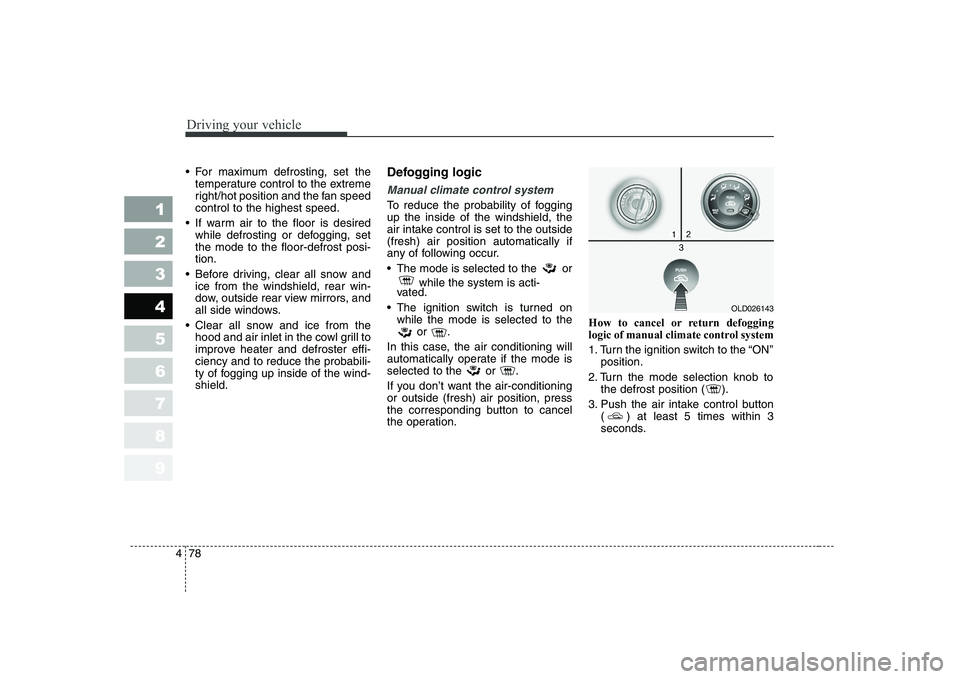
the operation. How to cancel or return defogging
logic of manual climate control system
1. Turn the ignition switch to the “ON”
position.
2. Turn the mode selection knob to the defrost position ( ).
3. Push the air intake control button ( ) at least 5 times within 3
seconds.
OLD026143