2007 JEEP PATRIOT battery
[x] Cancel search: batteryPage 11 of 440
NªChild-Protectionº Door Lock System (Rear Doors)
Ð If Equipped........................23
mRemote Keyless Entry Ð If Equipped.........24
NTo Unlock The Doors And Liftgate..........25
NTo Lock The Doors And Liftgate............26
NUsing The Panic Alarm:..................26
NTo Turn Off ªFlash Lights With Lockº........27
NProgramming Additional Transmitters........27
NGeneral Information....................29
NBattery Replacement....................29
mSecurity Alarm System Ð If Equipped.........30
NTo Set The Alarm......................31
NTo Disarm The System...................31NSecurity System Manual Override...........32
mLiftgate...............................32
mPower Windows........................34
NPower Window Switches.................34
NAuto Down..........................35
NWindow Lockout Switch.................36
mOccupant Restraints......................36
NLap/Shoulder Belts.....................37
NAdjustable Upper Shoulder Belt Anchorage....42
NSecond Row Center Lap/Shoulder Belt Operating
Instructions..........................43
NSeat Belt Pretensioners...................46
NEnhanced Driver Seat Belt Reminder System
(BeltAlert)...........................47
10 THINGS TO KNOW BEFORE STARTING YOUR VEHICLE
Page 30 of 440
NOTE:If you do not have a programmed transmitter,
contact your dealer for details.
General Information
This device complies with part 15 of FCC rules and with
RS-210 of Industry Canada. Operation is subject to the
following conditions:
1. This device may not cause harmful interference.
2. This device must accept any interference that may be
received including interference that may cause undesired
operation.
NOTE:Changes or modifications not expressly ap-
proved by the party responsible for compliance could
void the user's authority to operate the equipment.If your Remote Lock Control fails to operate from a
normal distance, check for these two conditions.
1. Weak batteries in transmitter. The expected life of
batteries is five years.
2. Closeness to a radio transmitter such as a radio station
tower, airport transmitter, military base, and some mobile
or CB radios.
Battery Replacement
The recommended replacement battery is CR2032.
NOTE:
Perchlorate Material ± special handling may ap-
ply, See www.dtsc.ca.gov/hazardouswaste/perchlorate.º
THINGS TO KNOW BEFORE STARTING YOUR VEHICLE 29
2
Page 31 of 440
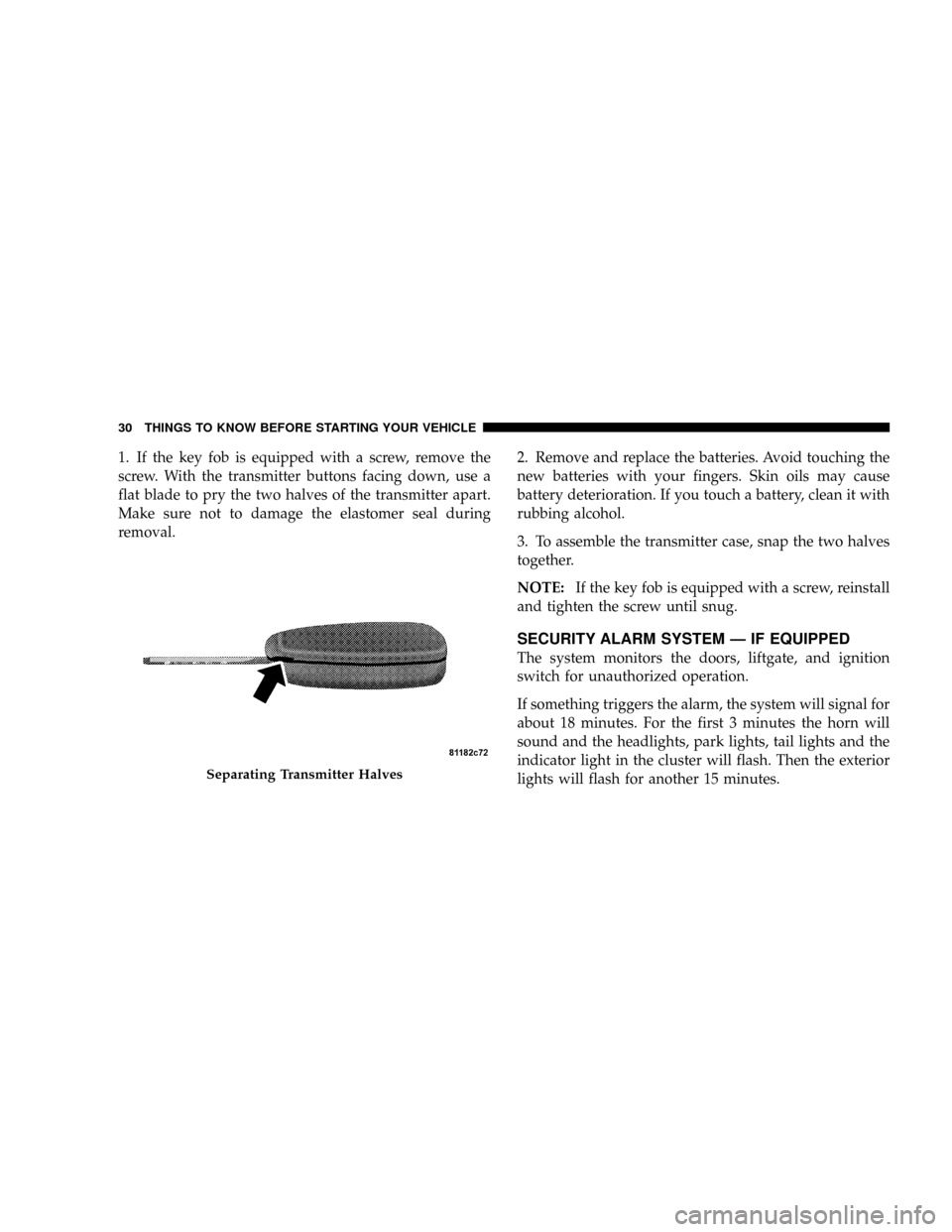
1. If the key fob is equipped with a screw, remove the
screw. With the transmitter buttons facing down, use a
flat blade to pry the two halves of the transmitter apart.
Make sure not to damage the elastomer seal during
removal.2. Remove and replace the batteries. Avoid touching the
new batteries with your fingers. Skin oils may cause
battery deterioration. If you touch a battery, clean it with
rubbing alcohol.
3. To assemble the transmitter case, snap the two halves
together.
NOTE:If the key fob is equipped with a screw, reinstall
and tighten the screw until snug.
SECURITY ALARM SYSTEM Ð IF EQUIPPED
The system monitors the doors, liftgate, and ignition
switch for unauthorized operation.
If something triggers the alarm, the system will signal for
about 18 minutes. For the first 3 minutes the horn will
sound and the headlights, park lights, tail lights and the
indicator light in the cluster will flash. Then the exterior
lights will flash for another 15 minutes.
Separating Transmitter Halves
30 THINGS TO KNOW BEFORE STARTING YOUR VEHICLE
Page 58 of 440
WARNING!
Deployed airbags can't protect you in another colli-
sion. Have the airbags replaced by an authorized
dealer as soon as possible.
Enhanced Accident Response System
In the event of an impact that causes airbag deployment,
with the vehicle stopped, and the vehicle communication
network intact, and the power intact, the Enhanced Acci-
dent Response System performs the following functions:
²Cuts off fuel to the engine.
²Flashes hazard lights.
²Turns on the interior lamps which remain on as long as
the battery has power or until the ignition key is
removed.
²Unlocks the doors automatically
Maintaining Your Airbag System
WARNING!
²Modifications to any part of the airbag system
could cause it to fail when you need it. You could
be injured because the airbags are not there to
protect you. Do not modify the components or
wiring, including adding any kind of badges or
stickers to the steering wheel hub trim cover or the
upper passenger side of the instrument panel. Do
not modify the front bumper, vehicle body struc-
ture, or frame.
²You need proper knee impact protection in a
collision. Do not mount or locate any aftermarket
equipment on or behind the knee impact bolster.
²It is dangerous to try to repair any part of the
airbag system yourself. Be sure to tell anyone who
works on your vehicle that it has airbags.
THINGS TO KNOW BEFORE STARTING YOUR VEHICLE 57
2
Page 59 of 440
Airbag Warning Light
You will want to have the airbags ready to
inflate for your protection in an impact. While
the airbag system is designed to be mainte-
nance free, if any of the following occurs, have
an authorized dealer service the system promptly:
²The Airbag Warning Light does not come on or flickers
during the 6 to 8 seconds when the ignition switch is
first turned on.
²The light remains on or flickers after the 6 to 8 second
interval.
²The light flickers or comes on and remains on while
driving.
Event Data Recorder (EDR)
In the event of an accident, your vehicle is designed to
record up to 5 - seconds of specific vehicle data param-
eters (see list below) in an event data recorder prior to the
moment of airbag deployment, or near-deployment, and
up to a quarter second of high-speed deceleration data
during and/or after air bag deployment or near-
deployment. EDR data are ONLY recorded if an airbag
deploys, or nearly deploys, and are otherwise unavail-
able.
NOTE:
1. A near-deployment event occurs when the airbag
sensor detects severe vehicle deceleration usually indica-
tive of a crash, but not severe enough to warrant airbag
deployment.
2. Under certain circumstances, EDR data may not be
recorded (e.g., loss of battery power).
58 THINGS TO KNOW BEFORE STARTING YOUR VEHICLE
Page 94 of 440
hold may not become active automatically. This is cell
phone dependent. To bring the call back from hold, press
and hold the `Phone' button until you hear a single beep.
Redial
²
Press the 'Phone' button to begin.
²After the9Ready9prompt and the following beep, say
9Redial.9
²The UConnectŸ system will call the last number that
was dialed on your cellular phone. Note: this may not
be the last number dialed from the UConnectŸ sys-
tem.
Call Continuation
Call continuation is progression of a phone call on
UConnectŸ system after the vehicle ignition key has
been switched to off. Call continuation functionality
available on the vehicle can be any one of three types:
²After ignition key is switched off, a call can continue
on the UConnectŸ system either until the call ends or
until the vehicle battery condition dictates cessation of
the call on the UConnectŸ system and transfer of the
call to the mobile phone.
²After ignition key is switched to off, a call can continue
on the UConnectŸ system for certain duration, after
which the call is automatically transferred from the
UConnectŸ system to the mobile phone.
²An active call is automatically transferred to the
mobile phone after ignition key is switched to off.
UConnectŸ System Features
Language Selection
To change the language that the UConnectŸ system is
using,
²Press the 'Phone' button to begin.
UNDERSTANDING THE FEATURES OF YOUR VEHICLE 93
3
Page 97 of 440
When calling a number with your UConnectŸ system
that normally requires you to enter in a touch-tone
sequence on your cellular phone keypad, you can push
the 'Voice Recognition' button and say the sequence you
wish to enter followed by the word9Send.9For example,
if required to enter your pin number followed with a
pound3746#,youcanpressthe'Voice Recognition'
button and say93746#Send.9Saying a number, or
sequence of numbers, followed by9Send9is also to be
used to navigate through an automated customer service
center menu structure and to leave a number on a pager.
Barge In - Overriding Prompts
The 'Voice Recognition' button can be used when you
wish to skip part of a prompt and issue your voice
recognition command immediately. For example, if a
prompt is playing9Would you like to pair a phone, clear
a{,9you could press the 'Voice Recognition' button and
say9Pair a Phone9to select that option without having to
listen to the rest of the voice prompt.
Turning Confirmation Prompts On/Off
Turning confirmation prompts off will stop the system
from confirming your choices (e.g., the UConnectŸ
system will not repeat a phone number before you dial
it).
²Press the 'Phone' button to begin.
²After the9Ready9prompt and the following beep, say
9Setup Confirmations.9The UConnectŸ system will
play the current confirmation prompt status and you
will be given the choice to change it.
Phone and Network Status Indicators
If available on the radio and/or on a premium display
such as the instrument panel cluster, and supported by
your cell phone, the UConnectŸ system will provide
notification to inform you of your phone and network
status when you are attempting to make a phone call
using UConnectŸ. The status is given for roaming net-
work signal strength, phone battery strength, etc.
96 UNDERSTANDING THE FEATURES OF YOUR VEHICLE
Page 131 of 440
On steep hills a greater speed loss or gain may occur so
it may be preferable to drive without speed control.
GARAGE DOOR OPENER Ð IF EQUIPPED
NOTE:The HomeLinktsystem will be disabled if the
Vehicle Theft Alarm (if equipped) is in the Armed or
Alarming state. The HomeLinktsystem will only operate
when the Vehicle Theft Alarm (if equipped) is in the
Disarmed mode.
The HomeLinktUniversal Transceiver replaces up to
three remote controls (hand held transmitters) that oper-
ate devices such as garage door openers, motorized
gates, or home lighting. It triggers these devices at the
push of a button. The Universal Transceiver operates off
your vehicle's battery and charging system; no batteries
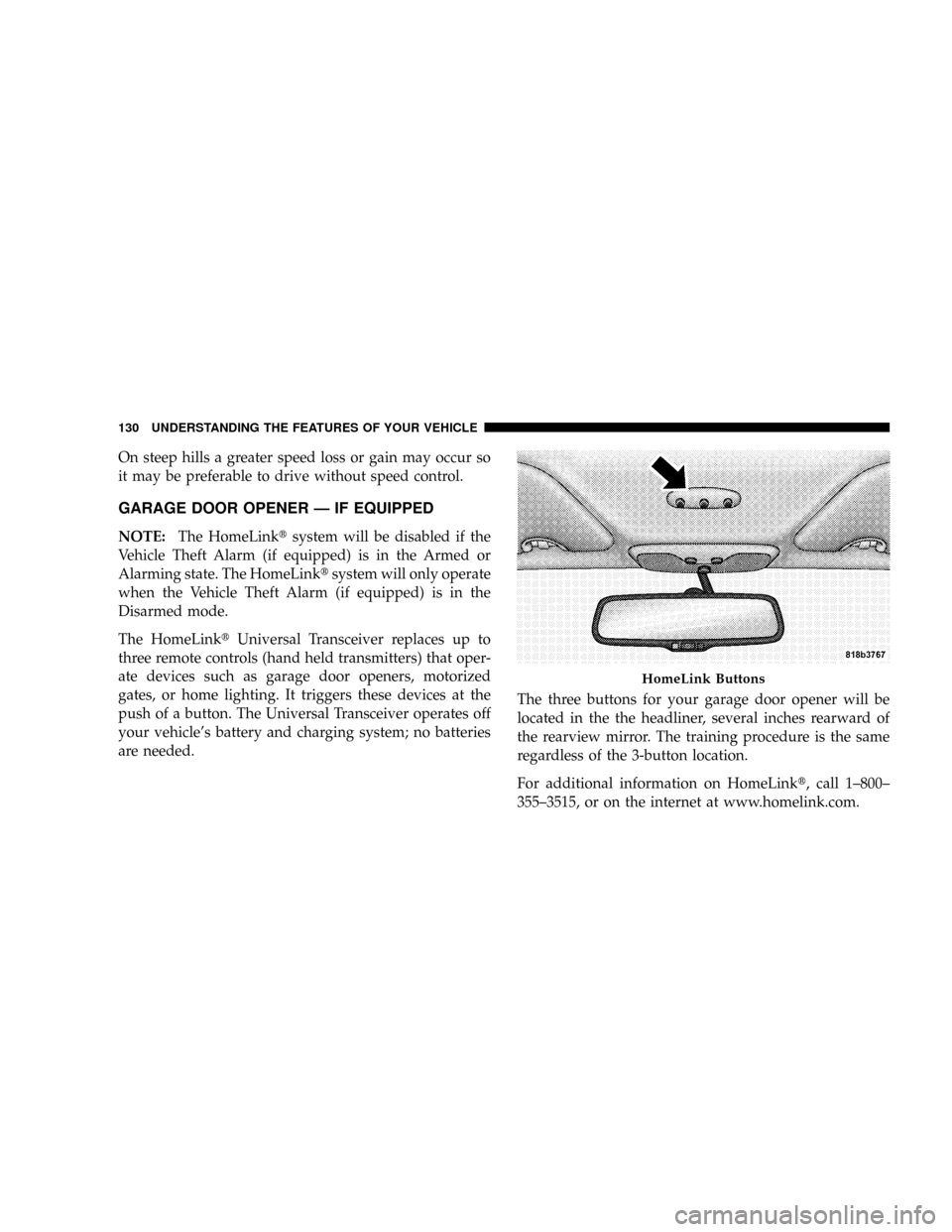
are needed.The three buttons for your garage door opener will be
located in the the headliner, several inches rearward of
the rearview mirror. The training procedure is the same
regardless of the 3-button location.
For additional information on HomeLinkt, call 1±800±
355±3515, or on the internet at www.homelink.com.
HomeLink Buttons
130 UNDERSTANDING THE FEATURES OF YOUR VEHICLE