Page 182 of 441
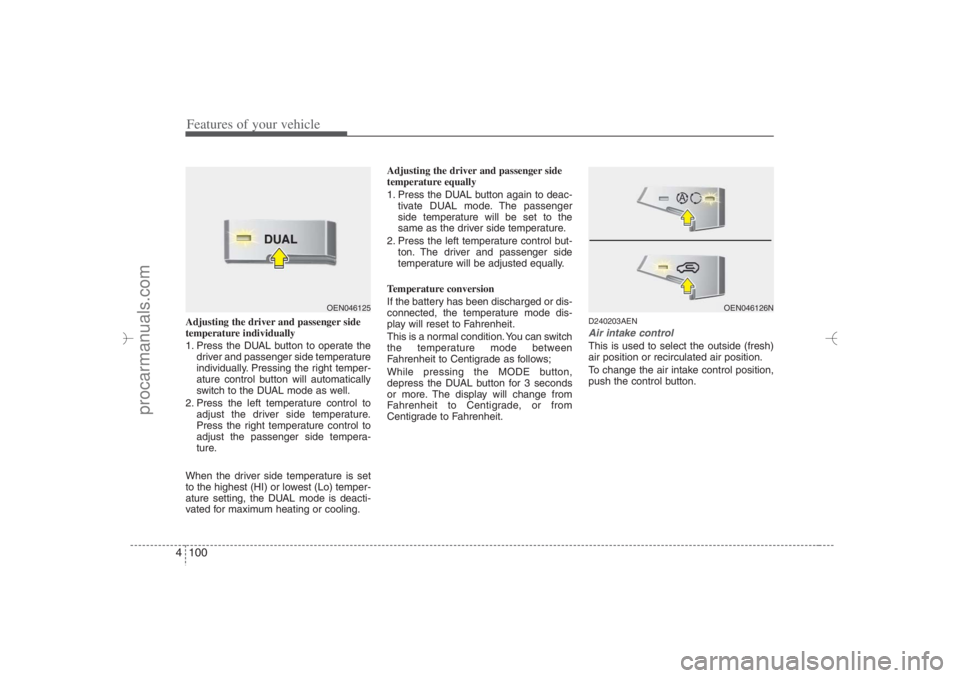
Features of your vehicle100 4Adjusting the driver and passenger side
temperature individually
1. Press the DUAL button to operate the
driver and passenger side temperature
individually. Pressing the right temper-
ature control button will automatically
switch to the DUAL mode as well.
2. Press the left temperature control to
adjust the driver side temperature.
Press the right temperature control to
adjust the passenger side tempera-
ture.
When the driver side temperature is set
to the highest (HI) or lowest (Lo) temper-
ature setting, the DUAL mode is deacti-
vated for maximum heating or cooling.Adjusting the driver and passenger side
temperature equally
1. Press the DUAL button again to deac-
tivate DUAL mode. The passenger
side temperature will be set to the
same as the driver side temperature.
2. Press the left temperature control but-
ton. The driver and passenger side
temperature will be adjusted equally.
Temperature conversion
If the battery has been discharged or dis-
connected, the temperature mode dis-
play will reset to Fahrenheit.
This is a normal condition. You can switch
the temperature mode between
Fahrenheit to Centigrade as follows;
While pressing the MODE button,
depress the DUAL button for 3 seconds
or more. The display will change from
Fahrenheit to Centigrade, or from
Centigrade to Fahrenheit.
D240203AENAir intake controlThis is used to select the outside (fresh)
air position or recirculated air position.
To change the air intake control position,
push the control button.
OEN046125
OEN046126N
EN hma 4-84~120.qxd 11/27/2006 5:33 PM Page 100
procarmanuals.com
Page 190 of 441
Features of your vehicle108 4D250300AUN-EUDefogging logicTo reduce the probability of fogging up
the inside of the windshield, the air intake
is controlled automatically according to
certain conditions such as or
position. To cancel or return the defog-
ging logic, do the following.
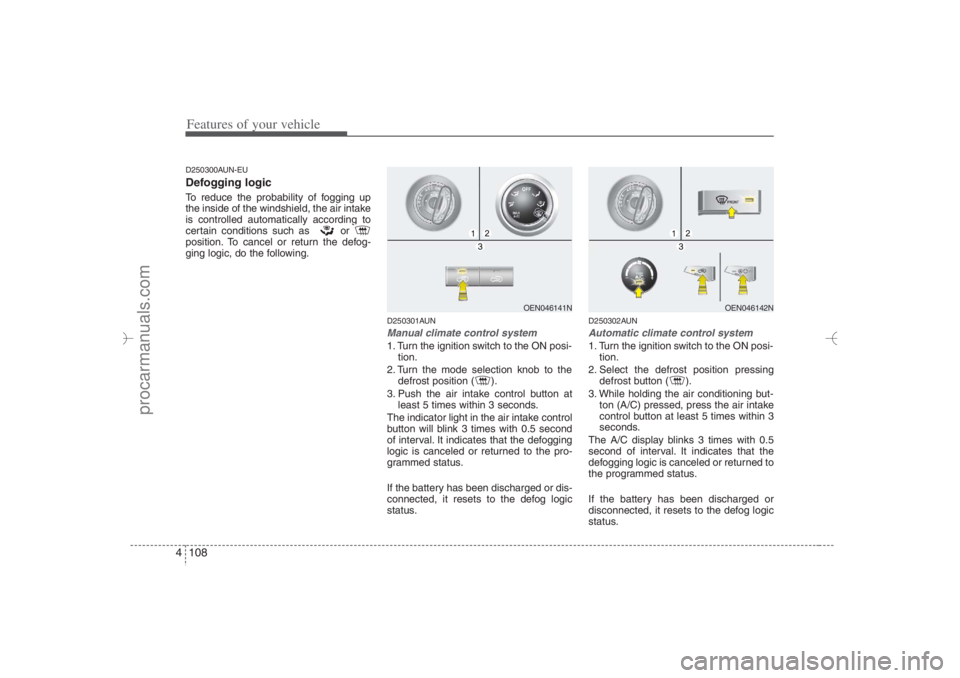
D250301AUNManual climate control system1. Turn the ignition switch to the ON posi-
tion.
2. Turn the mode selection knob to the
defrost position ( ).
3. Push the air intake control button at
least 5 times within 3 seconds.
The indicator light in the air intake control
button will blink 3 times with 0.5 second
of interval. It indicates that the defogging
logic is canceled or returned to the pro-
grammed status.
If the battery has been discharged or dis-
connected, it resets to the defog logic
status.
D250302AUNAutomatic climate control system1. Turn the ignition switch to the ON posi-
tion.
2. Select the defrost position pressing
defrost button ( ).
3. While holding the air conditioning but-
ton (A/C) pressed, press the air intake
control button at least 5 times within 3
seconds.
The A/C display blinks 3 times with 0.5
second of interval. It indicates that the
defogging logic is canceled or returned to
the programmed status.
If the battery has been discharged or
disconnected, it resets to the defog logic
status.
OEN046141N
OEN046142N
EN hma 4-84~120.qxd 11/27/2006 5:35 PM Page 108
procarmanuals.com
Page 199 of 441
4 117
Features of your vehicle
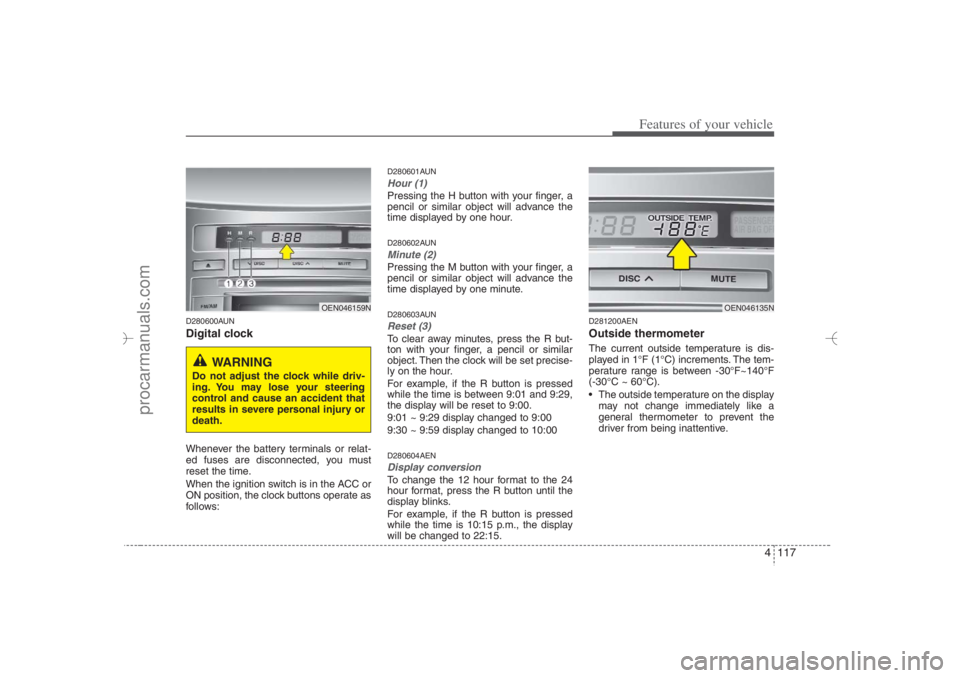
D280600AUNDigital clockWhenever the battery terminals or relat-
ed fuses are disconnected, you must
reset the time.
When the ignition switch is in the ACC or
ON position, the clock buttons operate as
follows:
D280601AUNHour (1)Pressing the H button with your finger, a
pencil or similar object will advance the
time displayed by one hour.D280602AUNMinute (2)Pressing the M button with your finger, a
pencil or similar object will advance the
time displayed by one minute.D280603AUNReset (3)To clear away minutes, press the R but-
ton with your finger, a pencil or similar
object. Then the clock will be set precise-
ly on the hour.
For example, if the R button is pressed
while the time is between 9:01 and 9:29,
the display will be reset to 9:00.
9:01 ~ 9:29 display changed to 9:00
9:30 ~ 9:59 display changed to 10:00D280604AENDisplay conversionTo change the 12 hour format to the 24
hour format, press the R button until the
display blinks.
For example, if the R button is pressed
while the time is 10:15 p.m., the display
will be changed to 22:15.
D281200AENOutside thermometerThe current outside temperature is dis-
played in 1°F (1°C) increments. The tem-
perature range is between -30°F~140°F
(-30°C ~ 60°C).
The outside temperature on the display
may not change immediately like a
general thermometer to prevent the
driver from being inattentive.
OEN046159N
WARNING
Do not adjust the clock while driv-
ing. You may lose your steering
control and cause an accident that
results in severe personal injury or
death.
OEN046135N
EN hma 4-84~120.qxd 11/27/2006 5:38 PM Page 117
procarmanuals.com
Page 200 of 441
Features of your vehicle118 4• Temperature conversion
If the battery has been discharged or
disconnected, the temperature mode
display will reset to Fahrenheit.
This is a normal condition. You can
switch the temperature mode between
Fahrenheit to Centigrade as follows;
While depressing the R button,
depress the H or M button. The display
will change from Fahrenheit to
Centigrade, or from Centigrade to
Fahrenheit.
D280700AENShopping bag holderTo use the holder, pull out the lower por-
tion.
D280800AENClothes hanger (if equipped)
OEN046163
2nd row
OEN046192
3rd row (if equipped)
CAUTION
Do not hang heavy clothes, since
those may damage the hook.
OEN046162
CAUTION
Do not hang a bag weighing more
than 7 lbs. (3 kg). It may cause dam-
age to the shopping bag holder.
EN hma 4-84~120.qxd 11/27/2006 5:38 PM Page 118
procarmanuals.com
Page 204 of 441
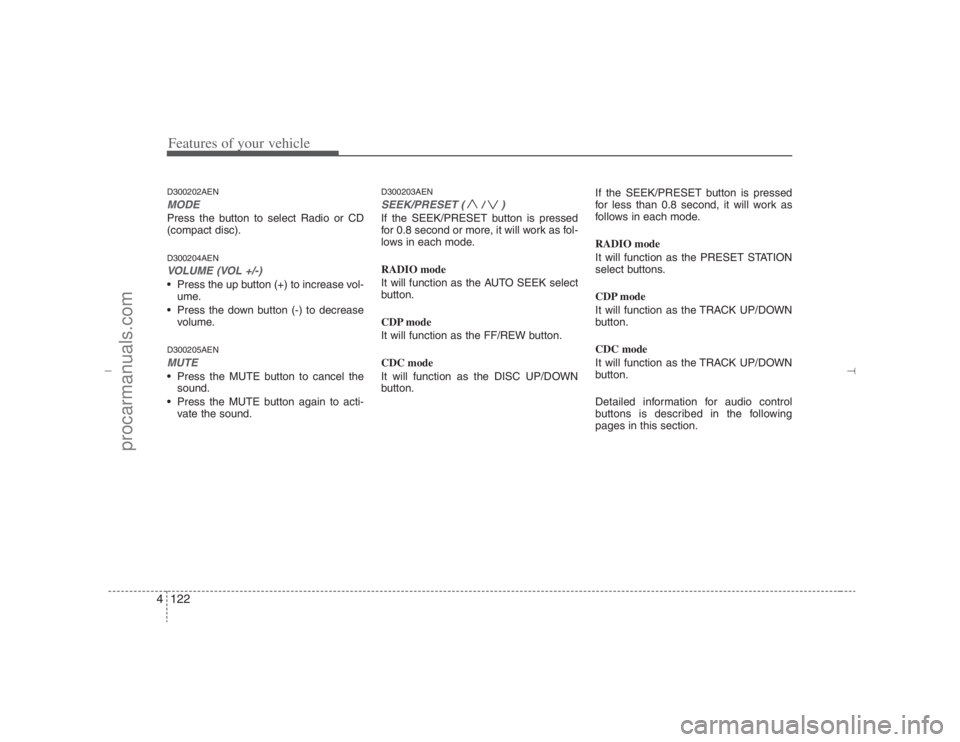
Features of your vehicle122 4D300202AENMODEPress the button to select Radio or CD
(compact disc).D300204AENVOLUME (VOL +/-)• Press the up button (+) to increase vol-
ume.
Press the down button (-) to decrease
volume.D300205AENMUTE Press the MUTE button to cancel the
sound.
Press the MUTE button again to acti-
vate the sound.
D300203AENSEEK/PRESET ( / )If the SEEK/PRESET button is pressed
for 0.8 second or more, it will work as fol-
lows in each mode.
RADIO mode
It will function as the AUTO SEEK select
button.
CDP mode
It will function as the FF/REW button.
CDC mode
It will function as the DISC UP/DOWN
button.If the SEEK/PRESET button is pressed
for less than 0.8 second, it will work as
follows in each mode.
RADIO mode
It will function as the PRESET STATION
select buttons.
CDP mode
It will function as the TRACK UP/DOWN
button.
CDC mode
It will function as the TRACK UP/DOWN
button.
Detailed information for audio control
buttons is described in the following
pages in this section.
EN hma 4-121~(Audio).qxd 11/28/2006 3:06 PM Page 122
procarmanuals.com
Page 208 of 441
Features of your vehicle126 4
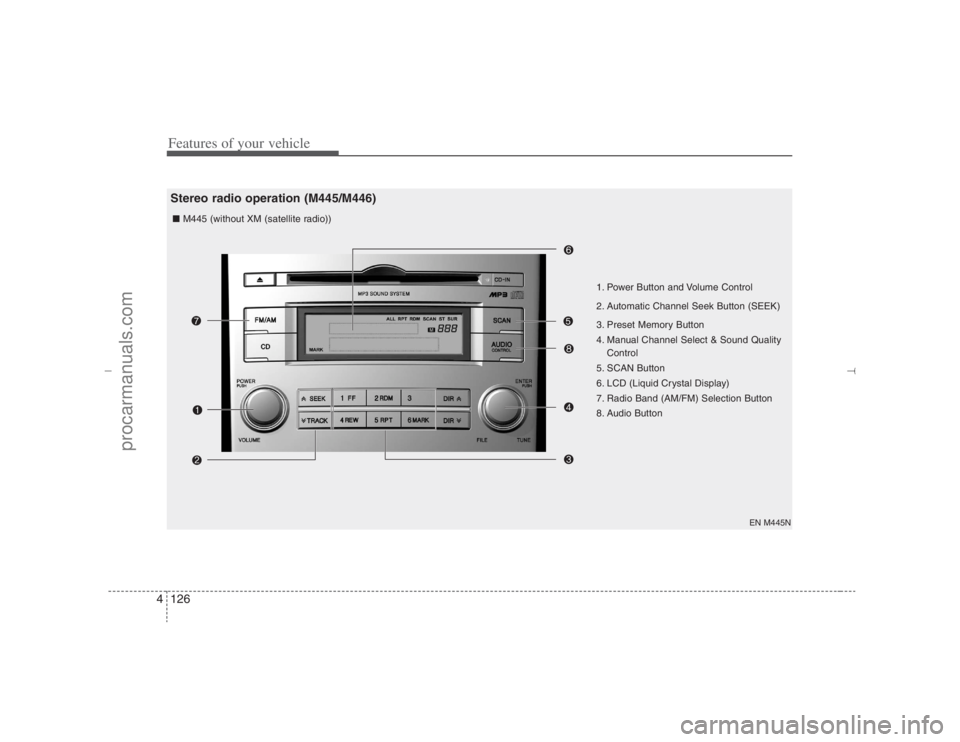
EN M445N
1. Power Button and Volume Control
2. Automatic Channel Seek Button (SEEK)
3. Preset Memory Button
4. Manual Channel Select & Sound Quality
Control
5. SCAN Button
6. LCD (Liquid Crystal Display)
7. Radio Band (AM/FM) Selection Button
8. Audio Button ■ M445 (without XM (satellite radio))
Stereo radio operation (M445/M446)
EN hma 4-121~(Audio).qxd 11/28/2006 3:06 PM Page 126
procarmanuals.com
Page 209 of 441
4127
Features of your vehicle
EN M445XM
1. Power Button and Volume Control
2. Automatic Channel Seek Button (SEEK)
3. Preset Memory Button
4. Manual Channel Select & Sound Quality
Control
5. SCAN Button
6. LCD (Liquid Crystal Display)
7. Radio Band (AM/FM) Selection Button ■ M445s (with XM (satellite radio))
EN hma 4-121~(Audio).qxd 11/28/2006 3:06 PM Page 127
procarmanuals.com
Page 210 of 441
Features of your vehicle128 4
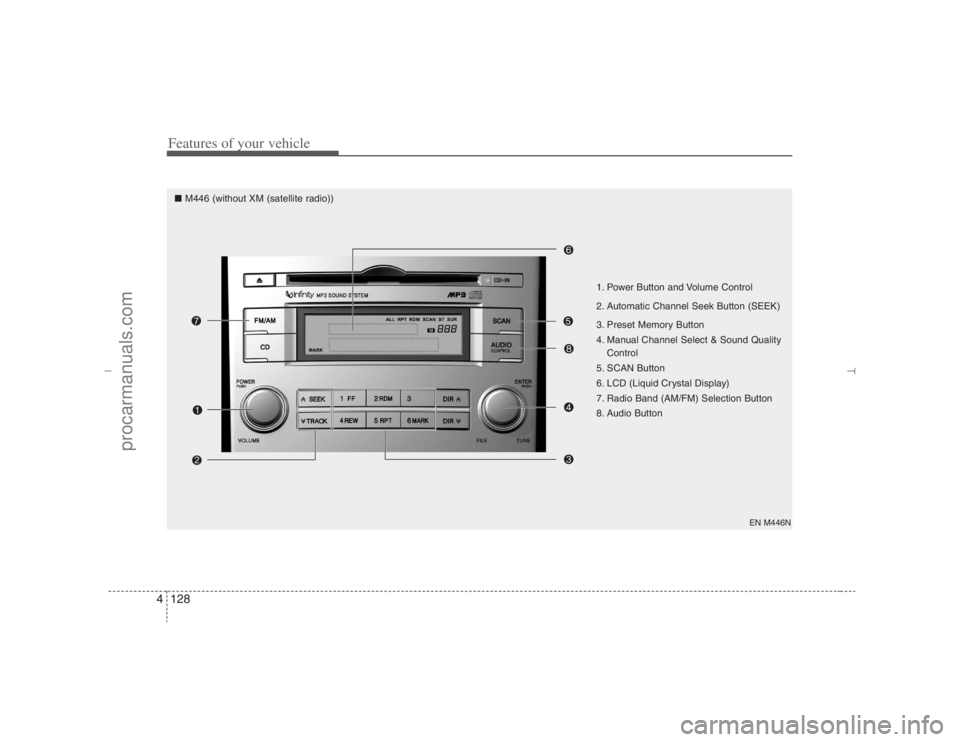
EN M446N
1. Power Button and Volume Control
2. Automatic Channel Seek Button (SEEK)
3. Preset Memory Button
4. Manual Channel Select & Sound Quality
Control
5. SCAN Button
6. LCD (Liquid Crystal Display)
7. Radio Band (AM/FM) Selection Button
8. Audio Button
■ M446 (without XM (satellite radio))
EN hma 4-121~(Audio).qxd 11/28/2006 3:06 PM Page 128
procarmanuals.com